Best Desk Cable Trays of 2026
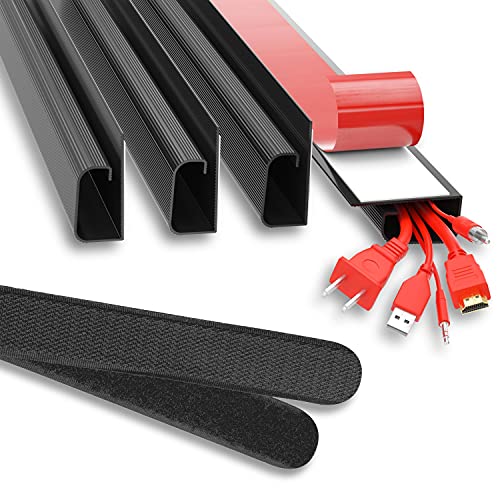
The ProOffice J Channel Cable Raceway Kit is our pick: four 16-inch under-desk channels that stick on with strong adhesive tape, no screws or drilling, even under glass tables, and hold up to 10 power cords. Choose the SOULWIT Cable Management kit if you would rather wrap cords in cut-to-length sleeves, with dozens of clips and ties included.
At a Glance
| # | Product | Award | Price |
|---|---|---|---|
| 1 | J Channel Cable Raceway Kit ProOffice |
Best Starter Kit | Check price on Amazon Buy → |
| 2 |  Mount-It! Under Desk Keyboard Tra… Mount-It! |
$99.99 as of Nov 24, 12:20 PM CT details Buy → |
|
| 3 | Best Bundle | $39.99 as of Nov 24, 12:29 PM CT details Buy → |
Desk Cable Trays Buying Guide
 Photo by Josh Sorenson / Pexels
J-channel cable raceways — the D-shaped plastic channels that snap open to accept cables — are the most practical solution for desk cable management. They mount with adhesive tape or screws, accept multiple cables, and route along natural cable paths: under desk edges, down desk legs, and along baseboards.
How Much Coverage You Need
A standard desk setup (monitor + keyboard + power strip) typically requires 48-72 inches of raceway to cover the main cable run from desk to outlet. JIECANG's 4-piece kit covers a basic one-monitor setup. Delamu's 62.8-inch 4-pack and EVEO's 96-inch 6-pack handle dual-monitor and more complex setups. SOULWIT's 180+ piece bundle includes raceways, corner pieces, and cable clips for full desk coverage.
Adhesive vs Screw Mounting
Adhesive tape mounting (included in all kits): clean, renter-friendly, and quick to install. Works on smooth desk surfaces and painted walls for typical cable weights. Screw mounting (included in most kits): permanent and stronger for runs with heavy cables like monitor power bricks. Most setups work fine with adhesive alone. Use screw mounting only for permanently-placed desks.
Paintable Channels
Delamu and YECAYE channels are white PVC that can be painted to match wall color — important for visible wall runs where white channels stand out. EVEO channels are also white. If aesthetics matter, buy a small can of wall-matching paint and paint the channels before installation.
What to Avoid
Avoid cable sleeves (fabric or neoprene tubes) for desk setups — they bunch up and are harder to modify when adding or removing cables. Avoid over-stuffing raceways — J-channels work best with 2-4 cables; pack more than that and the snap-close lid won't stay shut. Plan cable routing before buying to get the right total length.
What the page recommends, and what it costs
- J Channel Cable Raceway Kit - Computer Desk Cable — $12.99. 4x16 inch coverage per piece handles a standard desk run or wall segment in one kit. Against it: Adhesive strength varies on textured or painted surfaces.
- Mount-It! Keyboard Tray Under Desk — $99.99. Under-desk mount frees desk surface. Against it: Installation requires under-desk clearance.
- SOULWIT Cable Management — $16.99. Variety of clip sizes handles single USB cables through multi-cable bundles without separate purchases for different thicknesses. Against it: Large 180-piece kit can be overwhelming to sort.
How to choose among these
The J Channel Cable Raceway Kit - Computer Desk Cable at $12.99 is the default choice on this page — 4x16 inch coverage per piece handles a standard desk run or wall segment in one kit.
Watch Before You Buy
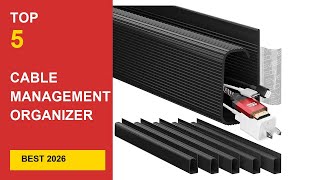

“The JIECANG J Channel Raceway uses a self-adhesive J-channel design to hide cables along walls and desk edges for just $12.99, covering 4x16 inches per kit. Adhesive grip can vary on textured or…”
See Today’s Price →What we like
- J-channel design hides cables flush against walls, desk edges, and baseboards — eliminates the visible cable bundle that marks budget home office setups
- 4x16 inch coverage per piece handles a standard desk run or wall segment in one kit
- Self-adhesive installation requires no drilling — mounts in minutes and removes cleanly from painted walls
- Budget pricing makes cable organization accessible without more complex cable management systems
Watch out for
- Adhesive strength varies on textured or painted surfaces
- White color may not match all wall colors
- Cable capacity limited per channel — multiple channels for thick cable bundles
Read Full Analysis
JIECANG's J-channel kit routes cables flush against wall edges and desk baseboards using self-adhesive mounting that requires no drilling — install in minutes, remove cleanly from painted walls. For 4x16 inches of coverage, it's the entry-level option here, costing $4 less than the SOULWIT bundle and $87 less than the Mount-It premium under-desk tray. The J-channel design hides cables that would otherwise sit in visible bundles along the desk or floor edge. Adhesive strength varies on textured or painted wall surfaces, and the white color may not match every workspace. The channel capacity is limited — thick cable bundles need multiple channels run in parallel. Compared to the SOULWIT's 180+ piece variety, JIECANG is focused: one type of cable management done economically. Best for users who need to clean up a single cable run along one desk edge or wall segment without building out a comprehensive cable management system.
“The Mount-It! under-desk keyboard tray slides out with an ergonomic negative tilt and gel wrist pad, freeing the entire desk surface for monitors and peripherals. It is the premium option…”
See Today’s Price →What we like
- Under-desk mount frees desk surface
- Slide-out ergonomic positioning
- Mount-It brand quality
- Negative tilt for wrist angle
- Adjustable height
Watch out for
- Very expensive for a keyboard tray
- Installation requires under-desk clearance
- Negative tilt takes adjustment period
- Tray width limited for full keyboards with numpad
Read Full Analysis
Mount-It! under-desk keyboard tray slides from under the desk surface on a telescoping track, positioning the keyboard at a negative-tilt angle that reduces wrist extension — the posture that contributes to repetitive strain injury during extended typing sessions. Negative tilt means the back edge of the keyboard is lower than the front, allowing wrists to remain flat rather than bending upward. The under-desk mounting frees the entire desk surface of keyboard and mouse, increasing usable work area on smaller desks without requiring a desk replacement. The integrated gel wrist pad provides cushioned support during typing pauses. The Mount-It! keyboard tray is the primary ergonomic typing accessory on a page otherwise focused on cable management products. Cable management improves desk aesthetics; a keyboard tray changes the physical posture of daily typing. For users experiencing wrist discomfort from elevated keyboard positioning, the tray delivers a direct ergonomic improvement that cable tidying can't replicate. Choose the Mount-It! under-desk keyboard tray if you type 4 or more hours daily and want to address wrist ergonomics through proper negative-tilt positioning. Verify your desk has at least 1.5 inches of clearance under the surface for the mounting hardware. Skip it if your current keyboard height already provides proper wrist alignment — the investment is most justified when existing positioning causes wrist fatigue, not as a general desk upgrade.
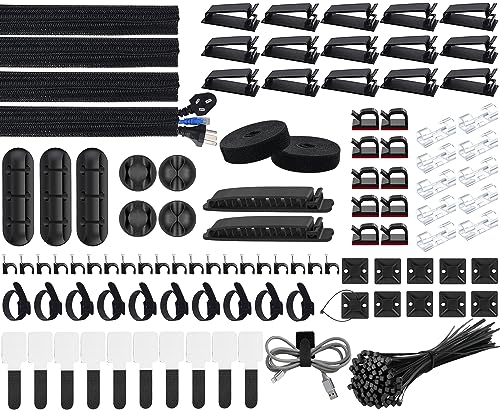
“The SOULWIT 180+ piece kit bundles a wide variety of cable clips and ties into one $16.99 purchase, making it a comprehensive starting point for any desk cable tray setup. The large count can feel…”
See Today’s Price →What we like
- 180+ piece variety covers most cable management scenarios — clips, ties, mounting hooks, and cable sleeves for different surface types and cable thicknesses
- Variety of clip sizes handles single USB cables through multi-cable bundles without separate purchases for different thicknesses
- Comprehensive kit practical for setting up a full home office, entertainment center, or desk without identifying individual piece needs first
- Budget pricing for the full 180+ piece set makes organizing an entire room economical
Watch out for
- Large 180-piece kit can be overwhelming to sort
- Kit includes many redundant pieces
- Adhesive quality varies by piece type
Read Full Analysis
The SOULWIT 180+ piece kit is the all-in-one cable management purchase — clips, ties, mounting hooks, and cable sleeves for different surface types and cable thicknesses in one box. It costs $4 more than the JIECANG J-channel kit but covers far more scenarios without needing to identify individual component requirements first. The variety of clip sizes handles everything from single USB cables to thick multi-cable bundles without a second order. The large count can be overwhelming to sort — expect to spend time organizing pieces before installation. Some adhesive quality varies by piece type across the kit. Compared to the JIECANG, SOULWIT is for the homeowner setting up an entire desk or home office in one session; JIECANG is better for targeting one specific cable run. Against the Mount-It premium under-desk tray, SOULWIT costs 83% less and covers more cable types, though Mount-It provides a cleaner permanent solution for the under-desk area specifically.
Frequently Asked Questions
How do I hide cables on a desk without drilling?
What is the difference between a cable tray and cable raceway?
How many cables fit in a J-channel raceway?
Can cable raceways be painted?
How do I install a desk cable tray without drilling into my desk?
How We Chose These Products
We compare each product’s Amazon listing, the manufacturer’s published specifications and Amazon customer ratings, shown with their review counts as Amazon’s data, and rank the products on how well they answer this page’s question. We do not test products in hand and we do not run our own analysis of review text. A publication or expert is named only where we cite its published findings about that product. No manufacturer paid for placement on this page.
A price appears only when Amazon’s API supplied it at a recent daily refresh, with the date and time beside it, and is withdrawn at 4 AM Central on the day after it turns 24 hours old; otherwise use “Check price on Amazon” for the live price. Read our full methodology →