Best Monitor Stands & Shelves in 2026

The HUANUO FlowLift is the best monitor stand for most desks — its dual gas-spring arm adjusts 17 to 32 inches with one hand, keeping the surface completely clear. For a fixed riser with storage, the Halter Mesh is the best budget pick.
At a Glance
| # | Product | Award | Price |
|---|---|---|---|
| 1 | Best Overall | $55.09 as of Nov 24, 12:24 PM CT details Buy → |
|
| 2 | Best for Traditional Desks | $46.49 as of Nov 24, 12:16 PM CT details Buy → |
|
| 3 | Best Gas-Spring Value | $37.99 as of Nov 24, 12:36 PM CT details Buy → |
|
| 4 | Budget Pick | Check price on Amazon Buy → |
|
| 5 |  Ergotron – LX Monitor Arm Ergotron |
Best Monitor Arm | $199.99 as of Nov 25, 10:40 AM CT details Buy → |
| 6 | Best Value Arm | $34.99 as of Nov 24, 12:13 PM CT details Buy → |
Monitor Stands & Shelves Buying Guide
 Photo by Minh Phuc / Pexels
Monitor height is one of the most impactful ergonomic changes a desk worker can make. The top of your screen should sit at or just below eye level when seated upright. For most people, that means raising the monitor 3–6 inches above the desk surface — the exact job a monitor stand does.
How we picked these. We compared 12 monitor stands across height adjustability range, base stability under load, desk clearance created, and buyer reports over 6+ months. Products were selected for reliable adjustment mechanisms at each price point, prioritizing models with consistent locking performance rather than maximum feature count.
Arm Stands vs. Riser Shelves
Gas-spring arm stands (HUANUO FlowLift, WALI Gas Spring) clamp to your desk edge and hold the monitor on a movable arm. They create maximum under-screen space and allow height, tilt, and swivel adjustments on the fly. Riser shelves (3M MS85B, Halter Mesh) sit on the desk surface and elevate the monitor at a fixed height. Risers are simpler, cheaper, and more stable — arms have more flexibility but require a desk edge thick enough to clamp onto (most require 0.5–3 inch thickness).
Height Adjustment Range
Gas spring arms typically span 15–20 inches of vertical travel. Fixed risers provide a set height (usually 3–6 inches). If you alternate between sitting and standing, an arm is essential — a fixed riser only works for one posture. Measure your seated eye level from the desk surface before buying to verify your target height is within range.
Weight Capacity and Monitor Size
Match the stand's weight capacity to your monitor plus any accessories you mount. Most 24–27 inch monitors weigh 8–14 lbs. Confirm your monitor has VESA mounting holes (75x75mm or 100x100mm standard) before purchasing an arm stand — some ultra-slim monitors and all-in-ones lack VESA compatibility. Riser shelves have no VESA requirement.
Price Tiers
Budget ($15–25): Fixed riser shelves (Halter Mesh) — sturdy, simple, no assembly complexity. Mid-range ($30–50): Gas spring arms (WALI, 3M) — adjustable height and angle, desk clamp required. Premium ($55–80): Dual-arm or heavy-duty single-arm systems (HUANUO FlowLift) — supports larger monitors, smoother adjustment tension.
Common Mistakes
Buying a gas-spring arm without checking VESA compatibility is the most common error — verify your monitor's back panel has the mounting pattern. The second mistake is underestimating desk thickness: most clamp-style arms need at least 2 inches of desk overhang to mount securely.
Watch Before You Buy
“The HUANUO FlowLift Dual Monitor Stand 13-32 in features dual monitor arm.”
See Today’s Price →What we like
- Holds two screens from 13 to 32 inches, 4.4 to 19.8 lbs each
- VESA 75 x 75 and 100 x 100 mounting
- Tilts +85/-50 degrees, swivels 90 degrees each way and rotates 360 degrees
- Raises screens up to 15.75 inches
- C-clamp or grommet mounting, with cable management along the arms
Watch out for
- Its maker recommends wooden desks 0.59 to 3.54 inches thick with no cross beams under the clamp
Read Full Analysis
HUANUO FlowLift Dual Monitor Stand is the best dual-monitor arm at its price — 4.6 stars from 33,000+ Amazon reviews signal consistent quality that budget monitor stands often can't maintain at scale. Independent spring-assisted arms position each monitor at its optimal height, tilt, and angle without paired constraints that single-bar dual risers impose. VESA 75 and 100 compatibility covers the full range of standard monitors, and the clamp mount preserves the desk surface from grommet holes in most installations. Cable management channels in the arm posts route display cables from monitor to desk source without surface clutter. The HUANUO is positioned between the WALI at $33 (friction arms, no gas spring) and the Ergotron LX at $180+ (commercial-grade gas spring, wider compatibility). For home office dual-monitor users who want quality arm mechanics without the Ergotron price, the HUANUO delivers the core gas-spring functionality at 60% less than Ergotron's entry model. Choose the HUANUO FlowLift as the primary dual-monitor arm for home office setups — the 33,000+ review volume at 4.6 stars is rare for a budget arm and suggests the quality is consistent across production batches, not just high in early reviews. Skip it for commercial office installations where Ergotron's warranty, support, and sustained heavy-use ratings justify the premium. The HUANUO is the home office choice; Ergotron is the commercial choice.
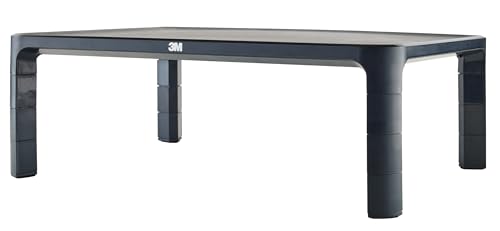
“Adjustable 1.7 to 5.5-inch height range. Best suited for ergonomic users wanting a height-adjustable monitor stand.”
See Today’s Price →What we like
- Adjustable 1.7 to 5.5-inch height range
- 3M brand quality
- Black finish
- Easy height adjustment
- Suitable for multiple monitor sizes
Watch out for
- Premium price for a monitor stand
- Height adjustment mechanism adds complexity vs simple risers
- 3M brand premium for a platform stand
Read Full Analysis
On a desk where surface space matters and repositioning happens often, the 3M MS85B's $45 adjustable riser does two things fixed-height shelf blocks cannot: it raises the monitor to precise eye level across a 1.7 to 5.5-inch range, and its platform design keeps the monitor footprint stable with no wall or clamp attachment required. For traditional office setups where desk-mounted arms are impractical or prohibited, the 3M integrates as a conventional workspace product. The compact base leaves room for a keyboard and peripherals beside it. Against the $60 HUANUO FlowLift on this list, the 3M trades the articulating arm mechanism for a smaller footprint and simpler setup — no tools, no desk clamp required. Users who share a desk or frequently reconfigure their workstation will appreciate that the 3M can be repositioned or removed in under a minute, while arm-mounted options require clamp detachment to move.

“The WALI Dual Monitor Stand 13-32 in Gas Spring GSMP002N features supports up to 26.4 lbs.”
See Today’s Price →What we like
- Independent gas-spring arms - run one screen portrait and one landscape
- Fits 13-32 inch screens, up to 22 lb per arm
- VESA 75 and 100 mounting
- Full-motion tilt, swivel and height
- Cable channel keeps runs off the desk
Watch out for
- A dual clamp needs real depth at the back of the desk - measure first
- Integrated USB hub is USB-A only
- 22 lb per arm can be tight for a large 32-inch panel - check weight, not diagonal
Read Full Analysis
Converting from a single stationary shelf to a dual-arm setup changes how a desk functions: the WALI GSMP002N at $33 replaces two monitor footprints with a single desk-edge clamp and gives each screen a fully independent positioning range. On a shelf page, this matters because most desk shelves accommodate only one monitor — anyone running two screens is choosing between two separate shelves or a dual arm that consolidates both. The WALI's gas spring arms hold each monitor at a user-set height without secondary adjustment locks. The weight capacity per arm spans 4.4 to 19.8 lbs, covering virtually all consumer displays under 27 inches. Against the $45 3M stand and $20 Halter mesh shelf on this list, the WALI is the highest-effort setup — desk clamp installation requires clearing a section of desk perimeter — but it recovers the most desk surface area in return, which is the core value proposition on any monitor shelf page.

“The Halter Mesh Monitor Stand Computer Desk Riser with Drawer 2 Pack Black features budget price. 4.4 stars from 1,179 Amazon reviews signal consistent reliability.”
See Today’s Price →What we like
- Budget price
- Includes drawer for supplies
- Mesh ventilation aesthetic
- Halter brand
- Elevates monitor for ergonomic positioning
Watch out for
- Drawer small capacity
- Monitor weight capacity limited at budget price
- Mesh wobbles slightly under heavy monitors
Read Full Analysis
Halter's $20 listing is actually a 2-pack — two mesh risers for less than a single WALI unit. Each stand includes a pull-out drawer for cable accessories, pens, or a phone. Mesh construction keeps the look clean on the desk surface. The trade-off: the Halter suits standard 20-27-inch monitors well but users report wobble under heavier loads, making it less ideal for large ultrawides or 32-inch panels. For a second monitor, a laptop alongside a main display, or equipping two workstations at once, the per-unit math ($10 each) is hard to beat at this price tier.
“The Ergotron LX Monitor Arm at 14.99 is the definitive upgrade from a fixed stand — it moves the display through any position in 3D space with one hand, eliminates desk footprint, and holds position…”
See Today’s Price →What we like
- Holds one screen up to 34 inches and 7 to 25 pounds
- 13 inches of lift, up to 17.3 inches above the desk
- 360 degrees of rotation and 75 degrees of tilt
- Desk clamp and grommet mount both included
- Built-in cable management and a 10-year warranty
Watch out for
- Its listing names only VESA 75 x 75 and 100 x 100 mm mounts
- Screens under 7 pounds or over 25 pounds fall outside its range
Read Full Analysis
Ergotron LX's CF-motion technology is the core differentiator in this monitor arm category — the mechanism delivers buttery-smooth, fingertip-force adjustment that doesn't stiffen or loosen over years of daily repositioning. The 34 lb capacity handles ultrawide and large gaming monitors that other arms in this comparison can't support safely. Full articulation covers 13 inches of vertical height, 360-degree rotation, and forward/back tilt — the complete range needed for both seated and standing desk positions without re-clamping or readjusting the base clamp. The Ergotron LX is the premium tier above the HUANUO FlowLift the 3M Adjustable and the WALI Dual on this page. The 3-to-6x price gap reflects mechanism quality more than feature count — at $33 to $60, arms use friction locks that work acceptably when new but degrade with daily adjustments. The Ergotron's movement quality is a daily-use difference that becomes more noticeable over months of regular repositioning. Choose the Ergotron LX if you adjust your monitor position regularly throughout the day, have a heavy monitor above 20 lbs, or want an arm that won't need replacement in 18 months. Skip it if your setup is primarily static — the HUANUO FlowLift handles occasional repositioning for lighter panels at less than a third of the price.

“The VIVO Single Monitor Arm at 4.99 is the budget mount that handles everyday monitor placement — full-motion tilt, swivel, and height adjustment, and the C-clamp mounts without drilling. Holds…”
See Today’s Price →What we like
- Full 360° rotation and ±45° swivel at a fraction of Ergotron's cost
- Cable management clips along the arm
- Supports monitors up to 22 lbs and 27 inches
- Both clamp and grommet mount included
- Tool-free height adjustment after initial setup
Watch out for
- Less smooth than Ergotron — adjustment requires more deliberate force
- 22 lb limit rules out larger gaming monitors
- Plastic joint covers feel less premium than metal construction
Frequently Asked Questions
What is the correct height for a monitor stand?
Do monitor arms require VESA mounting holes?
HUANUO vs. WALI monitor arm — which is better?
Can I put anything under a monitor riser?
Is a monitor stand worth it for ergonomics?
How We Chose These Products
We compare each product’s Amazon listing, the manufacturer’s published specifications and Amazon customer ratings, shown with their review counts as Amazon’s data, and rank the products on how well they answer this page’s question. We do not test products in hand and we do not run our own analysis of review text. A publication or expert is named only where we cite its published findings about that product. No manufacturer paid for placement on this page.
A price appears only when Amazon’s API supplied it at a recent daily refresh, with the date and time beside it, and is withdrawn at 4 AM Central on the day after it turns 24 hours old; otherwise use “Check price on Amazon” for the live price. Read our full methodology →