4K vs 1440p vs 1080p Monitors: Which Resolution Should You Choose? (2026)
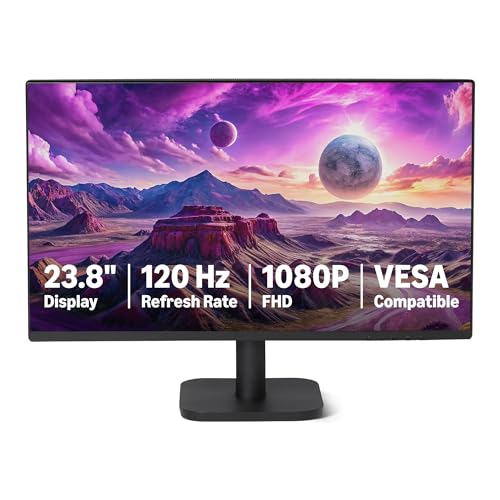
The Amazon Basics 23.8-inch 1080p 120Hz Monitor is the best budget 1080p recommendation — 120Hz refresh at under $85 is the only option in this comparison that proves 1080p gaming remains viable for GPU-budget-limited builders.
4K vs 1440p vs 1080p Monitors Buying Guide
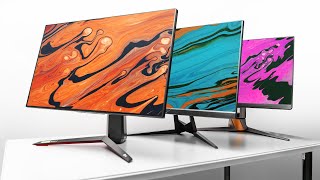
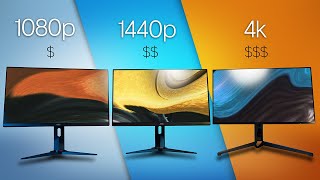
Resolution affects every aspect of your monitor experience: GPU load, visual sharpness at your seating distance, multitasking screen real estate, and the price premium you pay for the panel. 1080p, 1440p, and 4K are not just sequential upgrades — they involve different tradeoffs in hardware requirements, panel sizes, and practical seating distances. Most buyers choose resolution based on spec sheets rather than actual pixel density at their desk setup. This guide matches resolution to real-world use cases.
1080p (Full HD): When It Still Makes Sense
1080p (1920×1080) is 2.07 million pixels. At 24 inches viewed from 60cm, the pixel density is approximately 92 PPI — visible individual pixels at close inspection but comfortable for typical use. 1080p remains the correct choice in two scenarios: when your GPU is a mid-range card (RTX 3060, RX 6600 or below) and you prioritize high refresh rates (144Hz+), or when your budget is under $120 for a gaming monitor. A mid-range GPU that struggles to sustain 60fps at 1440p in demanding titles can often sustain 120-165fps at 1080p — filling a 144Hz or 165Hz panel's refresh rate and delivering the smooth motion that makes high-refresh gaming worth the investment. The Amazon Basics 23.8 in 1080P Monitor ($85.49) is an IPS 120Hz panel that delivers adequate 1080p for competitive gaming and general productivity. At 24 inches, 1080p is acceptable; at 27 inches, 1080p looks noticeably soft and is harder to justify. 1080p also requires lower GPU memory bandwidth, which benefits in games that frequently stream large textures.
1440p (QHD): The 2026 Sweet Spot
1440p (2560×1440) is 3.69 million pixels — 78% more than 1080p. At 27 inches, pixel density is approximately 109 PPI. The step up from 1080p to 1440p is immediately visible: text is noticeably sharper, UI elements have cleaner edges, and distant game objects (enemies, text markers, distant terrain) are easier to read. The GPU cost increase from 1080p to 1440p is 60-80% in typical demanding games — an RTX 3060 Ti or RX 6700 XT is the minimum GPU for a satisfying 1440p gaming experience at medium-high settings. Modern GPUs in the $250-$400 range (RTX 4070, RX 7800 XT) run 1440p at high settings in most titles above 100fps. The Alienware AW2725DM is a 27" 1440p 180Hz IPS panel — the resolution and refresh rate combination that makes 1440p the default recommendation for buyers upgrading from a mid-range setup. 1440p at 27" or 32" gives sufficient screen real estate for side-by-side work windows, code editors with multiple panels, or creative workflows where canvas space matters.

4K (Ultra HD): When the Hardware Matches
4K (3840×2160) is 8.29 million pixels — 124% more than 1440p and 300% more than 1080p. At 27 inches, 4K pixel density reaches 163 PPI — effectively indistinguishable from individual pixel perception at normal seating distance. At 32 inches, 137 PPI remains excellent. The GPU requirement is the primary barrier: sustaining 60fps at 4K in demanding titles like Cyberpunk 2077 or Alan Wake 2 requires a GPU in the RTX 4080 / RX 7900 XTX tier ($229.99+). At 30-60fps, 4K is usable for slower-paced and less demanding games on mid-range GPUs, but competitive gaming at 4K requires hardware budgets that put the monitor cost in perspective. The Acer Nitro XV275K ($229.99) is a 27" 4K Mini LED gaming monitor — a capable panel at the entry price point for 4K gaming displays. For productivity and content creation, 4K provides genuine benefit regardless of GPU: Windows and macOS scale UI elements beautifully at 4K, text is crisp at any size, and video editing at 4K native resolution allows accurate pixel-perfect review of footage. Creative professionals who don't game competitively should consider 4K regardless of GPU limitations.
Pixel Density at Actual Seating Distances
The practical impact of resolution depends heavily on seating distance and panel size. At 60cm (typical desktop seating): 24" 1080p = 92 PPI (acceptable), 27" 1440p = 109 PPI (excellent for desktop use), 27" 4K = 163 PPI (retina-level sharpness). At 90cm (sofa/TV viewing): 43" 4K = 102 PPI (equivalent to 27" 1440p at 60cm). The rule: pixels per inch at your seating distance, not raw pixel count, determines perceptible sharpness. A 27" 1080p monitor at 60cm viewing distance (93 PPI) looks identical to a 24" 1080p at 60cm in pixel density — but a 32" 4K monitor at 90cm (137 PPI) looks meaningfully sharper than a 32" 1440p at the same distance (91 PPI). Before choosing a resolution, estimate your actual seating distance and calculate PPI for the panel size you're considering.
The GPU Budget Implication
Resolution choice directly determines total system cost when accounting for the GPU needed to utilize the panel. A 1080p 165Hz gaming setup (monitor + GPU capable of filling 165fps) costs significantly less than a 4K 60fps gaming setup. The cross-over point: spending over $350 on a GPU makes 1440p justified; spending over $600 on a GPU makes 4K worth considering. Mismatching creates waste: a 4K monitor with an RTX 3060 runs most titles at 30-45fps at 4K high settings, wasting the panel's resolution potential. An RTX 4090 connected to a 1080p monitor wastes GPU headroom. The Alienware AW2725DM is the monitor to pair with RTX 4060 Ti / RX 7700 XT tier GPUs. The Acer Nitro XV275K ($229.99) is justified with an RTX 4080 / RX 7900 XTX tier.
How to match a resolution tier to your GPU
A panel is only as good as the card feeding it. A 1440p 144Hz monitor does nothing for you if the GPU cannot sustain 144fps at that resolution, and a 4K panel driven well below its refresh rate looks worse in motion than a 1440p panel driven at it. Broadly: 1080p high-refresh pairs with a mid-range card, 1440p high-refresh wants an upper-mid card, and 4K high-refresh wants a flagship. Genre decides as much as tier — competitive shooters reward refresh rate over resolution, while single-player games and productivity work reward pixel density. Seating distance matters too: at a normal desk distance the visible gap between 1440p and 4K on a 27-inch panel is far smaller than the spec difference suggests. Prices quoted on this page are street prices, not MSRP.
“The entry-level IPS 1080p option for budget builds and secondary monitors.”
See Today’s Price →What we like
- 23.8-inch IPS panel, 1920x1080, 99% sRGB
- 120Hz with Adaptive Sync
- LowBlue Light and flicker-free
- HDMI 1.4, DisplayPort 1.2 and audio out, with 2W x2 speakers
- 4-sided narrow bezel for multi-monitor setups
Watch out for
- 120Hz needs a graphics card, cable and settings that support it
Read Full Analysis
The Amazon Basics 23.8-inch 1080P IPS monitor is the budget anchor of this 4K vs 1440p vs 1080p comparison — establishing what you get at the lowest price tier. IPS panel technology delivers better color accuracy and wider viewing angles than TN alternatives at the same price, making it more suitable for general productivity and casual content consumption than a TN equivalent. VESA mount compatibility and tilt adjustment allow ergonomic positioning without a separate arm purchase. The 3-year warranty is above-average coverage for a budget monitor brand. Note: the product listing cites "120Hz" in the name, but the product data references 75Hz; verify the actual refresh rate at purchase, as specifications may vary by SKU. No height adjustment limits ergonomic flexibility beyond tilt — users not seated at the optimal height relative to the monitor may experience neck strain over extended sessions. The Amazon Basics competes against established budget monitor brands (Acer, ASUS, ViewSonic) that offer similar IPS 1080p panels with more established support infrastructure and broader driver compatibility histories. In this resolution comparison, the Amazon Basics 1080P sits $139 below the Alienware AW2725DM QHD and $344 below the Acer Nitro 4K. The 1080p tier is the correct choice for buyers on a strict budget, secondary monitor setups, or older GPU pairings where pushing higher resolutions at playable frame rates isn't feasible. The Alienware QHD buys a noticeable resolution jump plus 180Hz refresh rate for $139 more — a worthwhile upgrade for primary monitor use if the budget allows. The Amazon Basics makes most sense as a secondary productivity display or an entry-level primary monitor where cost is the overriding constraint.

“The 1440p 180Hz IPS reference for buyers upgrading from 1080p setups.”
See Today’s Price →What we like
- 27-inch 1440p IPS at 180Hz delivers the fastest competitive refresh rate at this panel size under $250 — excellent gaming performance-per-dollar
- Compatible with both Nvidia G-Sync and AMD FreeSync Premium — works on either GPU brand without screen tearing or frame rate fluctuation
- 1ms GtG response time keeps fast-moving scenes crisp without the ghosting that slower IPS panels produce in competitive gaming
- 95% DCI-P3 color gamut adds visual depth beyond standard sRGB monitors — noticeable in HDR content and high-color game environments
Watch out for
- No OLED — 1000:1 IPS contrast
- DisplayHDR 400 is entry-level
- USB hub missing on base model
Read Full Analysis
The Alienware AW2725DM 27-inch 1440p IPS is the performance-per-dollar leader in this 4K vs 1440p vs 1080p comparison. 180Hz at 27-inch 1440p is the competitive gaming sweet spot in 2026 — the resolution upgrade 1080p lacks combined with frame rates that 4K monitors at this price can't sustain. Dual G-Sync and FreeSync Premium compatibility eliminates screen tearing on either GPU brand without choosing an ecosystem. 1ms GtG response keeps fast-moving scenes crisp without the ghosting slower IPS panels produce in fast-twitch scenarios. 95% DCI-P3 color gamut adds visual depth beyond standard sRGB panels, noticeable in HDR game environments. The 1000:1 IPS contrast ratio is the format's inherent ceiling — blacks appear gray in dark room viewing compared to OLED alternatives at higher price points. DisplayHDR 400 certification is entry-level HDR; for genuine HDR impact, the Acer Nitro's DisplayHDR 1000 is the meaningful step up. The base model lacks a USB hub, adding a minor cable management consideration for users who need monitor-side ports. Against the Amazon Basics 1080P, the Alienware 1440p costs $139 more for a resolution and refresh rate upgrade that is visible in everyday use — worth the step up for primary monitor use. Against the Acer Nitro 4K Mini LED, the Alienware saves $205 and gains higher refresh rate (180Hz vs 160Hz), making it the stronger gaming monitor while the Acer wins on peak HDR brightness and resolution for content creators. The AW2725DM is the clearest recommendation in this comparison for gaming-primary buyers with mid-range GPUs.

“Entry-level 4K gaming with Mini LED for high-end GPU users who want maximum sharpness.”
See Today’s Price →What we like
- 1,152-zone Mini LED with VESA DisplayHDR 1000
- 160Hz at native 4K for smooth high-res gaming
- Dynamic Frequency Response: up to 320Hz at FHD
- 90W USB-C power delivery
Watch out for
- IPS panel lacks OLED contrast depth
- Plastic stand feels budget for the price
- HDR blooming visible on fine highlights
Read Full Analysis
The Acer Nitro XV275K 27-inch 4K Mini LED is the premium tier of this resolution comparison — 1,152-zone Mini LED with VESA DisplayHDR 1000 certification delivers local dimming performance that standard IPS monitors cannot match, creating genuine HDR impact rather than the entry-level experience of DisplayHDR 400 panels. At 160Hz native 4K, it handles both single-player gaming smoothly and content creation workflows with resolution to spare. Dynamic Frequency Response enabling 320Hz at FHD adds flexibility for esports sessions where frame rate matters more than resolution. 90W USB-C power delivery consolidates laptop charging through the monitor cable. IPS panel technology means blacks aren't as deep as OLED alternatives — HDR blooming is visible on fine highlights (bright text on dark backgrounds, stars in space environments) despite 1,152 dimming zones. The plastic stand feels budget-grade relative to a $424.95 price point; a VESA arm is worth budgeting for long-term ergonomics. Driving native 4K at 160Hz requires a high-end GPU — mid-range cards will need to run at 4K/60Hz or drop to 1440p to maintain playable frame rates in demanding titles. Against the Alienware AW2725DM 1440p, the Acer 4K costs $205 more and trades 180Hz for 160Hz while gaining 4K resolution and DisplayHDR 1000 — the correct trade for visual fidelity-focused users and content creators, a harder sell for competitive gamers who benefit more from refresh rate. Against the Amazon Basics 1080P, the Acer represents a fundamentally different product tier at $344 more. The XV275K is the right recommendation for high-end GPU owners who want the best single monitor for 4K content creation and gaming.
Frequently Asked Questions
Is 1440p worth it over 1080p?
Is 4K worth it for gaming in 2026?
What resolution is best for a 27-inch monitor?
Can you see the difference between 1080p and 1440p?
Does higher resolution affect gaming performance?
Is 4K better than 1440p for photo and video editing?
How We Chose These Products
We compare each product’s Amazon listing, the manufacturer’s published specifications and Amazon customer ratings, shown with their review counts as Amazon’s data, and rank the products on how well they answer this page’s question. We do not test products in hand and we do not run our own analysis of review text. A publication or expert is named only where we cite its published findings about that product. No manufacturer paid for placement on this page.
A price appears only when Amazon’s API supplied it at a recent daily refresh, with the date and time beside it, and is withdrawn at 4 AM Central on the day after it turns 24 hours old; otherwise use “Check price on Amazon” for the live price. Read our full methodology →