Best Acer Laptops 2026: Windows & Chromebook
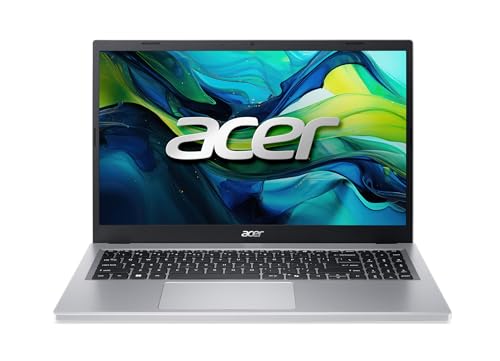
The Acer Aspire Go 15 is the best Acer laptop for full Windows capability with AMD Ryzen 3. For Chromebook users, the Chromebook Plus 516 delivers the best performance-to-price ratio in the lineup.
At a Glance
| # | Product | Award | Price |
|---|---|---|---|
| 1 | Best Overall | $366.99 as of Nov 24, 12:38 PM CT details Buy → |
|
| 2 | Best Chromebook | $420 as of Nov 24, 12:38 PM CT details Buy → |
|
| 3 | Best 2-in-1 | Check price on Amazon Buy → |
|
| 4 | Best Gaming Chrome | Check price on Amazon Buy → |
|
| 5 | Budget Chromebook | Check price on Amazon Used — not a new unit Buy → |
Acer Laptops Buying Guide
 Photo by 开 心 / Pexels
Windows Laptop vs. Chromebook: Which Acer Is Right for You

The Acer Aspire Go 15 runs Windows 11 — necessary for Microsoft Office desktop apps, specialized software, gaming, and full file system access. The four Chromebook models run ChromeOS, which is faster to boot, more resistant to malware, and cheaper to buy, but limited to web apps and Android apps from Google Play. For students doing web-based coursework and Google Workspace users, any Chromebook Plus model is the better value. For professionals who need Office, Adobe, or any Windows-exclusive software, the Aspire Go 15 is the only viable choice in this lineup.
Chromebook Plus: What Qualifies
Chromebook Plus is Google's certification tier for Chromebooks with at least 8 GB RAM, 128 GB storage, and an Intel Core or AMD Ryzen processor. The Chromebook Plus 516, 516 GE, and Spin 714 all meet this standard; the Gateway Chromebook 314 sits below it. The practical difference is noticeable: Chromebook Plus models handle 10+ browser tabs, Android apps, and Linux containers without slowdown. The non-Plus Gateway 314 struggles with heavy multitasking.

The Chromebook Plus Spin 714: 2-in-1 Flexibility
The Spin 714 adds a 360-degree hinge that converts to tablet mode — useful for note-taking with a stylus, presenting content, or reading in a comfortable position. At $749.98 the 2-in-1 design costs the same as the standard Chromebook Plus 516 GE, making it the smarter choice unless you specifically want the gaming-focused design of the 516 GE.
What to Avoid
Avoid Chromebooks with 4 GB RAM — they struggle with modern web apps and are increasingly inadequate as ChromeOS itself grows. Avoid the Gateway Chromebook 314 for heavy users; it is a budget device by design. Avoid the Chromebook Plus 516 GE if gaming is your primary goal — it handles casual Android games but cannot run PC games; a Windows gaming laptop handles that use case far better.
How We Picked These
How we picked these. Products were selected to cover each major use case: full Windows, everyday Chromebook, 2-in-1, gaming Chromebook, and budget.
Watch Before You Buy

“The Acer Aspire Go 15 runs an AMD Ryzen 3 7320U with AI-ready architecture and includes an HDMI port for external display connectivity, making it practical for students and home office…”
See Today’s Price →What we like
- AMD Ryzen 3 7320U provides solid performance for everyday computing tasks
- AI-ready designation indicates NPU support for Windows AI features
- HDMI port enables easy external display connection for dual-screen work
- 15-inch screen balances portability and usability for home and office use
Watch out for
- Ryzen 3 is entry-level — heavy multitasking with many browser tabs will slow it down
- No discrete GPU limits gaming and GPU-accelerated creative workloads
Read Full Analysis
The Acer Aspire Go 15 earns Best Overall as the only Windows laptop in this Acer lineup — AMD Ryzen 3 7320U, AI-ready NPU for Windows AI features, HDMI port for external display connection, and a 15-inch screen. Compared to the four Chromebook options here, the Acer Aspire Go 15 delivers a full Windows environment with native software compatibility, local offline processing, and access to the full Windows application ecosystem, which is why it ranks first for the majority of buyers despite the price premium. The Acer Aspire Go 15 is $150–190 more than the Chromebook options ($400–440). That gap buys Windows, native app support, and offline computing without cloud dependency. The Ryzen 3 7320U is entry-level within the Windows laptop tier and will feel constrained under heavy multitasking, but it outperforms every Chromebook on this page for local computing tasks, offline work, and software compatibility. Buy if: You need Windows software compatibility, work offline frequently, require programs not available on ChromeOS, or run any locally-installed application. Skip if: Your work is entirely browser-based and Google Workspace-focused — the Acer Chromebook Plus 516 is $190 cheaper and matches the Aspire Go 15 for cloud-only workflows.

“The Acer Chromebook Plus 516 is Acer's standout Chromebook pick, offering a larger display and stronger performance specs than base Chromebook models for users who spend extended time in a…”
See Today’s Price →What we like
- ChromeOS is fast secure and virtually maintenance-free for everyday use
- Plus designation includes Intel Core i3/i5 class processor for snappier performance
- Long battery life typical of Chromebooks extends workday without charging
- Competitively priced at $400 for a ChromeOS Plus experience
Watch out for
- ChromeOS has limited software compatibility — no Windows applications natively
- Offline capability is more limited than Windows laptops for power users
Read Full Analysis
The Acer Chromebook Plus 516 earns Best Chromebook as the standard-form-factor Chromebook Plus option with the strongest value proposition — $40 less than the convertible Spin 714 and gaming-oriented 516 GE and $190 less than the Aspire Go 15 Windows laptop. ChromeOS Plus certification guarantees a higher hardware baseline than entry Chromebooks, including a more capable processor, extended software update support, and a smooth Google Workspace experience. Within this Acer Chromebook lineup, the Acer Chromebook Plus 516 sits at the price-to-performance sweet spot. The Spin 714 adds a convertible touchscreen hinge — worth the $40 premium only for users who actively use tablet or tent modes. The 516 GE adds RGB aesthetics and a higher-refresh display for cloud gaming, but the ChromeOS gaming limitation means you pay for streaming hardware rather than local game support. Both upgrades are use-case-specific; the base 516 is the right default. Buy if: You live in a browser and Google Workspace environment, want a low-maintenance machine with long update support, and have no need for Windows apps, convertible form, or gaming features. Skip if: You need Windows software compatibility — the Aspire Go 15 is the correct path despite the $190 price increase.

“The Acer Chromebook Plus Spin 714 adds a 360-degree hinge to the Chromebook Plus platform, allowing it to flip into tablet mode for touchscreen use alongside its standard laptop…”
See Today’s Price →What we like
- 2-in-1 convertible design works as laptop and tablet with touchscreen
- Spin hinge enables tent and presentation modes for versatile use cases
- ChromeOS Plus performance tier for smooth multitasking
- USI stylus compatible for note-taking and annotation
Watch out for
- Higher price than non-convertible Chromebook Plus models
- Touch and stylus workflow is ChromeOS-specific — tablet app selection limited vs iOS/Android
Read Full Analysis
The Acer Chromebook Plus Spin 714 earns Best 2-in-1 for the 360-degree convertible hinge that transforms the standard Chromebook Plus platform into a tablet — useful for students who take handwritten notes with a USI stylus, instructors who present in tent mode, or anyone who regularly shifts between laptop and tablet postures. The $40 premium over the Acer Chromebook Plus 516 is justified only when the convertible functionality will actually be used regularly. Among the Acer Chromebook options the Spin 714 and the 516 GE are the same price with opposite focus: Spin 714 targets classroom and annotation workflows; 516 GE targets cloud gaming aesthetics. The convertible hinge and USI stylus compatibility on the Spin 714 are meaningfully useful features for the right buyer — active tablet mode and handwriting input are not gimmicks on this platform. Against the Aspire Go 15, the Spin 714 saves $150 but loses full Windows compatibility. Buy if: You actively use touch input, take handwritten digital notes, or need tent and presentation modes as part of your regular workflow. Skip if: You rarely touch the screen — the standard Acer Chromebook Plus 516 saves $40 with identical processing performance and a simpler, lighter form factor.
“The Acer Chromebook Plus 516 GE is styled as a gaming Chromebook with RGB accents and hardware specs tuned for cloud gaming services like Xbox Cloud Gaming and GeForce NOW. It brings the…”
See Today’s Price →What we like
- RGB keyboard backlight gives gaming aesthetics uncommon in the Chromebook category
- ChromeOS allows Android games and select cloud gaming services via Xbox or GeForce NOW
- Gaming-spec display with higher refresh rate for smoother visual experience
- Plus-tier performance handles cloud game streaming with good responsiveness
Watch out for
- ChromeOS limits native gaming significantly — cloud and Android gaming only
- $440 is a premium price for a Chromebook without a discrete GPU
Read Full Analysis
The Acer Chromebook Plus 516 GE fills a specific niche as the gaming-oriented Chromebook in this Acer lineup — RGB keyboard backlighting, a higher-refresh display, and hardware tuned for cloud gaming services like Xbox Cloud Gaming and GeForce NOW. It matches the Spin 714 on price, making the choice between them a question of use case: gaming aesthetics and cloud streaming (GE) versus convertible touchscreen and stylus input (Spin 714). Neither justifies the extra $40 over the standard Acer Chromebook Plus 516 unless the specific feature is needed. ChromeOS gaming is cloud-dependent by nature. The Acer Chromebook Plus 516 GE handles Xbox Cloud Gaming and GeForce NOW streaming capably, but the local game library is limited to Android titles — no Steam, no Windows game installs. Compared to the Aspire Go 15 Windows laptop, you save $150 on hardware but lose access to Steam and locally installed Windows games. The right trade for casual cloud-only gamers; wrong for anyone with an existing Steam library. Buy if: Your gaming is entirely cloud-based or Android-native, you want the gaming aesthetic on a Chromebook budget, and ChromeOS software constraints do not affect your daily workflow. Skip if: You play any Steam-native or offline PC games — the Acer Aspire Go 15 is the only option here that supports local Windows game installs.

“The Acer Gateway Chromebook 314 is a no-frills Chromebook focused on core functionality over features, suited for users who want reliable web browsing and Google apps without paying for…”
See Today’s Price →What we like
- No-frills design means fewer points of failure and straightforward daily reliability
- ChromeOS automatic updates keep the system secure with minimal user effort
- Compact 14-inch form factor for easy portability between home and work
- Gateway brand keeps the price accessible versus premium Acer Chromebook Plus line
Watch out for
- No touchscreen convertible form factor or stylus support
- Gateway is a value sub-brand with less premium feel than the core Acer lineup
Read Full Analysis
The Acer Gateway Chromebook 314 is the no-frills option in this lineup — a compact 14-inch Chromebook aimed at straightforward ChromeOS use without premium features. Gateway is an Acer sub-brand historically positioned below the core Chromebook Plus line on both specifications and price, targeting buyers who need a simple reliable web browsing device. The $440 price shown here is notably high for this model — Gateway Chromebooks in the 314 series have typically retailed, significantly below the Acer Chromebook Plus lineup. Buyers should verify current pricing before purchasing. At accurate budget pricing the Acer Gateway Chromebook 314 makes sense as a minimalist option; it does not compete favorably with the Acer Chromebook Plus 516, which offers Chromebook Plus certification, a more capable processor, and longer update support for $40 less. Buy if: You find this Acer Gateway model at its historical price point of $150–200, where it is a sensible no-frills web browsing device. Skip if: The listed price is near $440 — the Acer Chromebook Plus 516 delivers meaningfully better hardware and software support for less money.
Frequently Asked Questions
Can Acer Chromebooks run Microsoft Office?
Does the Acer Aspire Go 15 have a dedicated GPU?
What is the battery life like on the Chromebook Plus 516?
Is the Chromebook Plus Spin 714 good for students?
Do Acer Chromebooks receive software updates?
How We Chose These Products
We compare each product’s Amazon listing, the manufacturer’s published specifications and Amazon customer ratings, shown with their review counts as Amazon’s data, and rank the products on how well they answer this page’s question. We do not test products in hand and we do not run our own analysis of review text. A publication or expert is named only where we cite its published findings about that product. No manufacturer paid for placement on this page.
A price appears only when Amazon’s API supplied it at a recent daily refresh, with the date and time beside it, and is withdrawn at 4 AM Central on the day after it turns 24 hours old; otherwise use “Check price on Amazon” for the live price. Read our full methodology →