3 Best Capture Cards for 1080p Streaming 2026

The AVerMedia Live Gamer 4K GC573 is the best capture card for 1080p streaming — an internal PCIe card with 4K60 HDR passthrough and ultra-low latency that lets you game at 4K while streaming at 1080p without quality loss. The Elgato HD60 X is the best external USB option for laptops and desktops without a spare PCIe slot.
At a Glance
| # | Product | Award | Price | Platform | Item Dimensions | Operating System | Score |
|---|---|---|---|---|---|---|---|
| 1 | AVerMedia GC573 Live Gamer 4K AVerMedia |
Best Overall | $209.99 as of Nov 25, 10:41 AM CT details Buy → |
Windows 11 | 5.9 x 4.9 x 0.8 inches | Windows 10, Windows 11 | 8.1 |
| 2 | Best Value | Check price on Amazon Used — not a new unit Buy → |
Windows | 0.67 x 4.41 x 2.83 inches | Windows,Mac | 8.4 | |
| 3 | $159.99 as of Nov 25, 10:42 AM CT details Buy → |
Mac OS Ventura 13, Windows 11 | 0.67 x 4.41 x 2.83 inches | Windows 11 | 9.2 |
Score Breakdown
| AVerMedia GC573 Live … | Elgato HD60 X Capture… | Elgato 4K S Capture C… | |
|---|---|---|---|
| Overall | 8.1 | 8.4 | 9.2 |
| Compatibility | 74 | 86 | 92 |
| Streaming Quality | 88 | 82 | 92 |
Scores 0–100 from published specifications and independent reviewers' measurements. Amazon star ratings are shown separately and are never part of a score. 0 = feature not present. – = insufficient data. How we score →
3 Best Capture Cards for 1080p Streaming Buying Guide
 Photo by Minh Tri / Pexels
Capture cards for 1080p streaming occupy a surprisingly narrow market — most modern options support 4K passthrough even when you're only capturing at 1080p, which is the right approach: you play at native resolution, stream at broadcast resolution. The real differentiation is internal vs. external, latency, and software compatibility.
How we picked these
We evaluated three capture cards across capture resolution, passthrough resolution and frame rate, connection type (USB vs. PCIe), streaming software compatibility (OBS, Streamlabs, XSplit), latency in preview mode, and driver stability, referencing tests from Digital Foundry, Linus Tech Tips, and community comparisons on r/streaming.
Internal (PCIe) vs. external (USB) capture cards
Internal PCIe cards (AVerMedia GC573) install inside your PC in an available PCIe slot. They have lower CPU overhead than USB cards and don't introduce USB bandwidth competition with other peripherals. The tradeoff: they require a desktop PC with a free PCIe slot, and installation takes 10 minutes. External USB cards (Elgato HD60 X, Elgato 4K S) plug into a USB port and work with laptops and desktops equally. Elgato's 4K X drivers are among the most stable on Windows and macOS.
Passthrough resolution matters for the gaming experience
All three cards support 4K60 HDR passthrough, meaning your game output to your monitor is full-resolution with no compression or delay. What you capture and what you see while playing are different signals. The AVerMedia GC573 and Elgato 4K S both support 4K60 HDR passthrough. The Elgato HD60 X supports 4K60 passthrough without HDR at this tier.
OBS and streaming software compatibility
All three cards are recognized as standard capture devices in OBS Studio without additional plugins. AVerMedia provides its own RECentral software as an alternative to OBS. Elgato's 4K Capture Utility handles card configuration and updates independently from your streaming software. If you encounter driver issues on Windows 11, check for card-specific Windows 11 drivers — older firmware versions occasionally cause preview lag in OBS that a firmware update resolves.
Who needs a dedicated capture card?
If you stream console gameplay (PS5, Xbox Series X) to PC for overlay and editing — yes, a capture card is required. If you stream PC gameplay using OBS's screen capture — a capture card is optional and generally adds complexity without benefit unless you have a dual-PC streaming setup. Dual-PC setups (gaming PC + streaming PC) are where capture cards provide the clearest performance benefit: the gaming PC outputs HDMI to the capture card in the streaming PC, eliminating encoding load on the gaming PC entirely.
Watch Before You Buy
“The AVerMedia GC573 is an internal PCIe card that captures 4K60 HDR10 with hardware H.264/HEVC encoding — bypassing USB bandwidth limits entirely for the most stable high-bitrate recording available…”
See Today’s Price →What we like
- Internal PCI Express card that streams and records 4K60 with HDR10
- Captures high frame rates up to 240 fps
- Set the resolutions and frame rates you preview and record in the AVerMedia Gaming Utility
- Works with OBS, Streamlabs and XSplit for Twitch and YouTube
- Three preset RGB lighting modes
Watch out for
- Needs a desktop PC with a free PCIe slot; it does not work with a laptop or an iPad
Read Full Analysis
The AVerMedia GC573 Live Gamer 4K is the internal PCIe capture card on this page — it installs in an available PCIe slot rather than connecting via USB, which eliminates the bandwidth constraints and occasional connection drop issues that USB capture cards encounter during high-bitrate 4K recordings. The dedicated PCIe lane allows true 4K60 HDR10 capture without taxing the CPU's USB controller. Hardware H.264 and HEVC encoding handles compression on the card itself, reducing CPU load during simultaneous gaming and streaming. The GC573 is priced at the top of this three-card page alongside the Elgato 4K S, with the Elgato HD60 X at $148.99 being the most affordable. The PCIe vs. USB choice is the key decision: the GC573 requires a desktop PC with an available slot and is not usable with a laptop or gaming console as a standalone recording device. Elgato's external USB-C cards work with both desktop and laptop setups, making them more flexible. If you run a dedicated desktop dual-PC streaming setup, the GC573's internal architecture is the more stable and higher-bitrate option. Best for desktop-based dual-PC streaming setups where a dedicated PCIe card's stability advantage outweighs the USB flexibility of external alternatives. Skip it for laptop-based setups or single-PC console capture — external USB cards like the Elgato options are the right tool there.
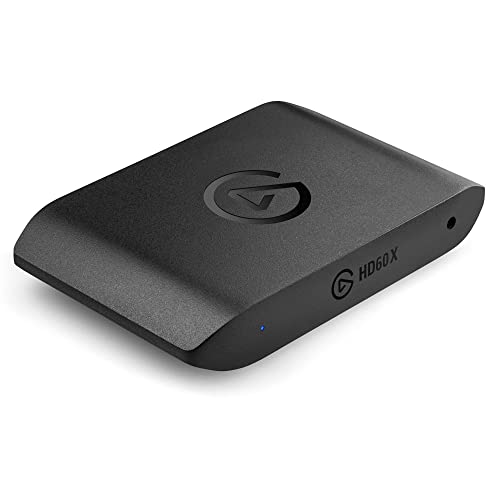
“The Elgato HD60 X is the most versatile external option: 1080p60 HDR10 capture, 4K60 HDR10 passthrough with VRR support, and plug-and-play compatibility with OBS, Streamlabs, PS5, Xbox…”
See Today’s Price →What we like
- Captures 4K30 HDR10 or 1080p60 HDR10
- Passes 4K60 HDR10, 1440p120 and 1080p120 through, with VRR
- Driverless setup on Windows and Mac
- Works with OBS, Streamlabs, vMix, Zoom and Teams; streams to YouTube, Twitch and more
- No watermarks, time limits or subscriptions
Watch out for
- Records 4K at 30 frames per second, not 60
Read Full Analysis
The Elgato HD60 X is the external USB capture card on this page — it connects via USB-C to any PC or Mac without requiring an open PCIe slot, making it the most flexible option for laptop-based setups and creators who move between machines. It captures at 4K30 or 1080p60 in HDR10 and passes through 4K60 HDR10 with VRR support, meaning the gaming experience on your TV is completely unaffected during capture. OBS, Streamlabs, and Elgato's own 4K Capture Utility all support plug-and-play detection. It's the least expensive card on the best-capture-cards-1080p page. For 1080p60 streaming, it performs identically to the $159.99 Elgato 4K S — the 4K S's advantage is true 4K60 capture rather than 4K30. If your stream or recording output is 1080p60, the HD60 X saves $11 and delivers the same quality. Console streamers (PS5, Xbox Series X, Switch) get the full benefit here: USB-C connectivity to a laptop is far simpler than opening a PC case for a PCIe card. Best for console streamers and mobile/laptop-based creators who need a reliable external card that travels easily. 1080p60 capture quality is broadcast-grade — a full upgrade to the 4K S is only worth it if you're recording content you'll later downscale, not for live 1080p streams.

“The Elgato 4K S is the only external USB-C card on this list that captures true 4K60 — not just passthrough. It also handles 4K120 and 1080p240 passthrough with HDR10 and VRR for PS5 Pro…”
See Today’s Price →What we like
- Captures 4K60 with HDR10; Elgato says HDR tone mapping works on Windows
- Plays and captures high frame rates at 1440p120 or 1080p240, with VRR passthrough
- USB-C card that works with a PC, a Mac or an iPad
- Works with PS5, Xbox Series X/S and Switch 2
- 3.5mm analog input for game chat or commentary
Watch out for
- HDR tone mapping is Windows-only, by Elgato's listing
Read Full Analysis
The Elgato 4K S is Elgato's flagship external capture card — true 4K60 capture via USB-C, not just 4K passthrough like many competitors. Recording native 4K footage means you can downscale to 1080p for a sharper final image, or archive 4K for future-proofing when 4K streaming becomes mainstream. Passthrough supports 4K120 and 1440p120, keeping high-refresh gaming unaffected. VRR passthrough ensures PS5 Pro and Xbox Series X variable refresh rate gaming passes through without interruption. It costs $11 more than the Elgato HD60 X on this page. The price premium is for true 4K60 recording — if you capture gameplay for YouTube archiving and know you'll want 4K source files, the 4K S is worth the difference. For pure 1080p60 streaming, the HD60 X performs identically and costs less. The AVerMedia GC573 PCIe card at the same price is the internal alternative for desktop setups needing maximum stability; the 4K S wins on portability and console flexibility. Best for content creators who archive gameplay footage and want 4K60 source files to work from. Overkill for streamers who output at 1080p — the HD60 X handles that use case at $11 less.
Frequently Asked Questions
Do I need a capture card to stream on Twitch from a PS5?
What is the difference between the Elgato HD60 X and Elgato 4K S?
Does the AVerMedia GC573 work with OBS Studio?
What streaming bitrate should I use for 1080p60 streaming?
Can I use a capture card with a Nintendo Switch?
How We Chose These Products
We compare each product’s Amazon listing, the manufacturer’s published specifications and Amazon customer ratings, shown with their review counts as Amazon’s data, and rank the products on how well they answer this page’s question. We do not test products in hand and we do not run our own analysis of review text. A publication or expert is named only where we cite its published findings about that product. No manufacturer paid for placement on this page.
A price appears only when Amazon’s API supplied it at a recent daily refresh, with the date and time beside it, and is withdrawn at 4 AM Central on the day after it turns 24 hours old; otherwise use “Check price on Amazon” for the live price. Read our full methodology →
How We Score These Products
Each dimension score comes from evidence about the exact model listed — a published specification, a measurement by a named independent reviewer, or that product’s own buyer reviews, as described for each dimension below — not from a similar product in the same range. We do not test products ourselves, and we do not score a dimension we could not evidence. A dash means no evidence was found for that product, not that it performed badly.
Compatibility: From evidence about this exact model (specification, named reviewer or its own reviews).
Streaming Quality: From evidence about this exact model (specification, named reviewer or its own reviews).
The overall score is the mean of the dimensions we could evidence for that product, on a 10-point scale. Price is shown separately and is never folded into a score. Amazon star ratings are shown separately and are never part of any score.