Best Ergonomic Keyboards for Wrist Pain (2026)

The Logitech ERGO K860 is our pick for wrist pain: a curved split keyframe with a memory-foam wrist rest that Logitech says means 25 percent less wrist bending than a standard keyboard without a palm rest, plus tilt legs at 0, -4 and -7 degrees. Choose the Logitech Wave Keys if you want a compact wave layout with a cushioned palm rest that leaves room for the mouse.
Holiday shopping





At a Glance
| # | Product | Award | Price | Connection | Score |
|---|---|---|---|---|---|
| 1 | Our Top Pick | $108.29 as of Nov 25, 10:41 AM CT details Buy → |
Bluetooth, USB | 7.6 | |
| 2 | Best Wave Keyboard | $52.24 as of Nov 25, 10:41 AM CT details Buy → |
Bluetooth | 6.9 | |
| 3 | Best Mac Ergonomic | $54.99 as of Nov 25, 10:41 AM CT details Buy → |
Bluetooth | 6.7 | |
| 4 |  X9 Wired Ergonomic Keyboard with … X9 Performance |
Best Wired Split Keyboard | $49.99 as of Nov 25, 10:41 AM CT details Buy → |
— | 7.1 |
| 5 | Best Wireless Split Combo | $54.99 as of Nov 25, 10:41 AM CT details Buy → |
— | 6.9 |
Score Breakdown
| Logitech Ergo K860 Wi… | Logitech Wave Keys Er… | Logitech Wave Keys Er… | X9 Wired Ergonomic Ke… | Adesso WKB-1600CB Tru… | |
|---|---|---|---|---|---|
| Overall | 7.6 | 6.9 | 6.7 | 7.1 | 6.9 |
| Ergonomics | 78 | 73 | 65 | – | – |
| Customization | 85 | 70 | 70 | – | – |
Scores 0–100 from published specifications and independent reviewers' measurements. Amazon star ratings are shown separately and are never part of a score. 0 = feature not present. – = insufficient data. How we score →
Related guides we’ve checked
 Best Mouse Pads 2026 — Desk Mats & GamingTop pick: Corsair MM300 Extended Anti-Fray Cloth Gaming Mouse Pad
 Best Computer Mice 2026: Wired, Wireless & VerticalTop pick: VssoPlor Wireless Mouse
 Logitech vs Corsair Gaming Mouse 2026Top pick: Logitech G305 LIGHTSPEED Wireless Gaming Mouse
Gift shopping? Holiday Gift Guide 2026: checked picks for everyone on your list.
Ergonomic Keyboards for Wrist Pain Buying Guide
 Photo by Huy Phan / Pexels
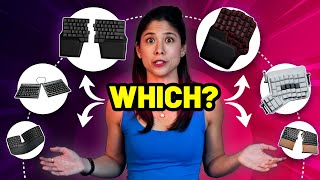
Every keyboard on this page is sold as ergonomic, and each changes something different: the Logitech ERGO K860 splits and curves its keys, the two Wave Keys models use a compact wave layout, the X9 Performance splits a full-size wired board, and the Adesso TruForm splits its key zones and comes with a mouse. The comfort and health claims below are the makers' own, quoted from their listings; if your wrists hurt, a doctor or occupational therapist is the person to ask what you need.
Split, wave or sloped
A split keyboard separates the keys for the left and right hand. The ERGO K860 has a curved, split keyframe, and Logitech says that with its sloping design it reduces muscle strain on wrists and forearms. The X9 Performance splits its keys in a wave layout on one wired board, which X9 says promotes a natural hand position. The Adesso TruForm splits its key zones on a sloped body that Adesso says gives hands, wrists and forearms a natural position. The two Wave Keys models do not split: Logitech curves the rows in a wave that it says places your hands, wrists and forearms in a natural typing position. On the three split designs here, the two halves are joined in one board.
Wrist and palm rests
Four of the five list a rest; the Adesso's listing names none. The ERGO K860's curved wrist rest has a memory-foam layer, and Logitech says it gives 54 percent more wrist support and 25 percent less wrist bending than a standard keyboard without a palm rest. The Wave Keys has a cushioned memory-foam palm rest that Logitech says gives more wrist support, and the Wave Keys for Mac a cushioned palm rest that Logitech says means less wrist pressure. X9 says the integrated cushion on its keyboard keeps your hand level with the keys.

Tilt and size
The ERGO K860 is the one keyboard here whose listing gives tilt settings: its legs set it at 0, -4 or -7 degrees, which Logitech says keeps a natural typing posture whether you sit or stand. The X9 lists an adjustable kickstand. Size changes where your mouse sits: Logitech says the compact Wave Keys lets you bring the mouse closer to your body for a more natural shoulder position than a full-size keyboard, while the ERGO K860 and the X9 keep a full-size layout, the X9 with 110 keys and a number pad.
Connection and computers
The ERGO K860 connects with its included USB receiver or Bluetooth, and its title lists Windows and Mac. The Wave Keys uses Bluetooth or a Logi Bolt receiver and switches between three devices on Windows, macOS, iPadOS and ChromeOS; the Wave Keys for Mac connects by Bluetooth for macOS, iPadOS and iOS. The X9 is wired, plug and play for PC and Chrome. The Adesso set uses 2.4 GHz wireless with a 30-foot range, and its mouse switches between 800, 1200 and 1600 DPI.
Which to choose
Choose the Logitech ERGO K860 for a curved split keyframe, a memory-foam wrist rest and negative tilt in one keyboard. Choose the Wave Keys, or the Wave Keys for Mac on a Mac, for a compact wave layout with a palm rest and room for the mouse. Choose the X9 Performance for a wired split board with a number pad, and the Adesso TruForm to replace keyboard and mouse at once.
How we picked: we compared each product's own listing - what it is, what comes in the box, the specifications its maker states and the warranty - and ranked them on how well they answer this page's question. We have not tested these products in hand.
Watch Before You Buy

“Logitech's ERGO K860 is a curved split keyboard with a memory-foam wrist rest and tilt legs at 0, -4 and -7 degrees, certified by United States Ergonomics.”
See Today’s Price →What we like
- Curved, split keyframe that Logitech says reduces muscle strain on wrists and forearms
- Memory-foam wrist rest: 54 percent more wrist support and 25 percent less wrist bending than a standard keyboard without a palm rest, per Logitech
- Tilt legs at 0, -4 and -7 degrees
- Connects with the included USB receiver or Bluetooth
- Quiet, scooped keys in a full-size layout, with Fn keys you set in Logitech Options
Watch out for
- The split is in one board, so the halves cannot be moved apart
Read Full Analysis
The ERGO K860 combines a split keyframe, a wrist rest and negative tilt in one keyboard. Its keyframe is curved and split, and Logitech says that with the sloping design it reduces muscle strain on wrists and forearms. The wrist rest has a memory-foam layer, and Logitech says it gives 54 percent more wrist support and 25 percent less wrist bending than a standard keyboard without a palm rest. Tilt legs set the board at 0, -4 or -7 degrees, which Logitech says keeps a natural typing posture whether you sit or stand. The keys are scooped to fit your fingertips and are quiet, the layout is full size, and it connects with the included USB receiver or Bluetooth. United States Ergonomics certifies it. A split layout takes some getting used to, so expect slower typing for the first days.
Skip this if: You want a compact keyboard that leaves room for the mouse

“Logitech's Wave Keys is a compact wave-shaped keyboard with a memory-foam palm rest, Bluetooth or Logi Bolt connection and up to three years of battery life.”
See Today’s Price →What we like
- Compact keyboard with wave-shaped rows, which Logitech says place hands, wrists and forearms in a natural typing position
- Cushioned memory-foam palm rest
- Bluetooth or Logi Bolt receiver, switching between 3 devices
- Up to 3 years of battery life
- Certified by United States Ergonomics
Watch out for
- A wave layout, not a split keyboard
Read Full Analysis
The Wave Keys is the compact, wave-shaped option. Instead of splitting the keys, Logitech curves the rows in a wave that it says places your hands, wrists and forearms in a natural typing position, and adds a cushioned memory-foam palm rest. Because it is compact, your mouse sits closer to your body, which Logitech says gives a more natural shoulder position than a full-size board. It connects by Bluetooth or the Logi Bolt receiver and switches between three devices, works with Windows, macOS, iPadOS and ChromeOS, runs up to three years on its batteries, and is certified by United States Ergonomics. It is a wave rather than a split; for a split keyframe, wrist rest and negative tilt in one board, look at the ERGO K860.
Skip this if: You want a split keyboard

“Logitech's Wave Keys for Mac is the same compact wave keyboard with a cushioned palm rest, in a Mac layout that pairs by Bluetooth with up to three devices.”
See Today’s Price →What we like
- Wave-shaped compact layout with a cushioned palm rest
- Mac layout for macOS, iPadOS and iOS
- Bluetooth with Easy-Switch between Mac, iPad and iPhone
- Quiet keys and up to 3 years of battery life
- Certified by United States Ergonomics
Watch out for
- Bluetooth only, with no Logi Bolt USB receiver in the box
- A wave layout, not a split keyboard
Read Full Analysis
The Wave Keys for Mac takes the Wave Keys design, a compact wave-shaped layout with a cushioned palm rest, and gives it a Mac layout for macOS, iPadOS and iOS. It connects by Bluetooth only, with no Logi Bolt receiver in the box, and the Easy-Switch keys move typing between a MacBook, an iPad and an iPhone with a tap. The keys are quiet, battery life is up to three years, and the Logi Options+ app adds shortcuts and Smart Actions. Like the standard version it is certified by United States Ergonomics, and Logitech suggests pairing it with its Lift for Mac vertical mouse. Choose it over the standard Wave Keys if you type on a Mac; for a split keyboard, the ERGO K860's title lists Mac compatibility.
Skip this if: You type on a Windows PC
“A wired split keyboard with a cushioned wrist rest and a full 110-key layout with number pad, plug and play for PC and Chrome.”
See Today’s Price →What we like
- Split ergonomic layout that X9 says keeps hands in a more natural position
- Integrated cushioned wrist rest level with the keys
- Full-size 110 keys with 17 shortcuts and a numeric keypad
- Wired USB plug and play for PC and Chrome, no drivers to install
- Adjustable kickstand, LED indicators and a 2-year warranty
Watch out for
- Wired only: a 5 ft USB cable and no Bluetooth
- No backlit keys
- The split is in one board, so the halves cannot be moved apart
Read Full Analysis
The X9 Performance is the wired option for wrist pain. It splits its keys on one board in a wave layout that X9 says keeps your hands in a more natural position, and an integrated cushioned wrist rest keeps your hands level with the keys. Unlike the compact picks, it keeps a full 110-key layout with 17 shortcut keys and a numeric keypad, plus LED indicators and an adjustable kickstand. It plugs into a PC or Chromebook over a 5 ft USB cable with no driver to install, and X9 backs it with a 2-year warranty. It has no Bluetooth and no backlit keys, and its listing names PC and Chrome rather than Mac.
Skip this if: You want wireless, a Mac layout or backlit keys

“Adesso's TruForm WKB-1600CB pairs a wireless keyboard with split key zones and a sloped shape with an optical mouse that switches between 800, 1200 and 1600 DPI.”
See Today’s Price →What we like
- Split key zones and a sloped shape, which Adesso says give hands, wrists and forearms a natural position
- Wireless 2.4 GHz with a 30-foot range and an on/off switch
- Optical mouse switches between 800, 1200 and 1600 DPI
- 17 multimedia and internet hotkeys
- Quiet low-profile chiclet keys rated for 5 million keystrokes
Watch out for
- The split zones are joined in one board, so the halves cannot be moved apart
Read Full Analysis
The Adesso TruForm is the keyboard-and-mouse set for replacing a whole desk setup at once. The keyboard splits its keys into left and right zones on a sloped body, which Adesso says gives your hands, wrists and forearms a more natural position, and its low-profile chiclet keys are quiet and rated for 5 million keystrokes. The optical mouse switches between 800, 1200 and 1600 DPI and has navigation hotkeys for browsing. Both connect over 2.4 GHz wireless with a 30-foot range, and the keyboard adds an on/off switch to save battery and 17 multimedia hotkeys. The split zones are joined in one board, so it is a milder change than fully separate halves; if you want a stronger split, the Logitech ERGO K860's curved split keyframe goes further.
Skip this if: You want a vertical mouse with your keyboard
Frequently Asked Questions
Do ergonomic keyboards actually help with wrist pain?
What is negative tilt and does it help with wrist pain?
Is a split keyboard worth the learning curve for wrist pain?
Should I use an ergonomic keyboard if I don't have wrist pain yet?
How We Chose These Products
We compare each product’s Amazon listing, the manufacturer’s published specifications and Amazon customer ratings, shown with their review counts as Amazon’s data, and rank the products on how well they answer this page’s question. We do not test products in hand and we do not run our own analysis of review text. A publication or expert is named only where we cite its published findings about that product. No manufacturer paid for placement on this page.
A price appears only when Amazon’s API supplied it at a recent daily refresh, with the date and time beside it, and is withdrawn at 4 AM Central on the day after it turns 24 hours old; otherwise use “Check price on Amazon” for the live price. Read our full methodology →
How We Score These Products
Each dimension score comes from evidence about the exact model listed — a published specification, a measurement by a named independent reviewer, or that product’s own buyer reviews, as described for each dimension below — not from a similar product in the same range. We do not test products ourselves, and we do not score a dimension we could not evidence. A dash means no evidence was found for that product, not that it performed badly.
Ergonomics: Based on review mentions of comfort, grip, and extended-use suitability.
Customization: From evidence about this exact model (specification, named reviewer or its own reviews).
The overall score is the mean of the dimensions we could evidence for that product, on a 10-point scale. Price is shown separately and is never folded into a score. Amazon star ratings are shown separately and are never part of any score.