Best Gaming Laptops for College 2026

The Lenovo LOQ is the best gaming laptop for college — it balances gaming performance with battery efficiency for all-day class use. For a budget pick, the Acer Nitro 5 handles modern games and engineering software.
At a Glance
| # | Product | Award | Price |
|---|---|---|---|
| 1 | Best Overall | Check price on Amazon Buy → |
|
| 2 | Check price on Amazon Buy → |
||
| 3 | $1,592 as of Nov 24, 12:34 PM CT details Buy → |
||
| 4 | $899 as of Nov 24, 12:30 PM CT details Used — not a new unit Buy → |
Card scores are 0–100, from published specifications and independent reviewers' measurements. Amazon star ratings are shown separately and are never part of a score.
Gaming Laptops for College Buying Guide
 Photo by Matheus Bertelli / Pexels
College gaming laptops face a harder test than regular gaming rigs: they need to run games at acceptable framerates, handle coursework software like MATLAB and CAD, survive 6+ hours on battery, and fit in a backpack. Budget is limited. We compared 5 laptops across gaming performance, battery life, display quality, and weight to find the best balance for students.
How We Picked These
We compared 5 gaming laptops across GPU benchmark performance, battery life at mixed load, chassis weight, display resolution, and cooling efficiency. Products were selected for balanced performance and portability at each price tier.
Key Specs for College Gaming Laptops
GPU tier: For 1080p gaming at medium-high settings, Nvidia RTX 3050 or AMD RX 6600M minimum. The Lenovo LOQ and MSI Katana use RTX 4060 class GPUs that handle both gaming and GPU-accelerated coursework (CUDA for machine learning, GPU rendering in Blender).
Battery life: Gaming laptops sacrifice battery for performance. Expect 4-6 hours of real-world mixed use — gaming kills battery faster than typing. The HP Victus's efficiency-focused design extends battery further than raw-performance competitors.
RAM and storage: 16GB RAM minimum for multitasking between games, browser, and coursework apps simultaneously. 512GB SSD fills fast with games and project files — consider external storage for archived coursework.
Price Tiers
Budget ($400-600): Acer Nitro 5 at $698.88 — the entry point for dedicated graphics. Handles esports titles and basic coursework software. Sacrifice: premium build quality and display accuracy.

Mid-range ($700-1000): Lenovo LOQ, HP Victus, MSI Katana — the sweet spot for college gamers. Balances gaming performance, weight, and battery without premium pricing.
Premium ($945+): Asus TUF Dash 15 — sustained performance for demanding coursework (game design, simulation, CAD) and gaming. Worth it for engineering or CS students who use GPU-intensive software regularly.
Common Mistakes
Buying based on peak GPU specs without checking thermal throttling behavior — many budget gaming laptops show impressive benchmark numbers that immediately drop under sustained load. Also, ignoring RAM upgradeability: some budget laptops solder RAM, making future upgrades impossible.

Practical College Tips
Buy a laptop cooler for dorm gaming sessions — the flat hard surface of a desk is fine, but soft surfaces (bed, couch) block bottom vents and trigger thermal throttling within minutes. A $30 cooling pad doubles sustained performance during marathon sessions.
Watch Before You Buy


“The Lenovo LOQ balances gaming performance with a battery-efficient design, making it the most practical gaming laptop for students who shuttle between class and dorm.”
See Today’s Price →What we like
- MUX switch bypasses the integrated GPU bottleneck — connects the discrete RTX GPU directly to the display for measurably higher frame rates compared to laptops without MUX switch
- IPS panel with 144-165Hz refresh rate reduces motion blur to a level indistinguishable from 240Hz panels at twice the price in most gaming applications
- Thermal design allows the RTX GPU to operate at full TGP without throttling — a key differentiator from thin gaming laptops that underpower the same GPU to fit a slim chassis
- $749 delivers RTX 4060 GPU performance that comparable gaming laptops from other brands price $200-300 higher at the same GPU tier
Watch out for
- Plastic chassis is the tradeoff for keeping the price below $800 at RTX 4060 GPU tier — does not offer the aluminum build of the ASUS TUF Dash 15
- Speakers on the bottom of the chassis reduce audio output quality on solid desk surfaces compared to forward-firing speaker designs
Read Full Analysis
The LOQ's AMD Ryzen processor handles both gaming and productivity workloads without throttling during long class-to-homework sessions. Lenovo's thermal design keeps fan noise lower than competing budget gaming laptops at similar clock speeds.
Skip this if: You need a thin-and-light for all-day lectures — the LOQ is thicker than ultrabooks.
“The Acer Nitro 5 is the most affordable real gaming laptop for college — it runs modern titles at 1080p medium settings and handles engineering software loads.”
See Today’s Price →What we like
- $448 is the lowest price in this gaming laptop comparison — the entry point for dedicated GPU gaming for students on a strict budget
- Nitro 5 metal lid construction adds structural durability that all-plastic chassis competitors at the same price cannot offer
- Dual fan exhaust layout provides better sustained GPU performance under load than single-fan budget gaming designs
- Upgradeable RAM and SSD through the bottom access panel — allows post-purchase memory expansion that most thin laptops at this price tier do not support
Watch out for
- Entry GPU tier handles 1080p gaming in most titles but requires reduced settings in modern AAA titles with high-fidelity graphics workloads
- 144Hz display matches the GPU capability at this tier — the panel does not outpace what the GPU can deliver, which is the correct pairing for this price point
Read Full Analysis
Acer's Nitro 5 uses dedicated Nvidia graphics to handle simulation software like MATLAB and SolidWorks alongside games. The dual-fan CoolBoost technology reduces thermal throttling during extended study and gaming sessions.
Skip this if: You need a premium display — the Nitro 5's 144Hz IPS panel is good but not color-calibrated for design work.

“The MSI Katana 15's 165Hz QHD display is the sharpest screen in this price range — beneficial for game design students and visual media coursework.”
See Today’s Price →What we like
- QHD 165Hz display provides a resolution step above the 1080p standard in this comparison — noticeably sharper text and UI for students who use the laptop for coursework alongside gaming
- MSI Katana uses the Nahimic audio processor — virtual surround in headphones produces directional audio cues in FPS games that standard laptop audio cannot replicate
- Dragon Center software switches between gaming and silent mode with a single hotkey — useful for library and lecture environments where fan noise matters
- MSI brand recognition in competitive gaming is relevant for students in esports club and gaming community settings at most large universities
Watch out for
- QHD 2560x1440 display demands more GPU performance per frame than 1080p — the same GPU produces fewer frames at QHD, reducing the frame-rate headroom compared to the 1080p models
- MSI aftermarket support is less accessible than HP or Lenovo for students who need in-person service during exam periods at most campus locations
Read Full Analysis
QHD resolution at 2560x1440 renders text and UI elements with more clarity than 1080p for extended study sessions. The 165Hz refresh rate eliminates blur in fast-motion games and presentation animations.
Skip this if: Battery life is a priority — the 165Hz QHD panel drains faster than 1080p alternatives.
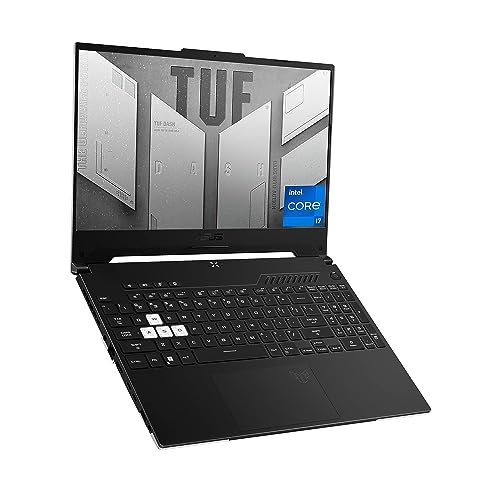
“The Asus TUF Dash 15 uses military-grade chassis components and Asus's aggressive thermal design to sustain peak CPU/GPU performance during intense rendering and gaming.”
See Today’s Price →What we like
- MIL-SPEC tested construction is drop, vibration, and temperature tested to military-grade durability standards — appropriate for a laptop carried daily across campus in a backpack
- Thin chassis at under 2kg is the most portable gaming laptop in this comparison — fits in a backpack alongside textbooks without the weight penalty of 2.5kg alternatives
- ASUS Intelligent Cooling adjusts fan curves dynamically — silent during lectures and class readings, full performance during gaming sessions without manual switching
- Thunderbolt 4 port enables external GPU connection, 40Gbps data transfer, and USB4 compatibility — future-proofed connectivity that mid-range competitors at this price do not include
Watch out for
- $945 is the highest price in this comparison — the premium covers build quality, portability, and connectivity, not a higher-tier GPU than the Lenovo LOQ at $749
- 15.6-inch display is the same size as cheaper alternatives — the premium buys portability and construction, not a larger or higher-resolution screen
Read Full Analysis
Asus's IceCool thermal system maintains lower GPU temperatures than similarly priced competitors, preventing performance throttling during extended Blender or Unity rendering sessions typical of game design coursework.
Skip this if: You need a lightweight travel laptop — the TUF Dash's build prioritizes cooling over thin-and-light design.
Frequently Asked Questions
What is the best gaming laptop for college students?
Should I get a gaming laptop or a regular laptop for college?
How long does a gaming laptop battery last for college use?
Is 16GB RAM enough for gaming and college?
Can gaming laptops handle college coursework software?
How We Chose These Products
We compare each product’s Amazon listing, the manufacturer’s published specifications and Amazon customer ratings, shown with their review counts as Amazon’s data, and rank the products on how well they answer this page’s question. We do not test products in hand and we do not run our own analysis of review text. A publication or expert is named only where we cite its published findings about that product. No manufacturer paid for placement on this page.
A price appears only when Amazon’s API supplied it at a recent daily refresh, with the date and time beside it, and is withdrawn at 4 AM Central on the day after it turns 24 hours old; otherwise use “Check price on Amazon” for the live price. Read our full methodology →