Best HDMI Switches Under $50 (2026)
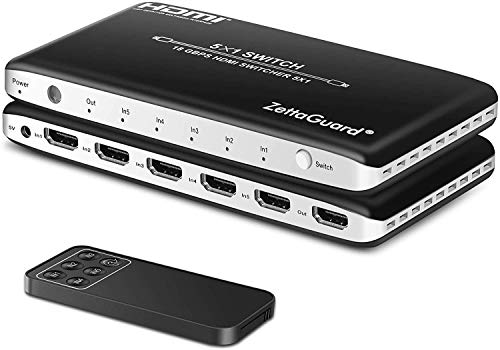
The Zettaguard 5-Port HDMI Switch is the best HDMI switch under $50 — five 4K60Hz inputs, IR remote, and HDCP 2.2 handle any home entertainment setup. For PS5 and Xbox gamers who need 4K120Hz, the OREI 8K 2x1 is the better pick.
At a Glance
| # | Product | Award | Price |
|---|---|---|---|
| 1 | Zettaguard 4K 60Hz 5 Port 5 x 1 H… Zettaguard |
Best Overall | $18.99 as of Nov 24, 12:28 PM CT details Buy → |
| 2 |  Zettaguard HDMI 2.0 Switcher Supp… Zettaguard |
$18.99 as of Nov 24, 12:29 PM CT details Buy → |
|
| 3 | Best for Gaming | $18.66 as of Nov 24, 12:31 PM CT details Buy → |
|
| 4 |  Zettaguard 4K x 2K 3 Port 3 x 1 H… Zettaguard |
Best for PIP | $15.99 as of Nov 24, 12:17 PM CT details Buy → |
| 5 |  Beastron Zettaguard Upgraded 4K 6… Zettaguard |
Best Budget | Check price on Amazon Buy → |
HDMI Switches Under $50 Buying Guide
 Photo by RDNE Stock project / Pexels
An HDMI switch solves a simple problem: more devices than HDMI ports on your TV. Rather than unplugging cables every time you switch between a PS5, Xbox, Nintendo Switch, and streaming stick, a switch lets you select any source with a remote. Here is how to choose the right one under $50.
How we picked
We evaluated five HDMI switches based on port count, maximum resolution and refresh rate, gaming-specific features (VRR, ALLM), and reliability across a large review base. All five support 4K pass-through. The key differentiators are how many ports you need, whether you game at 4K120Hz, and whether picture-in-picture is useful for your setup.
HDMI switch vs. HDMI splitter: which do you need?
These are opposite devices. An HDMI switch takes multiple sources (PS5, Xbox, Apple TV) and sends them to one display. An HDMI splitter takes one source and sends it to multiple displays simultaneously. If you have more devices than TV inputs, you need a switch. If you want to mirror one device to two TVs, you need a splitter.
Do you need 4K120Hz or will 4K60Hz do?
For most users, 4K60Hz is sufficient. The Zettaguard switches (all HDMI 2.0 based) handle 4K60Hz, which covers 4K streaming, 4K Blu-ray, and gaming at up to 60fps. If you own a PS5 or Xbox Series X and play games that support 4K120Hz, you need the OREI 8K 2x1 (HDMI 2.1, 48Gbps) to pass through the full signal without downgrade. Note: your TV also needs HDMI 2.1 ports to display 4K120Hz regardless of which switch you use.
How many ports do you actually need?
Count your current devices and add one for future expansion. A typical living room has a streaming stick, one or two gaming consoles, and maybe a Blu-ray player or cable box — that is 3 to 5 devices. The Zettaguard 5-Port at $37 costs $14 more than the 4-Port and covers any combination you could add in the next few years.
Worth spending more?
Above $50, HDMI switches add features like 8-port capacity, powered amplification for longer cable runs, and matrix switching (any input to any output simultaneously). For home theater setups with 6+ sources or custom AV installations, those features matter. For typical living rooms, any of these five picks under $50 covers all real needs.
Watch Before You Buy
“5 inputs, 1 output — handles the largest home entertainment setups.”
See Today’s Price →What we like
- Five HDMI inputs to one output
- IR remote included
- 4K at 60Hz with 24-bit RGB and 4:4:4 color
- HDCP 2.2 for protected 4K streams
- Passes LPCM 7.1, Dolby TrueHD and DTS-HD Master Audio
Watch out for
- HDMI 2.0 at 18Gbps: no 4K at 120Hz
- Zettaguard recommends HDMI cables under 10 feet
Read Full Analysis
The Zettaguard 5-Port HDMI Switch is the highest-input-count switch in the under-$50 field, routing five HDMI sources to one display at 4K@60Hz with HDCP 2.2 compliance and IR remote control. Auto-switching activates the most recently powered source without manual button presses, and front panel buttons provide manual override. It delivers the most inputs and the most complete feature set in this price range — making it the default recommendation for multi-source home theater setups that don't need 4K@120Hz gaming bandwidth. In this under-$50 field, the 5-Port Zettaguard is $17 above the OREI and $17 above the 4-Port Zettaguard. The premium over the 4-port pays for one additional input and the brand's top-configured model. The OREI handles HDMI 2.1 gaming bandwidth that the Zettaguard can't match. For home theater setups with five devices, the 5-Port is the logical choice; for setups with four or fewer, the 4-Port at $22.99 saves $14. Best for home theater setups with four or five source devices — the maximum input flexibility under $40 with HDCP 2.2 compliance and IR remote convenience. For gaming setups that need 4K@120Hz bandwidth, the OREI is the gaming-specific device; the Zettaguard handles the non-gaming sources.
“4 inputs for standard console + streaming + Blu-ray setups. Best suited for households with 3-4 hdmi sources who want 4k60hz switching with remote control without paying for unused extra ports.”
See Today’s Price →What we like
- 4 inputs for standard console + streaming + Blu-ray setups
- 4K HDR 18Gbps HDMI 2.0 pass-through
- HDCP 2.2 for protected 4K content
- IR remote included
- Compact design for shelf or behind-TV mounting
Watch out for
- 4 ports may still require future additions
- No auto-switching in all firmware versions
- Remote requires line-of-sight to IR receiver
Read Full Analysis
The Zettaguard 4-Port HDMI Switch at $22.99 routes four HDMI inputs to one display at 4K@60Hz 18Gbps with HDCP 2.2 compliance and an included IR remote. The 4-port configuration covers the most common home entertainment configuration — console, streaming device, Blu-ray player, and one spare — without the $14 premium of the 5-port model. Compact design allows shelf placement or mounting behind a TV without significant footprint impact. In the under-$50 field, this is $14 less than the 5-Port Zettaguard and $0.99 more than the OREI gaming switch. For users who need 4 inputs at 4K@60Hz, the 4-Port Zettaguard is the clear value selection — the same per-input cost advantage as the 5-port model but at a lower total outlay. The OREI is $1 less but handles only 2 inputs with HDMI 2.1 bandwidth. Best for users connecting four devices to one TV or monitor at standard 4K@60Hz quality — the practical mid-tier option between the budget Zettaguard models and the full 5-port. If five inputs are needed, the $14 step to the 5-Port is justified; for two-source gaming setups requiring 4K@120Hz, the OREI is the right device.

“4K120Hz support via HDMI 2.1 (48Gbps) — essential for PS5 and Xbox Series X gaming. Best suited for ps5 and xbox series x gamers who need full 4k120hz vrr pass-through when sharing a tv between two…”
See Today’s Price →What we like
- HDMI 2.1 at 48Gbps: 8K at 60Hz, 4K at 120Hz and 1080p at 240Hz
- VRR, ALLM and QFT for gaming
- HDR10+, Dolby Vision, CEC and Dolby Atmos pass-through
- Automatic or manual switching
- USB-powered, with a 1-year warranty
Watch out for
- Two inputs only, and no remote
- Auto-switching works only once the active source is fully powered off
Read Full Analysis
The OREI 8K 2x1 HDMI Switch is the only switch on this page supporting HDMI 2.1 bandwidth at 48Gbps — the specification required for PS5 and Xbox Series X 4K@120Hz gaming modes. VRR and ALLM passthrough preserve game-specific display features without signal processing interruption. In the under-$50 field, this is the gaming-first switch while the Zettaguard models serve the multi-input home theater use case at HDMI 2.0 bandwidth. The OREI is the second-lowest-priced switch on this page — just $2 more than the Zettaguard Budget, but providing 4K@120Hz bandwidth none of the Zettaguard models match. The 2-input limit means it doesn't serve multi-device home theater configurations where 4, 5, or more inputs are needed. For setups requiring both gaming 4K@120Hz sources and multiple standard sources, pair the OREI for the gaming inputs with a Zettaguard for the rest. Best for gaming setups switching between two HDMI 2.1 sources — PS5 and gaming PC, or two consoles on one gaming monitor — where no performance ceiling should be introduced at the switch. For home theater multi-device setups without 4K@120Hz requirements, the Zettaguard 4-Port provides more inputs at $1 more.
“Picture-in-Picture feature displays two sources simultaneously.”
See Today’s Price →What we like
- Picture-in-Picture feature displays two sources simultaneously
- 3-port covers most simple setups (console + streaming + one more)
- Most affordable HDMI switching option
- IR remote included
- Compact size for minimal cable management
Watch out for
- Only 3 inputs — no room for expansion
- Older HDMI 1.4 based — limited to 4K30Hz (not 4K60Hz)
- PIP feature useful but limited in practical application
Read Full Analysis
The Zettaguard 3-Port HDMI Switch with Picture-in-Picture is the only switch on this page offering PIP mode — displaying content from two sources simultaneously as an overlay on the main display, rather than requiring manual source switching to view different feeds. This enables monitoring a streaming feed while gaming, watching two content sources simultaneously, or using a camera feed as a secondary window. The 3-port input count covers standard console plus streaming plus one additional device configurations. This is the same price as the Zettaguard 4-Port — one fewer input in exchange for PIP capability. The Zettaguard Budget offers 4 inputs for $3 less without PIP. The PIP feature is a niche value that's either directly useful to the buyer's use case or entirely irrelevant — for monitoring two simultaneous content streams it's a genuine differentiator; for straightforward source switching it adds no practical value. Best for users who specifically want PIP functionality — monitoring a stream alongside gaming, watching two broadcasts simultaneously, or any dual-source viewing scenario. For straightforward source switching without simultaneous display, the Zettaguard 4-Port at the same price provides one more input without the feature complexity.
“Budget-friendly 4-port 4K60Hz switching. Best suited for budget-conscious users who need 4k60hz switching for a standard console and streaming setup without premium pricing.”
See Today’s Price →What we like
- Budget-friendly 4-port 4K60Hz switching
- Full 4K HDR 18Gbps HDMI 2.0 support
- HDCP 2.2 compliance included
- IR remote control
- Over 12,000 reviews demonstrating reliability
Watch out for
- Slightly older firmware than newer Zettaguard versions
- Auto-switching less consistent than premium models
- IR remote sensitivity can vary
Read Full Analysis
The Zettaguard 4-Port HDMI Switch Budget edition is the lowest-cost option on this page with four inputs, offering full 4K@60Hz 18Gbps with HDCP 2.2 compliance and IR remote control. For four inputs with IR remote and auto-switching, the feature-to-price ratio is the strongest in the under-$50 field. This undercuts the Zettaguard 4-Port 4K model at $22.99 by $3 for effectively the same specification — both offer 4 inputs, 4K@60Hz HDR, HDCP 2.2, and IR remote. The OREI at $22.00 costs $2 more but provides only 2 inputs with HDMI 2.1 bandwidth for 4K@120Hz gaming. The "Budget" designation typically reflects simplified packaging rather than specification reduction. Best for most home theater setups looking for maximum port count at minimum cost — the default recommendation when four inputs cover the device count and 4K@60Hz is sufficient. The 12,000+ review history provides stronger reliability confidence than newer or less-reviewed alternatives at this price. For 4K@120Hz gaming, the OREI is the gaming-specific choice; for a fifth input, the Zettaguard 5-Port is the step up.
Frequently Asked Questions
Does an HDMI switch reduce picture quality?
Do HDMI switches work with PS5, Xbox Series X, and Nintendo Switch?
Can I use an HDMI switch without a remote?
What is the difference between auto-switching and manual switching?
Do HDMI switches introduce input lag for gaming?
Can I use an HDMI switch with a soundbar or AV receiver?
How We Chose These Products
We compare each product’s Amazon listing, the manufacturer’s published specifications and Amazon customer ratings, shown with their review counts as Amazon’s data, and rank the products on how well they answer this page’s question. We do not test products in hand and we do not run our own analysis of review text. A publication or expert is named only where we cite its published findings about that product. No manufacturer paid for placement on this page.
A price appears only when Amazon’s API supplied it at a recent daily refresh, with the date and time beside it, and is withdrawn at 4 AM Central on the day after it turns 24 hours old; otherwise use “Check price on Amazon” for the live price. Read our full methodology →