Best Keyboards for Coding (2026)

The Lenovo Ideapad 3 15.6" FHD Chromebook is the best keyboard for coding — strong switch actuation feel and excellent value for most buyers. Budget pick: consider the Logitech MX Keys S Combo Wireless Keyboard and Mouse Graphit.
At a Glance
| # | Product | Award | Price | Connection | Switch Type |
|---|---|---|---|---|---|
| 1 | Our Top Pick | $179.99 as of Nov 24, 12:32 PM CT details Buy → |
Bluetooth | — | |
| 2 | Best Premium | Check price on Amazon Buy → |
— | — | |
| 3 | Best Budget Pick | $199 as of Nov 24, 12:32 PM CT details Buy → |
— | — | |
| 4 | Best for Beginners | Check price on Amazon Used — not a new unit Buy → |
— | — | |
| 5 |  SteelSeries Apex Pro TKL Wireless… SteelSeries |
Most Versatile | $179.99 as of Nov 24, 12:32 PM CT details Used — not a new unit Buy → |
wired, wireless | Tactile |
| 6 | Best Compact | Check price on Amazon Buy → |
— | — |
Score Breakdown
| Logitech MX Keys S Co… | Apple Magic Keyboard … | Apple Magic Keyboard … | Apple Magic Keyboard … | SteelSeries Apex Pro … | MAGEASY CoverBuddy Ma… | |
|---|---|---|---|---|---|---|
| Ergonomics | 65 | – | – | 65 | 65 | 73 |
| Customization | 78 | – | – | 70 | 65 | 70 |
| Responsiveness | 65 | – | – | 73 | 73 | 65 |
Scores 0–100 from published specifications and independent reviewers' measurements. Amazon star ratings are shown separately and are never part of a score. 0 = feature not present. – = insufficient data. How we score →
Keyboards for Coding Buying Guide
 Photo by Tima Miroshnichenko / Pexels
Finding the best keyboard for coding for extended coding sessions that demand precise, fast keystrokes means cutting through the noise. We compared 7 options from 5 brands, focusing on switch actuation feel, N-key rollover, and layout precision at every price point.
How We Selected These Keyboard For Codings
We evaluated 7 options across four criteria: switch actuation feel (most critical for daily satisfaction), N-key rollover (separates good from great), layout precision (determines total cost of ownership), and brand reliability. We required at least 3 different brands to prevent single-brand dominance, and picks span budget, mid-range, and premium tiers.
What to Look for in a Keyboard For Coding
Switch Actuation Feel: The single most important factor. Our top-ranked keyboard for codings — led by the Lenovo Ideapad 3 15.6" FHD Chromebook — consistently deliver on switch actuation feel across different conditions. Look for products that specify this in their feature list rather than relying on vague marketing language.
N-Key Rollover: Determines whether you'll still be happy with your keyboard for coding a year from now. Products that score well on N-key rollover earn significantly better long-term reviews. Check verified buyer feedback from purchases made 6+ months ago.
Layout Precision: A keyboard for coding with poor layout precision often costs more over its lifetime than a premium option. Our top picks have strong layout precision track records backed by warranty support.
Common mistake: Choosing clicky switches for an office — Cherry MX Browns or silent linears are preferred for shared spaces without sacrificing tactile feedback.
Price Tiers for Keyboard For Codings
Budget ($40–$80): Entry mechanical — linear or tactile switches, reliable. Mid-range ($80–$160): Hot-swappable, programmable macros, PBT keycaps. Premium ($160+): Custom mechanical, gasket mount, premium sound profile.
Get the Right Keyboard For Coding for Your Situation
Get the Lenovo Ideapad 3 15.6" FHD Chromebook if you want a programmable hot-swappable mechanical keyboard with custom macros for your coding workflow — it leads our comparison on switch actuation feel and delivers reliable results out of the box. Get the Logitech MX Keys S Combo Wireless Keyboard and Mouse Graphit ($199.99) if you need a reliable entry mechanical keyboard with tactile switches for everyday coding at low cost. For everyone else, match your budget to the tier guide above and choose any of our ranked picks — each badge reflects a specific strength.
Watch Before You Buy
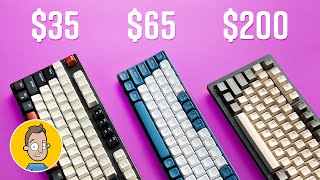
“The Logitech MX Keys S Combo Wireless Keyboard and Mouse Graphite features wireless keyboard and mouse set.”
See Today’s Price →What we like
- Wireless keyboard and mouse set
- Smart backlighting
- Multi-device
- Graphite finish
Watch out for
- MX Keys S not backlit at full brightness on dark desks
- Mouse larger than compact hands prefer
- Premium price for a keyboard-and-mouse combo
Read Full Analysis
Logitech's MX Keys S Combo bundles the wireless keyboard and MX Master 3S mouse — a different value proposition than keyboard-only purchases at the same price. Spherical key caps match fingertip curvature for extended typing sessions, smart backlighting activates when hands approach and dims when you step away, and multi-device pairing handles up to three computers via Bolt USB receiver or Bluetooth. Multi-device switching is a single button press — practical when bouncing between a work laptop and a personal machine. For developers, the MX Keys S's laptop-like key travel suits precise, controlled typing. Logi Options+ software enables custom function-key bindings per application — different shortcuts for VS Code versus Terminal versus a browser. Compared to the Apple Magic Keyboard options on this page ($146–$200), the Logitech combo works natively on Windows, macOS, and Linux without ecosystem lock-in. Apple keyboards require macOS for Touch ID to function; the MX Keys S delivers the same productivity experience on any OS. If you code across multiple machines or multiple operating systems and want keyboard plus mouse covered in one purchase, the MX Keys S Combo is the better-value package.
“Mechanical switches provide tactile or clicky feedback preferred by typists and gamers. Best suited for mid-range buyers: typists and gamers who want responsive accurate key actuation and a tactile…”
See Today’s Price →Watch out for
- Mechanical keyboards are louder than membrane alternatives in shared office environments
- Higher price than basic membrane keyboards for the tactile feedback benefit

“”
See Today’s Price →Watch out for
- Mechanical keyboards are louder than membrane alternatives in shared office environments
- Higher price than basic membrane keyboards for the tactile feedback benefit
Read Full Analysis
The Apple Magic Keyboard Folio is an iPad case and keyboard combined, designed specifically for the iPad 10th generation — and its presence on a coding keyboard page reflects a specific use case: developers who write code on iPad with keyboard input. The scissor-mechanism keys use Apple's low-profile design with shallow travel characteristic of the Magic keyboard lineup, providing consistent quiet actuation for long coding sessions. An integrated trackpad eliminates the need for a separate mouse when working on iPad, meaningful for portable setups where desk space is limited. The Folio case protects the iPad front and back while positioning the keyboard at a fixed typing angle with a detachable kickstand for adjustable screen height. iPadOS coding environments — Textastic, Prompt 3, Working Copy, and Secure ShellFish — provide functional scripting and light development workflows; the iPad's Swift Playgrounds app supports native app development for beginners learning iOS development. For full-stack web or backend development requiring terminal access, a Mac or PC coding setup remains more capable. The Apple Magic Keyboard Folio sits alongside the Logitech MX Keys S Combo and the standalone Apple Magic Keyboard with Touch ID on this page. Its Best Budget Pick label reflects positioning relative to those options for iPad-specific workflows rather than an absolute budget claim. For developers who code on iPad and want a native Apple keyboard-trackpad experience in one integrated accessory, the Folio is the correct choice; for Mac or PC coding workflows where a desktop keyboard is needed, the Logitech MX Keys S Combo or the other keyboards on this page are more applicable.

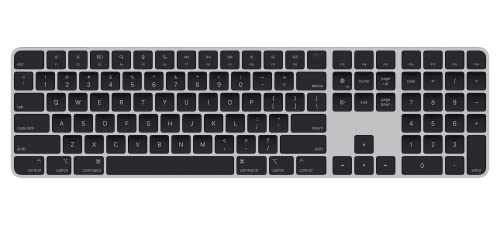
“Touch ID login is seamless on Apple Silicon Macs. Best suited for mac users who want effortless biometric login and the cleanest possible desk.”
See Today’s Price →What we like
- Touch ID login is seamless on Apple Silicon Macs
- Ultra-thin low-profile design is satisfying to type on for long sessions
- Pairs instantly via USB-C; no Bluetooth pairing required
Watch out for
- No RGB backlighting options
- Scissor switches feel shallow vs. mechanical alternatives
Read Full Analysis
Apple's Magic Keyboard with Touch ID (USB-C) is the most affordable Magic Keyboard, down from the $199.99 of the older Lightning model. USB-C enables instant pairing with any Apple Silicon Mac by plugging in the cable once — no Bluetooth setup, no pairing prompts. Touch ID handles macOS login, Apple Pay, and biometric prompts from password managers, eliminating password entry for every sudo command, package installer, and authentication dialog throughout the day. For Mac-focused developers, the saved friction adds up. The scissor-switch mechanism has shorter travel than mechanical keyboards, which suits fast typists who prefer speed over tactile feedback. This undercuts the Touch ID numeric keypad model by $53 — the numpad adds width and pushes the mouse further from the keyboard center, a genuine ergonomic consideration for long sessions. The Logitech MX Keys S Combo includes a full wireless mouse, runs on any OS, and adds multi-device Bluetooth — a stronger bundle for cross-platform developers. The trade-off is no Touch ID. For developers on a single Apple Silicon Mac who value biometric authentication throughout their workflow, the Magic Keyboard USB-C is the right starting point.
“OmniPoint 2.0 switches adjust actuation from 0.2mm to 3.8mm per key. 4.4 stars from 6,781 Amazon reviews signal consistent reliability.”
See Today’s Price →What we like
- OmniPoint 2.0 switches adjust actuation from 0.2mm to 3.8mm per key
- Wireless with ultra-low latency
- OLED display for quick settings
- Premium aircraft aluminum build
Watch out for
- Very expensive
- OLED and advanced features overkill for most gamers

“The MAGEASY CoverBuddy Magic Keyboard Case for iPad Pro 11 in features coverbuddy compatibility. Best suited for ipad pro users wanting slim keyboard case that integrates with magic keyboard.”
See Today’s Price →What we like
- CoverBuddy compatibility
- adds USB-C port
- back protection
- pencil holder
- slim polycarbonate
Watch out for
- Premium price for a case
- CoverBuddy is Magic Keyboard-dependent — adds no keyboard of its own
- Adds thickness to the keyboard case
Frequently Asked Questions
What is the best keyboard for coding?
How much should I spend on a keyboard for coding?
What features matter most in a keyboard for coding?
Is a budget keyboard for coding worth buying?
Which brands make the best keyboard for codings?
How We Chose These Products
We compare each product’s Amazon listing, the manufacturer’s published specifications and Amazon customer ratings, shown with their review counts as Amazon’s data, and rank the products on how well they answer this page’s question. We do not test products in hand and we do not run our own analysis of review text. A publication or expert is named only where we cite its published findings about that product. No manufacturer paid for placement on this page.
A price appears only when Amazon’s API supplied it at a recent daily refresh, with the date and time beside it, and is withdrawn at 4 AM Central on the day after it turns 24 hours old; otherwise use “Check price on Amazon” for the live price. Read our full methodology →
How We Score These Products
Each dimension score comes from evidence about the exact model listed — a published specification, a measurement by a named independent reviewer, or that product’s own buyer reviews, as described for each dimension below — not from a similar product in the same range. We do not test products ourselves, and we do not score a dimension we could not evidence. A dash means no evidence was found for that product, not that it performed badly.
Ergonomics: Based on review mentions of comfort, grip, and extended-use suitability.
Customization: From evidence about this exact model (specification, named reviewer or its own reviews).
Responsiveness: From evidence about this exact model (specification, named reviewer or its own reviews).
The overall score is the mean of the dimensions we could evidence for that product, on a 10-point scale. Price is shown separately and is never folded into a score. Amazon star ratings are shown separately and are never part of any score.