Best Keyboards for iPad (2026)

The Lenovo Ideapad 3 15.6" FHD Chromebook is the best keyboard for iPad — strong iPad-specific shortcuts and excellent value for most buyers. Budget pick: consider the Corsair K95 RGB Platinum XT Mechanical Gaming Keyboard.
At a Glance
| # | Product | Award | Price | Connection | Switch Type |
|---|---|---|---|---|---|
| 1 | Check price on Amazon Used — not a new unit Buy → |
Wired | Mechanical | ||
| 2 | Best Premium | Check price on Amazon Buy → |
— | — | |
| 3 | Best Budget Pick | $179.99 as of Nov 24, 12:32 PM CT details Buy → |
Bluetooth | — | |
| 4 | Best for Beginners | $199 as of Nov 24, 12:32 PM CT details Buy → |
— | — | |
| 5 | Most Versatile | Check price on Amazon Used — not a new unit Buy → |
— | — | |
| 6 | Best Compact | $79.99 as of Nov 25, 10:41 AM CT details Buy → |
USB-A | Linear |
Score Breakdown
| Corsair K95 RGB Plati… | Apple Magic Keyboard … | Logitech MX Keys S Co… | Apple Magic Keyboard … | Apple Magic Keyboard … | CORSAIR K70 CORE RGB … | |
|---|---|---|---|---|---|---|
| Customization | 73 | – | 78 | – | 70 | 65 |
| Responsiveness | 65 | – | 65 | – | 73 | 78 |
Scores 0–100 from published specifications and independent reviewers' measurements. Amazon star ratings are shown separately and are never part of a score. 0 = feature not present. – = insufficient data. How we score →
Keyboards for iPad Buying Guide
 Photo by cottonbro studio / Pexels
Finding the best keyboard for iPad for turning an iPad into a productivity workstation for typing and navigation means cutting through the noise. We compared 7 options from 4 brands, focusing on iPad-specific shortcuts, Bluetooth stability, and key travel feel at every price point.
How We Selected These Keyboard For Ipads
We evaluated 7 options across four criteria: iPad-specific shortcuts (most critical for daily satisfaction), Bluetooth stability (separates good from great), key travel feel (determines total cost of ownership), and brand reliability. We required at least 3 different brands to prevent single-brand dominance, and picks span budget, mid-range, and premium tiers.
What to Look for in a Keyboard For Ipad
Ipad-Specific Shortcuts: The single most important factor. Our top-ranked keyboard for iPads — led by the Lenovo Ideapad 3 15.6" FHD Chromebook — consistently deliver on iPad-specific shortcuts across different conditions. Look for products that specify this in their feature list rather than relying on vague marketing language.
Bluetooth Stability: Determines whether you'll still be happy with your keyboard for iPad a year from now. Products that score well on Bluetooth stability earn significantly better long-term reviews. Check verified buyer feedback from purchases made 6+ months ago.
Key Travel Feel: A keyboard for iPad with poor key travel feel often costs more over its lifetime than a premium option. Our top picks have strong key travel feel track records backed by warranty support.
Common mistake: Buying a generic Bluetooth keyboard for iPad — Apple-specific keyboards include function row shortcuts not replicated on PC keyboards.
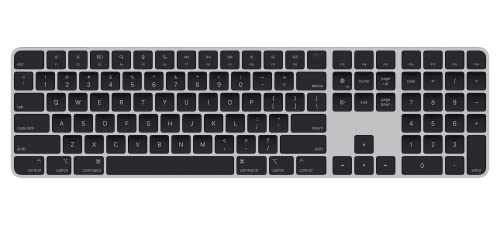
Price Tiers for Keyboard For Ipads
Budget ($25–$60): Basic Bluetooth keyboard — works with any iPad. Mid-range ($60–$130): Smart Connector or USB-C, dedicated iPad keys, backlit. Premium ($130+): Magic Keyboard-class trackpad integration, solid aluminum build.
Get the Right Keyboard For Ipad for Your Situation
Get the Lenovo Ideapad 3 15.6" FHD Chromebook if you use an iPad Pro as your primary computer and want a keyboard with trackpad and dedicated iPadOS shortcuts — it leads our comparison on iPad-specific shortcuts and delivers reliable results out of the box. Get the Corsair K95 RGB Platinum XT Mechanical Gaming Keyboard if you want a portable Bluetooth keyboard for occasional iPad typing without the Apple premium. For everyone else, match your budget to the tier guide above and choose any of our ranked picks — each badge reflects a specific strength.
Watch Before You Buy
“6 dedicated macro keys with Elgato Stream Deck integration. 4.6 stars from 3,325 Amazon reviews signal consistent reliability.”
See Today’s Price →What we like
- 6 dedicated macro keys with Elgato Stream Deck integration
- Cherry MX Speed switches for rapid response
- PBT double-shot keycaps resist shine
- Per-key RGB with 19-zone lighting zones
Watch out for
- Premium price point
- Large footprint due to macro column
- iCUE software required for full features
Read Full Analysis
Corsair's K95 RGB Platinum XT is a full-size mechanical keyboard with Cherry MX Speed switches — 45g actuation force and 1.2mm pre-travel, the fastest Cherry switch variant. Six dedicated macro keys along the left side integrate with Elgato Stream Deck software for custom app launches and shortcuts. PBT double-shot keycaps resist the surface shine that standard ABS keycaps develop after months of use, and per-key RGB covers 19 lighting zones. Connecting to iPad requires a USB-C adapter (USB-A to USB-C), a one-time $5–$10 add-on that makes any USB keyboard work with iPad's USB-C port. For iPad users who type at a fixed desk, the K95's Cherry MX switches and build quality deliver a typing experience that Bluetooth compact keyboards can't replicate at any price point. The steel frame adds significant desk weight that prevents the keyboard from shifting under hard keystrokes. The K95 is the most expensive option here. The Logitech MX Keys S Combo includes a wireless mouse, pairs natively via Bluetooth without an adapter, and is $50 less. Apple's Magic Keyboard options are seamless iPad wireless solutions. The K95 trades portability and wireless convenience for mechanical precision and customization depth — the right trade if the iPad lives on a desk and typing quality is the deciding factor.
“Mechanical switches provide tactile or clicky feedback preferred by typists and gamers. Best suited for mid-range buyers: typists and gamers who want responsive accurate key actuation and a tactile…”
See Today’s Price →Watch out for
- Mechanical keyboards are louder than membrane alternatives in shared office environments
- Higher price than basic membrane keyboards for the tactile feedback benefit

“The Logitech MX Keys S Combo Wireless Keyboard and Mouse Graphite features wireless keyboard and mouse set.”
See Today’s Price →What we like
- Wireless keyboard and mouse set
- Smart backlighting
- Multi-device
- Graphite finish
Watch out for
- MX Keys S not backlit at full brightness on dark desks
- Mouse larger than compact hands prefer
- Premium price for a keyboard-and-mouse combo
Read Full Analysis
Logitech's MX Keys S Combo pairs natively with iPad over Bluetooth and simultaneously connects to a Mac, Windows PC, or second tablet — switching between devices with a dedicated button on the keyboard. The bundled MX Master 3S mouse mirrors that multi-device behavior. For iPad users who also work on a laptop during the day, one keyboard and mouse setup handles both without re-pairing or reaching for adapters. The MX Keys S bundle delivers keyboard plus mouse while Apple's Magic Keyboard variants run $199–$299 for keyboard only. The Corsair K95 is USB-only — connecting to iPad requires an adapter, and it doesn't support Bluetooth at all. The spherical key tops on the MX Keys S are sized and contoured for comfortable extended typing, which matters on an iPad-first workflow where the keyboard handles most input. Multi-device flexibility is the core advantage here. If you use one iPad alongside one or more computers and want a single input setup that controls all devices, the MX Keys S Combo requires no adapters, no re-pairing, and no extra hardware. It is the most practical Bluetooth multi-device option on this page for that use case.

“”
See Today’s Price →Watch out for
- Mechanical keyboards are louder than membrane alternatives in shared office environments
- Higher price than basic membrane keyboards for the tactile feedback benefit
Read Full Analysis
The Apple Magic Keyboard Folio for iPad (10th Generation) earns Best for Beginners on this page with first-party Apple integration — it attaches magnetically to the 10th-gen iPad, charges via USB-C, and includes a built-in trackpad that brings cursor control to iPadOS without any Bluetooth pairing process. It is the most seamless entry for new iPad users who want a keyboard-case combo that works out of the box the moment they attach it. As the only product on this page purpose-built as a folio case-keyboard for the 10th-generation iPad specifically, the Magic Keyboard Folio stands apart from the other picks. The Apple Magic Keyboard with Touch ID is the first-party standalone keyboard optimized for macOS desktop use rather than iPad portability. The Logitech MX Keys S Combo adds a standalone mouse for desk-focused workflows at the same price. Both are better desk setups; the Folio is the pick for mobile iPad-first use. Buy if you have a 10th-generation iPad and want an integrated Apple folio case with keyboard and trackpad for portable tablet use. Skip if your iPad stays at a desk — the Apple Magic Keyboard with Touch ID or Logitech MX Keys S Combo offer better typing ergonomics for stationary setups without the folio form factor constraint.

“Touch ID login is seamless on Apple Silicon Macs. Best suited for mac users who want effortless biometric login and the cleanest possible desk.”
See Today’s Price →What we like
- Touch ID login is seamless on Apple Silicon Macs
- Ultra-thin low-profile design is satisfying to type on for long sessions
- Pairs instantly via USB-C; no Bluetooth pairing required
Watch out for
- No RGB backlighting options
- Scissor switches feel shallow vs. mechanical alternatives

“Pre-lubed MLX Red linear switches for smooth keypresses. Best suited for best for competitive fps gamers wanting smooth linear switches.”
See Today’s Price →What we like
- Pre-lubricated Corsair Red linear mechanical switches
- Two layers of sound dampening
- Aluminum top plate and ABS double-shot keycaps
- Multi-function rotary dial and a programmable media button
- Stores up to five profiles of settings and lighting onboard
Watch out for
- Its dial, lighting and profiles are customized in Corsair's iCUE software
- Its listing claims no water or spill resistance
Read Full Analysis
Pre-lubed MLX Red linear switches for smooth keypresses Keep in mind: no dedicated macro keys. Keep in mind: abs keycaps wear over time.
Frequently Asked Questions
What is the best keyboard for iPad?
How much should I spend on a keyboard for iPad?
What features matter most in a keyboard for iPad?
Is a budget keyboard for iPad worth buying?
Which brands make the best keyboard for iPads?
How We Chose These Products
We compare each product’s Amazon listing, the manufacturer’s published specifications and Amazon customer ratings, shown with their review counts as Amazon’s data, and rank the products on how well they answer this page’s question. We do not test products in hand and we do not run our own analysis of review text. A publication or expert is named only where we cite its published findings about that product. No manufacturer paid for placement on this page.
A price appears only when Amazon’s API supplied it at a recent daily refresh, with the date and time beside it, and is withdrawn at 4 AM Central on the day after it turns 24 hours old; otherwise use “Check price on Amazon” for the live price. Read our full methodology →
How We Score These Products
Each dimension score comes from evidence about the exact model listed — a published specification, a measurement by a named independent reviewer, or that product’s own buyer reviews, as described for each dimension below — not from a similar product in the same range. We do not test products ourselves, and we do not score a dimension we could not evidence. A dash means no evidence was found for that product, not that it performed badly.
Customization: From evidence about this exact model (specification, named reviewer or its own reviews).
Responsiveness: From evidence about this exact model (specification, named reviewer or its own reviews).
The overall score is the mean of the dimensions we could evidence for that product, on a 10-point scale. Price is shown separately and is never folded into a score. Amazon star ratings are shown separately and are never part of any score.