Best Keyboards for Programmers 2026

The Kraken Pro 60 Mechanical Keyboard is the best keyboard for programmers who want a compact layout — the 60% form factor clears desk space for notebooks and reference materials while the mechanical switches deliver tactile feedback preferred by coders for precise typing accuracy.
At a Glance
| # | Product | Award | Price |
|---|---|---|---|
| 1 | Kraken Pro 60 - BRED Edition 60% … KRAKEN KEYBOARDS |
Best Overall | Check price on Amazon Buy → |
| 2 | 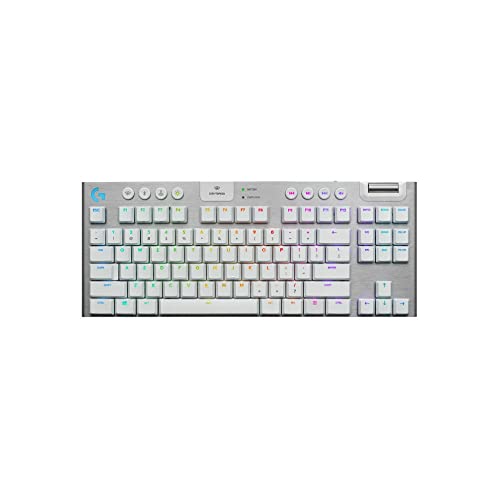 Logitech G915 TKL Tenkeyless Ligh… Logitech G |
Best Wireless TKL | Check price on Amazon Buy → |
| 3 | Best Full-Size | Check price on Amazon Buy → |
|
| 4 | Best 75% Wireless | $119.99 as of Nov 24, 12:31 PM CT details Buy → |
|
| 5 |  X9 Wired Ergonomic Keyboard with … X9 Performance |
Best Ergonomic | $49.99 as of Nov 25, 10:41 AM CT details Buy → |
| 6 | Best Compact Wireless | $116.05 as of Nov 24, 12:28 PM CT details Used — not a new unit Buy → |
Score Breakdown
| Kraken Pro 60 - BRED … | Logitech G915 TKL Ten… | CORSAIR K95 RGB PLATI… | NJ80-AP Wireless Mech… | X9 Wired Ergonomic Ke… | ASUS ROG Falchion Wir… | |
|---|---|---|---|---|---|---|
| Ergonomics | – | 73 | 73 | 80 | – | 73 |
| Customization | – | 80 | 80 | 70 | – | 85 |
| Responsiveness | – | 78 | 73 | 70 | – | 70 |
Scores 0–100 from published specifications and independent reviewers' measurements. Amazon star ratings are shown separately and are never part of a score. 0 = feature not present. – = insufficient data. How we score →
Keyboards for Programmers Buying Guide
 Photo by FOX ^.ᆽ.^= ∫ / Pexels
The keyboard is a programmer's primary tool — not a peripheral but an interface. Switch type determines the tactile feedback you get on every keystroke (linear switches are quieter and faster; tactile and clicky switches give audible/physical confirmation of actuation). Layout determines desk footprint: full-size keyboards have numpad and function rows but occupy significant desk real estate; 60% and 75% keyboards eliminate the numpad and navigation cluster, leaving more room for mouse movement during long coding sessions.
Switch Type: Tactile vs. Linear
Most programmers prefer tactile or clicky mechanical switches for typing accuracy — Cherry MX Brown (tactile, quiet), Cherry MX Blue (clicky, audible), or their equivalents from Gateron, Kailh, or Razer. Tactile switches give physical confirmation that the keystroke registered without fully bottoming out, reducing finger fatigue over long typing sessions. Linear switches (Cherry MX Red, Speed Silver) are faster for gaming but offer less tactile feedback for deliberate typed input. If you work in an open office, silent linear switches (Cherry MX Silent Red) are the office-friendly mechanical option.
Layout: 60%, 75%, TKL, or Full-Size
60% keyboards (like the Kraken Pro 60) eliminate the numpad, function row, and navigation cluster — leaving only the alphanumeric keys and modifiers. This forces function-layer use (Fn+key) for F1-F12, which has a small learning curve but results in a minimal desk footprint and natural mouse position. TKL keyboards (like the Logitech G915 TKL) keep the function row and navigation cluster but remove the numpad — a popular programmer compromise. 75% keyboards add a single column of navigation keys to the right of the alphanumeric block. Full-size keyboards with macro keys (like Corsair K95) are best for programmers who use IDE shortcuts extensively and want dedicated keys for build/test/debug commands.
Wireless vs. Wired for Programmers
Wireless keyboards (Logitech G915 TKL, Keydous NJ80-AP) reduce cable clutter on programming desks and allow positioning the keyboard farther from the monitor — useful for programmers who use a standing desk or switch between desk and couch. Wireless latency has become negligible on 2.4GHz dongles (1ms polling rate on Logitech LIGHTSPEED). The main downside is battery management: low-profile switches have smaller batteries and require charging every 1-3 weeks depending on RGB settings.
Ergonomic Keyboards: Reducing RSI Risk
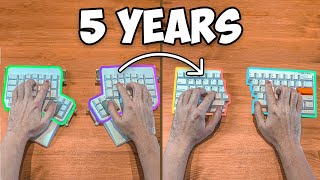
Programmers with wrist or forearm discomfort should consider ergonomic keyboards like the X9 Ergonomic, which uses a split or curved layout that positions hands at a more neutral angle. Ergonomic keyboards have a steeper learning curve — typing speed typically drops 15-20% for 2-4 weeks during adjustment — but for programmers logging 8+ hour days, the RSI risk reduction is worth the adaptation period. Pair an ergonomic keyboard with a wrist rest for maximum benefit.
Watch Before You Buy

“”
See Today’s Price →Watch out for
- 60% layout removes dedicated arrow keys and F-row — productivity users relying on F-keys will need Fn layer shortcuts|Limited colorway options in black and purple — teams or desk setups preferring neutral colors should note the aesthetic
Read Full Analysis
The Kraken Pro 60 Mechanical Keyboard is the entry point for programmers who want mechanical key actuation without spending on premium brands like Keychron, Ducky, or GMMK. The 60% form factor eliminates the numpad, navigation cluster, and F-row to create a compact footprint that leaves more desk surface for mouse movement — a meaningful physical benefit for programmers using multiple monitors or wide trackpads. Mechanical switches deliver the tactile and auditory keystroke feedback that sustains typing accuracy over long coding sessions, a noticeable improvement over membrane keyboards after extended use. This positions against the Redragon K530 and Motospeed CK62 rather than the Keychron K6 or Ducky One 2 Mini — appropriate value expectations for this tier. The black and purple colorway limits appeal for neutral desk setups. For programmers prioritizing compact form factor and mechanical tactile feedback at under $40, the Kraken Pro 60 delivers the core functional upgrade.
“”
See Today’s Price →What we like
- TKL compact layout eliminates numpad to give more desk space for a wide gaming mousepad|Logitech LIGHTSPEED wireless delivers tournament-grade latency in a fully cord-free design|Low-profile GL switches travel 40% less distance than standard mechanical switches|Per-key RGB with LIGHTSYNC syncs to Logitech G Hub for unified lighting ecosystem
Watch out for
- TKL layout sacrifices numpad access — inconvenient for spreadsheet or number-entry work|Premium Logitech G pricing compared to budget gaming keyboards with similar features
Read Full Analysis
For programmers, the Logitech G G915 TKL provides premium wireless connectivity where portability between home office and workplace workstations becomes a genuine productivity benefit. LIGHTSPEED 1ms wireless delivers no perceptible latency difference from wired keyboards — critical for developers who don't want input lag interfering with rapid code entry and IDE keyboard shortcut execution. The TKL compact layout keeps the mousing hand at a natural distance from the keyboard, reducing shoulder extension during long coding sessions compared to full-size boards with numpad. Low-profile GL switches travel 40% less than standard mechanical switches, a characteristic that divides programmers: developers who type in short bursts between mouse navigation favor the reduced travel; developers who prefer deep tactile feedback per keystroke during continuous long-form code entry may find the shallow profile less satisfying than standard-height mechanical switches. Three GL switch variants — Tactile, Clicky, and Linear — allow matching the keyboard feel to individual keystroke preference before purchasing. The Logitech G G915 TKL sits between the Keydous NJ80-AP and the Corsair K95 on this programmers page. The G915 TKL's value over the Keydous is Logitech's reliability record, LIGHTSPEED wireless specification, and broad OS driver support — relevant for developers working across macOS, Windows, and Linux environments where keyboard compatibility without configuration friction matters. For programmers who prioritize wireless reliability from an established brand with proven long-term support, the Logitech G G915 TKL is the correct mid-tier recommendation.

“”
See Today’s Price →What we like
- 6 dedicated programmable macro keys enable complex in-game command sequences with a single keypress
- Cherry MX Speed RGB switches at 1.2mm actuation deliver the fastest keypress registration on this page
- 8MB onboard profile storage allows three full keyboard lighting and macro configurations to travel with the board
Watch out for
- This is the most expensive keyboard on this page — three to five times the cost of alternatives
- Full-size layout with macro column requires a large desk footprint that may crowd smaller gaming setups
Read Full Analysis
The Corsair K95 is the most feature-complete keyboard on this programmers page, and its six dedicated macro keys have specific development utility beyond gaming: one-touch execution of build commands, test runners, git commit sequences, and IDE refactoring shortcuts that replace multi-key chord sequences with a single keypress. For developers who automate repetitive workflow steps through keyboard bindings, the dedicated macro column removes the cognitive overhead of chord execution during rapid development cycles. The 8MB onboard memory stores three complete profiles, allowing separate macro configurations for VS Code, JetBrains, and terminal-heavy workflows without requiring Corsair iCUE running. Cherry MX Speed RGB switches actuate at 1.2mm — the fastest registration point in Cherry's lineup — which suits developers who type quickly and want key registration to keep pace with typing speed rather than requiring deliberate keypress completion. The aluminum chassis eliminates flex under sustained rapid typing pressure, and the full-size layout with dedicated numpad preserves numpad input for numeric entry and code navigation shortcuts. The USB passthrough port adds desk connectivity for secondary peripheral management. The Corsair K95 is nearly double the Logitech G915 TKL on this page and costs nearly eight times the Kraken Pro 60. The macro column investment is justified specifically for programmers who will configure and actively use automated keystroke sequences — if keyboard macro programming is not part of your development workflow, the keyboards below this price point on the page deliver better per-dollar value. For developers who do automate build and test processes through dedicated keybindings, the Corsair K95 pays for itself in workflow efficiency over time.
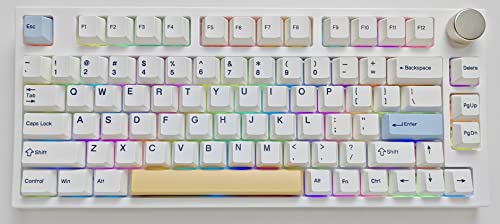
“NJ80-AP wireless switches between 2.4 GHz, Bluetooth 5.0, and wired USB-C in seconds. Best suited for typists and gamers who want tactile feedback and long-term key durability.”
See Today’s Price →What we like
- Gasket-mount design provides a softer, more cushioned keystroke feel than standard tray-mounted gaming keyboards
- Tri-mode wireless via 2.4GHz, Bluetooth 5.0, and USB-C supports switching between PC, tablet, and phone
- Compact 80% TKL layout retains the full function row while reclaiming desk space versus full-size keyboards
Watch out for
- Keydous is a boutique keyboard brand with limited support resources compared to Corsair or Logitech
- Gasket mount feel is better suited to typing enthusiasts than competitive gaming where keystroke precision is critical
Read Full Analysis
For programmers, the Keydous NJ80-AP's gasket-mount construction addresses a typing longevity concern that other keyboards on this page overlook: developers type more keystrokes per day than most computer users, making keyboard feel across an 8-hour coding session more consequential than for occasional typists. Gasket mounting isolates the PCB from the keyboard frame, cushioning the bottom-out sound and reducing wrist fatigue during sustained coding sessions versus the harder bottom-out of tray-mounted boards. Hot-swappable switch sockets allow changing switch type without soldering if the factory configuration proves fatiguing after months of daily use. Tri-mode wireless (2.4GHz, Bluetooth 5.0, USB-C wired) provides the broadest connectivity range on this programmers page, relevant for developers who move between home and office workstations, pair the keyboard with both desktop and laptop, or work in Linux environments where Bluetooth pairing behavior can be inconsistent with gaming-specific wireless protocols. The 80% layout retains the full function row — F-keys are used extensively in IDEs, terminal emulators, and browser developer tools — while reclaiming desk space versus the Corsair K95's full-size macro column footprint. Against the Logitech G G915 TKL on this page, the Keydous NJ80-AP costs $30 less and delivers gasket-mount feel and hot-swap capability at the trade of Logitech's brand support and LIGHTSPEED wireless specification. For developers who prioritize typing comfort and switch customization over brand reliability infrastructure, the Keydous NJ80-AP is the correct value recommendation. Keyboard enthusiasts in the programming community have adopted gasket-mount boards specifically for the reduced fatigue benefit during long coding sessions.
“X9 Performance's wired split keyboard pairs a 110-key layout and number pad with a cushioned wrist rest and an adjustable kickstand, plug and play for PC and Chrome.”
See Today’s Price →What we like
- Split ergonomic layout that X9 says keeps hands in a more natural position
- Integrated cushioned wrist rest level with the keys
- Full-size 110 keys with 17 shortcuts and a numeric keypad
- Wired USB plug and play for PC and Chrome, no drivers to install
- Adjustable kickstand, LED indicators and a 2-year warranty
Watch out for
- Wired only: a 5 ft USB cable and no Bluetooth
- No backlit keys
- The split is in one board, so the halves cannot be moved apart
Read Full Analysis
The X9 Ergonomic Keyboard occupies the split ergonomic niche on this programmers page for developers who type extensively and experience wrist strain from the pronation that standard flat keyboards enforce across long coding sessions. Split ergonomic keyboards divide the key layout into two separate halves, each angled to match the natural shoulder-width hand position, eliminating the inward wrist rotation that standard keyboards require for all-day use. For programmers who spend 6-8 hours daily at the keyboard, this posture correction directly addresses one of the primary root causes of repetitive strain injury in the development profession. The X9 design aims to reduce the adjustment learning curve compared to more extreme split keyboards while providing the core ergonomic benefit of widened key separation. Developers transitioning to split ergonomic keyboards typically require 1-2 weeks before typing speed returns to pre-transition levels — the muscle memory for key positions must be rebuilt against the new hand positioning. The transition is most practical during a lower-intensity work period rather than a sprint or release cycle. Verify current availability and pricing at checkout, as the X9 Ergonomic Keyboard listing varies by configuration. Against the other keyboards on this programmers page, the X9 fills the role no other option provides: addressing wrist pronation through keyboard geometry rather than through switch weight, surface curve, or wireless convenience. For developers who have confirmed wrist discomfort from flat keyboard use and are ready to commit to an ergonomic transition, the X9 is the starting point for split ergonomic consideration on this page.

“”
See Today’s Price →What we like
- Innovative touch panel strip along the left edge enables custom gesture-based controls and macro execution
- 450-hour battery life at 2.4GHz RF wireless far outlasts the competition for untethered gaming sessions
- 65% compact layout retains dedicated arrow and navigation keys within a 60% keyboard footprint
Watch out for
- 65% layout removes the function row and number pad that some gaming and productivity workflows require
- Touch panel learning curve requires setup time to configure useful gestures effectively
Frequently Asked Questions
What keyboard switch is best for programming?
Is a 60% keyboard good for programming?
Should programmers use mechanical or membrane keyboards?
What is the best keyboard layout for programming — 60%, TKL, or full-size?
How We Chose These Products
We compare each product’s Amazon listing, the manufacturer’s published specifications and Amazon customer ratings, shown with their review counts as Amazon’s data, and rank the products on how well they answer this page’s question. We do not test products in hand and we do not run our own analysis of review text. A publication or expert is named only where we cite its published findings about that product. No manufacturer paid for placement on this page.
A price appears only when Amazon’s API supplied it at a recent daily refresh, with the date and time beside it, and is withdrawn at 4 AM Central on the day after it turns 24 hours old; otherwise use “Check price on Amazon” for the live price. Read our full methodology →
How We Score These Products
Each dimension score comes from evidence about the exact model listed — a published specification, a measurement by a named independent reviewer, or that product’s own buyer reviews, as described for each dimension below — not from a similar product in the same range. We do not test products ourselves, and we do not score a dimension we could not evidence. A dash means no evidence was found for that product, not that it performed badly.
Ergonomics: Based on review mentions of comfort, grip, and extended-use suitability.
Customization: From evidence about this exact model (specification, named reviewer or its own reviews).
Responsiveness: From evidence about this exact model (specification, named reviewer or its own reviews).
The overall score is the mean of the dimensions we could evidence for that product, on a 10-point scale. Price is shown separately and is never folded into a score. Amazon star ratings are shown separately and are never part of any score.