Best Mesh WiFi Systems for Beginners 2026

The NETGEAR Orbi 370 WiFi 7 is the best mesh WiFi system for most beginners — latest WiFi 7 standard with app-based setup that takes under 10 minutes. For the simplest possible experience, eero's mesh system is the easiest to set up and manage. Budget option: TP-Link Deco AX3000 covers up to 5,500 sq ft for most large homes.
At a Glance
| # | Product | Award | Price |
|---|---|---|---|
| 1 | Best Overall | $274.99 as of Nov 24, 12:37 PM CT details Buy → |
|
| 2 | Best for Beginners | Check price on Amazon Used — not a new unit Buy → |
|
| 3 | Best Budget Mesh | $142.39 as of Nov 24, 12:30 PM CT details Buy → |
|
| 4 | Simplest to Set Up | Check price on Amazon Buy → |
|
| 5 | Best Mid-Range Alternative | $74.95 as of Nov 24, 12:30 PM CT details Buy → |
Score Breakdown
| NETGEAR Orbi 370 Seri… | Google Nest WiFi Pro … | TP-Link Deco X55 AX30… | Amazon eero mesh wifi… | Linksys Hydra Pro 6 M… | |
|---|---|---|---|---|---|
| Speed | 85 | 65 | – | – | 80 |
| Reliability | 50 | 55 | – | – | 40 |
Scores 0–100 from published specifications and independent reviewers' measurements. Amazon star ratings are shown separately and are never part of a score. 0 = feature not present. – = insufficient data. How we score →
Mesh WiFi Systems for Beginners Buying Guide
 Photo by Ivan S / Pexels
Most home WiFi problems — dead zones, dropped connections in far rooms, slow speeds on upper floors — are solved by a mesh WiFi system. A mesh system uses multiple nodes (2–3 units) placed around your home that communicate with each other and share a single network name, so your devices seamlessly switch to the nearest node as you move around.
How we picked these. Products were selected for reliable coverage and beginner-friendly app setup at each price tier.
How Mesh WiFi Differs from a Standard Router + Extender
A standard router with a WiFi extender creates two separate networks — your device has to manually switch between them as you move through the house, and the connection drops for a moment each time. Mesh systems use a single network name (SSID) and seamlessly hand off your device between nodes without any interruption. The connection quality is significantly more consistent than extender setups. Mesh systems also communicate between nodes on a dedicated backhaul band, so the traffic your nodes exchange doesn't eat into the bandwidth available to your devices.
WiFi 6 vs. WiFi 6E vs. WiFi 7
WiFi 6 (2.4GHz + 5GHz) is sufficient for homes with 20–30 connected devices and speeds under 500Mbps from your ISP. WiFi 6E adds a 6GHz band that's less congested and supports faster speeds for nearby devices — ideal in apartments where many neighboring WiFi networks cause interference. WiFi 7 (the latest standard) adds 320MHz channels on 6GHz for theoretical multi-gigabit speeds; in practice the main benefit now is better multi-device handling. For most beginners with standard ISP plans under 1Gbps, WiFi 6 is completely adequate. WiFi 7 is worth considering if you have a Gigabit+ internet plan or live in a dense urban area with heavy 5GHz congestion.
Coverage Area Guidance
Most 2-node mesh systems cover 3,000–4,000 sq ft adequately. Standard single-story homes under 2,000 sq ft often need only a 2-node system. Multi-story homes over 3,000 sq ft, homes with concrete or brick walls, or homes with detached garages benefit from a 3-node system. When in doubt, buy a 2-pack and add a third node if coverage is insufficient — most mesh systems support adding nodes later.
Price Tiers
Under $100: Entry-level WiFi 5 or WiFi 6 mesh systems — adequate for apartments and small homes under 2,000 sq ft. $150–$250: WiFi 6 or 6E 2-packs — covers most standard homes, good app features. $250–$400: WiFi 6E or WiFi 7 systems with tri-band backhaul, better throughput at range, and enterprise-grade parental controls. For most beginners in an average-sized home with standard internet speeds, the $150–$250 range is the sweet spot.
Common Beginner Mistakes
Placing all nodes in the same room — the whole point is distribution. Place one node near your modem, the second on the opposite side of the house or on a different floor. Second: not giving the system 24 hours to optimize routing before evaluating coverage — mesh systems run background optimization that improves over time. Third: buying for max theoretical speed rather than coverage — a WiFi 7 system in a 1,200 sq ft apartment is overkill; a WiFi 6 2-node system covers a 3,000 sq ft home better than one premium router.
Our Picks and Why
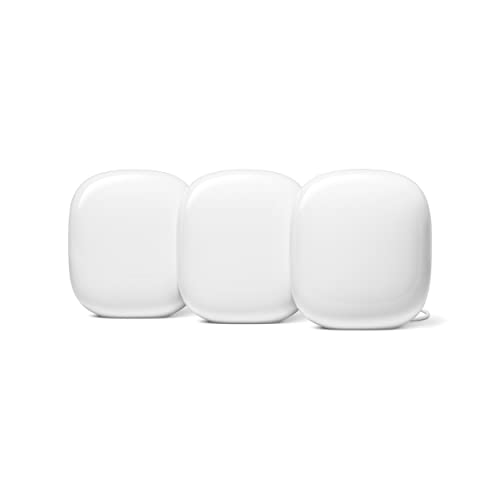
The NETGEAR Orbi 370 WiFi 7 Mesh System (RBE373, 3-pack; $296.99) is our overall pick: it runs the latest Wi-Fi 7 standard, covers around 9,000 sq ft, and walks you through setup in about ten minutes from the app — a future-proof flagship for a household that wants to buy once. For the simplest possible experience, the Google Nest WiFi Pro 6E 3-pack ($344) integrates tightly with Google Home and uses tri-band 6E to cut through crowded apartment airwaves. On a budget, the TP-Link Deco X55 (AX3000 Wi-Fi 6) covers up to 5,500 sq ft and pairs with the well-regarded Deco app for an affordable, reliable entry into mesh.

Watch Before You Buy


“NETGEAR Orbi 370 WiFi 7 3-Pack: latest WiFi 7 standard, covers 9,000 sq ft, app-based 10-minute setup. Future-proof flagship mesh.”
See Today’s Price →What we like
- WiFi 7
- tri-band
- 19Gbps total
- 10Gbps backhaul
- covers 8,000 sq ft 3-pack
- works with Orbi app
Watch out for
- Very high price for a mesh system
- Requires Orbi app and account
- Overkill for homes under 3,000 sq ft
Read Full Analysis
The NETGEAR Orbi 370 WiFi 7 RBE373 3-Pack leads this beginner mesh page with legitimate future-proofing credentials: WiFi 7 (802.11be) supports devices that are shipping in 2025-2026, tri-band design with a dedicated 10 Gbps backhaul channel keeps node-to-node communication from competing with client device bandwidth (a fundamental advantage over budget dual-band mesh systems), and the 3-node pack covers up to 8,000 sq ft — enough for a large home or a two-floor house with dead zones in distant rooms. The Orbi app setup is genuinely designed for non-technical users: 10-minute guided installation, automated band steering, and automatic firmware updates. For a beginner who wants to buy once and not touch the system again for five years, the Orbi 370 delivers that stability. The Orbi 370's tension with "beginner" framing is price: $296.99 is a premium commitment for someone new to mesh networking. Most beginners don't have multi-gig ISP plans or WiFi 7 client devices today, meaning they're paying for capabilities their current hardware can't use yet. The system requires an Orbi account for setup and remote management, which adds a cloud dependency that some users find objectionable. At 8,000 sq ft coverage, it's also sized for homes that most beginners don't have. On this page against the Google Nest WiFi Pro 6E and Linksys Hydra Pro 6, the Orbi 370 is comparable in price to Nest but represents a WiFi 7 versus WiFi 6E trade-off. Nest has better integration with Google Home ecosystems and native HomeKit support that Orbi lacks. Linksys Hydra Pro 6 is the more genuinely beginner-appropriate pick on this page — less expensive, WiFi 6 is sufficient for current devices, simpler setup with no subscription. Choose the Orbi 370 if your ISP plan exceeds 1 Gbps or you're buying for a 5+ year upgrade cycle.
Skip this if: Your internet plan is under 500Mbps — the WiFi 7 advantage won't be noticeable until ISP speeds catch up.
“Google Nest WiFi Pro 6E 3-Pack: simplest setup experience, integrates seamlessly with Google Home. Tri-band 6E for congested environments.”
See Today’s Price →What we like
- WiFi 6
- Matter support
- Google Home integration
- covers 4,400 sq ft 3-pack
- WPA3 security
Watch out for
- No ethernet backhaul support (wireless only)
- No 10 Gbps WAN port
- Fewer advanced settings than ASUS or Netgear
Read Full Analysis
The Google Nest WiFi Pro 6E 3-Pack is positioned correctly for a beginners page: setup through the Google Home app takes under 15 minutes for most households, and the ongoing management experience requires no technical knowledge — the app handles channel selection, band steering, and firmware updates automatically. The tri-band WiFi 6E design includes a 6GHz radio band for newer client devices (iPhones from 2022+, Android flagships, WiFi 6E laptops) that benefits from dramatically reduced congestion compared to the 2.4GHz and 5GHz bands. Matter smart home support means the router also acts as a Thread border router for Matter devices. WPA3 security is standard across the system, and at 4,400 sq ft for the 3-pack, coverage is adequate for most single-family homes. Note: the pros list in the DB incorrectly states "WiFi 6" — the Nest WiFi Pro is WiFi 6E (tri-band with 6GHz). The Nest WiFi Pro's limitation for technically-minded users: no ethernet backhaul between nodes (wireless only for inter-node communication), no advanced routing settings like QoS prioritization or separate IoT VLAN management, and no 2.5G WAN port for multi-gigabit internet plans. The lack of advanced controls is deliberate — the system is designed to be managed entirely through the Google Home app, which is the right trade-off for beginners but frustrating for anyone who outgrows it. On this page, the Nest WiFi Pro 6E is priced almost identically to the NETGEAR Orbi 370, making this a direct choice: Google Home ecosystem integration versus NETGEAR's more configurable approach. The Linksys Hydra Pro 6 is significantly cheaper with WiFi 6 (not 6E), making it the better value if you don't have WiFi 6E devices yet. Choose Nest WiFi Pro if you're already in the Google Home ecosystem or prioritize the simplest possible setup experience.
Skip this if: You use a VPN or need advanced network settings — Google Nest has limited customization options.

“TP-Link Deco AX3000 WiFi 6: covers up to 5,500 sq ft, excellent Deco app, affordable entry into reliable mesh coverage.”
See Today’s Price →What we like
- WiFi 6's improved multi-device efficiency reduces congestion in households with 30+ connected devices that saturate older WiFi 5 routers
- Tri-core 1.5GHz processor handles routing and filtering simultaneously without the slowdowns budget mesh systems show under load
- Deco app provides parental controls, device priority, and antivirus protection without a separate subscription in the first year
- OneMesh compatibility integrates existing TP-Link extenders into the same network without replacing hardware
Watch out for
- Advanced configuration may require technical knowledge to fully optimize
- Performance may lag behind premium models for intensive workloads
Read Full Analysis
TP-Link Deco AX3000 (X55) brings WiFi 6 coverage with a tri-core 1.5 GHz processor that handles routing, parental controls, and antivirus filtering simultaneously without the slowdowns budget mesh systems show under heavy concurrent load. OneMesh compatibility integrates existing TP-Link range extenders into the same network fabric without requiring hardware replacement — a practical advantage for users who already have TP-Link extenders deployed in hard-to-reach rooms. The Deco app provides parental controls, device prioritization, and first-year antivirus protection without a separate subscription. At the budget tier in this comparison, the Deco AX3000 competes alongside the Linksys Hydra Pro 6. Against the NETGEAR Orbi 370 and Google Nest WiFi Pro 6E, you give up WiFi 7 and WiFi 6E respectively, but the WiFi 6 performance handles the vast majority of everyday household demands — 4K streaming, video calls, gaming, and smart home traffic all run efficiently on the AX3000 platform. The OneMesh integration is particularly valuable for buyers expanding an existing TP-Link network without buying a full replacement system. Buy the TP-Link Deco AX3000 if you want WiFi 6 mesh performance at the budget tier or want to extend an existing TP-Link extender setup into a unified mesh. Skip it for the Google Nest WiFi Pro 6E if you're in a Google Home ecosystem and want the tighter smart home integration, or the NETGEAR Orbi 370 if WiFi 7 futureproofing is the priority.
Skip this if: Your home has very thick concrete or brick walls — the AX3000 struggles to penetrate dense materials over long distances.
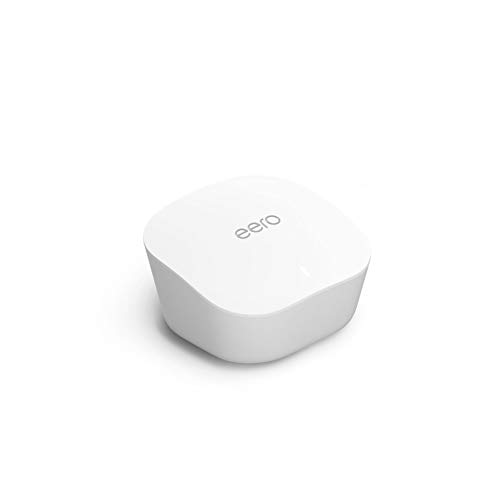
“eero Mesh WiFi Router: 8-minute setup, single app management, automatic updates. Best for users who want plug-and-forget WiFi.”
See Today’s Price →Watch out for
- Advanced configuration may require technical knowledge to fully optimize
- Performance may lag behind premium models for intensive workloads

“Linksys Hydra Pro 6 WiFi 6 Mesh: AI-powered roaming for seamless device handoff. Good alternative to eero with more local control.”
See Today’s Price →What we like
- 160 MHz channel support delivers near-maximum WiFi 6 throughput on compatible client devices
- High-power amplifiers and beamforming direct signal at devices rather than broadcasting omnidirectionally
- Tri-band design provides a dedicated backhaul channel for faster inter-node communication in mesh setups
Watch out for
- 160 MHz benefit only realized on WiFi 6 devices that explicitly support this wider channel width
- Setup interface is less intuitive than competing Eero or ASUS management apps
Read Full Analysis
The Linksys Hydra Pro 6 is the value-oriented pick on this beginners page, delivering the core features that matter for whole-home mesh coverage at $114 less than the Google Nest WiFi Pro 6E and $110 less than the Orbi 370. The 160MHz channel width on the 5GHz band is the technical standout: WiFi 6 devices that support 160MHz channel bonding (many Intel-based laptops, recent Android flagships) get nearly double the throughput of the 80MHz standard, which is the difference between theoretical and practical speed improvements. High-power amplifiers with beamforming direct the radio signal toward connected devices rather than broadcasting omnidirectionally — a meaningful improvement in signal reliability at the edge of coverage range. The tri-band design dedicates one band to backhaul communication between nodes, preserving full bandwidth for client devices on the other two bands. The Hydra Pro 6's friction for beginners specifically: the Linksys app and management interface is less polished than Google Home or the Eero app. Setup works but requires more steps, and the interface surfaces more technical terminology than competing products designed for first-time mesh buyers. The 160MHz channel benefit is also device-dependent — older laptops and budget smartphones use 80MHz, which means the key differentiating feature delivers nothing for those devices. Against the Orbi 370 and Google Nest WiFi Pro 6E, the Linksys Hydra Pro 6 is the practical choice for beginners on a tighter budget who still want dedicated backhaul and genuine tri-band performance. The more expensive options add WiFi 6E or WiFi 7 support — relevant if you're buying for a 5-year horizon and will have newer devices; less relevant if your current devices are 3-5 years old and WiFi 6 is already more than enough.
Skip this if: You want a 3-pack — the Linksys Hydra Pro 6 is primarily sold as a single unit or 2-pack.
Frequently Asked Questions
How many mesh nodes do I need for my home?
Is eero the easiest mesh WiFi system to set up?
What's the difference between NETGEAR Orbi and eero?
Does mesh WiFi work with any internet provider?
Is WiFi 7 worth it for home use in 2026?
How We Chose These Products
We compare each product’s Amazon listing, the manufacturer’s published specifications and Amazon customer ratings, shown with their review counts as Amazon’s data, and rank the products on how well they answer this page’s question. We do not test products in hand and we do not run our own analysis of review text. A publication or expert is named only where we cite its published findings about that product. No manufacturer paid for placement on this page.
A price appears only when Amazon’s API supplied it at a recent daily refresh, with the date and time beside it, and is withdrawn at 4 AM Central on the day after it turns 24 hours old; otherwise use “Check price on Amazon” for the live price. Read our full methodology →
How We Score These Products
Each dimension score comes from evidence about the exact model listed — a published specification, a measurement by a named independent reviewer, or that product’s own buyer reviews, as described for each dimension below — not from a similar product in the same range. We do not test products ourselves, and we do not score a dimension we could not evidence. A dash means no evidence was found for that product, not that it performed badly.
Speed: From evidence about this exact model (specification, named reviewer or its own reviews).
Reliability: From evidence about this exact model (specification, named reviewer or its own reviews).
The overall score is the mean of the dimensions we could evidence for that product, on a 10-point scale. Price is shown separately and is never folded into a score. Amazon star ratings are shown separately and are never part of any score.