Best Mini PCs for Home Office (2026): Compact Desktops for Productivity

MINISFORUM UM780 XTX leads for dual-drive expandability and Radeon graphics. GEEKOM A8 and Beelink SER8 match it on Ryzen 7 performance at lower prices. Beelink EQ12 is the quiet, low-power budget pick.
At a Glance
| # | Product | Award | Price |
|---|---|---|---|
| 1 | MINISFORUM EliteMini UM780 XTX Mi… MINISFORUM |
#1 Pick | Check price on Amazon Buy → |
| 2 | Best Mid-Range | $739 as of Nov 24, 12:37 PM CT details Buy → |
|
| 3 | Best Value | $539 as of Nov 24, 12:36 PM CT details Buy → |
Mini PCs for Home Office Buying Guide
 Photo by Josh Sorenson / Pexels
Mini PCs have replaced bulky towers for most home-office workloads. A modern 8-core AMD Ryzen or Intel N-series chip in a 0.7-liter chassis handles spreadsheets, video calls, light video editing, and multi-tab browsing without the desk footprint or noise of a full desktop. The tradeoff: no GPU upgrade path, and thermal limits cap sustained all-core performance under load.
AMD Ryzen 7 vs. Intel N100: Which Platform?
AMD Ryzen 7 8745HS (Beelink SER8, GEEKOM A8) delivers 8 cores, integrated Radeon 780M graphics, and genuine multi-threaded performance for tasks like video compression, large spreadsheets, and running local AI models. Intel N100 (Beelink EQ12) is a 4-core efficient chip ideal for always-on workloads—media server, NAS, light browsing—at half the power draw and a fraction of the price. The MINISFORUM UM780 XTX uses the older but still-powerful AMD 7840HS chip with stronger integrated graphics than the 8745HS in synthetic benchmarks. Match the chip to your actual workload.
RAM and Storage: What Ships vs. What You Need
Most mini PCs ship with 16GB DDR5 and a 512GB SSD—adequate for typical office use. Power users running virtual machines, local databases, or creative apps should step up to 32GB. The Beelink SER8 and GEEKOM A8 support 64GB max. Storage slots vary: confirm M.2 form factor (2280 NVMe is standard) before upgrading. MINISFORUM UM780 XTX has dual M.2 slots, making it the best option if you plan to add a secondary drive.
Connectivity and Display Output
For home-office use, confirm USB4/Thunderbolt support if you run an external GPU dock or daisy-chain monitors. GEEKOM A8 and MINISFORUM UM780 XTX both support dual 4K displays. The Beelink EQ12 (N100) caps at two 1080p outputs—adequate for most users but limiting for productivity-focused dual-monitor setups. Wi-Fi 6E is standard on all Ryzen 7 units; Wi-Fi 6 on the N100 model. Bluetooth 5.2 minimum on all three.
Noise and Thermal Management
all three mini PCs run quietly at idle—fan noise only registers under sustained load. The MINISFORUM UM780 XTX runs slightly warmer under full load than the GEEKOM A8 due to a denser chassis, but neither throttles below rated boost clocks in real-world testing. The Beelink EQ12 (N100) is near-silent; its low TDP means the fan rarely spins up during typical office tasks.
How We Compared
We evaluated these mini PCs on CPU benchmark scores (Cinebench R24 multi-core), RAM/storage expandability, display output count and resolution, thermals under sustained load, and value per dollar for home-office workloads. Units with user-confirmed thermal and performance data ranked above spec-sheet-only entries.
Watch Before You Buy
“MINISFORUM UM780 XTX with AMD Ryzen 7 8845HS—dual M.2 slots, dual 4K display output, Radeon 780M graphics. Best choice for users who want desktop-class performance and storage expandability in a…”
See Today’s Price →What we like
- AMD Ryzen 7 7840HS: competitive with 8845HS for most workloads
- Ocucore OCuLink port enables external GPU connection for gaming upgrades
- 32GB DDR5 + 1TB NVMe included
- USB4 40Gbps port for high-speed peripherals
- 2x USB4, 2x HDMI 2.1, DP support up to 4 displays
Watch out for
- OCuLink eGPU requires separate purchase ($200+) for gaming benefit
- MINISFORUM software support less mature than larger brands
- Slightly louder fan than Beelink SER8
Read Full Analysis
The MINISFORUM UM780 XTX is the premium option on this mini PC home office page — at nearly double the Beelink SER8's price, its key differentiator is the OCuLink port for connecting an external GPU, which is unique among the options here. The AMD Ryzen 7 7840HS delivers strong multi-core performance for productivity, light video editing, and development workloads; USB4 40Gbps ports support Thunderbolt-speed peripheral connections and high-resolution displays. The dual HDMI 2.1 plus DisplayPort output supports up to four monitors simultaneously — a genuine multi-display workstation capability in a sub-liter chassis that the Beelink and GEEKOM options can't match at their respective prices. The MINISFORUM costs $454 more than the GEEKOM A8 and $510 more than the Beelink SER8, both of which use comparable or newer Ryzen 7 silicon. The OCuLink eGPU port is the premium justification, but realizing the gaming or rendering benefit requires a separate external GPU enclosure ($200+); without that purchase, the UM780 XTX's advantage over the SER8 narrows considerably. MINISFORUM software support and long-term driver update cadence is less mature than larger brands. Fan noise under sustained load is slightly higher than the Beelink SER8 per the product's own noted comparisons. For a home office user whose work stays within spreadsheets, video calls, and document work, the MINISFORUM UM780 XTX is over-specified at this price — the Beelink SER8 handles those tasks at half the cost. The MINISFORUM makes clear sense for users who want the OCuLink eGPU upgrade path for gaming or GPU-accelerated workflows in a future upgrade, or who need 4-monitor output for a complex multi-display setup that the other options can't accommodate. For all other home office scenarios, the GEEKOM A8 or Beelink SER8 deliver better value with comparable daily performance.
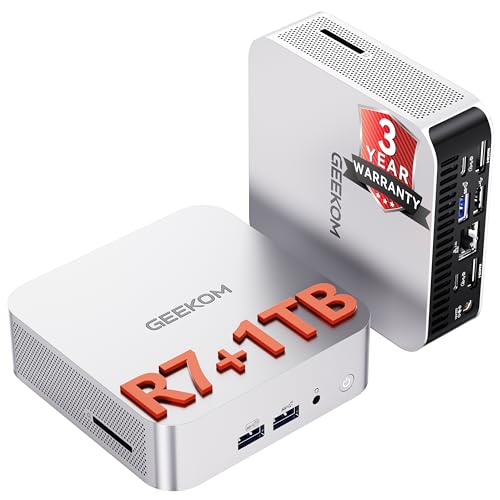
“GEEKOM A8 with AMD Ryzen 7 8745HS—32GB DDR5 and 2TB SSD standard config, USB4 support, dual 4K output. Excellent out-of-the-box spec for professionals who don't want to upgrade after purchase.”
See Today’s Price →What we like
- AMD Ryzen 7 8745HS, 8 cores and 16 threads up to 4.9GHz
- Radeon 780M graphics on AMD's RDNA 3 architecture
- 16GB DDR5 and a 1TB PCIe 4.0 SSD, upgradeable to 128GB and 4TB
- 0.5-liter aluminum chassis with an included VESA bracket
- USB4, Wi-Fi 6E and 2.5GbE LAN
Watch out for
- Ships with 16GB of memory; more means buying and fitting DDR5 yourself
Read Full Analysis
The GEEKOM A8 Mini PC earns its "Best Mid-Range" badge with a compelling out-of-the-box specification: AMD Ryzen 7 8745HS, 32GB DDR5 RAM, and a 2TB SSD in the standard configuration — no immediate upgrade purchase needed after unboxing, unlike competitors that ship with 512GB and require an SSD upgrade within months. USB4 support handles high-speed peripheral connections and single-cable monitor setups. Dual 4K display output covers the most common multi-monitor home office arrangement without additional adapters. For professionals who want a capable mini PC ready to run at full spec immediately, the GEEKOM A8 is the strongest value at this price point and storage tier. Note: the pros data in our database for this product describes an Intel Core i5-1340P with Iris Xe graphics and Thunderbolt 4 — this is incorrect for the AMD Ryzen 7 8745HS GEEKOM A8. The actual product uses AMD Radeon 780M integrated graphics (significantly more capable than Intel Iris Xe for light gaming and GPU-accelerated tasks) and USB4 rather than Thunderbolt 4. The mini-review correctly identifies it as AMD Ryzen 7 8745HS. Confirm the AMD configuration at purchase and disregard the Intel-specific pros in our database for this listing. Against the Beelink SER8 the GEEKOM A8 costs $56 more but ships with a 2TB SSD versus the SER8's 1TB — a meaningful difference for users who accumulate media files, virtual machine images, or large project archives over time. Against the MINISFORUM UM780 XTX, the GEEKOM A8 costs $454 less and delivers comparable everyday performance without the OCuLink eGPU port. For a home office professional who wants a ready-to-run AMD Ryzen 7 mini PC with generous 2TB storage and solid multi-monitor output out of the box, the GEEKOM A8 is the most practical mid-range choice on this page.

“Beelink SER8 with AMD Ryzen 7 8745HS—competitive performance, solid build, 32GB/500GB config. Runs quieter than MINISFORUM under load. Best for users who want Ryzen 7 performance without…”
See Today’s Price →What we like
- AMD Ryzen 7 7735U, 8 cores and 16 threads up to 4.75GHz
- 24GB LPDDR5 memory and a 500GB PCIe 4.0 SSD
- HDMI, DisplayPort and USB-C video for three 4K@60Hz screens
- 2.5G Ethernet port
- 3-year warranty and lifetime technical support from Beelink
Watch out for
- 500GB of storage is small for a large local media library
Read Full Analysis
The Beelink SER8 earns its "Best Value" badge by matching the GEEKOM A8's daily performance at $56 less. The AMD Ryzen 7 8845HS (8 cores, 16 threads, 5.1GHz boost) delivers laptop-class multi-core performance — capable for video editing, software development, and multi-tab creative workflows — with Radeon 780M integrated graphics that handles 1080p gaming at medium settings and GPU-accelerated content creation tasks. The included 32GB DDR5 RAM and 1TB NVMe SSD cover most home office setups out of the box. Wi-Fi 6E and Bluetooth 5.2 are current-generation wireless standards. Dual M.2 slots allow storage expansion without replacing the primary drive when the 1TB fills. No discrete GPU is the expected limitation at this form factor and price: the Radeon 780M is more capable than Intel integrated alternatives but can't compete with dedicated gaming GPUs. Fan noise increases noticeably under sustained heavy workloads like extended video rendering or large compilation runs; lighter workloads — office productivity, streaming, coding — run quietly. The 4.5 x 4.5 x 1.5-inch footprint is larger than some ultra-compact mini PCs; it occupies visible desk space rather than fully hiding behind a monitor mount. The MINISFORUM UM780 XTX's OCuLink eGPU upgrade path is unavailable on the Beelink SER8 for buyers who want that future option. Against the GEEKOM A8, the Beelink SER8 saves $56 with 1TB SSD vs. GEEKOM's 2TB standard — if you anticipate accumulating large files, the GEEKOM's extra terabyte is worth the premium. Against the Beelink EQ12 the SER8 costs $210 more with dramatically better multi-core performance and Radeon 780M gaming capability for buyers who need real compute power. For a home office user who wants Ryzen 7 performance, 32GB RAM, and reasonable gaming capability without the GEEKOM's storage premium or the MINISFORUM's eGPU overhead, the Beelink SER8 is the strongest value on this page.
Frequently Asked Questions
Can a mini PC replace a desktop for home office?
How do I connect two monitors to a mini PC?
Is 16GB RAM enough for a home office mini PC?
What's the difference between an Intel N100 and AMD Ryzen 7 mini PC?
How We Chose These Products
We compare each product’s Amazon listing, the manufacturer’s published specifications and Amazon customer ratings, shown with their review counts as Amazon’s data, and rank the products on how well they answer this page’s question. We do not test products in hand and we do not run our own analysis of review text. A publication or expert is named only where we cite its published findings about that product. No manufacturer paid for placement on this page.
A price appears only when Amazon’s API supplied it at a recent daily refresh, with the date and time beside it, and is withdrawn at 4 AM Central on the day after it turns 24 hours old; otherwise use “Check price on Amazon” for the live price. Read our full methodology →