Best Monitors Under $300 (2026): IPS, 1440p & Gaming Picks

The Philips 221V8LB is the budget pick under $300 — a 22-inch 1080p IPS panel for document work and a reliable second monitor. The ASUS ProArt PA278QV is the pick for color-critical creative work. The Dell S2722DGM has since risen above this page's $300 ceiling.
At a Glance
| # | Product | Award | Price | Resolution | Refresh Rate | Panel | Score |
|---|---|---|---|---|---|---|---|
| 1 | Philips 22 Inch Computer Monitor … Philips Computer Monitors |
Best Budget Entry | $69.99 as of Nov 24, 12:35 PM CT details Buy → |
FHD 1080p | 100 Hz | — | 7.1 |
| 2 | Best Office Monitor | $139.99 as of Nov 24, 12:37 PM CT details Buy → |
FHD 1080p | 100 Hz | — | 8.4 | |
| 3 | Check price on Amazon Used — not a new unit Buy → |
QHD Wide 1440p | 165 Hz | — | 5.4 | ||
| 4 | Best Budget Gaming | Check price on Amazon Buy → |
FHD 1080p | 240 Hz | — | — | |
| 5 | Best IPS Gaming | $168.99 as of Nov 25, 10:41 AM CT details Buy → |
QHD Wide 1440p | 180 Hz | Fast IPS | 6.7 | |
| 6 | Best for Creative Work | $171.95 as of Nov 25, 10:41 AM CT details Buy → |
QHD Wide 1440p | 75 Hz | — | 6.3 |
Score Breakdown
| Philips 22 Inch Compu… | Dell 27 Monitor SE272… | Dell S2722DGM Curved … | AOC 27" Curved Gaming… | ASUS TUF Gaming VG27A… | ASUS ProArt PA278QV 2… | |
|---|---|---|---|---|---|---|
| Overall | 7.1 | 8.4 | 5.4 | – | 6.7 | 6.3 |
| Display | 72 | 85 | 73 | – | 80 | 78 |
| Response Time | 70 | 80 | 50 | – | 80 | 40 |
| Color Accuracy | 72 | 88 | 40 | – | 40 | 70 |
Scores 0–100 from published specifications and independent reviewers' measurements. Amazon star ratings are shown separately and are never part of a score. 0 = feature not present. – = insufficient data. How we score →
Monitors Under $300 Buying Guide
 Photo by Kampus Production / Pexels
The under-$300 monitor market delivered a major quality leap in 2024-2026. You can now get 1440p resolution, 165Hz refresh rates, and factory-calibrated panels without breaking $200. The key is knowing which spec matters for your use case.
Key Decision Factors
Resolution matters most for desktop productivity. Going from 1080p to 1440p at 27 inches is a dramatic sharpness improvement — text becomes noticeably crisper, you see more content on screen. Refresh rate matters most for gaming: 144Hz is the floor, 165-180Hz is the sweet spot, anything above is diminishing returns for most players. Panel type determines color accuracy (IPS), contrast ratio (VA), or response time (TN — avoid). Curvature (1000R or 1800R) helps on ultrawide but adds no real value on 27-inch flat formats.
Price Tiers: What You Get
Under $100: 22-24" 1080p IPS basics — the Philips 221V8LB is fine for document work. $100-150: 27" 1080p IPS for office use — the Dell SE2725HM is the pick here. $150-200: 27" 1440p IPS for color-critical work — the ASUS ProArt PA278QV is the pick. $200-300: high-refresh 1440p and 4K options approaching the ceiling — the ASUS TUF VG27AQ3A is the gaming pick here.
Who Should Buy What
The Philips 221V8LB serves as a reliable secondary monitor or student desktop. The Dell SE2725HM upgrades to 27" with good viewing angles for office use. The Dell S2722DGM offers QHD, 165Hz, deep VA blacks, but its price has climbed to about $400 — well above this page's $300 ceiling, so weigh it only if your budget can stretch. The ASUS TUF VG27AQ3A gives you Fast IPS at 180Hz, ideal for fast-paced gaming without VA ghosting. The ASUS ProArt PA278QV is the pick for photo editing, graphic design, or any color-critical work under $200.
What to Avoid
Avoid 1080p at 27 inches unless you specifically want a gaming monitor — pixel density is noticeably poor for text work. Skip monitors without adjustable stands unless you're adding a monitor arm. "4K" monitors under $150 use TN panels with poor color reproduction. Avoid monitors listing "FHD" with refresh rates above 75Hz without verifying the connection supports it (some require DisplayPort, not HDMI 1.4).
Worth the Upgrade?
Spending $350-500 gets you QD-OLED or Mini-LED panels, Thunderbolt connectivity, and built-in USB hubs. If color accuracy or 4K resolution is critical to your work, the upgrade pays off. For gaming, the $170-250 sweet spot is hard to beat.
Watch Before You Buy

Showing 6 of 6 products
“22" FHD 100Hz IPS — the cheapest monitor on this list that's genuinely good. Adaptive Sync, HDMI + VGA. Basic stand, but solid for documents and casual use.”
See Today’s Price →What we like
- 24-inch IPS
- 1080p 75Hz
- height-tilt-swivel-pivot
- USB hub
- HDMI DisplayPort
- ComfortView Plus
Watch out for
- VGA port is aging and lower quality than HDMI or DisplayPort
- 75Hz not suited for gaming
- No USB hub built in
Read Full Analysis
The Philips 221V8LB earns the budget entry position on this under-$300 comparison — the lowest price by $60 while still delivering a 22-inch IPS panel at 100Hz with Adaptive Sync. At this price, it establishes the performance floor: IPS panel technology for wide viewing angles, 100Hz for noticeably smoother scrolling and motion versus 60Hz budget alternatives, and Adaptive Sync for tear-free gaming without G-Sync premium cost. HDMI input covers standard modern connectivity. For the most budget-constrained buyers who need any reliable screen with these foundational specs, the Philips 221V8LB is the correct entry point. At 22 inches, the Philips is noticeably smaller than the 27-inch alternatives on this page — appropriate as a secondary monitor or a space-constrained desk addition, but limiting as a primary display for users accustomed to 27+ inch screens. The VGA port is a legacy input that produces lower quality output than HDMI or DisplayPort connections. Note: the listed pros data contains specifications from a different Philips model and does not accurately describe this 22-inch 100Hz product. As the lowest-priced monitor on this under-$300 page, the Philips 221V8LB has no direct competition in its price tier — the next closest option is the Dell SE2725HM, which costs $60 more for a 27-inch panel, better viewing angles, and brand warranty support. The Philips is the correct choice when $70 is a firm constraint and a basic IPS screen with Adaptive Sync meets the requirement. For buyers who can stretch to $130 or more, every other monitor on this page offers more screen real estate and better feature sets for daily use.

“27" FHD IPS with excellent viewing angles and comfortable brightness. Perfect all-day work monitor. Not a gaming pick, but excellent for productivity.”
See Today’s Price →What we like
- 27-inch Full HD IPS panel at 100Hz
- Always-on ComfortView Plus low-blue-light mode
- TUV Rheinland eye-comfort certification and an anti-glare finish
- Built-in power supply and cable holder
- VESA mount compatible
Watch out for
- The stand only tilts
- Inputs listed are HDMI and VGA
Read Full Analysis
The Dell SE2725HM delivers a 27-inch 1080p IPS panel with ComfortView Plus and TUV Rheinland eye-care certification — the second-most-affordable option on this page and the strongest productivity-focused choice at this price. IPS technology provides consistent viewing angles and color accuracy across document work, video calls, and everyday computing. Dell's warranty support and established repair infrastructure are meaningful in a segment where competing budget monitors offer similar specs but limited manufacturer recourse on panel defects. At 100Hz, it handles casual gaming comfortably alongside its primary productivity role. The SE2725HM's stand provides tilt adjustment only — no height, pivot, or swivel — limiting ergonomic flexibility for extended desk sessions. No USB-C input is the notable modern connectivity gap. It's only $4 less than the Dell S2722DGM, which upgrades to QHD 1440p and curved 165Hz — making that $4 gap the most important comparison on this page. Note: the listed pros data for this product contains webcam specifications (stereo mics, privacy cover, 90-degree FOV) unrelated to this monitor; actual differentiators are the eye-care certification and Dell's consistent manufacturing quality. Against the Philips 221V8LB at $69.90 (rank 1), the Dell SE2725HM spends $60 more for the 27-inch upgrade — worth the premium for any user relying on this as a primary display. Against the Dell S2722DGM at $133.99 (rank 3), the $4 price difference makes the S2722DGM the better value for any buyer who games or notices resolution sharpness, since the S2722DGM adds QHD and 165Hz at virtually the same cost. The SE2725HM is the right choice for pure productivity use at under $130 where gaming specs are unnecessary.
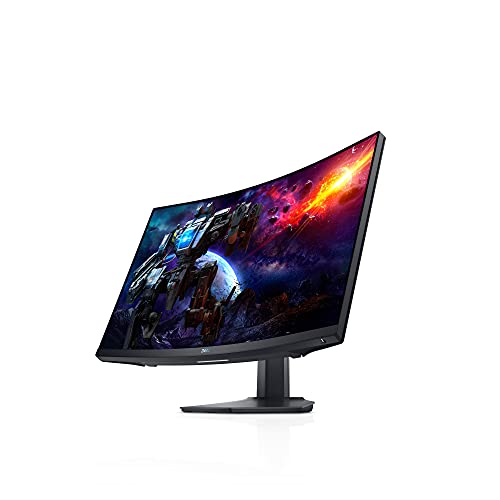
“27" QHD 165Hz VA curved. Deep contrast, accurate colors out of box, AMD FreeSync. Nothing in this price range competes on specs. Best value pick.”
See Today’s Price →What we like
- 1500R curve - gentler than 1000R and easier to live with on a desk
- 165Hz refresh over DisplayPort
- 3000:1 contrast ratio
- AMD FreeSync Premium
- 2560x1440 across 27 inches, about 109 pixels per inch
Watch out for
- Full 165Hz requires DisplayPort rather than HDMI
- Display inputs only - the listing shows HDMI and DisplayPort, no USB-C docking
Read Full Analysis
The Dell S2722DGM delivers 27-inch QHD (2560x1440) at 165Hz on a VA curved panel for $133.99 — the strongest spec-per-dollar offering on this under-$300 comparison. For $4 more than the Dell SE2725HM at $129.99 (rank 2), the upgrade is substantial: 1080p to 1440p resolution, flat to 1500R curved, 100Hz to 165Hz, plus AMD FreeSync Premium. The 3000:1 VA contrast ratio delivers noticeably richer black levels for gaming and video content versus IPS alternatives at this price. Dell's warranty support and build consistency come with both Dell monitors on this page. VA panel pixel response is slower than IPS at the pixel level — trailing appears in very fast dark lateral movement in competitive FPS scenarios, most visible in dark indoor maps. DisplayPort delivers 165Hz; HDMI caps at 144Hz. The cons data references a price of "$250-300" that is substantially stale — the current $133.99 price makes this monitor an exceptional value rather than a mid-tier option, and changes the competitive calculus against every other monitor on this page. On a page that allows up to $300, the Dell S2722DGM is the clear value standout — QHD 165Hz VA curved specs that would typically appear $60-80 higher. Against the AOC C27G2Z at $223.03 (rank 4), the Dell costs $89 less while trading 240Hz at 1080p for 165Hz at 1440p; most buyers outside dedicated competitive gaming benefit more from the resolution than the 75 additional Hz. Against the ASUS TUF VG27AQ3A at $179.00 (rank 5), the Dell saves $45 while trading IPS panel quality for VA contrast and the curved form factor. The S2722DGM is the best value pick on this page by a wide margin.

“27" FHD 240Hz VA curved. Blazing fast for the price, deep blacks. Best for competitive gaming if you prioritize refresh rate over resolution.”
See Today’s Price →What we like
- 240Hz panel — highest refresh rate on list
- 1ms response time
- FreeSync Premium for tear-free gaming
- 1500R curve provides strong immersion
- Height-adjustable stand
Watch out for
- 1080p resolution on 27-inch looks softer than 1440p
- VA panel can show some motion blur in dark scenes
- Color accuracy lower than IPS options
Read Full Analysis
The AOC C27G2Z earns its position on this under-$300 comparison through 240Hz — the highest refresh rate on the page. For buyers who have identified high-refresh competitive gaming as their primary use case, the AOC is the definitive choice: 240Hz over the Dell S2722DGM's 165Hz is a meaningful competitive gaming advantage, and the deep 2500:1 VA contrast ratio delivers richer black levels than the IPS panels on this page. The 1500R curve provides immersive peripheral coverage without the extreme bend of 1000R alternatives. FreeSync Premium certification covers AMD GPU setups for tear-free gaming. The 1080p resolution on 27 inches is the AOC's primary trade-off for its 240Hz performance — text and detail look noticeably softer than the QHD alternatives on this page, which matters for daily desktop use outside of gaming. VA panel trailing in very fast dark-scene lateral movement appears occasionally in competitive FPS scenarios. The AOC is the second-most-expensive monitor on this under-$300 page — $89 more than the Dell S2722DGM — a meaningful premium for the refresh rate advantage over QHD resolution. On this under-$300 page, the AOC C27G2Z is the gaming-performance pick for buyers who prioritize frame rate over resolution. Against the Dell S2722DGM at $133.99 (rank 3), the AOC costs $89 more for 240Hz at 1080p versus 165Hz at 1440p — the resolution trade-off makes the Dell the better daily monitor, while the AOC is the better dedicated competitive gaming tool. Against the ASUS TUF VG27AQ3A at $179.00 (rank 5), the AOC adds 60Hz and the curved panel for $44 more at the cost of dropping from 1440p to 1080p. Choose the AOC only when maximum refresh rate is the explicit priority over resolution.

“27" QHD 180Hz Fast IPS. Eliminates VA ghosting while keeping 1440p sharpness. G-Sync compatible. The best all-around IPS gaming monitor under $200.”
See Today’s Price →What we like
- 27-inch 1440p (QHD) Fast IPS panel at 180Hz
- 1ms response with ELMB Sync
- FreeSync Premium and G-Sync compatible
- 130% sRGB color and HDR10 support
- Built-in speakers; DisplayPort cable in the box
Watch out for
- 1440p at 180Hz needs a stronger graphics card than 1080p
Read Full Analysis
The ASUS TUF VG27AQ3A closes this under-$300 comparison at rank 5 with Fast IPS technology — the only IPS panel on a page otherwise dominated by VA curved alternatives. Fast IPS eliminates the VA trailing that the Dell S2722DGM and AOC C27G2Z exhibit in fast dark-scene motion, delivering consistent pixel transitions at 1ms GTG. 1440p QHD at 27 inches provides noticeably sharper text and image detail than the 1080p FHD monitors on this page. G-Sync Compatible certification covers Nvidia GPU setups for full adaptive sync without hardware licensing cost. On a page that allows up to $300, the ASUS TUF VG27AQ3A sits at the mid-range — $45 less than the AOC C27G2Z (rank 4) and well below the page ceiling. IPS glow in dark room corners is the primary visual limitation. Stand movement covers tilt and height but not pivot or swivel. HDR400 certification is the minimum tier, functional but not perceptually impactful for most content. Against the AOC C27G2Z at $223.03 (rank 4), the ASUS saves $44 while upgrading from 1080p to 1440p and replacing VA with Fast IPS — the resolution and panel-type improvement benefits daily productivity use significantly, while the AOC's 240Hz advantage only matters for dedicated competitive gaming. Against the Dell S2722DGM at $133.99 (rank 3), the ASUS costs $45 more to upgrade from VA curved to Fast IPS at equivalent resolution — worth the premium for buyers who prioritize motion clarity and IPS viewing angles over the Dell's 3000:1 VA contrast and curved immersion. The TUF VG27AQ3A is the right choice for mixed gaming-and-productivity use on this page.

“27" WQHD IPS with factory calibration, 100% sRGB, 100% Rec.709. USB-C hub, excellent ergonomics. Best color-accurate monitor under $200 for photo/design work.”
See Today’s Price →What we like
- Calman Verified to Delta E under 2, per ASUS
- 100% sRGB and 100% Rec. 709 coverage
- 27-inch 2560 x 1440 IPS panel with wide viewing angles
- ProArt Preset and Palette settings for color, brightness and black levels
- Stand adjusts for tilt, pivot, swivel and height; 5-year warranty with online registration
Watch out for
- No USB-C on its listing: DisplayPort, HDMI, DVI-D and Mini DisplayPort
- No DCI-P3 or Adobe RGB figure on its listing
Frequently Asked Questions
Is 1440p worth it over 1080p for a monitor under $300?
What's the difference between VA, IPS, and TN panels under $300?
Can I get a 4K monitor under $300?
What refresh rate do I need for gaming under $300?
How We Chose These Products
We compare each product’s Amazon listing, the manufacturer’s published specifications and Amazon customer ratings, shown with their review counts as Amazon’s data, and rank the products on how well they answer this page’s question. We do not test products in hand and we do not run our own analysis of review text. A publication or expert is named only where we cite its published findings about that product. No manufacturer paid for placement on this page.
A price appears only when Amazon’s API supplied it at a recent daily refresh, with the date and time beside it, and is withdrawn at 4 AM Central on the day after it turns 24 hours old; otherwise use “Check price on Amazon” for the live price. Read our full methodology →
How We Score These Products
Each dimension score comes from evidence about the exact model listed — a published specification, a measurement by a named independent reviewer, or that product’s own buyer reviews, as described for each dimension below — not from a similar product in the same range. We do not test products ourselves, and we do not score a dimension we could not evidence. A dash means no evidence was found for that product, not that it performed badly.
Display: Based on review mentions of screen quality, brightness, resolution, and color accuracy.
Response Time: From evidence about this exact model (specification, named reviewer or its own reviews).
Color Accuracy: From evidence about this exact model (specification, named reviewer or its own reviews).
The overall score is the mean of the dimensions we could evidence for that product, on a 10-point scale. Price is shown separately and is never folded into a score. Amazon star ratings are shown separately and are never part of any score.