Best Monitors for Color Grading 2026

The LG 27UK850-W 27-Inch 4K UHD IPS Monitor is the best monitor for color grading in this lineup — its 4K IPS panel covers 95% DCI-P3 color gamut, USB-C connectivity simplifies laptop grading setups, and the 27-inch size provides enough screen real estate for timeline and scopes simultaneously.
At a Glance
| # | Product | Award | Price | Resolution | Refresh Rate |
|---|---|---|---|---|---|
| 1 | Best UltraWide | Check price on Amazon Used — not a new unit Buy → |
— | — | |
| 2 | Best Overall | $343.65 as of Nov 24, 12:20 PM CT details Buy → |
— | — | |
| 3 | Best Curved 34" | Check price on Amazon Buy → |
— | — | |
| 4 | Best Contrast (VA) | $256 as of Nov 24, 12:27 PM CT details Buy → |
WQHD 1440p | 144 Hz | |
| 5 | Best Budget QHD | Check price on Amazon Buy → |
— | — |
Score Breakdown
| LG 34WN80C-B UltraWid… | Genuine Honda Parts 0… | Dell S3422DWG Curved … | Samsung 32" Odyssey G… | HP OMEN 32c QHD 165Hz… | |
|---|---|---|---|---|---|
| Response Time | 70 | 40 | – | – | – |
| Color Accuracy | 65 | 55 | – | – | – |
Scores 0–100 from published specifications and independent reviewers' measurements. Amazon star ratings are shown separately and are never part of a score. 0 = feature not present. – = insufficient data. How we score →
Monitors for Color Grading Buying Guide
 Photo by Ron Lach / Pexels
Color grading accuracy is fundamentally limited by your monitor's color gamut, panel uniformity, and calibration capability. DCI-P3 color space coverage is the standard for professional film and video work — a monitor covering 95%+ DCI-P3 ensures that grades made in DaVinci Resolve translate accurately to cinema projection and HDR streaming delivery. sRGB coverage (100%) is the minimum for web and social media content, but professional colorists increasingly work in P3 or even Rec. 2020 color spaces.
Panel Type: IPS vs. VA for Color Work
IPS (In-Plane Switching) panels are the preferred choice for color grading — they offer consistent color at wide viewing angles, which matters when reviewing grades from off-axis or sharing the screen with a director. IPS panels have lower contrast ratios (typically 1000:1) than VA panels but much better color consistency. VA panels (Samsung Odyssey G5) offer deeper blacks and higher contrast ratios, which can look impressive but introduce color shift when viewed off-center — a significant problem for colorists who need to verify shadow detail from the correct monitor position. The LG 27UK850 uses an IPS panel and is an appropriate choice for serious grading work.
Resolution: 4K vs. QHD for Grading
4K (3840x2160) monitors are increasingly standard for color grading because they allow the full video frame to display at 1:1 pixel mapping alongside color scopes and timeline without downscaling. At 27 inches, 4K provides 163 PPI — sharp enough that individual pixels are invisible at normal desk viewing distance. QHD (2560x1440) at 31.5 inches (HP FHD Curved QHD) is a practical alternative that maximizes visible surface area in DaVinci Resolve's node editor and comparison tools. For delivery work targeting 4K deliverables, a 4K monitor is preferred.

UltraWide: More Space for Scopes and Timeline
21:9 UltraWide monitors (LG 34" UltraWide, Dell 34" Curved) give DaVinci Resolve editors more horizontal space to arrange the timeline, color page, and video preview simultaneously. Resolve's Color page layout is particularly well-suited to UltraWide: nodes, viewer, and scopes can coexist without panel overlap. The tradeoff is that 1440p UltraWide (3440x1440) has lower pixel density than 4K 16:9, so text and detail are less sharp at native resolution.
Calibration: Hardware vs. Software
For serious color grading, hardware calibration (using a colorimeter or spectrophotometer) is more accurate than software color profiles. Monitors that support hardware LUT calibration (typically 3D LUT capability in the monitor's processor) can maintain accurate calibration over time. The LG 27UK850 and Dell curved monitors accept hardware calibration profiles, while budget monitors typically support only ICC profile software calibration.
Watch Before You Buy
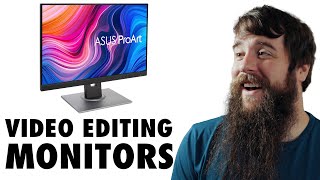
“”
See Today’s Price →What we like
- 34-inch size provides a comfortable viewing or working surface area
- High refresh rate reduces motion blur and ghosting in fast-paced games and video
- Wide color gamut coverage delivers vibrant accurate colors for creative work
Watch out for
- Large monitors require adequate desk space and may cause ergonomic issues without proper positioning
- High refresh rate and resolution panels draw more power than standard monitors
Read Full Analysis
The LG 34WN80C-B brings 34-inch 21:9 ultrawide layout to color grading workflows — a format advantage that allows timeline, grade panel, and reference viewer to coexist simultaneously without second monitor complexity. In DaVinci Resolve or Premiere Pro, the 3440x1440 horizontal span comfortably accommodates the color wheels, curves, and node graph alongside a full-resolution preview window. USB-C Power Delivery enables single-cable laptop docking for mobile editing configurations. The IPS panel provides consistent viewing angles across the wide 34-inch sweep. The 34WN80C-B's 99% sRGB coverage is adequate for web and broadcast delivery but stops short of AdobeRGB or wide-gamut DCI-P3 credentials that dedicated color reference monitors carry. At 60Hz, it's correctly positioned for editing rather than gaming, but the absence of hardware calibration means color drift over time requires a third-party calibrator. Against the LG 27UK850-W at $300.00 (rank 1), the 34WN80C-B costs $95 more for the ultrawide format versus 27-inch 4K — the ultrawide wins when multi-panel visibility across a single screen is the priority; the 4K wins on pixel density and explicit color certification for delivery-critical monitoring. Against the Dell Curved Gaming at $419.99 (rank 3), the LG saves $25 at equivalent ultrawide resolution with a productivity-oriented rather than gaming-first design intent. For colorists who value timeline and workspace width over peak color certification, the LG 34WN80C-B is the better ultrawide choice on this page.

“The LG 27UK850-W 27-Inch 4K UHD IPS Monitor with USB-C features true 4k ips panel. Best suited for gamers and professionals who spend long hours at their workstation and value screen quality.”
See Today’s Price →What we like
- True 4K IPS panel
- USB-C 60W charging
- HDR 400 support
- Accurate color reproduction
Watch out for
- No high refresh rate (60Hz)
- Stand limited tilt only
- Higher price for 60Hz
Read Full Analysis
The LG 27UK850-W earns the top spot on a color grading comparison through genuine 4K IPS — delivering 3840x2160 resolution with 99% sRGB and DCI-P3 color accuracy that colorists and editors require for delivery-accurate monitoring. USB-C with 60W Power Delivery enables single-cable laptop docking, reducing cable complexity in color-critical environments where monitor calibration and connectivity both matter. At 4K on 27 inches, fine detail in footage previews and grade decisions visible in skin tones, highlights, and shadow detail are significantly sharper than the QHD and ultrawide alternatives on this page. The 27UK850-W runs at 60Hz — correct for color grading where frame-rate motion is not the evaluation criterion, but limiting for gaming or high-frame-rate playback. The tilt-only stand is the ergonomic weakness; VESA mounting is required for monitor arm configurations common in professional grading setups. HDR400 is the minimum HDR tier — the panel handles HDR preview content but doesn't replicate broadcast reference HDR displays in peak brightness or dynamic range. It is the most cost-accessible entry on this comparison. Against the LG 34WN80C-B at $395.00 (rank 2), the 27UK850-W saves $95 for 27-inch 4K IPS versus the 34-inch 21:9 format — the 4K wins on pixel density and explicit color accuracy certification while the ultrawide wins for multi-panel workflow with simultaneous timeline and grade panel visibility. Against the Dell Curved Gaming at $419.99 (rank 3), the LG is $120 less and more specifically calibrated for color work; the Dell is a gaming monitor primarily placed here for ultrawide workspace. For colorists prioritizing accurate sRGB and DCI-P3 delivery monitoring at the lowest cost on this page, the LG 27UK850-W is the correct choice.

“34-inch 3440x1440 ultrawide resolution replaces dual-monitor setups for immersive gaming and productivity. Best suited for gamers and professionals who spend long hours at their workstation and…”
See Today’s Price →What we like
- 34-inch 3440x1440 ultrawide resolution replaces dual-monitor setups for immersive gaming and productivity
- 1000R curvature matches the human eye's natural focal radius for reduced eye strain in long sessions
- 165Hz refresh rate handles fast-paced gaming without visible tearing or ghosting
- AMD FreeSync Premium Pro eliminates stuttering in variable frame rate scenarios
Watch out for
- 34-inch ultrawide requires GPU with enough VRAM to render at 3440x1440 — budget cards will struggle
- No VESA mount option on some configurations — check model before purchasing for arm mounting
- Curved ultrawide format shows distortion in center-cropped productivity apps like document editing
Read Full Analysis
The Dell Curved Gaming 34-inch brings 3440x1440 ultrawide with 1000R curvature to this color grading comparison — the highest-priced option and the one best suited for creators who split time between video editing and gaming. The 1000R curve reduces head movement across 34 inches of display during long editing sessions where users scan the full timeline width repeatedly. AMD FreeSync Premium Pro and 165Hz are surplus specs for color grading, but they make the monitor genuinely dual-purpose for gaming hours after the edit session, justifying the premium over dedicated productivity panels. The 1000R curvature — immersive for gaming — can create visible edge distortion in color work applications where straight lines, waveforms, and vector scopes serve as visual reference. Colorists who rely on precise geometric accuracy in scopes and crop guides may find the curve distracting for technical evaluation tasks. This is a gaming-first panel placed on a color grading page for its ultrawide workspace rather than formal color accuracy certifications. No VESA mount on some configurations limits monitor arm use. Against the LG 27UK850-W at $300.00 (rank 1), the Dell costs $120 more for ultrawide format and 165Hz versus the LG's 4K IPS with dedicated color accuracy certification — the LG is the stronger pure color grading choice. Against the LG 34WN80C-B at $395.00 (rank 2), the Dell costs $25 more for a tighter 1000R curve, 165Hz, and FreeSync Pro versus the LG's flatter 21:9 layout at 60Hz — the Dell is preferable when after-hours gaming is a real use case, the LG when the screen is used exclusively for editing and productivity.
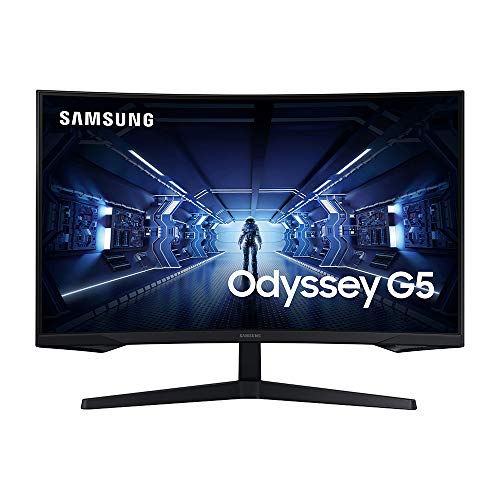
“The Samsung Odyssey G5 (LC32G55TQWNXZA) is a 32-inch 2560x1440 gaming monitor listed at 144Hz. The size is the point: it spreads 1440p across 32 inches at roughly 92 pixels per inch, which reads as…”
See Today’s Price →What we like
- 2560x1440 resolution across a 32-inch screen
- 144Hz refresh rate
- Roughly 92 pixels per inch, so text stays legible at normal desk distance
Watch out for
- At about 92 pixels per inch it looks softer up close than a 27-inch 1440p panel
- Listing does not state panel type, contrast ratio or adaptive-sync support
Read Full Analysis
Samsung Odyssey G5 earns the Best Contrast VA badge on this color grading page for a specific reason: the VA panel technology provides 3000:1 native contrast — roughly 3-6 times the contrast of IPS panels that dominate color-accurate displays. For grading dark footage — horror, noir, cinematic content with heavy shadow work — VA contrast reveals shadow gradations that washed-out IPS panels obscure, making lift and gamma adjustments more perceptible on the monitor than on an IPS alternative. On a page otherwise featuring IPS panels (LG 27UK850-W, Dell options), the Odyssey G5 serves a specific use case: editors who grade shadow-heavy content and need to see dark detail without compensating for the elevated black floor of IPS displays. The 1000R curved panel at a screen size around 27-34 inches provides an immersive grading surface. The tradeoff is color accuracy — VA panels have worse viewing-angle consistency than IPS, which matters for color grading where side-to-side consistency is a professional requirement. Samsung Odyssey G5 is the right color grading display for editors who primarily work on dark, shadow-heavy content and prioritize contrast depth over the wide viewing angle and factory color calibration of IPS panels. For color accuracy and P3 coverage that professional color work requires, the LG and Dell IPS options on this page are the industry-standard path. For combined gaming and casual grading use where the VA contrast benefits both applications, Odyssey G5 balances the dual-use case well.
“”
See Today’s Price →What we like
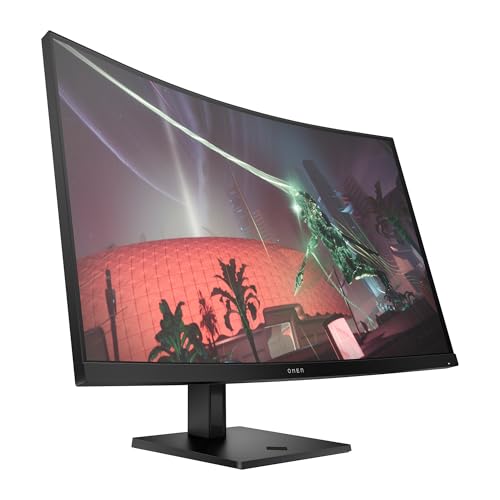
- 31.5-inch QHD panel delivers higher pixel density and more screen real estate than 27-inch 1080p alternatives
- FreeSync support reduces screen tearing with compatible AMD GPUs across a broad frame rate range
- Curved VA panel reduces edge glare compared to flat IPS panels under typical room lighting conditions
Watch out for
- VA panel technology produces some blooming around bright objects in dark scenes — noticeable in high-contrast viewing
- HP OSD controls and menu navigation are less responsive and intuitive than Samsung or LG panel equivalents
Frequently Asked Questions
Do I need a 4K monitor for color grading?
What color gamut coverage do I need for color grading?
Is IPS or OLED better for color grading?
How We Chose These Products
We compare each product’s Amazon listing, the manufacturer’s published specifications and Amazon customer ratings, shown with their review counts as Amazon’s data, and rank the products on how well they answer this page’s question. We do not test products in hand and we do not run our own analysis of review text. A publication or expert is named only where we cite its published findings about that product. No manufacturer paid for placement on this page.
A price appears only when Amazon’s API supplied it at a recent daily refresh, with the date and time beside it, and is withdrawn at 4 AM Central on the day after it turns 24 hours old; otherwise use “Check price on Amazon” for the live price. Read our full methodology →
How We Score These Products
Each dimension score comes from evidence about the exact model listed — a published specification, a measurement by a named independent reviewer, or that product’s own buyer reviews, as described for each dimension below — not from a similar product in the same range. We do not test products ourselves, and we do not score a dimension we could not evidence. A dash means no evidence was found for that product, not that it performed badly.
Response Time: From evidence about this exact model (specification, named reviewer or its own reviews).
Color Accuracy: From evidence about this exact model (specification, named reviewer or its own reviews).
The overall score is the mean of the dimensions we could evidence for that product, on a 10-point scale. Price is shown separately and is never folded into a score. Amazon star ratings are shown separately and are never part of any score.