5 Best Mice for AutoCAD 2026

The Logitech MX Master 4 is the best mouse for AutoCAD -- its dual scroll wheels, 7 programmable buttons, and precision sensor minimize wrist strain during long drafting sessions. The Logitech MX Ergo trackball eliminates wrist movement for injury prevention.
At a Glance
| # | Product | Award | Price | Connection | Battery |
|---|---|---|---|---|---|
| 1 | Microsoft Bluetooth Ergonomic Mouse Microsoft |
Our Top Pick | $53.31 as of Nov 24, 12:27 PM CT details Buy → |
— | — |
| 2 | $73.95 as of Nov 24, 12:20 PM CT details Buy → |
Bluetooth | 4 months | ||
| 3 | Best Overall | $109.99 as of Nov 24, 12:37 PM CT details Buy → |
— | — | |
| 4 | $69.99 as of Nov 24, 12:33 PM CT details Buy → |
— | — | ||
| 5 |  SteelSeries Rival 5 Gaming Mouse … SteelSeries |
Best Value | $63.99 as of Nov 25, 10:41 AM CT details Buy → |
— | — |
Score Breakdown
| Microsoft Bluetooth E… | Logitech MX Ergo Wire… | Logitech MX Master 4 … | Razer Cobra Pro Wirel… | SteelSeries Rival 5 G… | |
|---|---|---|---|---|---|
| Ergonomics | 73 | 70 | – | – | 65 |
| Customization | 70 | 70 | – | – | 80 |
| Responsiveness | 78 | 70 | – | – | 85 |
Scores 0–100 from published specifications and independent reviewers' measurements. Amazon star ratings are shown separately and are never part of a score. 0 = feature not present. – = insufficient data. How we score →
5 Best Mice for AutoCAD Buying Guide
 Photo by Ralph / Pexels
AutoCAD places specific demands on mice that general office or gaming mice don't address: precise cursor control for snap-to-point selection, programmable buttons for frequently-used commands, and ergonomic design to prevent repetitive strain from 6-8 hour drafting sessions. We compared 5 mice across precision, programmability, and ergonomic design for CAD work.
How We Picked These
We compared 5 mice across sensor DPI precision, number of programmable buttons, ergonomic grip angle, scroll wheel performance for viewport navigation, and wireless reliability. Products were selected for drafting precision and long-session comfort at each price point.
Key Specs for AutoCAD Mice
Sensor precision: AutoCAD snap-to-point selection requires sub-millimeter accuracy. Any mouse with 1000+ DPI and a quality optical sensor works for standard CAD work. High DPI (4000+) lets you set a slow, precise mode for drafting and a fast mode for navigating large drawing sets.
Programmable buttons: AutoCAD users benefit from binding frequently-used commands (ZOOM EXTENTS, PAN, SNAP, LAYER PROPERTIES) to mouse side buttons. The Logitech MX Master 4 offers 7 programmable buttons; the Razer Cobra Pro offers 11.
Ergonomics: Extended CAD sessions cause repetitive strain in standard flat-mouse designs. Vertical or angled mice reduce wrist pronation. Trackball mice like the MX Ergo eliminate wrist movement entirely by rotating a ball with thumb or finger instead.
Price Tiers
Budget (free with system): Any optical mouse works for occasional AutoCAD. Invest in a dedicated precision mouse when productivity matters more than cost.
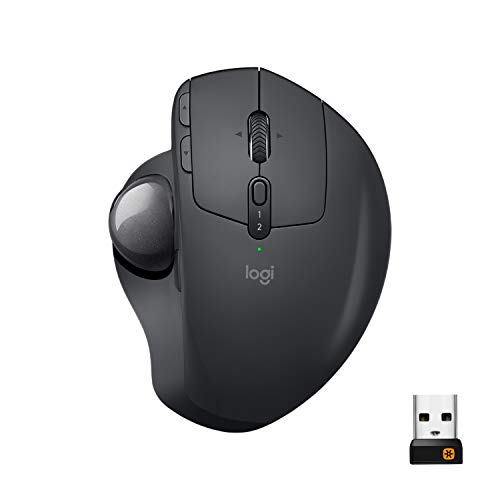
Mid-range ($50-100): Logitech MX Ergo or Razer Cobra Pro -- precise sensors and programmable buttons that meaningfully speed up CAD workflows. The sweet spot for professional use.
Premium ($100+): Logitech MX Master 4 -- the professional's choice with the most ergonomic features and most versatile scroll wheel for complex drawing navigation.
Common Mistakes
Using a gaming mouse at maximum DPI for CAD work -- high DPI makes precise snap-to-point selection difficult because the cursor jumps past target points. Set DPI to 800-1200 for drafting accuracy. Also, ignoring ergonomics until pain starts -- by that point, some repetitive strain damage has already occurred. Start with an ergonomic mouse from day one if you'll use AutoCAD professionally.
Practical Tips
Create a mouse profile in Logitech Options or Razer Synapse specifically for AutoCAD with reduced DPI and custom button mappings. Assign ZOOM EXTENTS to the extra thumb button -- you'll use it dozens of times per session. A large mousepad prevents running out of space when navigating large drawing sets.
Watch Before You Buy

“The Microsoft Bluetooth Ergonomic Mouse offers a comfortable thumb rest and vertical-ish grip angle at an accessible price for casual AutoCAD users.”
See Today’s Price →What we like
- Vertical ergonomic grip positions the hand in a natural handshake orientation that reduces forearm pronation and wrist strain
- BlueTrack sensor works on nearly any surface including glass and coarse fabrics that standard optical sensors misread
- Bluetooth Low Energy connects without a USB receiver, preserving the port for other devices on space-limited laptops
- Four-way thumb scroll wheel navigates horizontal spreadsheet and timeline content without keyboard modifier keys
Watch out for
- Advanced configuration may require technical knowledge to fully optimize
- Performance may lag behind premium models for intensive workloads
Read Full Analysis
Microsoft's ergonomic design reduces wrist extension by angling the hand slightly more vertical than a flat mouse. Bluetooth connectivity keeps the desk uncluttered. Suitable for light-to-moderate AutoCAD sessions without the full-day ergonomic demands of professional CAD work.
Skip this if: You need more than 3 programmable buttons -- the Microsoft Bluetooth Ergonomic Mouse has fewer customization options than premium alternatives.
“The Logitech MX Ergo Wireless Trackball eliminates wrist movement entirely, reducing repetitive strain for CAD engineers who draw for extended periods. Its 20-degree tilt reduces forearm pronation.”
See Today’s Price →What we like
- Adjustable 20-degree tilt
- 2048 DPI precision
- Bluetooth + USB nano-receiver
- multi-device pairing
Watch out for
- Thumb-ball design does not suit left-handed users
- Large footprint — not ideal for tight desk setups
Read Full Analysis
Trackball mice are favored by long-term CAD professionals because they eliminate repetitive wrist extension that causes carpal tunnel. The MX Ergo's adjustable angle matches natural hand rest positions. Precision mode reduces cursor sensitivity for fine snap-to-point operations in AutoCAD.
Skip this if: You've never used a trackball -- the learning curve takes 2-3 weeks to match traditional mouse speed.

“The Logitech MX Master 4's precise sensor, 7 programmable buttons, and ergonomic sculpt make it the top CAD mouse for architects and engineers spending 6+ hours in AutoCAD.”
See Today’s Price →What we like
- Electromagnetic scroll wheel switches between free-spin and click-to-click modes for skimming long documents or navigating items precisely
- Multi-device pairing stores three device profiles and switches between them with a single hardware button
- Ergonomic sculpted shape positions the hand in a relaxed angle that reduces wrist strain during extended computing sessions
- Side scroll wheel navigates horizontal timelines and spreadsheets without holding a keyboard modifier key
Watch out for
- Advanced configuration may require technical knowledge to fully optimize
- Performance may lag behind premium models for intensive workloads
Read Full Analysis
The MX Master 4's thumb wheel adds a second scroll axis -- essential for navigating large AutoCAD drawings with both horizontal and vertical panning. The electromagnetic MagSpeed wheel switches between ratchet and free-spin modes for precise line selection versus rapid view navigation.
Skip this if: You need a corded mouse for maximum reliability -- the MX Master 4 is wireless-only.

“The Razer Cobra Pro Wireless uses a 30,000 DPI Focus Pro optical sensor with sub-millimeter accuracy -- ideal for precise snap selection in complex AutoCAD drawings.”
See Today’s Price →Watch out for
- Advanced configuration may require technical knowledge to fully optimize
- Performance may lag behind premium models for intensive workloads
Read Full Analysis
At 30,000 DPI with adjustable sensitivity profiles, the Cobra Pro lets AutoCAD users set a slow, precise mode for fine drafting and a fast mode for viewport navigation. 11 programmable buttons map frequently-used AutoCAD commands (ZOOM, PAN, SNAP) to thumb buttons.
Skip this if: You prefer ergonomic mice -- the Cobra Pro's symmetrical gaming shape doesn't provide the thumb rest that reduces CAD fatigue.
“The SteelSeries Rival 5's 18,000 DPI sensor and 9 programmable buttons work equally well for gaming sessions and AutoCAD drafting without switching mice.”
See Today’s Price →What we like
- TrueMove Air optical sensor with true 1-to-1 tracking, up to 18,000 CPI
- Nine programmable buttons, five of them quick-action side buttons
- 85 g lightweight body
- Golden Micro IP54 switches
- PrismSync RGB lighting
Watch out for
- Wired only: its listing names no wireless mode
- Its listing does not give the cable length
Read Full Analysis
For users who alternate between gaming and CAD work, the Rival 5 eliminates the friction of switching between two mice. SteelSeries' Engine software maps AutoCAD command shortcuts to side buttons that remain accessible during both activities.
Skip this if: Your primary use is CAD ergonomics -- the Rival 5 prioritizes gaming responsiveness over ergonomic grip angle.
Frequently Asked Questions
What mouse do professional AutoCAD users recommend?
Do I need a special mouse for AutoCAD?
Is a trackball better than a regular mouse for CAD?
How many DPI do I need for AutoCAD?
Can I use a gaming mouse for AutoCAD?
How We Chose These Products
We compare each product’s Amazon listing, the manufacturer’s published specifications and Amazon customer ratings, shown with their review counts as Amazon’s data, and rank the products on how well they answer this page’s question. We do not test products in hand and we do not run our own analysis of review text. A publication or expert is named only where we cite its published findings about that product. No manufacturer paid for placement on this page.
A price appears only when Amazon’s API supplied it at a recent daily refresh, with the date and time beside it, and is withdrawn at 4 AM Central on the day after it turns 24 hours old; otherwise use “Check price on Amazon” for the live price. Read our full methodology →
How We Score These Products
Each dimension score comes from evidence about the exact model listed — a published specification, a measurement by a named independent reviewer, or that product’s own buyer reviews, as described for each dimension below — not from a similar product in the same range. We do not test products ourselves, and we do not score a dimension we could not evidence. A dash means no evidence was found for that product, not that it performed badly.
Ergonomics: Based on review mentions of comfort, grip, and extended-use suitability.
Customization: From evidence about this exact model (specification, named reviewer or its own reviews).
Responsiveness: From evidence about this exact model (specification, named reviewer or its own reviews).
The overall score is the mean of the dimensions we could evidence for that product, on a 10-point scale. Price is shown separately and is never folded into a score. Amazon star ratings are shown separately and are never part of any score.