Best Home Security Cameras for Beginners 2026

The Wyze Cam v3 is the best security camera for most beginners -- it works indoors and outdoors, delivers color night vision, and includes 14 days of free cloud clips with no subscription. For a full home security system, the Wyze Home Monitoring Core Starter Kit adds sensors and monitoring.
At a Glance
Home Security Cameras for Beginners Buying Guide
 Photo by Thomas VEILLON / Pexels
Home security cameras for beginners split into two decisions: indoor vs outdoor, and subscription vs no-subscription. Getting these wrong costs you either monthly fees you didn't expect or a camera that can't survive weather.
How we picked these. Products were selected for genuine beginner usability -- we excluded systems requiring professional installation or dedicated recorders.
Indoor vs Outdoor: The Most Important Decision
Indoor cameras (eufy E220, Wyze Cam v3 indoor mode) are not weather-resistant. They're for monitoring rooms, pets, entry points from inside. Lower cost, no weatherproofing needed. Outdoor cameras (Arlo Spotlight, Wyze Cam v3 outdoor) need an IP65+ weather rating. Most beginner cameras are dual-use (Wyze Cam v3 works indoors and out). Video doorbells (Arlo, Ring) are outdoor cameras with a doorbell button -- the fastest growing category because they cover your most important entry point.
Subscription vs No-Subscription
Most cameras save short clips to the cloud free (Wyze: 14 days, Ring: basic motion detection) but charge monthly for full video history, person detection, and package detection. eufy is the major exception -- it stores all footage locally on the device at no cost. Budget $4-$10/month if you want cloud video history from Ring, Arlo, or Nest cameras.
Key Specs That Matter
Resolution: 1080p (Full HD) is enough for identifying faces and packages. 2K adds detail at distance. 4K overkill for most home use. Night vision: Infrared (black and white) works in dark. Color night vision (Wyze v3, Arlo Spotlight) requires a light source but shows colors. Field of view: 100-180 degrees. Wide angles cover more but distort edges. 110-130 degrees is the sweet spot for most doorways.
Price Tiers
Budget ($35-$50): Wyze Cam v3, eufy E220. 1080p-2K, basic features, limited or no subscription. Good starting point. Mid-range ($50-$100): Arlo Video Doorbell, Wyze Starter Kit. Better video, more smart home integration, optional monitoring. Premium ($150+): Arlo Pro 4/5 series, Google Nest Cam. 4K, better AI detection, faster support. Worth it after you outgrow budget cams.
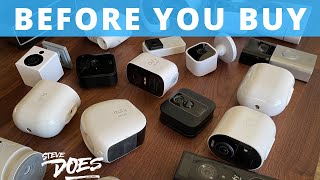
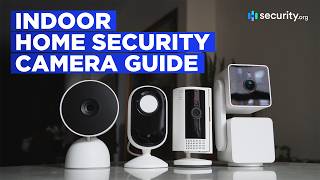
Watch Before You Buy
“1080p HD with color night vision via Starlight Sensor. Best suited for affordable indoor/outdoor home security with color night vision.”
See Today’s Price →What we like
- 1080p HD with Starlight color night vision
- IP65 rating for outdoor installation
- Continuous recording to a microSD card (sold separately)
- Two-way talk with motion and sound alerts
- Works with Alexa and Google Assistant
Watch out for
- Wired, and connects only to 2.4GHz Wi-Fi
Read Full Analysis
The Wyze Cam v3 is the standard beginner recommendation in home security cameras because it removes the two barriers that prevent most first-time buyers from setting up a camera: price and complexity. It's the lowest-commitment security camera purchase that still delivers meaningful capability — 1080p HD with color night vision via the Starlight Sensor, IP65 weather resistance for both indoor and outdoor placement, 2-way audio, and free 14-day rolling cloud event clip storage without a subscription. Setup through the Wyze app takes under 10 minutes from box-open to first live view. Alexa and Google Assistant integration means the camera connects into most smart home ecosystems beginners are already building. The subscription model is the nuance beginners should know before buying: the free tier delivers motion alerts, 14-day event clips, and live view — sufficient for basic monitoring. The Wyze Cam Plus subscription ($1.99-2.99/month) unlocks person, pet, and package AI detection that makes alerts actionable rather than constant. Many beginners start with the free tier and upgrade after experiencing alert fatigue from motion-triggered notifications without AI filtering. On this beginner page against the Arlo Video Doorbell 2K, the Wyze Cam v3 is the general-purpose security camera while the Arlo is a front-door doorbell specifically. They don't compete directly: the Wyze is for mounting on a wall, window, or surface anywhere you have an outlet; the Arlo replaces or supplements your existing doorbell for front-door monitoring with two-way communication for visitors. A beginner securing an apartment with one camera should start with the Wyze; a homeowner wanting both doorbell video and interior/exterior coverage needs both types.

“2K HDR video for sharper detail at distance. 4.2 stars from 2,593 Amazon reviews signal consistent reliability.”
See Today’s Price →What we like
- 2K HDR head-to-toe video with night vision
- Person, package, pet and vehicle detection
- Battery or hardwired power
- IP65 weather resistance
- Works with Alexa, Apple Home, Google Home and SmartThings
Watch out for
- 60-day video history and AI detection need a paid Arlo Secure plan after the trial
Read Full Analysis
The Arlo Video Doorbell 2K fills the front-door monitoring role that a general security camera like the Wyze Cam v3 cannot: it replaces or supplements an existing doorbell with 2K HDR video (2560×1440), enabling sharp identification of visitor faces, package labels, and license plates at the close distance of a doorstep. The 2K HDR combination is particularly effective for front-door use — high dynamic range handles the common scenario of a backlit visitor on a bright day where standard cameras blow out the background and lose the subject. Package detection distinguishes a package being delivered from a person walking past, reducing irrelevant alerts. Wired installation uses existing 8-24V AC doorbell wiring, or the battery option works without existing wiring — covering both homes with and without traditional doorbells. The Arlo's subscription model follows the same pattern as most modern security cameras: Arlo Secure subscription unlocks extended video history (free tier provides limited live view access and 30-day trial). 2K resolution generates larger video files than 1080p, making the cloud storage subscription more load-bearing for extended history access. Beginners should factor $3-5/month into their total ownership cost if they want to review clips older than a few days. Against the Wyze Cam v3 on this beginners page, the Arlo Video Doorbell 2K is a different product category rather than a direct competitor — doorbells and security cameras solve different access-point monitoring problems. The Wyze is for general placement (indoor, outdoor, any surface); the Arlo is exclusively for front-door doorbell replacement with visitor interaction. A first-time home security buyer typically needs both types: the doorbell for the front door and a standard camera for any other exterior or interior coverage point.

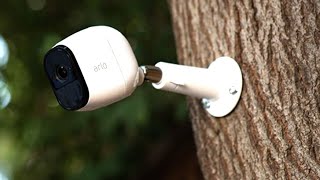
“The Arlo Essential Spotlight Camera features wire-free (battery). Best suited for outdoor monitoring without running wires -- wireless battery-powered with built-in spotlight.”
See Today’s Price →What we like
- Wire-free (battery)
- Built-in spotlight for color night video
- 1080p
- Motion-activated alerts
Watch out for
- Requires Arlo Secure subscription for most useful features
- Battery lasts 3-6 months
Read Full Analysis
The Arlo Essential Spotlight Camera adds a feature the Wyze Cam v3 and Ring Video Doorbell on this page don't offer: a built-in spotlight that activates on motion to produce color night video instead of the grayscale footage delivered by standard infrared night vision. Wire-free battery operation means installation requires no ladder work near an electrical panel — place it wherever coverage is needed and rechargeable batteries handle the power. Against the Wyze Cam v3, Arlo's spotlight and battery freedom justify the price difference for outdoor placement. The Wyze Cam is strong indoors and at covered entry points with power access; the Arlo Essential Spotlight wins when color night clarity and zero-wiring flexibility matter. Choose Arlo Essential Spotlight for outdoor positions where power access is limited and color night footage is a priority. Skip it for indoor use, where the Wyze Cam's continuous power and lower price make more sense.
Frequently Asked Questions
What security camera is best for a complete beginner?
Do home security cameras require a monthly subscription?
What's the difference between a security camera and a video doorbell?
How long do wireless security camera batteries last?
Can security cameras work without Wi-Fi?
How We Chose These Products
We compare each product’s Amazon listing, the manufacturer’s published specifications and Amazon customer ratings, shown with their review counts as Amazon’s data, and rank the products on how well they answer this page’s question. We do not test products in hand and we do not run our own analysis of review text. A publication or expert is named only where we cite its published findings about that product. No manufacturer paid for placement on this page.
A price appears only when Amazon’s API supplied it at a recent daily refresh, with the date and time beside it, and is withdrawn at 4 AM Central on the day after it turns 24 hours old; otherwise use “Check price on Amazon” for the live price. Read our full methodology →