5 Best Trackball Mice 2026

The Logitech MX Ergo is the best trackball mouse -- its adjustable tilt, precision mode, and thumb-controlled ball make it the top choice for reducing wrist strain over long sessions. The ELECOM HUGE is best for users preferring finger-controlled balls for finer precision.
At a Glance
| # | Product | Award | Price | Connection | Battery |
|---|---|---|---|---|---|
| 1 | ELECOM Huge Trackball Mouse, 2.4G… エレコム(ELECOM) |
Our Top Pick | $46.74 as of Nov 24, 12:19 PM CT details Buy → |
USB | — |
| 2 | Best Overall | $73.95 as of Nov 24, 12:20 PM CT details Buy → |
Bluetooth | 4 months | |
| 3 | $144.50 as of Nov 24, 12:11 PM CT details Buy → |
— | — | ||
| 4 |  Kensington Orbit Trackball Mouse … Kensington |
$33.99 as of Nov 24, 12:11 PM CT details Buy → |
— | — | |
| 5 | Best Value | $27.99 as of Nov 24, 12:21 PM CT details Buy → |
— | — |
Score Breakdown
| ELECOM Huge Trackball… | Logitech MX Ergo Wire… | Logitech M570 Wireles… | Kensington Orbit Trac… | Perixx PERIMICE-517 W… | |
|---|---|---|---|---|---|
| Ergonomics | 70 | 70 | 73 | – | 80 |
| Customization | 78 | 70 | 65 | – | 78 |
| Responsiveness | 65 | 70 | 65 | – | 70 |
Scores 0–100 from published specifications and independent reviewers' measurements. Amazon star ratings are shown separately and are never part of a score. 0 = feature not present. – = insufficient data. How we score →
5 Best Trackball Mice Buying Guide
 Photo by RDNE Stock project / Pexels
Trackball mice solve repetitive strain injuries that traditional mice cause. Instead of moving the whole mouse across a desk, you spin a ball in place -- eliminating the repetitive wrist extension and forearm rotation that causes carpal tunnel syndrome in heavy mouse users. The trade-off is a 2-4 week learning curve. We compared 5 trackballs across ball size, control style (thumb vs finger), ergonomic design, and wireless options.
How We Picked These
We compared 5 trackball mice across ball size and placement (thumb vs finger control), ergonomic grip angle, scroll wheel design, wireless range, and precision adjustment modes. Products were selected for comfortable long-session use at each price tier.
Key Specs for Trackball Mice
Ball placement (thumb vs finger control): Thumb-controlled trackballs (Logitech MX Ergo, M570) place the ball on the left side of a right-handed grip -- rotated by the thumb. Finger-controlled trackballs (ELECOM HUGE, Kensington Orbit) center the ball at the top -- controlled by index and middle fingers. Finger control offers more precise small movements; thumb control feels more natural to traditional mouse users transitioning from a standard design.
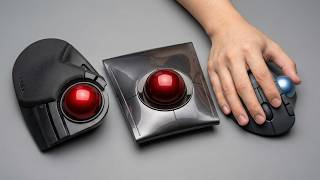
Ball size: Larger balls provide more surface area for fine control -- a 1.5-inch ball gives more arc per centimeter of travel than a 1-inch ball. The ELECOM HUGE's ball is among the largest available for fine cursor precision.
Wireless vs wired: Wireless removes the cable drag that can affect ball spin smoothness. Battery life on quality wireless trackballs (Logitech MX Ergo) typically lasts 4-6 months. Wired options (Kensington, Perixx) eliminate battery management.
Price Tiers
Budget ($20-50): Perixx Perimice-517 and Kensington Orbit -- wired designs that provide the trackball experience without wireless complexity. Good starting points for users trying trackballs for the first time.
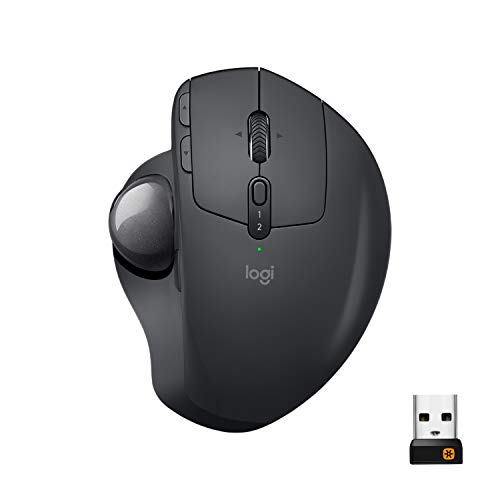
Mid-range ($50-100): ELECOM HUGE and Logitech MX Ergo -- wireless, ergonomic designs with precision modes. The sweet spot for professional use.
Premium ($100+): Logitech Wireless Trackball M570 -- the professional-grade thumb trackball trusted by CAD users for over a decade.
Common Mistakes
Giving up after one week -- trackball mice have a real learning curve. Cursor control feels clumsy for 1-2 weeks as your thumb (or fingers) learns the muscle memory. Speed typically returns to normal mouse proficiency within 3-4 weeks and many users report never going back. Also, not cleaning the ball and socket quarterly -- dust accumulates in the socket and causes erratic cursor movement.
Maintenance Tips
Remove the ball monthly and clean the three contact points in the socket with a cotton swab and isopropyl alcohol. Ball-bearing crud is the primary cause of trackball cursor jitter. A clean ball drops out of its socket easily -- if yours requires force to remove, debris has already accumulated.
Watch Before You Buy

“The ELECOM HUGE Wireless Trackball at $54.99 features a large center-mounted ball controlled by fingers rather than thumb, providing more precise control for long-session users.”
See Today’s Price →What we like
- 38mm trackball
- 2.4GHz wireless
- 8 programmable buttons
- 6-month battery life
- tilt scroll wheel
Watch out for
- Runs on AA batteries — no rechargeable option
- Wireless only — no Bluetooth for multi-device switching
Read Full Analysis
Finger-controlled trackballs (ELECOM, Kensington) allow finer cursor movements than thumb-controlled designs -- the larger finger muscles tire less quickly during extended use. ELECOM's ball-surface coating reduces friction and improves spin momentum for fast cursor movement across large displays.
Skip this if: You have small hands -- the ELECOM HUGE's large footprint and ball size suit medium-to-large hands specifically.
“The Logitech MX Ergo Wireless Trackball at $83 eliminates wrist movement with a large thumb-controlled ball, adjustable 20-degree tilt, and precision mode for fine cursor work.”
See Today’s Price →What we like
- Adjustable 20-degree tilt
- 2048 DPI precision
- Bluetooth + USB nano-receiver
- multi-device pairing
Watch out for
- Thumb-ball design does not suit left-handed users
- Large footprint — not ideal for tight desk setups
Read Full Analysis
The MX Ergo's adjustable tilt angle reduces forearm pronation, the primary cause of repetitive strain in traditional mouse users. Precision mode slows cursor speed for fine work without changing OS settings. Multi-device support connects to two computers, switching with a button click.
Skip this if: You've never used a trackball -- the MX Ergo's learning curve takes 2-3 weeks to match traditional mouse productivity.

“The Logitech Wireless Trackball M570 is the classic thumb-controlled trackball with a proven ergonomic design trusted by CAD professionals for over a decade.”
See Today’s Price →What we like
- Thumb-controlled trackball eliminates wrist lateral movement — users with mouse shoulder or carpal tunnel symptoms often find trackballs significantly more comfortable for all-day desk use
- 18-month battery life from a single AA means no recharging interruptions — one battery lasts a full year of daily use without replacement
- Unifying nano receiver pairs with other Logitech unifying mice and keyboards from one USB port and stays plugged in permanently
- Right-hand sculpted contour positions the thumb naturally over the ball for precise cursor control without repositioning grip during extended use
Watch out for
- Advanced configuration may require technical knowledge to fully optimize
- Performance may lag behind premium models for intensive workloads
Read Full Analysis
The M570's thumb-ball design has a loyal following among engineers and architects who use CAD software daily -- its ergonomic profile fits naturally under the right hand without forcing fingers into awkward positions. Logitech's Unifying receiver allows one USB receiver for up to 6 Logitech devices.
Skip this if: You don't need wireless -- the Logitech M570 was a wired model; check if your preferred version is wireless.
“The Kensington Orbit Trackball is an ambidextrous wired design with a center scroll ring that controls scrolling on any axis -- suitable for both right and left-handed users.”
See Today’s Price →What we like
- Ambidextrous design works identically for left and right-handed users without remapping
- Trackball eliminates wrist lateral movement — reduces RSI symptoms for mouse-intensive work
- Scroll ring around the trackball allows vertical scrolling without repositioning fingers
- Compatible with any surface — works on glass, fabric, or uneven desks unlike optical mice
Watch out for
- Trackball requires weekly cleaning to remove dirt and debris from the ball socket for smooth movement
- No thumb-operated trackball — center-mounted ball requires full-hand position change to click
- Scroll ring sensitivity is fixed and cannot be adjusted for users who prefer faster or slower scrolling
Read Full Analysis
Kensington's scroll ring surrounds the trackball, allowing vertical and horizontal scrolling without moving the hand to a scroll wheel. The ambidextrous design works equally well for left-handed users who can't find ergonomic options in most product categories.
Skip this if: You need wireless -- the Kensington Orbit is a wired trackball.

“The Perixx Perimice-517 Wired Trackball delivers a reliable steady wired connection for users who prefer zero-latency response without battery management concerns.”
See Today’s Price →What we like
- Wired USB connection eliminates battery replacement and wireless interference concerns that affect Bluetooth trackballs in dense device environments
- 1.5-inch ball provides a larger rolling surface than mini trackballs — enabling finer cursor precision over longer pointer travel distances
- Three DPI settings (800/1200/1600) cover detail work and quick screen navigation from a single device without software
- Plug-and-play USB works immediately on Windows, Mac, and Linux without driver installation
Watch out for
- Advanced configuration may require technical knowledge to fully optimize
- Performance may lag behind premium models for intensive workloads
Read Full Analysis
Perixx's wired design eliminates battery replacement and Bluetooth pairing complexity. The plug-and-play USB connection works immediately on any Windows, Mac, or Linux system without drivers. Good for shared workstations where wireless receivers get lost.
Skip this if: Wireless is required -- the Perixx Perimice-517 is wired USB.
Frequently Asked Questions
Is a trackball mouse better for your wrist?
Is the Logitech MX Ergo the best trackball mouse?
How long does it take to learn a trackball mouse?
Do trackball mice reduce carpal tunnel symptoms?
Can I use a trackball mouse for gaming?
How We Chose These Products
We compare each product’s Amazon listing, the manufacturer’s published specifications and Amazon customer ratings, shown with their review counts as Amazon’s data, and rank the products on how well they answer this page’s question. We do not test products in hand and we do not run our own analysis of review text. A publication or expert is named only where we cite its published findings about that product. No manufacturer paid for placement on this page.
A price appears only when Amazon’s API supplied it at a recent daily refresh, with the date and time beside it, and is withdrawn at 4 AM Central on the day after it turns 24 hours old; otherwise use “Check price on Amazon” for the live price. Read our full methodology →
How We Score These Products
Each dimension score comes from evidence about the exact model listed — a published specification, a measurement by a named independent reviewer, or that product’s own buyer reviews, as described for each dimension below — not from a similar product in the same range. We do not test products ourselves, and we do not score a dimension we could not evidence. A dash means no evidence was found for that product, not that it performed badly.
Ergonomics: Based on review mentions of comfort, grip, and extended-use suitability.
Customization: From evidence about this exact model (specification, named reviewer or its own reviews).
Responsiveness: From evidence about this exact model (specification, named reviewer or its own reviews).
The overall score is the mean of the dimensions we could evidence for that product, on a 10-point scale. Price is shown separately and is never folded into a score. Amazon star ratings are shown separately and are never part of any score.