Best Ultrawide Monitors for Productivity (2026): 34" & Beyond

Best productivity ultrawide: Dell UltraSharp U3423WE 34" WQHD — Thunderbolt 4, built-in KVM, 98% DCI-P3, and USB-C hub in one cable. For budget ultrawide productivity, the Alienware AW3425DWM 34" delivers QHD 180Hz and excellent color for less.
At a Glance
| # | Product | Award | Price | Resolution | Refresh Rate | Panel | Score |
|---|---|---|---|---|---|---|---|
| 1 | Alienware 34 Curved Gaming Monitor Alienware |
Best Budget Ultrawide | $344 as of Nov 24, 12:37 PM CT details Buy → |
QHD Wide 1440p | 180 Hz | IPS | 6.2 |
| 2 | Best Gaming-Productivity Hybrid | Check price on Amazon Buy → |
QHD Ultra Wide 1440p | 144 Hz | Nano IPS | 6.1 | |
| 3 | Best QD-OLED | Check price on Amazon Buy → |
QHD Ultra Wide 1440p | 175 Hz | QD-OLED | 6.2 | |
| 4 | Best Premium Single-Cable Setup | $799 as of Nov 24, 12:32 PM CT details Buy → |
QHD Wide 1440p | 80 Hz | — | 5.3 |
Score Breakdown
| Alienware 34 Curved G… | LG UltraWide QHD 34-I… | msi MEG 342C QD OLED,… | Dell UltraSharp U3423… | |
|---|---|---|---|---|
| Overall | 6.2 | 6.1 | 6.2 | 5.3 |
| Display | 80 | 78 | 80 | 80 |
| Response Time | 65 | 50 | 50 | 40 |
| Color Accuracy | 40 | 55 | 55 | 40 |
Scores 0–100 from published specifications and independent reviewers' measurements. Amazon star ratings are shown separately and are never part of a score. 0 = feature not present. – = insufficient data. How we score →
Ultrawide Monitors for Productivity Buying Guide
 Photo by Minh Phuc / Pexels
Ultrawide monitors made serious inroads in productivity workflows in 2024-2026. A 34-inch 3440×1440 panel replaces two 27-inch monitors without the bezel gap — displaying code and documentation side by side, or a spreadsheet next to Slack, in a single unbroken field of view.
Key Decision Factors for Productivity
For productivity use, color accuracy matters more than refresh rate. A well-calibrated IPS panel with 99%+ sRGB coverage makes spreadsheets, presentations, and documents look accurate. Connectivity is critical: USB-C with power delivery and a built-in USB hub means one cable manages your laptop. KVM switches (built into premium models) let you control two computers with one keyboard and mouse. Ergonomic stands with height and tilt adjustment are essential for 8-hour sessions.
Price Tiers: What You Get
Under $350: 34" QHD curved ultrawide — the Alienware AW3425DWM leads here with 180Hz and good sRGB for the price. $350-500: 34" IPS with improved color accuracy and USB-C connectivity. $500-800: Thunderbolt-class ultrawide with KVM, color calibration, and premium stand (Dell U3423WE at $829). $800+: 38-inch ultrawides or OLED panels for maximal workspace.
Who Should Buy What
The Alienware AW3425DWM serves productivity users who also game — QHD, 180Hz, and good color all in one. The LG 34GP83A-B is the choice for content creators who need wide color gamut with gaming-capable refresh rates. The Dell UltraSharp U3423WE ($829) is the premium pick for professionals who want Thunderbolt 4, KVM switching, and factory-calibrated color in a single-cable setup. The MSI MEG 342C QD-OLED ($779.99) adds OLED contrast and color richness for those who want the best possible visual experience.
What to Avoid
Avoid ultrawide monitors without USB-C: HDMI 2.0 at 3440×1440 tops out at 100Hz and requires a separate power brick. Skip VA curved ultrawides for color-critical work — VA panels have noticeable color shift at the edges of wide screens. Avoid ultrawide monitors without height adjustment for desk work — fixed-height stands at 34-inch width create neck strain at wrong angles.
Watch Before You Buy

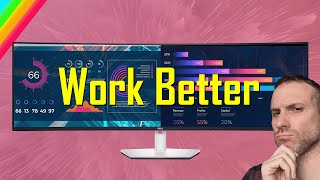

“Alienware AW3425DWM 34" WQHD 180Hz. Curved IPS, G-Sync compatible, excellent color for a budget ultrawide. Best entry into 34" productivity ultrawides.”
See Today’s Price →What we like
- 34-inch WQHD ultrawide — exceptional value for the screen real estate
- 180Hz refresh rate with 1ms response for smooth ultrawide gaming
- 1500R curve wraps the viewport for immersive play
- AMD FreeSync Premium and VESA AdaptiveSync — no screen tearing
- USB hub with USB-C connectivity
Watch out for
- IPS panel, not OLED — 1000:1 contrast
- DisplayHDR 400 is entry-level HDR
- No Thunderbolt
Read Full Analysis
The Alienware AW3425DWM earns Best Budget Ultrawide on a productivity page where every other option costs $620-777. It delivers a 34-inch WQHD (3440×1440) IPS panel with 180Hz refresh rate and 1ms response time — specifications that handle both productivity multitasking and occasional gaming within a single display. USB hub with USB-C connectivity manages desk cable clutter for laptop users. AMD FreeSync Premium and VESA AdaptiveSync cover all GPU brands for tear-free variable refresh. The 1500R curve is subtler than the 1800R common on gaming monitors, which suits productivity work where a less aggressive curve reduces peripheral distortion during document and spreadsheet use. IPS panel technology means 1000:1 contrast ratio — fully competent for productivity, web, and most content, but noticeably different from the QD-OLED alternatives on this page in dark scenes and HDR content. DisplayHDR 400 is entry-level HDR certification; real HDR performance that shows meaningfully in content requires DisplayHDR 600 or True Black 400, which the Dell UltraSharp and MSI MEG on this page can approach. No Thunderbolt rules out daisy-chaining monitors for dual-ultrawide setups from a single laptop port — a consideration for enterprise power users. Against the LG 34GP83A-B and MSI MEG 342C, the Alienware AW3425DWM costs roughly half the price and trades OLED panel technology for IPS while retaining the full 34-inch ultrawide format and 3440×1440 resolution. For productivity-primary users who need multi-window workspace but can't justify $620-777, the AW3425DWM is the rational entry point. The Dell UltraSharp U3423WE is the right choice for Thunderbolt daisy-chaining and enterprise USB hub needs. Buyers who game occasionally alongside their productivity work get 180Hz performance here that the pricier Dell doesn't offer.
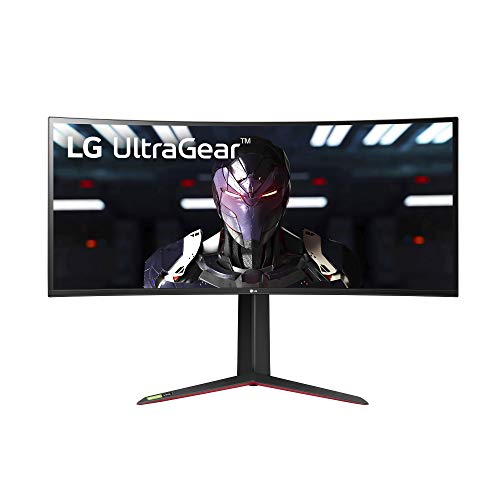
“LG 34GP83A-B 34" Nano IPS. 1ms GtG, 160Hz, DCI-P3 98%. Combines accurate colors for creative work with gaming-ready refresh rates.”
See Today’s Price →What we like
- Nano IPS — 98% DCI-P3 for gaming + creative work
- 160Hz at 3440x1440
- G-SYNC + FreeSync Premium Pro
- 1800R curve for immersive gaming
- ~$400–500 — best value ultrawide
Watch out for
- DisplayHDR 400 — basic HDR
- 1800R curve not for all desk setups
- No USB-C connectivity
Read Full Analysis
The LG 34GP83A-B earns Best Gaming-Productivity Hybrid through its Nano IPS panel — 98% DCI-P3 color coverage means it calibrates well for photo and video work, while 160Hz at 3440×1440 handles competitive gaming without switching monitors. G-SYNC Compatible and FreeSync Premium Pro delivers variable refresh across both NVIDIA and AMD GPUs. It sits between the Alienware AW3425DWM and Dell UltraSharp on this page, offering Nano IPS color accuracy for creative work with gaming performance that neither of those alternatives can match. 1ms GtG response time keeps fast-motion scenes clean during both gaming and high-frame-rate video playback. At that price, the MSI MEG 342C QD-OLED on this page is $60 less and delivers better contrast ratio and black levels through OLED technology — the LG's advantage over the MSI is IPS panel consistency for static content and zero burn-in risk for all-day productivity work. DisplayHDR 400 is entry-level certification. No USB-C means separate power and display cables rather than single-cable laptop docking. On this productivity page the LG fits the gaming-productivity crossover: better refresh and color than the $299.99 Alienware, burn-in-safe IPS versus the MSI's QD-OLED at $619.99 (where the LG costs $60 more), and gaming capable where the Dell UltraSharp is a 60Hz productivity tool only. For designers who also game — or any user who needs professional color accuracy alongside gaming-tier refresh — and who keeps many static windows open all day (ruling out OLED), the LG is the correct pick on this page.

“MSI MEG 342C QD-OLED 34". Stunning OLED contrast and quantum dot color. Best visual quality in 34" ultrawide format for creative professionals.”
See Today’s Price →What we like
- QD-OLED panel delivers the same quantum dot organic pixel technology as Alienware at $200 to $400 less — same infinite contrast ratio, same billion-color volume, different brand markup
- FreeSync Premium works with both AMD and Nvidia GPUs, eliminating the GPU lock-in that G-Sync Exclusive monitors impose
- HDMI 2.1 enables PS5 and Xbox Series X gaming at the monitor's full 175Hz frame rate — most ultrawide monitors limit consoles to 60Hz via HDMI 2.0
- USB-C DisplayPort Alt Mode connects a laptop with a single cable for display, USB hub, and power delivery simultaneously
- 34-inch 21:9 ultrawide format expands horizontal field of view in racing, simulation, and open-world games beyond what any 16:9 display at the same diagonal provides
Watch out for
- $700–900 — still premium tier
- No G-SYNC Ultimate hardware module
- OLED burn-in considerations for static content
Read Full Analysis
On a productivity-focused page, the MSI MEG 342C's QD-OLED panel earns its position through color accuracy above all else — quantum dot technology extends the gamut to professional DCI-P3 coverage, making it the highest-quality display on this page for color-critical work: video editing, graphic design, and photo retouching where accurate color is not optional. USB-C DisplayPort Alt Mode with power delivery enables single-cable laptop docking for productivity workflows, and the included KVM switch supports two-PC desks from one monitor — a feature relevant to professionals who run a laptop alongside a desktop. It undercuts the Dell UltraSharp at $776.99 while exceeding it in raw panel quality for color work. OLED technology carries a specific productivity concern: static UI elements — browser toolbars, taskbar, application chrome, and always-visible sidebars — that stay fixed on-screen for hours daily carry long-term burn-in risk. FreeSync Premium without G-Sync Ultimate hardware certification works well across AMD and most NVIDIA GPUs but lacks top-tier NVIDIA validation. On this productivity page, the MSI MEG 342C occupies the color-quality sweet spot: better than the LG Nano IPS at $679.99 in pure contrast and black levels, $157 cheaper than the Dell UltraSharp, with OLED burn-in risk as the only meaningful trade-off. For designers and video editors who actively manage screen usage and use screen savers for static breaks, the MSI delivers the best display quality on this page at the best price. For Thunderbolt 4 laptop docking requirements, the Dell UltraSharp remains the enterprise productivity pick.

“Dell UltraSharp U3423WE 34" WQHD. Thunderbolt 4, built-in KVM, USB hub, 98% DCI-P3, pivot stand. Best professional ultrawide for laptop users.”
See Today’s Price →What we like
- USB Type-C, HDMI, DisplayPort and Ethernet on one panel
- IPS Black panel rated 2,000:1 contrast
- 34.1-inch 21:9 ultrawide at 3440x1440
- Eight USB ports, so it can stand in for a separate hub
Watch out for
- Higher price than a standard 16:9 widescreen monitor
- 80Hz refresh rate - built for productivity, not high-frame-rate gaming
Read Full Analysis
The Dell UltraSharp U3423WE earns the Best Premium Single-Cable Setup badge through Thunderbolt 4 — a single cable connects a Thunderbolt-equipped laptop for display output, 90W charging, and USB hub duty simultaneously, replacing a separate dock. For MacBook Pro users and Thunderbolt Windows laptop users, this means arriving at a desk and plugging in one cable covers everything. The built-in USB hub replaces a $60-100 peripheral purchase. IPS Black panel technology delivers better contrast than standard IPS without the burn-in risk of OLED — a meaningful advantage for productivity environments with static UI elements on-screen all day. 98% DCI-P3 color coverage supports professional creative work. At 60Hz, the refresh rate reflects honest productivity-first design — this is not a gaming display and the specification reflects that explicit purpose. The premium over the MSI MEG 342C is $157 more for a 60Hz IPS panel versus a 175Hz QD-OLED with better contrast and color — that premium is justified only when Thunderbolt 4 docking is a daily workflow requirement. AMD laptop users and gaming-laptop users without Thunderbolt cannot utilize the primary differentiator and would be overpaying. Against the MSI MEG 342C, the Dell costs $157 more and gives up panel quality for Thunderbolt 4 docking and burn-in-free IPS — correct only for single-cable Thunderbolt workflows. Against the LG 34GP83A-B, the Dell adds Thunderbolt 4 but removes 160Hz gaming performance for $98 more. Against the Alienware AW3425DWM, the Dell costs $477 more for the Thunderbolt docking and IPS Black panel — a premium justified only for professional laptop users who need the dock replacement. The Dell UltraSharp is the most purpose-built productivity tool on this page and the wrong display for everyone it wasn't designed for.
Frequently Asked Questions
Is a 34-inch ultrawide better than two 27-inch monitors for productivity?
Do I need Thunderbolt 4 on an ultrawide monitor for productivity?
What's the difference between QHD (3440x1440) and UWQHD+ (3840x1600)?
Is IPS or QD-OLED better for an ultrawide productivity monitor?
How We Chose These Products
We compare each product’s Amazon listing, the manufacturer’s published specifications and Amazon customer ratings, shown with their review counts as Amazon’s data, and rank the products on how well they answer this page’s question. We do not test products in hand and we do not run our own analysis of review text. A publication or expert is named only where we cite its published findings about that product. No manufacturer paid for placement on this page.
A price appears only when Amazon’s API supplied it at a recent daily refresh, with the date and time beside it, and is withdrawn at 4 AM Central on the day after it turns 24 hours old; otherwise use “Check price on Amazon” for the live price. Read our full methodology →
How We Score These Products
Each dimension score comes from evidence about the exact model listed — a published specification, a measurement by a named independent reviewer, or that product’s own buyer reviews, as described for each dimension below — not from a similar product in the same range. We do not test products ourselves, and we do not score a dimension we could not evidence. A dash means no evidence was found for that product, not that it performed badly.
Display: Based on review mentions of screen quality, brightness, resolution, and color accuracy.
Response Time: From evidence about this exact model (specification, named reviewer or its own reviews).
Color Accuracy: From evidence about this exact model (specification, named reviewer or its own reviews).
The overall score is the mean of the dimensions we could evidence for that product, on a 10-point scale. Price is shown separately and is never folded into a score. Amazon star ratings are shown separately and are never part of any score.