Best USB-C Hubs for Beginners 2026
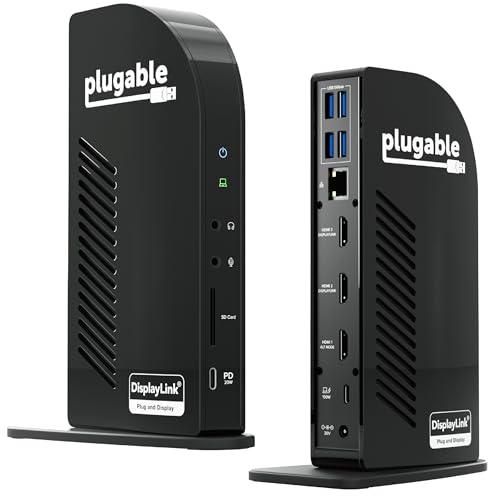
The Plugable 11-in-1 is the best USB-C hub for most beginners -- it delivers 96W laptop charging, dual HDMI outputs, and plug-and-play reliability across Windows and Mac. For Dell laptop users, the Dell WD19S delivers 180W and is fully Dell-certified.
At a Glance
| # | Product | Award | Price | Watts |
|---|---|---|---|---|
| 1 | Best Overall | $146.24 as of Nov 24, 5:52 PM CT details Buy → |
100.0 | |
| 2 | Best for Power Users | Check price on Amazon Buy → |
100 watts | |
| 3 | Best for Dell Laptops | $109.76 as of Nov 24, 5:52 PM CT details Buy → |
— | |
| 4 | Best for HP Laptops | $94 as of Nov 24, 12:28 PM CT details Buy → |
— | |
| 5 | Best for Dual 4K Monitors | $159.99 as of Nov 24, 12:26 PM CT details Buy → |
— | |
| 6 | Best Budget Multi-Port | $132.99 as of Nov 24, 12:26 PM CT details Buy → |
— |
USB-C Hubs for Beginners Buying Guide
 Photo by Anzor Dukaev / Pexels
USB-C hubs look identical but differ dramatically: some charge your laptop at 30W while others deliver 180W, some support dual 4K monitors while others cap at 1080p. Buying the wrong hub means spending $150 and still needing separate adapters.
How we picked these. Products were selected for reliable plug-and-play operation -- we excluded hubs with documented chipset overheating or inconsistent monitor output.
Hub vs Docking Station: What's the Difference?
Portable hub ($30-$80): 6-8 ports, bus-powered (no wall outlet needed). Goes in your bag. Limited to 60-85W laptop charging. Good for travel. Docking station ($100-$250): 10-15+ ports, requires wall power. Sits on your desk. Supports 96-180W laptop charging and dual monitors. The ones on this page are all docking stations -- for desk setups where you want one cable to connect everything.
Key Specs That Matter
Power delivery (PD): How many watts the hub passes to your laptop. Most laptops need 45-65W for normal use; gaming or creative laptops need 90-130W. If PD is lower than your laptop's requirement, the battery charges slowly or drains during use. Display output: HDMI 2.0 supports 4K@60Hz per monitor. Some hubs send duplicate signals to both HDMI ports (so both show 1080p@60Hz, not 4K). Check this carefully if you need dual 4K. DisplayLink technology enables dual 4K but requires a driver install.
Price Tiers
Budget ($100-$140): HP USB-C Dock G5, Dell WD19S. Brand-certified options that work reliably with matching laptop brands. Mid-range ($180-$200): Plugable 11-in-1. Best all-around reliability. The sweet spot for most desk setups. Premium ($240+): Plugable 14-in-1. Dual 4K, maximum ports. Worth it for multi-monitor creative setups.
Common Mistakes
Buying a hub with lower PD than your laptop needs: check your laptop's charger wattage first. Assuming HDMI on a hub means 4K: many hubs cap at 1080p or 4K@30Hz. Verify 4K@60Hz support. Not installing drivers when required: DisplayLink hubs need a driver; skip this and your second monitor won't work at all.
Watch Before You Buy

“The Plugable 11-in-1 USB-C Docking Station features 11 ports covering all needs. 4.4 stars from 1,548 Amazon reviews signal consistent reliability.”
See Today’s Price →What we like
- Up to three extended HDMI displays through DisplayLink, Macs included (driver required)
- 100W laptop charging plus a 20W front USB-C port
- Four 5Gbps USB-A ports, an SD reader, gigabit Ethernet and audio in/out
- Power adapter and a 1-meter USB-C host cable in the box
Watch out for
- Only HDMI 1 reaches 4K, at 30Hz; HDMI 2 and 3 top out at 1920x1200 60Hz
- No protected (HDCP) playback such as Netflix or Hulu
Read Full Analysis
The Plugable 11-in-1 USB-C Docking Station expands a single USB-C port into dual HDMI outputs for two external monitors, Gigabit Ethernet, SD plus microSD card slots, and multiple USB-A ports — a full desk setup from one cable. It is the entry-level model in Plugable's lineup, requiring a separate power adapter but offering the most port coverage of any unit on this page. Against the Dell WD19S 180W ($134.00 on this page), the Plugable costs $52 more but adds dual HDMI for two monitors — a meaningful difference for split-screen productivity. The HP USB-C Dock G5 and the Plugable USB 3.0 Dual 4K both undercut it by $76 while covering fewer simultaneous use cases. Buy the Plugable 11-in-1 for users who need dual-monitor output plus wired networking from a single USB-C cable — it is the complete beginner setup in a single purchase. Skip it if you need only one external monitor (the Dell WD19S is $52 less), or if high wattage laptop charging is the priority (the Dell WD19S 180W delivers more charging power).

“Supports up to 3 external displays via MST. Best suited for multi-monitor workstations.”
See Today’s Price →What we like
- 14 ports cover dual monitors, USB-A peripherals, Ethernet, SD/microSD, and audio simultaneously
- USB-C connection works with a broader range of laptops than Thunderbolt-only docks
- Plugable specializes in docking stations with thorough compatibility documentation for hundreds of laptops
- $239.95 delivers high port count at significantly less than the CalDigit TS4
Watch out for
- USB-C bandwidth (typically 10Gbps) is lower than Thunderbolt 4's 40Gbps for data-intensive workloads
- Some port combinations share bandwidth, which can throttle simultaneous high-speed peripheral use
Read Full Analysis
Supports up to 3 external displays via MST Triple display requires DisplayPort MST hub support on laptop Compared to the Plugable 11-in-1 USB-C Docking Station on this page, the Plugable Plugable 14-in-1 USB-C Docking Station costs $54 more but may offer additional features or brand support worth considering for serious users.

“180W charging power — handles Dell XPS 15 and Precision workstations. Best suited for dell laptop users and windows power users.”
See Today’s Price →What we like
- Rated 180W, with up to 130W of Power Delivery to the laptop
- One USB-C cable from the dock to the laptop
- HDMI plus two DisplayPort outputs for external monitors
- Dell's own dock for its USB-C laptops
Watch out for
- Laptop charging tops out at 130W, below the dock's 180W rating
Read Full Analysis
The Dell WD19S delivers 180W power delivery — enough to fast-charge Dell XPS 15 and Precision workstation-class laptops from a single cable, a wattage no USB-C hub on this page matches. As a Dell-native dock, it handles driver and firmware management automatically for Dell laptops, simplifying enterprise IT deployment. Against the Plugable 11-in-1 ($185.95 on this page), the Dell WD19S costs $52 less and delivers 80W more charging power, but with fewer total ports. The tradeoff is brand specificity: Dell's native integration pays off on Dell hardware and becomes irrelevant on HP, Lenovo, or Mac systems. Buy the Dell WD19S for Dell XPS, Latitude, or Precision users who need maximum wattage charging and seamless native driver integration. Skip it for non-Dell laptops where the native advantages don't apply — the Plugable 11-in-1 covers more use cases at only $52 more. Also skip if dual 4K displays are required: the Plugable Dual 4K handles both at 60Hz.
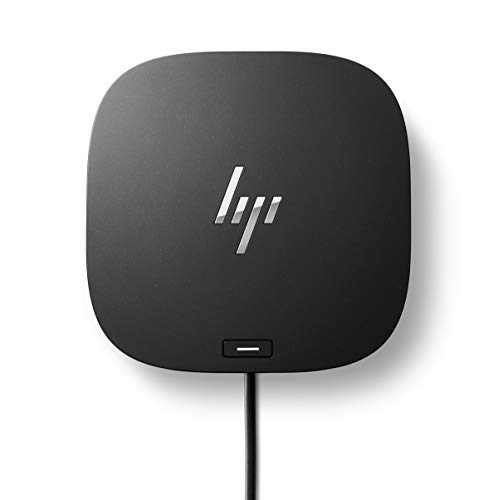
“HP certified for Elite, ProBook, ENVY series. Best suited for hp laptop users who want a certified hub with reliable drivers and hp support.”
See Today’s Price →What we like
- HP certified for Elite, ProBook, ENVY series
- USB-A + USB-C mix
- 100W passthrough
- Clean design
Watch out for
- Less useful on non-HP laptops
- Fewer ports than Plugable at similar price
Read Full Analysis
The HP USB-C Dock G5 carries HP certification for Elite, ProBook, and ENVY laptops, guaranteeing validated power management, driver compatibility, and warranty support on HP hardware. Its USB-A and USB-C port mix with 100W PD passthrough covers standard home office peripherals from one cable connection. It matches the Plugable USB 3.0 Dual 4K Docking Station in price while serving a different need. The Plugable delivers dual 4K@60Hz display output across Windows and Mac. The HP G5 prioritizes certified compatibility on HP laptops over display output flexibility — IT-managed HP environments will prefer the certification; individual power users likely prefer the Plugable. Buy the HP USB-C Dock G5 for HP Elite, ProBook, or ENVY users in IT-managed or business environments where vendor certification and HP support matter. Skip for non-HP laptops (certification benefits disappear) or for dual 4K display setups (the Plugable Dual 4K handles those for the same price).

“The Plugable USB 3.0 and USB-C Dual 4K Display Docking Station Most Comprehensive features true dual 4k@60hz output. Best suited for dual-monitor setups where both monitors need 4k resolution at…”
See Today’s Price →What we like
- True dual 4K@60Hz output
- USB-A and USB-C ports
- Ethernet
- Works across Windows and Mac
Watch out for
- Requires DisplayLink driver install
- No USB4/Thunderbolt output
Read Full Analysis
The Plugable USB 3.0 Dual 4K Display Docking Station delivers true dual 4K@60Hz output across Windows and Mac — a capability no other single unit at this price on the page matches. Gigabit Ethernet, USB-A, and USB-C ports round out the port set. DisplayLink driver installation (one-time, 5 minutes) enables the dual display output architecture. It matches the HP G5 in price. The HP is certified for HP laptops; the Plugable works across Dell, HP, Lenovo, Microsoft, and Mac. For cross-platform teams or mixed-hardware households, the Plugable's compatibility advantage is meaningful. The DisplayLink driver requirement is the only friction point in otherwise seamless setup. Buy the Plugable Dual 4K for dual-monitor setups where both displays need 4K@60Hz and cross-platform laptop support is required. Skip it for IT-restricted environments that block third-party drivers — Dell or HP native docks are safer in those cases. Also skip if USB4 or Thunderbolt bandwidth for high-speed storage is the priority.

“The Anker PowerExpand 13-in-1 USB-C Dock Most Comprehensive features 13 ports including hdmi and vga. Best suited for budget-focused buyers who want anker's reliability with 13 ports at mid-range…”
See Today’s Price →What we like
- 13 ports including HDMI and VGA
- 85W laptop charging
- USB 3.0 speeds
- Anker 18-month warranty
Watch out for
- Single display output
- No 4K@60Hz on HDMI
- Bulkier than portable hubs
Frequently Asked Questions
What USB-C hub works best with a MacBook Pro?
Does a USB-C hub slow down my laptop?
What's the difference between a USB-C hub and Thunderbolt dock?
How many watts does a USB-C hub need to charge my laptop?
Can a USB-C hub support two monitors?
How We Chose These Products
We compare each product’s Amazon listing, the manufacturer’s published specifications and Amazon customer ratings, shown with their review counts as Amazon’s data, and rank the products on how well they answer this page’s question. We do not test products in hand and we do not run our own analysis of review text. A publication or expert is named only where we cite its published findings about that product. No manufacturer paid for placement on this page.
A price appears only when Amazon’s API supplied it at a recent daily refresh, with the date and time beside it, and is withdrawn at 4 AM Central on the day after it turns 24 hours old; otherwise use “Check price on Amazon” for the live price. Read our full methodology →