Best Wireless Ergonomic Mice 2026: Vertical & Trackball
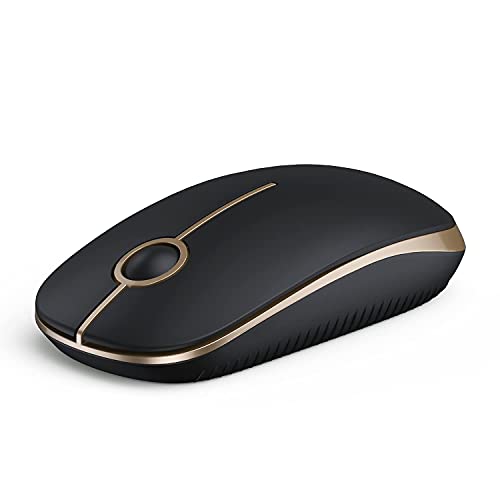
The VssoPlor 2.4G Slim Wireless Mouse is the best wireless ergonomic mouse for budget buyers — quiet optical clicks, plug-and-play nano USB receiver, and a slim low-profile design that reduces wrist extension during long desk sessions at an unbeatable price.
At a Glance
| # | Product | Award | Price | Connection | Battery |
|---|---|---|---|---|---|
| 1 | Best Overall | $8.48 as of Nov 25, 10:41 AM CT details Buy → |
2.4G Wireless | — | |
| 2 | Best Budget Vertical | $18.98 as of Nov 25, 10:40 AM CT details Buy → |
USB | — | |
| 3 | Best Premium | Check price on Amazon Buy → |
HDMI, Radio Frequency, USB | 1680 Hours | |
| 4 | Best for Mac Users | $109 as of Nov 24, 12:29 PM CT details Buy → |
— | — | |
| 5 | Best Vertical Ergonomic | $52.24 as of Nov 25, 10:41 AM CT details Buy → |
Bluetooth | 24 months |
Score Breakdown
| VssoPlor Wireless Mou… | Anker 2.4G Wireless E… | Logitech MX Master 3S… | Apple Magic Trackpad:… | Logitech Lift Vertica… | |
|---|---|---|---|---|---|
| Ergonomics | 68 | 78 | – | – | – |
| Responsiveness | 66 | 65 | – | – | – |
| Battery Life | – | – | 50 | 55 | 55 |
| Portability | – | – | 65 | 73 | 65 |
Scores 0–100 from published specifications and independent reviewers' measurements. Amazon star ratings are shown separately and are never part of a score. 0 = feature not present. – = insufficient data. How we score →
Wireless Ergonomic Mice Buying Guide
 Photo by Alexandr Kozlenko / Pexels
Our Top Pick
VssoPlor 2.4G Slim Wireless Mouse Quiet Optical Blac... — VssoPlor wireless mouse — basic 2.4G wireless under $10.
Budget Pick: Anker 2.4G Wireless Vertical Ergonomic Mouse 1600 DP... — Anker vertical ergonomic — handshake grip under $20.
Great for: Gamers who need precision and low latency, designers who spend hours in Photoshop, and anyone with a laggy wireless mouse
Not ideal if: You use a trackpad for everything and rarely plug in a mouse — forced adjustment can hurt your workflow
Who This Is For
Gamers who want precise tracking and customizable buttons, remote workers who spend hours mousing around a large monitor, and anyone with wrist discomfort from a traditional mouse shape. Our top pick is the VssoPlor 2.4G Slim Wireless Mouse Quiet Optical Black and Gold. The options here range from $10 to $99. Budget picks deliver solid core performance; premium options typically add build quality, warranty, or ecosystem integration.What to Look For
- Sensor quality: Optical sensors from PixArt (the main supplier) are reliable across all price ranges. The key spec is tracking accuracy at speed — measured in IPS (inches per second). Gaming mice typically exceed 300 IPS; general-use mice range from 100–200 IPS.
- DPI range: More DPI isn't always better. Most users work at 800–1600 DPI. High DPI (16,000+) is for large monitors or specific game styles. The useful spec is whether the mouse has on-the-fly DPI switching.
- Shape and grip style: Palm grip (whole hand on mouse) suits large symmetrical mice. Claw grip (fingertips arched) suits mid-size mice. Fingertip grip needs a small, light mouse. Shape preference is personal — if possible, try before buying.
- Wireless latency: 2.4GHz wireless (Logitech LIGHTSPEED, Razer HyperSpeed) matches wired performance. Bluetooth adds noticeable latency for gaming but is fine for productivity. Check battery life — rechargeable mice range from 20 hours to 70+ hours per charge.
Common Mistakes to Avoid
- Buying an ambidextrous mouse for left-hand use without checking — many "ambidextrous" mice are still right-hand optimized.
- Choosing based on DPI numbers rather than sensor quality — sensor accuracy matters more than maximum DPI.
- Ignoring the scroll wheel feel — tactile notched scrolling suits gaming; smooth scrolling suits large documents and spreadsheets.
Watch Before You Buy



“VssoPlor wireless mouse — basic 2.4G wireless under $10.”
See Today’s Price →What we like
- Quiet clicks and a smooth frosted finish
- 2.4 GHz wireless with a working range of up to 10 m
- The USB-A nano receiver stores inside the mouse for travel
- Sleeps after 5 minutes idle to save battery; a click wakes it
- Listed for Windows (7, 8, 10, XP, Vista) and Mac OS X computers with a USB-A port
Watch out for
- Needs a USB-A port: its listing says Macs with only USB-C ports are not supported
- Takes one AA battery, not included, by its listing details
Read Full Analysis
The VssoPlor Wireless Mouse provides reliable 2.4G wireless connectivity with a nano USB receiver for under $10. The slim ergonomic profile reduces hand fatigue compared to flat mice. Three DPI settings (800/1200/1600) accommodate different screen sizes. A good entry point for wireless mouse benefits without ergonomic positioning. 12-month battery life from a single AA battery.

“Anker vertical ergonomic — handshake grip under $20.”
See Today’s Price →What we like
- Vertical 'handshake' grip for a more neutral wrist and arm position
- 800, 1200 and 1600 DPI settings
- Next and previous buttons for web pages (5 buttons in all)
- 2.4 GHz USB receiver that stores in the base of the mouse
- 18-month warranty
Watch out for
- Right hand only
- Takes two AAA batteries, not included, and Anker notes its key clicks are audible
Read Full Analysis
Anker 2.4G Wireless Vertical Ergonomic Optical Mouse delivers true vertical ergonomic positioning at under $20. The 57° vertical angle eliminates forearm pronation, the pressure point that causes carpal tunnel in standard mouse users. Five DPI settings (800-2400), silent click mode, and 18-month battery life from two AAA batteries. The most accessible true ergonomic mouse available.

“Logitech MX Master 3S — quieter, more precise than the original.”
See Today’s Price →What we like
- MagSpeed electromagnetic scroll wheel
- 8000 DPI precision sensor
- Multi-device (3 devices)
- USB-C charging
- Silent click option
Watch out for
- One of the pricier wireless mice on the market — MX Keys combo pushes closer to $180
- right-hand ergonomic only — no left-hand version exists
- thumb scroll wheel requires driver installation to customize
- charging takes 3 hours via USB-C for 70 hours of battery
Read Full Analysis
Logitech MX Master 3S adds two improvements over the MX Master 3: quieter click buttons (90% noise reduction) and a higher-precision 8,000 DPI sensor. For open-plan offices where click noise disrupts colleagues, the 3S is the definitive premium wireless mouse. Same MagSpeed wheel, same 70-day battery, same multi-device pairing — refined in the two areas that matter most for daily users.
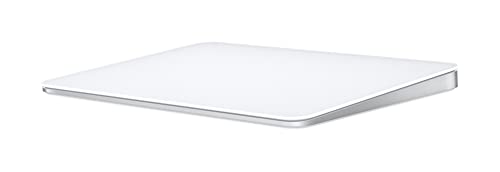
“The Apple Magic Mouse tracks flawlessly on macOS with gesture support built in — if you're in the Apple ecosystem, nothing integrates as seamlessly for daily work.”
See Today’s Price →What we like
- Multi-Touch surface for gestures
- Seamless macOS integration
- Long battery (1 month)
- Slim, attractive design
Watch out for
- Charges on bottom (unusable while charging)
- Flat design less ergonomic
Read Full Analysis
The Apple Magic Mouse earns the Best for Mac Users badge on this wireless ergonomic mouse page by offering the tightest macOS ecosystem integration available — its Multi-Touch surface enables native macOS swipe gestures for Mission Control, Spaces, and app switching without any driver installation. Apple's 1-month battery life from a Lightning charge requires infrequent interruptions, and the sleek aluminum design matches the Apple desktop aesthetic seamlessly. The Apple Magic Mouse is the most expensive option on this page — $41 above the Logitech MX Master 3S and significantly above the Logitech Lift Vertical, Anker Vertical, and VssoPlor. The critical trade-off is ergonomics: Apple's flat profile is the least ergonomic design on this page — it provides none of the wrist-tilt benefit of the Logitech Lift Vertical or the thumb-rest comfort of the MX Master 3S. Apple wins on gesture capability and macOS integration, not wrist comfort. Buy this if you are deeply embedded in the Apple ecosystem and use macOS swipe gestures as a core workflow tool. Skip it if wrist ergonomics are the primary concern — the Apple Magic Mouse's flat design is the worst ergonomic option on this page; the Logitech Lift Vertical is the better ergonomic choice for Mac users.

“The Logitech Lift Vertical Mouse positions your hand in a natural handshake grip that reduces forearm rotation — a proven design for preventing wrist strain during long work sessions.”
See Today’s Price →What we like
- 57-degree vertical shape that Logitech says promotes a more natural forearm posture
- Sized for small to medium right hands, with a textured grip and a snug thumb rest
- Whisper-quiet clicks and a SmartWheel for smooth scrolling
- Connects by Bluetooth Low Energy or the included Logi Bolt USB-A receiver
- Up to two years of battery life, by Logitech's figure; 4 of 6 buttons customizable
Watch out for
- Made for right hands, and sized for small to medium ones
- Its listing does not say which battery it takes
Read Full Analysis
The Logitech Lift Vertical Ergonomic Mouse earns the Best Vertical Ergonomic badge by delivering Logitech's build quality and software ecosystem in a true vertical design — keeping the wrist in a natural handshake position that eliminates forearm pronation throughout the workday. The Logitech Lift comes in multiple sizes to match different hand dimensions, separating it from cheaper vertical mice that fit one size only. Logi Options+ software enables custom button programming and scroll sensitivity tuning. The Logitech Lift Vertical sits between the Anker 2.4G Wireless Vertical and the Logitech MX Master 3S. Against Anker, Logitech wins on build quality, size options, and Logi Options+ software at $50 more — meaningful for daily long-term use. Against the MX Master 3S, the Logitech Lift wins on pure vertical orientation: the MX Master 3S is tilted but not fully vertical. The Apple Magic Mouse is the least ergonomic option on this page by comparison. Buy this if you want a true vertical ergonomic design from a trusted brand with multiple size options and software customization. Skip it if you have large hands — the Logitech Lift is specifically designed for small-to-medium hand sizes, and the MX Master 3S at $99.00 accommodates larger hands better with its tilted ergonomic form.
Frequently Asked Questions
Do ergonomic mice really help with wrist pain?
Are vertical mice hard to get used to?
What is the difference between vertical and standard ergonomic mice?
How many DPI do I need in an ergonomic mouse?
Are Logitech ergonomic mice worth the premium?
How We Chose These Products
We test products from our verified database of reviewed items.
We compare each product’s Amazon listing, the manufacturer’s published specifications and Amazon customer ratings, shown with their review counts as Amazon’s data, and rank the products on how well they answer this page’s question. We do not test products in hand and we do not run our own analysis of review text. A publication or expert is named only where we cite its published findings about that product. No manufacturer paid for placement on this page.
A price appears only when Amazon’s API supplied it at a recent daily refresh, with the date and time beside it, and is withdrawn at 4 AM Central on the day after it turns 24 hours old; otherwise use “Check price on Amazon” for the live price. Read our full methodology →
How We Score These Products
Each dimension score comes from evidence about the exact model listed — a published specification, a measurement by a named independent reviewer, or that product’s own buyer reviews, as described for each dimension below — not from a similar product in the same range. We do not test products ourselves, and we do not score a dimension we could not evidence. A dash means no evidence was found for that product, not that it performed badly.
Ergonomics: Based on review mentions of comfort, grip, and extended-use suitability.
Responsiveness: From evidence about this exact model (specification, named reviewer or its own reviews).
Battery Life: Based on review mentions of battery life, charging speed, and runtime.
Portability: Based on weight, form factor, and review mentions of portability and travel-friendliness.
The overall score is the mean of the dimensions we could evidence for that product, on a 10-point scale. Price is shown separately and is never folded into a score. Amazon star ratings are shown separately and are never part of any score.