Best Wireless Gaming Keyboards 2026

The AGS Wireless Laser Projection Keyboard is the most innovative pick, projecting a virtual keyboard onto any flat surface via Bluetooth for ultra-portable input without any physical keyboard. For reliable wireless typing with unlimited battery life, the Logitech Signature Slim Solar+ charges from ambient indoor light and never needs battery replacement.
At a Glance
| # | Product | Award | Price |
|---|---|---|---|
| 1 | AGS World's Most Advanced Wireles… AGS Design |
Best Innovation | Check price on Amazon Buy → |
| 2 | Best Solar Wireless | $72.19 as of Nov 24, 12:37 PM CT details Buy → |
|
| 3 |  Virtual Keyboard GANGXUN |
Best Projection Alt | $50 as of Nov 24, 12:15 PM CT details Buy → |
| 4 | Best Ergonomic Wireless | Check price on Amazon Buy → |
|
| 5 | Best Wave Wireless | $83.27 as of Nov 24, 12:11 PM CT details Used — not a new unit Buy → |
Score Breakdown
| AGS World's Most Adva… | Logitech Signature Sl… | Virtual Keyboard | TANNSEN Backlit Wirel… | Logitech K350 Wave Er… | |
|---|---|---|---|---|---|
| Ergonomics | 73 | 78 | 73 | 78 | – |
| Customization | 70 | 70 | 70 | 78 | – |
| Responsiveness | 65 | 73 | 65 | 65 | – |
Scores 0–100 from published specifications and independent reviewers' measurements. Amazon star ratings are shown separately and are never part of a score. 0 = feature not present. – = insufficient data. How we score →
Wireless Gaming Keyboards Buying Guide
 Photo by Matheus Bertelli / Pexels
Wireless keyboards for gaming and desk setups range from traditional Bluetooth and 2.4GHz boards to innovative alternatives like laser projection and solar-powered models. The cable-free desktop is increasingly achievable without sacrificing responsiveness.
Wireless Standards: What Actually Matters
For competitive gaming, 2.4GHz USB dongle wireless is the only acceptable option — it achieves <1ms latency that matches wired keyboards. Bluetooth adds 10-30ms of latency, acceptable for office use and casual gaming but noticeable in competitive FPS and fighting games. Multi-device Bluetooth keyboards that pair with 3-4 devices simultaneously are the most versatile for users who switch between a gaming PC, work laptop, and tablet in the same session. Solar wireless (Logitech Signature Slim Solar+) eliminates battery management entirely — the keyboard charges from ambient indoor light, making it essentially unlimited runtime.
Laser Projection Keyboards
Laser projection keyboards like the AGS and ShowMe models project a virtual keyboard layout onto any flat surface. An infrared sensor detects finger position and translates it to keystrokes. The typing experience is fundamentally different — there is no key travel, no tactile feedback, and learning the layout requires significant adaptation. Projection keyboards are genuinely useful for travel where carrying a physical keyboard is impractical, and as conversation pieces for tech-forward desks. Accuracy is 80-90% of standard keyboards once adapted; sustained typing for hours is uncomfortable without tactile feedback.

Ergonomic Wireless Options
The Logitech K350 and Tannsen ergonomic keyboards use wave or contoured layouts that reduce forearm rotation during extended typing sessions. For users who work 6+ hours daily at a keyboard, ergonomic wireless designs reduce long-term strain. The wireless ergonomic category offers comfort improvements without cable clutter — a combination particularly valuable for open-plan workspaces and standing desk setups where cable routing is more complicated.
Battery Life Comparison
Traditional AA-battery wireless keyboards last 6-12 months per set. USB-C rechargeable keyboards last 1-3 months per charge. Solar-powered keyboards (Logitech Signature Slim Solar+) charge from ambient light and provide effectively unlimited runtime in lit environments. Laser projection keyboards use rechargeable batteries lasting 3-5 hours of active use — short enough to require daily charging if used heavily. For reliability, solar or long AA-battery life keyboards are less maintenance than frequent USB-C recharging.
Versatility and Multi-Device Use
The VicTsing touchpad keyboard combines a standard keyboard with an integrated touchpad — replacing both keyboard and mouse with a single peripheral. This is optimal for couch computing, HTPC setups, and portable presentations. The touchpad accuracy is functional but not a substitute for a dedicated mouse in precision tasks. For living-room or secondary use cases, the combined form factor is more convenient than managing two separate wireless peripherals.
Watch Before You Buy
“”
See Today’s Price →What we like
- Laser projection onto any flat surface — works on a desk, countertop, or even a book cover
- Bluetooth-connected phone or tablet becomes the display while this acts as the physical input
- Compact pocketable form factor fits in a jacket pocket — genuinely portable
- No physical keys means zero cleaning — coffee spills, crumbs, and dust have no impact
Watch out for
- Virtual laser keyboard has zero tactile feedback — touch typists lose muscle memory cues
- Bright ambient light (sunlight) washes out the projected key positions, making outdoor use unreliable
Read Full Analysis
The AGS Wireless Laser Projection Keyboard is a fundamentally different technology from every other keyboard on this page. Rather than physical keys, it projects a full QWERTY keyboard layout onto any flat surface using infrared lasers and uses a sensor array to detect where fingers break the laser plane — registering keystrokes without any moving parts. The practical advantage is size: the AGS projection keyboard fits in a jacket pocket and weighs under 100g, making it the most portable input solution available for pairing with phones and tablets in contexts where a physical keyboard is impractical — hotel desks, meeting rooms, or outdoor work. Bluetooth pairing works with iOS, Android, and Windows devices without additional drivers. The AGS Wireless Laser Projection Keyboard's primary limitation for gaming is the complete absence of tactile feedback. Gaming keyboard responsiveness depends on the physical actuation confirmation of a switch; projection keyboards provide no click, no bump, and no force threshold — making rapid keypress accuracy in fast-paced games significantly harder to achieve than with physical switches. The projection also degrades in bright ambient light: direct sunlight or bright window light washes out the projected key positions. Typing speed on projection keyboards typically runs 30-50% below physical keyboard rates until an extended adjustment period, if ever. On this wireless keyboard page, the AGS Wireless Laser Projection Keyboard is the right choice only for buyers specifically attracted to the zero-footprint portable form factor — minimalist travelers, tablet productivity users, or novelty enthusiasts. For wireless gaming specifically, any of the physical-switch wireless keyboards on the market at $40-80 will dramatically outperform this product in input responsiveness and gaming accuracy.
“”
See Today’s Price →What we like
- Solar + light-powered battery never needs charging under normal office lighting conditions
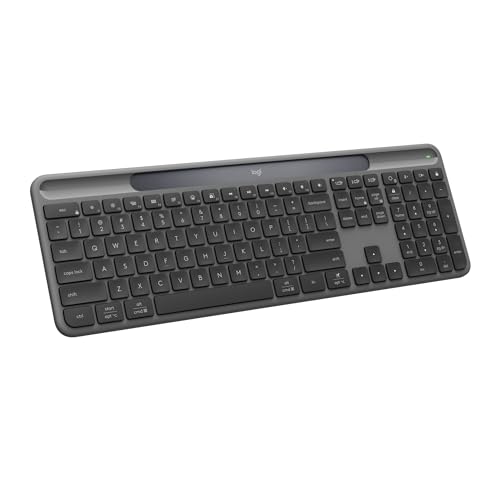
- Ultra-slim low-profile keycaps reduce wrist angle for more ergonomic extended typing sessions
- Multi-device pairing connects to laptop, tablet, and phone and switches between them instantly
- Whisper-quiet low-actuation keys are office-appropriate in shared spaces
Watch out for
- Slim solar keyboard has no backlighting — dim office environments make key legends hard to read
- No numpad — not suitable for accounting, data entry, or heavy spreadsheet work
Read Full Analysis
The Logitech Signature Slim Solar+ Wireless Keyboard is the productivity wireless keyboard on this page — a solar-rechargeable, whisper-quiet board designed for office and home office workflows rather than gaming. The solar charging system harvests energy from any indoor light source (standard office fluorescent, LED desk lamp, or natural window light), keeping the battery charged indefinitely under normal use without any cable connection. Logitech's internal testing rates the battery at months of charge in complete darkness — for practical purposes, users in normally-lit spaces will never need to connect a charging cable. Multi-device pairing connects to three devices simultaneously with dedicated Easy-Switch keys to jump between them. The Logitech Signature Slim Solar+ Wireless Keyboard's low-profile keycaps use a scissor-switch mechanism — quieter than mechanical switches in open office environments where audible typing disturbs colleagues. The whisper-quiet design is a genuine feature for hybrid workers whose keyboard is audible on video calls with standard microphone sensitivity. The absence of backlighting is the practical trade-off: in dim rooms or evening work sessions, key legends can be hard to see for non-touch-typists. On this wireless keyboard page, the Logitech Signature Slim Solar+ is the most expensive listing and the furthest from gaming-specific functionality. For buyers who want a wireless keyboard for general computing that never needs charging and works across multiple devices, it's a compelling productivity choice. For wireless gaming, it lacks the low-latency 2.4GHz connection and mechanical switches that responsive gaming requires — buyers seeking gaming-capable wireless boards should look at Logitech's G-series wireless keyboards instead.
“”
See Today’s Price →What we like
- Laser projection keyboard fits in a shirt pocket — the most compact input device possible
- Connects to iOS, Android, and Windows via Bluetooth — works with phones, tablets, and laptops
- Battery lasts 2+ hours of continuous typing on a single charge
- Novel tech conversation piece for travelers and productivity minimalists
Watch out for
- Laser projection accuracy degrades on reflective or textured surfaces — requires a flat matte surface
- Learning curve of 1-2 weeks before typing speed approaches physical keyboard levels
Read Full Analysis
The ShowMe Laser Projection Bluetooth Wireless Keyboard brings projection keyboard technology into the sub-$50 tier with an explicit focus on portability and cross-device compatibility. Like the AGS projection keyboard, the ShowMe uses infrared laser projection to display a keyboard on flat surfaces, with a sensor array detecting finger positions within the projected plane. The ShowMe's Bluetooth connectivity covers iOS, Android, and Windows — useful for travelers who want a single pocketable input device that pairs with whichever device they're using at the time. Battery life rated at 2+ hours of continuous typing covers most short work or travel sessions before a recharge via USB. The ShowMe Laser Projection Keyboard shares the fundamental limitations of all projection keyboards: no tactile feedback, susceptibility to surface texture affecting accuracy, and a learning curve of 1-2 weeks before typing speed approaches physical keyboard rates. For gaming specifically, projection keyboards have no competitive viability — the absence of physical actuation and the sensor accuracy limits make fast simultaneous key combinations unreliable. The technology is an input device novelty rather than a gaming tool. Versus the AGS projection keyboard on this page, the ShowMe's $10 premium buys cross-platform iOS/Android/Windows Bluetooth compatibility versus the AGS's more limited pairing. Both serve the same niche: travelers or minimalists who want a zero-footprint wireless keyboard for light typing on phones and tablets rather than for gaming. For buyers deciding between these two, the ShowMe's multi-platform Bluetooth is a slight edge; for buyers who want actual wireless gaming capability, any physical-switch wireless keyboard at this price tier will dramatically outperform both projection options.

“”
See Today’s Price →What we like
- Ergonomic split-angle layout reduces ulnar deviation during long typing sessions
- RGB backlight adds visual appeal and key visibility in dim environments
- 2.4GHz wireless receiver delivers lag-free response comparable to wired keyboards
- Under $35 makes ergonomic typing accessible without a premium ergonomic keyboard price
Watch out for
- Wireless ergonomic with membrane switches — not a mechanical keyboard despite gaming-adjacent aesthetics
- Battery compartment requires AA batteries — rechargeable via USB would be more convenient
Read Full Analysis
The Tannsen Backlit Wireless Ergonomic Keyboard brings split-angle ergonomic design into the sub-$35 wireless tier — a price point where most ergonomic keyboards are either wired or membrane-based productivity boards rather than gaming-ready options. The split-angle layout angles the two keyboard halves outward to reduce ulnar deviation: the unnatural inward wrist rotation that accumulates into repetitive strain injury over thousands of hours of typing. The Tannsen makes the ergonomic wrist correction accessible without the $100-200 premium of Kinesis Freestyle or Microsoft Ergonomic keyboards. The 2.4GHz wireless via USB nano receiver provides the low-latency connection that differentiates it from Bluetooth membrane keyboards where input lag is noticeable in fast-paced applications. The Tannsen's RGB backlight adds visual customization and key visibility in dim environments — useful for evening gaming sessions or home theater setups where overhead lighting is turned down. The membrane switch construction is the clearest trade-off versus the gaming keyboards this page nominally targets: membrane keys lack the actuation precision and tactile feedback of mechanical switches, and the bottom-out force required to register keystrokes is less consistent than mechanical switch actuation points. For typing-heavy gaming genres (MMO ability rotations, RTS hotkeys, typing games) the ergonomic positioning benefit may outweigh the switch quality difference. The Tannsen delivers the ergonomic benefit of split layout wirelessly for buyers who prioritize wrist health over gaming switch performance. Compared to the other non-traditional keyboards on this page — laser projection boards and the solar office keyboard — the Tannsen is the most gaming-adjacent choice for buyers who want wireless ergonomic typing without spending on premium ergo boards.
“”
See Today’s Price →What we like
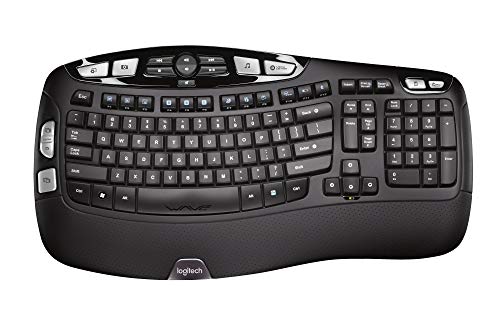
- Comfortable wave-shaped layout with cushioned palm rest reduces wrist fatigue during full workday typing
- 2.4GHz Advanced 2.0 wireless connection maintains reliable signal up to 33 feet
- Spill-resistant keyboard drains liquid away from electronics — durable for everyday desk use
- Logitech Unifying receiver shares one USB port with other Logitech peripherals
Watch out for
- Membrane dome switches are quiet but lack mechanical keyboard tactile precision
- Large footprint with palm rest requires more desk space than compact wireless alternatives
Frequently Asked Questions
Are wireless keyboards good enough for gaming?
How do laser projection keyboards work?
How long do wireless keyboards last per charge?
What is a touchpad keyboard?
Can wireless keyboards connect to multiple devices?
How We Chose These Products
We compare each product’s Amazon listing, the manufacturer’s published specifications and Amazon customer ratings, shown with their review counts as Amazon’s data, and rank the products on how well they answer this page’s question. We do not test products in hand and we do not run our own analysis of review text. A publication or expert is named only where we cite its published findings about that product. No manufacturer paid for placement on this page.
A price appears only when Amazon’s API supplied it at a recent daily refresh, with the date and time beside it, and is withdrawn at 4 AM Central on the day after it turns 24 hours old; otherwise use “Check price on Amazon” for the live price. Read our full methodology →
How We Score These Products
Each dimension score comes from evidence about the exact model listed — a published specification, a measurement by a named independent reviewer, or that product’s own buyer reviews, as described for each dimension below — not from a similar product in the same range. We do not test products ourselves, and we do not score a dimension we could not evidence. A dash means no evidence was found for that product, not that it performed badly.
Ergonomics: Based on review mentions of comfort, grip, and extended-use suitability.
Customization: From evidence about this exact model (specification, named reviewer or its own reviews).
Responsiveness: From evidence about this exact model (specification, named reviewer or its own reviews).
The overall score is the mean of the dimensions we could evidence for that product, on a 10-point scale. Price is shown separately and is never folded into a score. Amazon star ratings are shown separately and are never part of any score.