Best Wireless Mouse Under $40 (2026)

The TECKNET Ergonomic Vertical Wireless Mouse is our pick for a wireless mouse under 40 dollars: a right-handed vertical design that eases arm and wrist stress, with silent clicks, two side buttons and five DPI steps up to 4800. Choose the Logitech MK270 combo if you also need a full-size wireless keyboard.
At a Glance
Wireless Mouse Under $40 Buying Guide
 Photo by Alexandr Kozlenko / Pexels
The TECKNET 2.4G Ergonomic Mouse Vertical Wireless - 4800 DPI at $22.99 is the one to beat on this page: 57-degree vertical grip. There are 3 picks here in total, from $21.48 to $31.98, and the differences between them are specific rather than a question of tier.
Which of these to buy
Take the TECKNET 2.4G Ergonomic Mouse Vertical Wireless - 4800 DPI at $22.99 if you want vertical mouse users wanting ergonomic wireless mouse for wrist pain relief. Take the Logitech 920-004536 MK270 Wireless Keyboard and Mouse at $21.48 if you want value-focused buyers: Typists and gamers who want responsive accurate key actuation and a tactile typing experience. Take the YUMQUA Finger Handheld Mouse at $31.98 if you want couch and bed computing users, presenters, and travelers who want trackball control without needing a flat tracking surface or desk space.
Our top pick: the TECKNET 2.4G Ergonomic Mouse Vertical Wireless - 4800 DPI — 57-degree vertical grip. The 2 alternatives ranked below it, starting with the Logitech 920-004536 MK270 Wireless Keyboard and Mouse, cover the cases where it is more than you need.
What You Get at Under $40
Under $40, Logitech dominates with the M185 and M220 SILENT — both offer reliable 2.4GHz wireless, a USB nano receiver, and 12-month battery life in compact bodies. Expect optical sensors rated 1000 DPI, which is fine for productivity and web browsing. Build quality is lightweight plastic but holds up to daily use.
The Trade-offs vs Spending More
Spending $40–80 gets ergonomic sculpted shapes (Logitech MX Anywhere 3, Microsoft Arc Mouse), higher-precision sensors (2000+ DPI with adjustable steps), Bluetooth in addition to 2.4GHz, and soft-touch rubberized grips. You get the MX Master 3 with customizable thumb wheels and gesture controls.
What to Avoid at This Price
Avoid no-name wireless mice without recognizable RF technology — their 2.4GHz implementations often drop signal and have inconsistent tracking. Check that the USB receiver is nano-sized (not a full-size dongle from 2010). Avoid mice with 3-month battery claims — good ones last a year.
Watch Before You Buy



Showing 3 of 3 products
“57-degree vertical grip”
See Today’s Price →What we like
- 57-degree vertical grip
- 800-1600 DPI
- Bluetooth plus 2.4GHz
- rechargeable
- 6 buttons
- silent
Watch out for
- Vertical mouse requires a learning curve for new users
- Black only
- 2.4G USB receiver occupies a USB port
“”
See Today’s Price →What we like
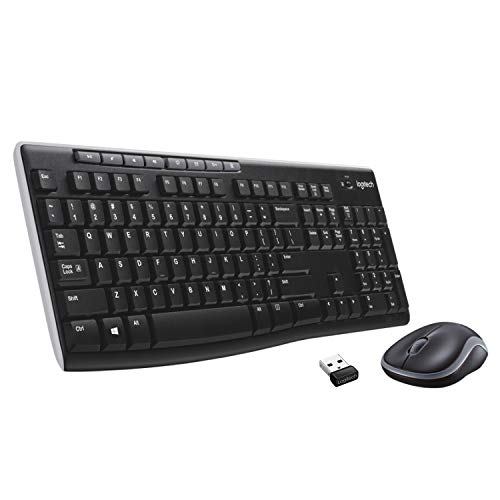
- BestReviews Best Bang for the Buck for wireless combos — plug-and-play performance with Logitech quality at an affordable price|Single 2.4GHz nano-receiver provides reliable 33-foot wireless range suitable for media center and living room use|Logitech MK270 mouse delivers the same exceptional 3-year battery life as higher Logitech models without the premium cost|Ergonomic right-hand mouse contour reduces grip fatigue during all-day computing and home office sessions
Watch out for
- Budget MK270 uses membrane keyboard keys — less tactile feedback than mechanical switch alternatives for heavy typists|No backlit keys — key labels are difficult to read in low-light environments for those who type in the dark
Read Full Analysis
The Logitech MK270 Wireless Keyboard and Mouse Combo is Logitech's entry-level complete wireless desktop bundle — connecting keyboard and mouse through a single 2.4GHz nano-receiver that covers the full wireless setup in one USB port at a budget-friendly price. The 33-foot wireless range handles typical living room and home office distances, and both devices are powered by standard AA batteries with the mouse rated for 3 years on a pair — extending well beyond the 6-12 month typical battery intervals on budget wireless mice. The ergonomic right-hand mouse contour provides a comfortable grip for standard desk computing without the premium price that higher-spec ergonomic mice require. The Logitech MK270's membrane keyboard uses standard full-size layout with a functional row and dedicated numpad, covering all key positions for productivity and general computing. The absence of backlighting and media keys reflects a budget-first design that prioritizes functional reliability over feature completeness. Logitech's build quality at this tier maintains the consistent key feel and mouse tracking performance users expect from the brand across years of standard desk use. The Logitech MK270 is a keyboard and mouse combo bundle rather than a standalone wireless mouse — the primary focus of this page. For buyers who specifically need only a wireless mouse under $30 and already have a keyboard, standalone options like the Logitech M185 or M310 are more appropriate single-device choices. The MK270 is the right choice for buyers replacing both keyboard and mouse simultaneously at the lowest possible price for a reliable Logitech wireless pair.

“Handheld form factor works without a flat surface — usable from a couch, in bed, or during presentations where a desk mouse requires a stable tracking area. Best for: couch and bed computing users…”
See Today’s Price →What we like
- Handheld form factor works without a flat surface — usable from a couch, in bed, or during presentations where a desk mouse requires a stable tracking area
- Bluetooth and 2.4G dual connectivity switches between a laptop and a tablet without re-pairing from scratch
- Three DPI settings cover fine pointer work to fast screen navigation without third-party software
- Compact body packs into a laptop bag side pocket for travel without the footprint a standard desk trackball requires
Watch out for
- Trackball pointing technique requires a 1-2 week learning curve for users transitioning from a standard scroll mouse|Trackball ball requires cleaning every 2-4 weeks as dust and debris accumulate and reduce pointer tracking accuracy
Frequently Asked Questions
Are budget wireless mice laggy?
Do I need Bluetooth or a USB dongle?
Will it work on a glass desk?
How We Chose These Products
We compare each product’s Amazon listing, the manufacturer’s published specifications and Amazon customer ratings, shown with their review counts as Amazon’s data, and rank the products on how well they answer this page’s question. We do not test products in hand and we do not run our own analysis of review text. A publication or expert is named only where we cite its published findings about that product. No manufacturer paid for placement on this page.
A price appears only when Amazon’s API supplied it at a recent daily refresh, with the date and time beside it, and is withdrawn at 4 AM Central on the day after it turns 24 hours old; otherwise use “Check price on Amazon” for the live price. Read our full methodology →