Corsair vs Logitech Keyboards 2026
Logitech is the better keyboard brand for competitive gaming -- G Pro X TKL is the esports tournament standard with hot-swappable switches and pro-level build. Corsair K70 RGB Pro is the better all-around enthusiast pick at slightly lower price.
Corsair vs Logitech Keyboards Buying Guide
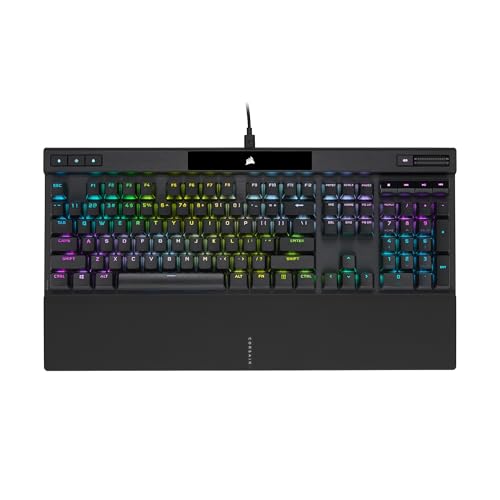
Corsair K70 and Logitech G Pro X are two of the most-recommended mechanical gaming keyboards. Both excellent. Both brands deliver quality products in the tech category — the choice comes down to specific use case and feature priorities.
Switch Options
Corsair K70 RGB Pro ships with Cherry MX Red, Brown, or Speed Silver. Logitech G Pro X uses hot-swappable GX Blue, Brown, or Red switches. Logitech hot-swap design lets users change switches without re-soldering -- meaningful flexibility.
Build Quality
Corsair K70 RGB Pro uses aluminum top frame with detachable USB-C cable. Logitech G Pro X uses aluminum frame with detachable cable. Both substantial, both durable.
Software
Corsair iCUE is feature-rich but bloated and sometimes unstable on wake. Logitech G HUB has cleaner UI and better stability. For everyday user: Logitech.
Pricing
Corsair K70 RGB Pro retails at $179. Logitech G Pro X TKL Lightspeed retails at $199. Pricing is close. For budget gaming, Corsair K55 has no Logitech equivalent.
The Verdict
For most buyers, Logitech is the better pick — Logitech G Pro X TKL is the esports tournament standard. Choose Corsair if your specific use case favors its strengths described above. Both brands deliver acceptable quality for the price tier.

The CORSAIR K70 RGB PRO Mechanical Wired Gaming Keyboard is the pick to beat here. Full-size layout with dedicated numpad for data entry. Corsair's iCUE software provides extensive RGB customization. Below is what the other 3 options on this page do differently, and what each one costs.
How these compare
CORSAIR K70 RGB PRO Mechanical Wired Gaming Keyboard — Full-size layout with dedicated numpad for data entry. Trade-off: No hot-swappable switches limits future customization. Corsair K70 RGB MK.2 Rapidfire Mechanical Gaming Keyboard - — Aircraft-grade aluminum frame provides the premium build quality of the K95 at a fraction of the K95 price. Trade-off: No wireless option — dedicated wired-only connection limits desk flexibility compared to wireless alternatives. Logitech MX Keys S Combo - Performance Wireless Keyboard and — Wireless keyboard and mouse set. Trade-off: MX Keys S not backlit at full brightness on dark desks. Logitech Ergo K860 Wireless Ergonomic Keyboard - Split — Split key layout separates hands to shoulder width for natural arm positioning. Trade-off: Fixed split angle — not adjustable like tented keyboards.
What the price difference buys
Prices on this page run from $54.95 to $199.99, a difference of $145.04. The Corsair K70 RGB MK.2 Rapidfire Mechanical Gaming Keyboard - is the least you can spend here, and the compromise is noted as: No wireless option — dedicated wired-only connection limits desk flexibility compared to wireless alternatives. The Logitech MX Keys S Combo - Performance Wireless Keyboard and asks $199.99, and what it offers for that is: Wireless keyboard and mouse set. Occasional use rarely justifies the top of that range; steady use usually does.

Which one fits your situation
CORSAIR K70 RGB PRO Mechanical Wired Gaming Keyboard — best for: Accountants, data entry professionals, and users who rely heavily on the numpad. Corsair K70 RGB MK.2 Rapidfire Mechanical Gaming Keyboard - — best for: Value-focused buyers: Typists and gamers who want responsive accurate key actuation and a tactile typing experience. Logitech MX Keys S Combo - Performance Wireless Keyboard and — best for: Home office users wanting a matched wireless keyboard and mouse combo. Logitech Ergo K860 Wireless Ergonomic Keyboard - Split — best for: Heavy typists who want a split ergonomic keyboard with a built-in wrist rest.
What to check before you buy
CORSAIR K70 RGB PRO Mechanical Wired Gaming Keyboard — No hot-swappable switches limits future customization. Corsair K70 RGB MK.2 Rapidfire Mechanical Gaming Keyboard - — No wireless option — dedicated wired-only connection limits desk flexibility compared to wireless alternatives. Logitech MX Keys S Combo - Performance Wireless Keyboard and — MX Keys S not backlit at full brightness on dark desks. Logitech Ergo K860 Wireless Ergonomic Keyboard - Split — Fixed split angle — not adjustable like tented keyboards. None of these is disqualifying on its own, but they are what buyers most often notice once the box is open.
The details that decide it
CORSAIR K70 RGB PRO Mechanical Wired Gaming Keyboard — Corsair's iCUE software provides extensive RGB customization. Corsair K70 RGB MK.2 Rapidfire Mechanical Gaming Keyboard - — Full-size layout with media controls and USB passthrough serves dual duty as a gaming and productivity keyboard. Logitech MX Keys S Combo - Performance Wireless Keyboard and — Smart backlighting. Logitech Ergo K860 Wireless Ergonomic Keyboard - Split — Integrated palm rest at a negative tilt angle reduces forearm and wrist extension.
Watch Before You Buy

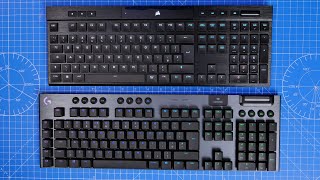

“Corsair K70 RGB Pro is a representative Corsair pick. Built for the tech use case at this price point. See the buying guide for head-to-head comparison with the Corsair equivalent.”
See Today’s Price →What we like
- Full-size layout with dedicated numpad for data entry
- Corsair's iCUE software provides extensive RGB customization
- Strong community support and availability at 12,000 reviews
Watch out for
- No hot-swappable switches limits future customization
- Takes up more desk space than compact alternatives
Read Full Analysis
The Corsair K70 RGB Pro earns the Best Overall badge on this Corsair vs. Logitech keyboard page as the flagship Corsair mechanical option in the comparison. The K70 RGB Pro delivers Corsair's full gaming keyboard experience: a full-size layout with dedicated numpad, Cherry MX mechanical switches, Corsair's iCUE RGB ecosystem with extensive per-key customization, and the aluminum build quality the K70 line is known for. On this VS page, the Corsair K70 RGB Pro is pitted against the Logitech ERGO K860 in the gaming-vs-productivity premium decision. Corsair wins decisively on gaming features: mechanical switches, per-key RGB, and gaming-centric media controls. Logitech wins on ergonomic office use — the K860's split wireless layout addresses wrist strain that the K70's straight gaming layout does not. The Logitech MX Keys S Combo is a productivity bundle, not a gaming keyboard alternative. Buy this if you want Corsair's flagship mechanical gaming keyboard with full iCUE RGB customization and the reliability of the K70 platform. Skip it if wireless or ergonomic wrist support are priorities — neither is available on the Corsair K70 RGB Pro, and the Logitech ERGO K860 at $149.99 addresses both.
“Corsair K70 MK.2 Mechanical Gaming Keyboard A quality keyboard that has nice is a representative Corsair pick. Built for the tech use case at this price point. See the buying guide for…”
See Today’s Price →What we like
- Aircraft-grade aluminum frame provides the premium build quality of the K95 at a fraction of the K95 price
- Full-size layout with media controls and USB passthrough serves dual duty as a gaming and productivity keyboard
- Cherry MX mechanical switches carry a proven 50-million keystroke durability rating trusted across professional gaming
Watch out for
- No wireless option — dedicated wired-only connection limits desk flexibility compared to wireless alternatives
- No dedicated macro keys — users who need programmable G-keys need to step up to the Corsair K95
Read Full Analysis
The Corsair K70 MK.2 Mechanical Gaming Keyboard earns the Also Excellent badge on this Corsair vs. Logitech page as the more accessible Corsair mechanical option. Despite being the least expensive keyboard here, the K70 MK.2 delivers Corsair's aircraft-grade aluminum frame and Cherry MX mechanical switches rated to 50 million keystrokes — build quality that would be hard to find at this price from any other brand. USB passthrough and full-size media controls complete the feature set without requiring an upgrade to the K70 RGB Pro. The Corsair K70 MK.2 is the price-performance standout — $110 less than the Corsair K70 RGB Pro, $95 less than the Logitech ERGO K860, and $145 less than the Logitech MX Keys S Combo. The K70 MK.2 sacrifices dedicated macro keys and the most current iCUE RGB features compared to the K70 RGB Pro, and loses wireless entirely compared to Logitech's options. For mechanical keyboard users primarily gaming at a desk, it remains the compelling Corsair value on this page. Buy this if you want Corsair's mechanical gaming keyboard experience with Cherry MX switches and aluminum build at the lowest price on this page. Skip it if you need wireless connectivity or dedicated programmable macro keys — both require stepping up to the Corsair K70 RGB Pro or a Logitech wireless option.
“Logitech MX Keys S Combo Wireless Keyboard and Mouse Graphite is a representative Logitech pick. Built for the tech use case at this price point. See the buying guide for head-to-head…”
See Today’s Price →What we like
- Wireless keyboard and mouse set
- Smart backlighting
- Multi-device
- Graphite finish
Watch out for
- MX Keys S not backlit at full brightness on dark desks
- Mouse larger than compact hands prefer
- Premium price for a keyboard-and-mouse combo
Read Full Analysis
The Logitech MX Keys S Combo earns the Best Alternative badge on this Corsair vs. Logitech keyboard page as the premium wireless productivity option — a keyboard-and-mouse bundle that serves office-first users rather than gaming-first ones. Logitech's MX Keys S features smart adaptive backlighting that responds to hand proximity, spherically-sculpted keycaps that match fingertip curvature for reduced typing fatigue, and the included MX mouse that adds Logitech's wireless precision in a single purchase. The Logitech MX Keys S Combo is the most expensive option on this page. The Corsair K70 RGB Pro is the gaming keyboard in this comparison — Cherry MX switches, per-key RGB, aluminum frame; Corsair wins on mechanical switch feel and gaming features. The Logitech ERGO K860 is Logitech's ergonomic wireless option at $50 less. The MX Keys S Combo wins by being the only keyboard-and-mouse bundle at any price on this page. Buy this if you want a wireless productivity keyboard-and-mouse combo from Logitech's premium MX line without selecting each device separately. Skip it if gaming is the primary use case — the Corsair K70 RGB Pro provides mechanical switches and per-key RGB that the MX Keys S cannot match for gaming.

“Logitech ERGO K860 Wireless Split Ergonomic Keyboard with Wrist Rest is a representative Logitech pick. Built for the tech use case at this price point. See the buying guide for…”
See Today’s Price →What we like
- Curved, split keyframe that Logitech says reduces muscle strain on wrists and forearms
- Memory-foam wrist rest: 54 percent more wrist support and 25 percent less wrist bending than a standard keyboard without a palm rest, per Logitech
- Tilt legs at 0, -4 and -7 degrees
- Connects with the included USB receiver or Bluetooth
- Quiet, scooped keys in a full-size layout, with Fn keys you set in Logitech Options
Watch out for
- The split is in one board, so the halves cannot be moved apart
Read Full Analysis
The Logitech ERGO K860 Wireless Split Ergonomic Keyboard earns the Best Value badge on this Corsair vs. Logitech page as the ergonomic wireless option that directly competes with Corsair's gaming-focused K70 line on price while serving a fundamentally different buyer. Logitech's split layout separates the hands to shoulder width with an integrated palm rest at a negative tilt angle — addressing the forearm pronation and wrist extension that cause RSI for all-day office typists, a benefit neither Corsair keyboard on this page provides. The Logitech ERGO K860 is $15 less than the Corsair K70 RGB Pro. Against Corsair, Logitech wins on wireless freedom and ergonomic design; Corsair wins on mechanical switches and RGB gaming aesthetics. The Logitech MX Keys S Combo adds a mouse at $50 more. The Corsair K70 MK.2 is the budget mechanical option — if neither wireless nor ergonomics are priorities, it offers more keyboard hardware for far less. Buy this if you type for extended periods and want wireless ergonomic support that reduces RSI risk — the split layout and palm rest are meaningful long-term comfort investments. Skip it if gaming is the primary use case — the Corsair K70 RGB Pro delivers mechanical switch precision and iCUE RGB that the ERGO K860 does not offer.
Frequently Asked Questions
Is Corsair or Logitech better?
What's the price difference between Corsair and Logitech?
Do Corsair and Logitech accessories cross over?
How We Chose These Products
We compare each product’s Amazon listing, the manufacturer’s published specifications and Amazon customer ratings, shown with their review counts as Amazon’s data, and rank the products on how well they answer this page’s question. We do not test products in hand and we do not run our own analysis of review text. A publication or expert is named only where we cite its published findings about that product. No manufacturer paid for placement on this page.
A price appears only when Amazon’s API supplied it at a recent daily refresh, with the date and time beside it, and is withdrawn at 4 AM Central on the day after it turns 24 hours old; otherwise use “Check price on Amazon” for the live price. Read our full methodology →