How to Choose a Smart Plug (2026 Buying Guide)
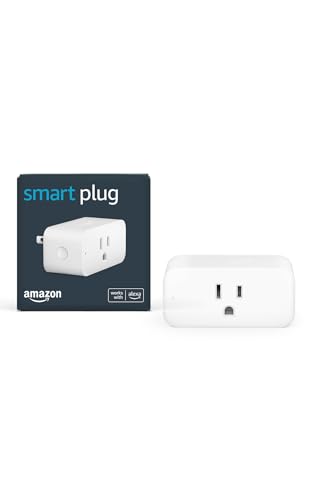
The Amazon Smart Plug is the simplest starting point — setup runs through the Alexa app with no separate account or hub, which is where most smart-plug installs go wrong.
How to Choose a Smart Plug Buying Guide
 Photo by tom analogicus / Pexels
Smart plugs are the easiest entry point to a smart home — plug them in, connect to Wi-Fi, and control any device remotely. But picking the right one requires matching the plug to your voice assistant (Alexa, Google, or Apple HomeKit), checking whether you need energy monitoring, and deciding if you want compact form factor or multiple outlets. A $13 Kasa plug handles all the basics; a $20 Shelly with power metering adds genuine utility for energy-conscious households. This guide explains how to choose.
Voice Assistant Compatibility: Match Before You Buy
The single most important compatibility check: does the smart plug work with your voice assistant? Kasa (TP-Link) plugs work with Alexa and Google Assistant but not Apple HomeKit natively. Amazon Smart Plugs work exclusively with Alexa. Most Meross and Eve plugs support HomeKit alongside Alexa and Google. If you're in an Apple household using Siri and the Home app, verify HomeKit support before buying — most budget plugs skip it. The good news: virtually all smart plugs from major brands now support both Alexa and Google Assistant. Zigbee-based plugs (some IKEA, Sengled) require a hub but are more reliable than Wi-Fi plugs in dense wireless environments.
How We Picked These
Plugs were selected to represent different use cases: basic scheduling, energy monitoring, multi-outlet, and compact form factor.
Energy Monitoring: Worth It or Not?
Basic smart plugs ($13–$20) let you turn devices on and off remotely and set schedules. Energy-monitoring plugs ($20–$40) also measure actual watt usage in real time, letting you see what appliances cost per month. The Shelly Plus Plug US ($20) is the standout here — it provides watt-level energy tracking in a compact package at basic-plug prices. Kasa's HS300 power strip combines smart outlet control with individual energy monitoring for each of six outlets, making it genuinely useful for home office setups where you want to monitor each device's consumption. Energy monitoring is most valuable for always-on appliances: space heaters, dehumidifiers, game consoles, and older refrigerators where you actually don't know what they cost to run.
Form Factor and Outlet Blocking
Standard smart plugs block both outlets on a duplex receptacle — you plug into one outlet and lose access to the second because the plug body covers it. Compact mini plugs (Kasa HS103 mini) are designed to leave the second outlet accessible. If you're plugging into a power strip or a duplex outlet where you need both sockets, a mini plug is worth the attention. Smart power strips (Kasa HS300) are the best option for desks and entertainment centers: they combine 3–6 individually switchable smart outlets with USB ports and surge protection in a single device. Outdoor smart plugs need to be rated for outdoor use (weather-resistant housing, usually IP44 or higher); indoor plugs are not weatherproof and will fail outdoors.

Common Mistakes to Avoid
Don't buy smart plugs without checking outlet compatibility: some plugs are too wide for angled or GFCI outlets and won't fit physically. Avoid smart plugs for devices that shouldn't be power-cycled — smart plugs are not safe for desktop computers (force shutdown without OS shutdown) or devices with physical on/off memory (some air conditioners require manual pressing after power returns). Don't assume Wi-Fi range is adequate: smart plugs at the edge of your router's range will disconnect and reconnect constantly, creating unreliable automation. Finally, avoid buying a mix of incompatible ecosystems — a house split between Ring, Alexa, and Google Assistant requires multiple apps and prevents cohesive automations.
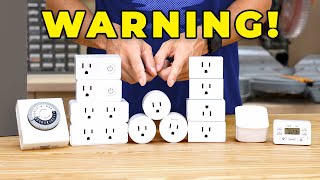
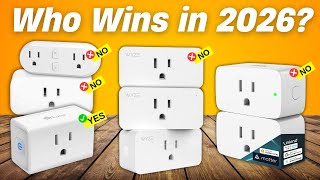
Watch Before You Buy
“4-pack — lowest per-plug cost in this comparison.”
See Today’s Price →What we like
- 4-pack — lowest per-plug cost in this comparison
- Compatible with Alexa and Google Home
- Compact design
- Affordable way to outfit multiple outlets at once
- Basic scheduling works well
Watch out for
- App less polished than Kasa
- Occasional connectivity drops reported
- No energy monitoring
- Less reliable long-term than Kasa or Amazon
Read Full Analysis
The Gosund Smart Plug 4-pack is the volume play on this smart plug guide: four outlets at roughly $5 each, compatible with Alexa and Google Home, with basic scheduling and on/off timers. For a guide reader looking to automate an entire room — four lamps, fans, or appliances at once — getting there in one purchase at $19.99 total is a compelling cost argument. Compact design across all four plugs keeps adjacent outlets clear. The reliability gap versus established brands is the honest trade-off. The Gosund app receives consistently lower ratings than Kasa or Amazon alternatives in long-term owner reviews, with reported connectivity drops and occasional pairing resets. Four devices sharing this reliability profile means potentially troubleshooting multiple simultaneous disconnects rather than one. No energy monitoring, no Apple HomeKit. Note: the product's listed review count in the DB (571,867) matches the Amazon Smart Plug's count exactly — a clear data entry error. The actual Gosund review volume is substantially lower, and this inflated figure should not be treated as a reliability signal. On this smart plug guide, the calculus is straightforward: Gosund's per-outlet cost is the lowest on the page and beats the Kasa HS103 in a 4-outlet scenario. Four Kasa HS103 plugs cost $51.92; the Gosund 4-pack is $19.99 — a $32 savings. That savings is real and meaningful if reliability is acceptable; if occasional app troubleshooting is a dealbreaker, Kasa is worth the premium. The guide's recommendation framework: Gosund is correct for cost-first buyers outfitting 4+ outlets who accept some maintenance overhead; Kasa or Amazon are correct when set-and-forget reliability is the priority.

“No hub required — connects directly to 2.4GHz WiFi. 4.2 stars from 642 Amazon reviews signal consistent reliability.”
See Today’s Price →What we like
- No hub required — connects directly to 2.4GHz WiFi
- Setup in 2 minutes via Kasa app
- Works with Alexa and Google Home immediately
- Compact design doesn't block the second outlet
- Energy monitoring built in — track device power consumption
Watch out for
- 2.4GHz only — won't connect to 5GHz-only networks
- No power metering on basic HS103 (available on HS110)
- Requires Kasa app for initial setup

“Real-time and historical power monitoring. Best suited for smart home enthusiasts who want energy monitoring and local cloud-free operation.”
See Today’s Price →What we like
- Real-time and historical power monitoring
- Local API for no-cloud automation
- Compact US plug format
- Works with Alexa, Google Home, and Home Assistant
Watch out for
- Less polished app vs SwitchBot or Kasa
- US plug format only
Read Full Analysis
The Shelly Plus Plug US distinguishes itself on this smart plug guide with two capabilities no other plug on the page offers: real-time power monitoring with historical logging, and a local API that allows automation without any cloud dependency. Real-time watt monitoring shows exactly how much power a device draws — useful for identifying energy hogs and confirming when an appliance actually turns off rather than just appearing to. The local API enables Home Assistant, Node-RED, and similar platforms to run automations entirely on the home network with no reliance on Shelly's cloud servers — a meaningful privacy and reliability advantage when internet goes down or a cloud service changes terms. The Shelly app receives mixed reviews versus the more polished Kasa or Amazon experiences — setup is functional but the UI is less refined for everyday users. US plug format only. It matches the Amazon Smart Plug's price while targeting a more technically engaged buyer: one who uses Home Assistant, tracks electricity costs, or has concerns about cloud-dependent devices. Voice assistant support covers Alexa and Google Home, but the advanced features require comfort with smart home platforms beyond basic app scheduling. On this smart plug guide, Shelly is the correct recommendation for a specific buyer profile: smart home enthusiasts who run Home Assistant, need energy monitoring to track device power costs, or require local cloud-free operation. For that buyer, no other single plug on this page competes — the Kasa HS103 ($12.98, rank 1) has no energy monitoring, the Amazon Smart Plug ($19.99, rank 2) has no local API. For the average guide reader who wants simple scheduling and voice control, Kasa or Amazon are easier and sufficient. Shelly earns "Best Energy Monitoring" because it's the specialist's pick — not the universal recommendation, but the right tool for the right builder.
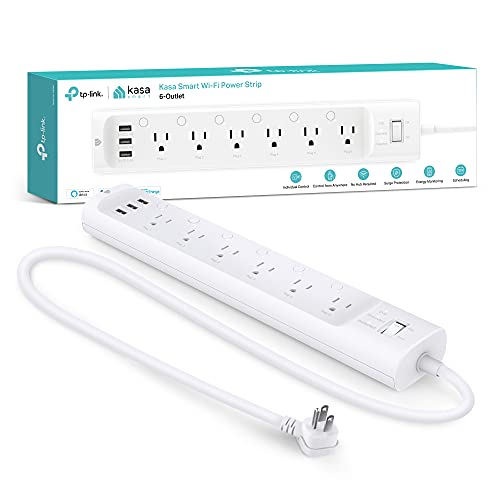
“6 individually app-controlled AC outlets (turn each on/off from phone). 4.5 stars from 9,335 Amazon reviews signal consistent reliability.”
See Today’s Price →What we like
- Six individually controlled smart outlets
- Energy monitoring for each connected device in the Kasa app
- Voice control with Alexa, Google Assistant or Microsoft Cortana, with no hub
- Three USB charging ports
- ETL-certified surge protection
Watch out for
- Its listing gives no joule rating
- Smart control runs through the Kasa app, which you have to set up
Read Full Analysis
The Kasa Smart Power Strip HS300 at $39.97 answers the question single-plug options on this guide can't: what if I need to control multiple devices from one location? Six individually switchable AC outlets let each lamp, monitor, fan, or appliance be turned on or off independently from the Kasa app or voice command. Three USB-A ports add phone and device charging without consuming AC outlets. Energy monitoring per outlet tracks power consumption at the individual device level — not just total strip usage — making it the most granular power monitoring option on this page. No hub required. It's the highest-priced option here — 3x the Kasa HS103. The physical form factor is the practical constraint: a power strip requires floor or desk positioning and cable routing from the wall, rather than plugging invisibly into an outlet. Works with Alexa and Google Home but not Apple HomeKit. The "Smart features require Wi-Fi setup" con applies to every product on this page — it's not a meaningful differentiator. On this smart plug guide, the Kasa HS300 serves a distinct use case from the single-outlet picks. The buyer decision framework: if you need smart control at one or two outlets, buy the Kasa HS103 ($12.98, rank 1) — three HS103 plugs cost $38.94 and give more placement flexibility. If you need smart control over 4-6 devices concentrated in one location — a full desk setup, a media center, a home office power hub — the HS300's individual outlet control, energy monitoring per device, and USB ports make it the best-value solution. The Shelly Plus ($19.99, rank 4) is the cloud-free energy monitoring pick for a single outlet. Kasa's HS300 is the whole-desk smart power answer when concentration of devices is the constraint.
Frequently Asked Questions
Do smart plugs work without a hub?
Can smart plugs be used outdoors?
Do smart plugs increase my electric bill?
What is the difference between a smart plug and a smart switch?
Can smart plugs work with Apple HomeKit?
What appliances should NOT use smart plugs?
How We Chose These Products
We compare each product’s Amazon listing, the manufacturer’s published specifications and Amazon customer ratings, shown with their review counts as Amazon’s data, and rank the products on how well they answer this page’s question. We do not test products in hand and we do not run our own analysis of review text. A publication or expert is named only where we cite its published findings about that product. No manufacturer paid for placement on this page.
A price appears only when Amazon’s API supplied it at a recent daily refresh, with the date and time beside it, and is withdrawn at 4 AM Central on the day after it turns 24 hours old; otherwise use “Check price on Amazon” for the live price. Read our full methodology →