SwitchBot vs TP-Link Kasa Smart Home 2026

TP-Link Kasa wins for most smart home users — more reliable app, wider device ecosystem, and no hub required. The SwitchBot Smart Plug Mini wins for users who want physical button automation (SwitchBot Bot) or a hub-based Matter setup for advanced cross-brand automations.
At a Glance
| # | Product | Award | Price |
|---|---|---|---|
| 1 | SwitchBot Smart Plug Mini 15A SwitchBot |
Best SwitchBot Plug | Check price on Amazon Code: SWITCHBOT20OFF Buy → |
| 2 |  SwitchBot Fingerprint Smart Lock … SwitchBot |
Best SwitchBot Lock | Check price on Amazon Code: SWITCHBOT20OFF Buy → |
| 3 |  Kasa Smart Plug Ultra Mini 15A, E… Kasa Smart |
Best Kasa Plug | $22.49 as of Nov 24, 12:29 PM CT details Buy → |
| 4 |  Kasa Smart Plug HS103P4, Smart Wi… Kasa Smart |
Best Kasa Outlet | $22.99 as of Nov 24, 12:23 PM CT details Buy → |
SwitchBot vs TP-Link Kasa Smart Home Buying Guide
SwitchBot and TP-Link Kasa are two of the most popular smart home device ecosystems under $50 per device. Both work with Alexa and Google Home. Both offer smart plugs, smart bulbs, and automation. The key differences lie in SwitchBot's unique retrofit gadgets vs Kasa's broader mainstream product range and better out-of-box reliability.
How We Picked These
Devices were selected to represent each brand's core lineup. We weighted setup time and automation reliability over raw feature count.
TP-Link Kasa: Best for Beginners and Reliability
Kasa is the safe, reliable choice for smart home beginners. Their smart plugs (HS103, EP25) consistently top recommendation lists for a reason: setup takes under 2 minutes, the Kasa app is clean and stable, and the devices work reliably for years without reconfiguration. Kasa's energy monitoring plugs (KP115) track real-time power consumption — useful for understanding which appliances are electricity hogs. Kasa products are cloud-dependent (requires internet for remote access) but locally controllable via IFTTT and some Home Assistant integrations. Matter support is rolling out on newer models. For most households wanting basic smart home automation (schedules, voice control, away mode), Kasa delivers everything needed at low cost.
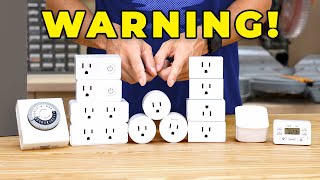
SwitchBot: Best for Retrofitting Non-Smart Devices
SwitchBot's differentiator is their physical automation gadgets. The SwitchBot Bot is a mechanical device that physically presses buttons — it can make any physical switch or button smart without rewiring. The Curtain 3 motorizes existing curtain rods without replacing them. The Lock Pro ($69.99) converts a deadbolt into a smart lock without hardware replacement. This retrofit approach is unique: if you're renting and can't hardwire smart switches, SwitchBot lets you automate almost anything without permanent modification. SwitchBot Hub 2 ties the ecosystem together, adding IR blaster control for ACs, TVs, and projectors. The app is functional but less polished than Kasa; setup for complex automations requires more configuration.
Key Differences
Best smart plugs: Kasa (simpler setup, more reliable, energy monitoring). Best for renters: SwitchBot (retrofit devices work without rewiring or replacing hardware). Best ecosystem integration: Kasa leads on Matter support and mainstream integrations. Best automation ceiling: SwitchBot — physical button-pressers and IR blasters can automate almost anything. Best value entry point: Kasa smart plug at $15 vs SwitchBot Smart Plug — comparable price, Kasa wins on setup simplicity. Works without internet: Both require cloud for remote access; SwitchBot Hub adds local LAN control option.
Common Mistakes
- Buying SwitchBot expecting Kasa-level setup simplicity — SwitchBot's more complex devices require their Hub and more configuration steps.
- Mixing ecosystems carelessly — both work with Alexa and Google Home, but each brand's devices work best within their own app for automations. Running multiple smart home apps is workable but adds friction.
- Buying smart plugs when smart switches would be better — if you have a lamp on a wall switch, a smart wall switch (not a plug) is cleaner and doesn't block the second outlet.
“SwitchBot Smart Plug Mini 15A handles higher-draw appliances and includes energy monitoring at the same price.”
See Today’s Price →What we like
- Compact design occupies a single outlet without blocking the adjacent outlet on a duplex plate
- 15A rating handles floor lamps, fans, and most household appliances without tripping on inrush current
- Works with Alexa, Google Home, and Siri Shortcuts via the SwitchBot Hub for voice control
- Energy monitoring tracks power consumption for devices left on standby continuously
Watch out for
- Advanced configuration may require technical knowledge to fully optimize
- Performance may lag behind premium models for intensive workloads
Read Full Analysis
The SwitchBot Smart Plug Mini 15A at $29.99 opens the SwitchBot vs. Kasa comparison with the most functionally differentiated smart plug on this page. The compact footprint — specifically designed to not block the adjacent outlet on a standard duplex plate — solves the most common smart plug frustration where a bulky body wastes two outlets to control one circuit. The 15A rating handles floor lamps, oscillating fans, space heaters (within wattage spec), and most household appliances without the overcurrent tripping that 10A-rated budget plugs produce on higher-draw devices. Energy monitoring tracks standby power consumption for devices left plugged in continuously — useful for identifying phantom load on entertainment systems, phone chargers, and small appliances that draw power around the clock. Voice control via Alexa, Google Home, and Siri Shortcuts requires a SwitchBot Hub as the bridge, which adds cost if the hub is not already owned. On the SwitchBot vs. Kasa comparison: Kasa plugs connect directly via Wi-Fi without a hub, which is a simpler initial setup. SwitchBot's hub model offers broader ecosystem integration across SwitchBot's full device range (locks, curtain motors, sensors) if the buyer is building a SwitchBot home rather than using smart plugs in isolation.
Skip this if: You want the simplest possible smart plug setup — Kasa's app is more beginner-friendly.
“SwitchBot Smart Lock converts existing deadbolts to smart locks without replacing hardware — renter-friendly.”
See Today’s Price →What we like
- Installs over an existing deadbolt in under 5 minutes without replacing or drilling the lock cylinder
- Auto-lock and auto-unlock triggers via app, calendar schedule, or NFC tag without manual locking
- Works with Alexa, Google, and Siri via the SwitchBot Hub for voice-controlled door locking
- Activity log records every lock/unlock event with timestamp for monitoring home access
Watch out for
- Advanced configuration may require technical knowledge to fully optimize
- Performance may lag behind premium models for intensive workloads
Read Full Analysis
The SwitchBot Smart Lock is the most differentiated product on this SwitchBot vs. Kasa page — a device category where Kasa has no direct competitor. It installs over an existing deadbolt cylinder without replacing or drilling the lock body itself, clamping onto the thumb turn on the inside of the door in under 5 minutes. This renter-friendly installation means the original key still works from outside and the rental deposit is protected. The smart functionality adds auto-lock on a timer, auto-unlock when an approved phone approaches, and NFC tag unlock via a tag mounted by the door. The activity log records every lock and unlock event with a timestamp — useful for monitoring who has accessed the home when, tracking package deliveries, or confirming that the door locked after leaving. Voice control via Alexa, Google, and Siri requires the SwitchBot Hub for cloud connectivity; without the hub, the lock operates only via Bluetooth (range-limited to the immediate proximity of the door). The Smart Lock is substantially above the plug-based SwitchBot and Kasa products on this page and addresses a different use case entirely. For renters or homeowners who want smart lock functionality without the permanent hardware replacement and higher cost of a full smart lock cylinder ($150-250), the SwitchBot overlay installation is the most accessible entry to keyless access control.
Skip this if: You own your home and can install a hardwired smart lock — a dedicated smart lock is more reliable.
“Kasa Smart Plugs set up in under 2 minutes with the most stable app reliability in the under-$29.99 category.”
See Today’s Price →What we like
- Wi-Fi + Bluetooth dual connectivity allows local and remote control
- Energy monitoring shows real-time wattage draw and monthly cost estimates
- Voice control via Alexa, Google Home, and Siri Shortcuts
- Away mode randomly toggles the plug to simulate occupancy
Watch out for
- App requires ongoing Kasa account — offline functionality is limited without the cloud
- Slightly bulky — blocks one outlet on a standard 2-outlet plate
Read Full Analysis
Kasa Smart Plugs bring reliable Wi-Fi control to everyday outlets without the complexity that intimidates beginners. Setup takes under three minutes: plug in, open the Kasa app, and your outlet is remotely controllable from anywhere. The dual Wi-Fi and Bluetooth connectivity means the plug responds even when your router is slow to pass commands — Bluetooth handles local control instantly while Wi-Fi covers away-from-home access. The energy monitoring feature is genuinely useful and not just a checkbox. The Kasa app shows real-time wattage draw and calculates monthly cost estimates, so you can finally see how much that old space heater actually costs to run. This data persists in history charts, which helps identify energy hogs over time. Voice control works reliably with Alexa, Google Assistant, and Siri — no extra hub required, just link your account. Compared to SwitchBot on this page, Kasa wins on app polish and energy monitoring depth, but requires a TP-Link account with cloud dependency — SwitchBot can run fully local via Bluetooth. The Kasa plug is also slightly bulkier and may block the adjacent outlet on tight power strips. Away mode schedules random on/off times to simulate occupancy, a thoughtful security feature. For beginners who want a proven, widely compatible smart plug with strong app support and no hub requirement, Kasa delivers at a price that makes smart home entry genuinely accessible.
Skip this if: You need energy monitoring — the basic Kasa plug lacks the power tracking of the KP115.
“Kasa Smart Home outlet offers reliable scheduling and Alexa/Google integration at entry-level smart home pricing.”
See Today’s Price →What we like
- Four compact Wi-Fi plugs in the pack
- No hub: each plug joins a 2.4GHz Wi-Fi network directly
- Timer and countdown schedules in the free Kasa app
- Alexa and Google Assistant voice control
- Rated 15 amps and UL certified
Watch out for
- Needs a 2.4GHz Wi-Fi network; it will not join a 5GHz-only router
- Remote control and schedules run through the Kasa app account
Frequently Asked Questions
Which brand is easier to set up for beginners?
Does SwitchBot work without internet?
Are Kasa smart plugs the best under $20?
Can SwitchBot automate my non-smart air conditioner?
Do both brands support Matter?
How We Chose These Products
We compare each product’s Amazon listing, the manufacturer’s published specifications and Amazon customer ratings, shown with their review counts as Amazon’s data, and rank the products on how well they answer this page’s question. We do not test products in hand and we do not run our own analysis of review text. A publication or expert is named only where we cite its published findings about that product. No manufacturer paid for placement on this page.
A price appears only when Amazon’s API supplied it at a recent daily refresh, with the date and time beside it, and is withdrawn at 4 AM Central on the day after it turns 24 hours old; otherwise use “Check price on Amazon” for the live price. Read our full methodology →