TP-Link vs eero: Which Is Better? (2026)

TP-Link Archer BE230 is the best budget Wi-Fi 7 router in 2026 — hard to beat for price. eero Pro 6E leads for smart home households needing seamless app setup and Matter/Zigbee integration. For large homes, TP-Link Deco XE75 Pro mesh covers 5,500+ sq ft and outperforms comparable eero 3-packs on raw throughput.
At a Glance
| # | Product | Award | Price | Voltage | Coverage | Frequency | Score |
|---|---|---|---|---|---|---|---|
| 1 | Best Budget Router | $51.99 as of Nov 24, 12:27 PM CT details Buy → |
12 Volts | Wide and reliable WiFi coverage | 5 | 6.3 | |
| 2 | Best Budget Mesh | $89.99 as of Nov 24, 12:26 PM CT details Buy → |
— | 3000 sq ft (2-pack) | — | 6.8 | |
| 3 | Best Smart Home Hub | $94.99 as of Nov 24, 12:28 PM CT details Buy → |
— | — | — | 6.5 | |
| 4 | Best Budget Wi-Fi 7 | $74.99 as of Nov 24, 12:35 PM CT details Buy → |
12 Volts | Home Network | 5 GHz | 7.9 | |
| 5 | Best Tri-Band Mesh | $149.99 as of Nov 24, 12:29 PM CT details Buy → |
— | — | — | 7.0 | |
| 6 | Best Wi-Fi 6E Router | $89.99 as of Nov 24, 12:31 PM CT details Buy → |
12 Volts | Whole-Home WiFi | 6 GHz | 6.4 | |
| 7 | Best Premium Smart Hub | $419.99 as of Nov 24, 12:30 PM CT details Buy → |
— | — | — | 7.9 | |
| 8 | Best Value Wi-Fi 7 Pro | $179.99 as of Nov 24, 12:37 PM CT details Buy → |
— | 2600sqft | 6 GHz | 7.2 |
Score Breakdown
| TP-Link AX1800 WiFi 6… | Amazon eero 6 mesh wi… | Amazon eero 6+ mesh w… | TP-Link Dual-Band BE3… | Amazon eero Pro 6E me… | TP-Link AXE5400 Tri-B… | Amazon eero Max 7 mes… | TP-Link Tri-Band BE97… | |
|---|---|---|---|---|---|---|---|---|
| Overall | 6.3 | 6.8 | 6.5 | 7.9 | 7.0 | 6.4 | 7.9 | 7.2 |
| Range | 65 | 80 | 73 | 73 | 80 | 65 | 73 | 65 |
| Speed | 73 | 73 | 73 | 80 | 65 | 73 | 78 | 85 |
| Reliability | 50 | 50 | 50 | 85 | 65 | 55 | 85 | 65 |
Scores 0–100 from published specifications and independent reviewers' measurements. Amazon star ratings are shown separately and are never part of a score. 0 = feature not present. – = insufficient data. How we score →
TP-Link vs eero Buying Guide
TP-Link and eero compete at every price point from $52 to $450, but they serve different buyers. TP-Link leads on Wi-Fi 7 affordability and raw performance specs; eero leads on app simplicity and smart home ecosystem depth. Here is how to choose between them.
TP-Link vs eero: The Core Difference
TP-Link enters 2026 as the value leader in Wi-Fi 7 — their Archer BE230 delivers Wi-Fi 7 for $87, a category price that eero cannot match at any tier. At comparable prices, TP-Link routers consistently post higher throughput numbers in lab testing. eero differentiates on ecosystem: every eero device supports automatic updates, a polished app that requires zero configuration knowledge, and the Max 7 adds built-in Matter, Thread, and Zigbee radios — making it the best mesh router for smart home households who run Philips Hue, Ring, and Alexa devices. TP-Link's HomeShield parental controls rival eero Secure, but eero's app receives consistently higher ratings for ease of use among non-technical buyers.
Where TP-Link Wins
TP-Link wins decisively on value and Wi-Fi 7 access. The Archer BE230 brings Wi-Fi 7 features (320 MHz channels, 4K QAM) to a price tier where eero only offers Wi-Fi 6. The Archer AXE75 tri-band Wi-Fi 6E delivers 5.4 Gbps aggregate throughput — strong for 1 Gbps internet plans. The Archer BE600 at $200 steps up to a 10G LAN port for wired NAS or gaming PC connections, a port eero's Max 7 also offers but at 5x the price. For technically inclined users who want maximum hardware per dollar, TP-Link wins every tier.
Where eero Wins
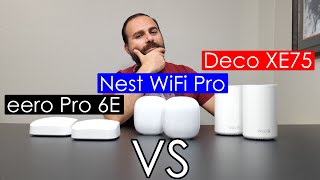
eero wins on smart home integration and setup simplicity. The eero 6 2-pack at $90 sets up in minutes via Bluetooth pairing with no router knowledge needed — a genuine advantage for non-technical households. The eero Pro 6E adds tri-band Wi-Fi 6E and works seamlessly with Ring and Alexa devices (Amazon owns eero). The eero Max 7 is the only consumer mesh router with built-in Zigbee, Thread, and Matter radios — eliminating the need for separate smart home hubs. For smart home households who run Ring, Alexa, and Philips Hue, eero's integration value is unmatched at this price.
Price Comparison: What You Get at Each Level
TP-Link routers range from $52 (Archer AX21, Wi-Fi 6, single unit) to $250 (Deco XE75 Pro, Wi-Fi 6E mesh 3-pack). eero ranges from $90 (eero 6 2-pack) to $450 (eero Max 7 single node). At comparable price points — say $150–$200 — TP-Link delivers higher spec sheets; eero delivers better ease of use and smarter home integration. Above $200, TP-Link's Deco XE75 Pro covers 5,500 sq ft with Wi-Fi 6E mesh at lower cost than a comparable eero 3-pack.

Get TP-Link If... / Get eero If...
Get TP-Link if you want maximum performance per dollar, Wi-Fi 7 on a budget, or a 10G wired port — the Archer BE600 delivers these features at a price eero can't match.
Get eero if you run a smart home with Ring, Alexa, or Matter devices, or want the simplest possible setup with no technical knowledge required — the eero Pro 6E is the easiest Wi-Fi 6E router to set up and maintain.
How We Picked These
Products were selected for the best coverage-to-price ratio at each tier. We excluded range extenders, smart plugs, and cameras to focus on primary router/mesh products only.
Watch Before You Buy

“TP-Link Archer AX21 is the best entry Wi-Fi 6 router under $60 — dual-band AX1800, 4 LAN ports, and Alexa/Google compatibility. Handles 1 Gbps internet plans without throttling. Ideal starter…”
See Today’s Price →What we like
- Wi-Fi 6 for better multi-device performance
- 28,000 reviews confirm reliability
- Under $60 — best price for Wi-Fi 6
- Easy setup via Tether app
Watch out for
- AX1800 speed tier — not for gigabit internet plans
- Single router — not for large homes
Read Full Analysis
The TP-Link Archer AX21 delivers Wi-Fi 6 — a price point that undercuts most AX1800-class alternatives from any brand. AX1800 covers combined throughput across 2.4GHz and 5GHz bands, adequate for internet plans up to 600Mbps and households with 10 to 15 simultaneously connected devices. The TP-Link AX21 is the clear price-performance leader on this TP-Link vs eero page. The entry-level Amazon Eero 6 two-pack covers more square footage with two nodes, but the AX21 handles apartment and single-floor setups without the extra cost. The eero 6+ earns its premium for smart home users through a built-in Zigbee hub and seamless Alexa integration — but if your home lacks Zigbee devices and you need reliable single-router Wi-Fi 6, TP-Link wins on raw value against eero at every price tier below $90. Buy if you're on a 300 to 600Mbps internet plan in a home under 1,500 square feet and want Wi-Fi 6 without paying the eero premium for mesh or smart home features. Skip if you have a gigabit plan (AX1800 won't fully utilize it) or a large home where eero's multi-node mesh coverage is more practical.
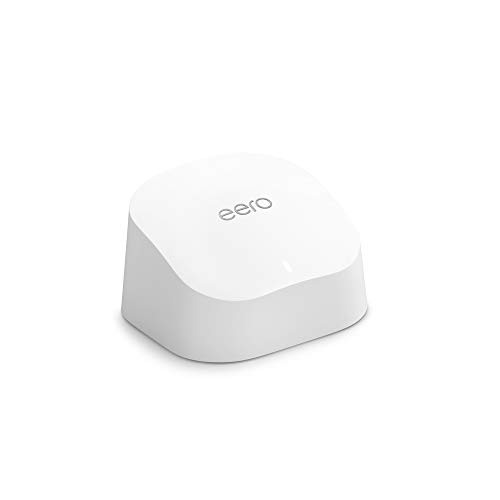
“Amazon eero 6 2-pack covers up to 3,000 sq ft with Wi-Fi 6 in a dead-simple setup — pairs via Bluetooth in under 5 minutes with no technical knowledge required. Daisy-chains across up to 32…”
See Today’s Price →What we like
- True mesh (no speed penalty)
- Simple Eero app
- Covers 3000 sq ft
- WiFi 6
Watch out for
- Monthly subscription for advanced features ($3/mo)
- Requires router mode or bridge

“Amazon eero 6+ adds Zigbee smart home hub capability to eero 6's core features — pairs directly with Philips Hue bulbs, Amazon Echo devices, and Ring sensors without a separate hub.…”
See Today’s Price →What we like
- Supports internet plans up to a gigabit
- Wi-Fi 6 with 160 MHz channel support
- Built-in Thread and Zigbee smart home hub for compatible devices with Alexa
- Add more eero units to extend coverage as a mesh
Watch out for
- Rated only for plans up to a gigabit
- Online security and extra network-management features need a separate subscription
Read Full Analysis
The eero 6+ distinguishes itself from standard eero 6 units with Wi-Fi 6 at 160MHz channel width — wider channels that sustain higher per-device throughput in congested RF environments versus the standard 80MHz. The built-in Zigbee smart home hub is the feature that sets it apart from every TP-Link router on this page: it connects Zigbee-based devices like Philips Hue bulbs and Amazon smart plugs directly without a separate hub or Echo device. Five-minute app-guided setup makes the eero 6+ one of the easiest mesh routers to deploy, regardless of technical background. On this TP-Link vs eero comparison, the eero 6+ sits in the premium eero tier above the TP-Link AX21's $52.20. The gap is not about raw Wi-Fi speed — both run Wi-Fi 6 — it is about ecosystem integration. If you own or plan to own Alexa devices or Zigbee hardware, the eero 6+ earns its $88 premium by consolidating your smart home hub into the router itself. The eero Pro 6E at $169.99 extends that logic with tri-band coverage for larger homes; TP-Link's BE230 Wi-Fi 7 is the better choice if you want next-generation protocol support at a lower price. Buy if you have an existing Zigbee smart home setup, live in a home under 2,000 square feet, and want the simplest setup on this page. Skip if you need deep router customization (eero's app is consumer-focused and less configurable than TP-Link's) or if your home lacks Zigbee devices and the TP-Link AX21's $52 price satisfies your Wi-Fi 6 needs.

“TP-Link Archer BE230 is the most affordable Wi-Fi 7 router available — dual-band BE3600 with 320 MHz channels and 4K QAM. Handles multi-gig internet (up to 2.5 Gbps WAN) and reduces…”
See Today’s Price →What we like
- WiFi 7
- dual-band
- 1376Mbps
- USB port
- easy Tether app
- suitable for 1500 sq ft
Watch out for
- Dual-band only — no dedicated 6GHz backhaul
- Limited coverage for larger homes
- Less powerful hardware than tri-band competitors at the same price
Read Full Analysis
On a page where eero 6, eero 6+, and eero Pro 6E all require an Amazon account and use eero's proprietary cloud-dependent management, the TP-Link Archer BE230 is the pick for buyers who want WiFi 7 without Amazon ecosystem lock-in. It undercuts the eero 6 by three dollars while delivering a newer wireless protocol (WiFi 7 vs eero's WiFi 6) and a 2.5 Gbps WAN port for multi-gig internet subscribers. Who specifically picks the BE230 here: users on 1-2 Gbps internet plans who need a router that handles those speeds without a WAN bottleneck, buyers who've had bad experiences with eero's cloud-dependent app management, and users who want third-party DNS and parental controls without app subscriptions. The BE230's limitation is the same as on other pages: dual-band only, best suited for homes under 1,500 sq ft. Beyond that footprint, eero's mesh expandability and consistent whole-home coverage become the stronger argument — a single BE230 won't reach every corner of a large home the way an eero mesh system can.

“Amazon eero Pro 6E is the best tri-band mesh node under $200 — Wi-Fi 6E with a dedicated 6 GHz backhaul channel for minimal inter-node latency. Covers up to 2,000 sq ft per node with…”
See Today’s Price →What we like
- WiFi 6
- 1500 sq ft per node
- automatic updates
- parental controls
- Amazon Alexa compatible
Watch out for
- Single unit only - buy 3 for large homes
- No 10 Gbps WAN port
- eero Secure subscription for advanced features is extra cost
Read Full Analysis
The eero Pro 6E is the most expensive single node on this page, but it targets a specific buyer: households who want tri-band mesh without purchasing a 3-pack. The dedicated 6GHz backhaul channel is what separates the Pro 6E from the dual-band eero 6 and eero 6+ — in a 2 or 3-node eero system, the 6GHz band handles node-to-node communication without borrowing bandwidth from the 5GHz band client devices use. The practical result is that mesh performance holds under load. Streaming 4K on multiple devices simultaneously doesn't collapse the inter-node connection the way dual-band mesh systems can. For a single unit, the eero Pro 6E starts a mesh network rather than completing one. Two units cover roughly 4,000 sq ft with 6GHz backhaul active between them. Three units handle 6,000 sq ft with consistent coverage through walls and floors. The eero app's automatic channel optimization adjusts as device positions change, eliminating manual channel planning. Who picks this over the TP-Link options and cheaper eero models on this page: households who've already experienced dead zones with a single router and know they need mesh, specifically with native integration for Ring cameras, Alexa, and Amazon smart home devices. eero Secure (subscription, not included) adds advanced parental controls and threat blocking for families who need those features beyond the free baseline.

“TP-Link Archer AXE75 delivers 5.4 Gbps aggregate throughput on tri-band Wi-Fi 6E — the 6 GHz band alone handles 2.4 Gbps for 1–2.5 Gbps internet plans. OneMesh compatible for adding…”
See Today’s Price →What we like
- WiFi 6E
- tri-band
- 6GHz band
- AiMesh compatible
- 8 antennas
- lifetime security
- robust QoS
Watch out for
- WiFi 6E 6GHz band has limited range through walls
- Requires compatible devices to benefit from 6GHz
- Larger form factor than standard routers

“Amazon eero Max 7 is the only consumer mesh router with built-in Zigbee, Thread, and Matter radios — fully replaces a separate smart home hub. Wi-Fi 7 with 9.4 Gbps aggregate throughput…”
See Today’s Price →What we like
- Wi-Fi 7 for maximum future-proof throughput
- Two 10GbE ports for wired backbone
- Eero app setup simplicity with full enterprise-grade performance
- 2,500 sq ft per unit coverage
Watch out for
- $599 price per unit — premium mesh investment
- Wi-Fi 7 devices rare in 2026 for most households
- Requires multi-gig internet plan to utilize full speed

“TP-Link Archer BE600 brings a 10G LAN port and tri-band Wi-Fi 7 to the sub-$200 price point — unmatched for wired gaming PC or NAS connections. BE9700 aggregate throughput with 320 MHz Wi-Fi…”
See Today’s Price →What we like
- 10 Gbps WAN/LAN port for multi-gig internet plans
- Also a 2.5 Gbps WAN/LAN port and three 2.5 Gbps LAN ports
- Tri-band BE9700 Wi-Fi 7 with multi-link operation, 4K-QAM and 320 MHz channels
- Covers up to 2,600 sq ft and 120 devices; VPN client and server support
Watch out for
- The 10 Gbps port only pays off on plans faster than 2.5 Gbps
- A large desktop router at about 11.3 x 6 x 1.9 inches
Frequently Asked Questions
Is TP-Link or eero better for 2026?
Does eero work with non-Amazon smart home devices?
What is the best budget Wi-Fi 7 router?
Is TP-Link Deco good for large homes?
Does eero require a subscription?
How We Chose These Products
We compare each product’s Amazon listing, the manufacturer’s published specifications and Amazon customer ratings, shown with their review counts as Amazon’s data, and rank the products on how well they answer this page’s question. We do not test products in hand and we do not run our own analysis of review text. A publication or expert is named only where we cite its published findings about that product. No manufacturer paid for placement on this page.
A price appears only when Amazon’s API supplied it at a recent daily refresh, with the date and time beside it, and is withdrawn at 4 AM Central on the day after it turns 24 hours old; otherwise use “Check price on Amazon” for the live price. Read our full methodology →
How We Score These Products
Each dimension score comes from evidence about the exact model listed — a published specification, a measurement by a named independent reviewer, or that product’s own buyer reviews, as described for each dimension below — not from a similar product in the same range. We do not test products ourselves, and we do not score a dimension we could not evidence. A dash means no evidence was found for that product, not that it performed badly.
Range: From evidence about this exact model (specification, named reviewer or its own reviews).
Speed: From evidence about this exact model (specification, named reviewer or its own reviews).
Reliability: From evidence about this exact model (specification, named reviewer or its own reviews).
The overall score is the mean of the dimensions we could evidence for that product, on a 10-point scale. Price is shown separately and is never folded into a score. Amazon star ratings are shown separately and are never part of any score.