USB-C vs Thunderbolt: What's the Difference? (2026)
The Cable Matters Thunderbolt 4 Cable is the best value Thunderbolt recommendation — the lightning bolt certification guarantees 40 Gbps and 100W power delivery, the minimum standard for true Thunderbolt performance this guide explains.
USB-C vs Thunderbolt Buying Guide

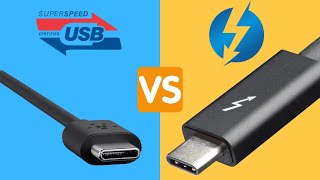
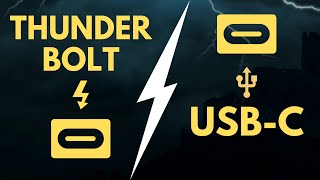
USB-C is a connector shape. Thunderbolt is a protocol. They share the same physical port and cable design — which is exactly why the confusion exists. A USB-C cable that comes in a phone box will not deliver Thunderbolt speeds. A Thunderbolt 4 cable will work in any USB-C port. Understanding this distinction prevents expensive compatibility mistakes when buying hubs, docks, and cables.
Speeds: USB-C vs Thunderbolt
USB-C covers a wide range of protocols. USB 3.2 Gen 2 (the most common on laptops) delivers 10 Gbps. USB4 Gen 2×2 reaches 20 Gbps. Thunderbolt 4 delivers 40 Gbps — the same as Thunderbolt 3 — with stricter minimum specs for video, data, and power. Thunderbolt 5 (2024+) doubles bandwidth to 80 Gbps for the latest MacBook Pros and Intel Meteor Lake machines. For reference: transferring a 100GB file takes 20 seconds on Thunderbolt 4 vs. 80 seconds on USB 3.2 Gen 2. The CalDigit TS4 Thunderbolt 4 Dock unlocks the full 40 Gbps bandwidth for demanding workflows.
What Thunderbolt Enables That USB-C Doesn't
Thunderbolt 4 requires: at least one 4K display or two 4K displays via daisy-chain, minimum 40 Gbps data bandwidth, 100W power delivery, and PCIe tunneling for external GPUs. USB-C with USB4 can do most of this — but there's no mandatory minimum spec, so a USB4 hub that claims 40 Gbps may deliver 15 Gbps under real conditions. The Thunderbolt logo (a lightning bolt icon) on a port or cable is Intel's certification that the device meets all minimums. The Anker 7-in-2 Hub for MacBook with Thunderbolt 4 carries that certification at an unusually low price point.
When USB-C Is Sufficient
For most users — charging a laptop, connecting one external display, transferring files from a phone — a quality USB-C cable or hub delivers everything you need at a fraction of the Thunderbolt price. The Anker 5-in-1 USB-C Hub handles 4K HDMI output, two USB-A ports, and 85W pass-through charging for under $20. The Cable Matters Thunderbolt 4 Cable is the rare exception: it's a Thunderbolt-certified cable at USB-C cable price, which means it works with both protocols and handles everything from phone charging to 40 Gbps transfers.
Compatibility Rules to Remember
Thunderbolt ports work with USB-C cables and devices (backward compatible). USB-C ports do NOT work with Thunderbolt features — you get USB speeds only. Thunderbolt 3 and 4 cables are physically interchangeable, but Thunderbolt 5 requires new cables for full bandwidth. Apple Silicon Macs (M1+) have Thunderbolt 4 ports. Most Windows laptops have USB4 or USB 3.2 — check the spec sheet. Never buy a Thunderbolt dock for a laptop with USB-C-only (non-Thunderbolt) ports — it will function as a USB hub but at USB speeds only.
Common Mistakes
Using a generic USB-C cable with a Thunderbolt dock and wondering why it doesn't work at full speed. Buying a Thunderbolt 4 dock for a laptop that doesn't have Thunderbolt ports. Assuming a USB-C port on a budget laptop is USB4 (it's usually USB 3.2 Gen 1 at 5 Gbps). Check your laptop's spec sheet for the port standard before buying any dock or hub — look for "Thunderbolt" or "USB4" in the port description, not just "USB-C."
Watch Before You Buy

Showing 4 of 4 products
“”
See Today’s Price →What we like
- Thunderbolt 4 certified (40Gbps)
- 100W charging
- Intel certified
- Compatible with USB4
- Supports dual 4K displays
Watch out for
- Higher price than basic cables
- Shorter 1m length

“Anker 5-in-1 USB-C Hub — $19.99, 4K HDMI + 2x USB-A + 85W PD. Sufficient for most laptops.”
See Today’s Price →What we like
- Five ports: 4K HDMI, a 5Gbps USB-C data port, two 5Gbps USB-A ports and a USB-C power-in port
- Passes up to 85W through to the laptop when you plug its charger into the hub
- Moves files at up to 5Gbps over the USB-C and USB-A data ports
- Works with USB-C, USB4 and Thunderbolt laptops, macOS 12 or newer, Windows 10 and 11 and ChromeOS
- 18-month warranty
Watch out for
- HDMI runs 4K at 30Hz, not 60Hz
- No SD card slot and no Ethernet port
- Not compatible with Linux, and the charger for pass-through is not included

“Anker 7-in-2 MacBook Hub with Thunderbolt 4 — $34.99, 4K 60Hz HDMI, certified 40 Gbps data.”
See Today’s Price →What we like
- 4-port USB 3.0
- 5Gbps
- individual power switches
- LED indicators
- flat cable
- bus-powered
Watch out for
- Thunderbolt 4 port requires Thunderbolt host — standard USB-C gets slower speeds
- Premium price for a MacBook-specific hub
- Larger footprint than portable alternatives
Read Full Analysis
On this page, the Cable Matters Thunderbolt 4 Cable and Anker 5-in-1 Hub cover the basics — data transfer and a handful of ports. The Anker 7-in-2 is the pick for MacBook users who need full desk connectivity without stepping up to the CalDigit TS4. Seven ports — 4K 60Hz HDMI, Thunderbolt 4, four USB 3.0, and SD/microSD — in a MacBook-optimized form factor with a flat cable that doesn't stress the port. Individual power switches and LED indicators on each port are features absent on the cheaper Anker 5-in-1, making this the right choice for anyone managing multiple peripherals that need to be toggled without unplugging. The Thunderbolt 4 port delivers its full 40 Gbps speed only when connected to a Thunderbolt host port. On a standard USB-C laptop, speeds revert to USB 3.2 (10 Gbps). MacBook Pro and Air users with Thunderbolt ports get the full specification — Windows laptop users with USB-C only ports should verify Thunderbolt host support before choosing this over the 5-in-1 at a lower price.
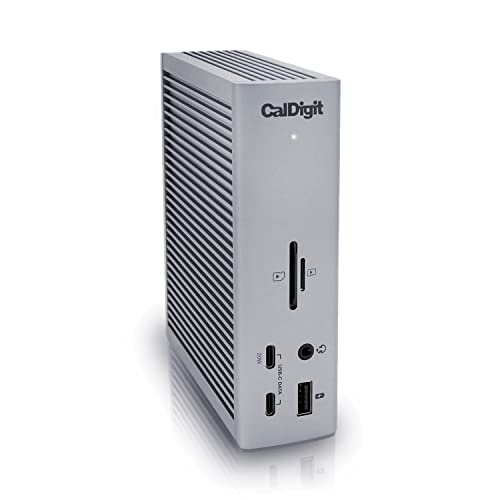
“CalDigit TS4 Thunderbolt 4 Dock — $380, 18 ports, 98W charging, dual 6K display support.”
See Today’s Price →What we like
- 18 ports including 3x DisplayPort 1.4, 2x Thunderbolt 4, SD card, and 98W upstream laptop charging
- Thunderbolt 4 (40Gbps) supports simultaneous full-speed transfer across all connected devices
- CalDigit is the benchmark brand for professional Thunderbolt docks used by creative professionals
- Single cable connection powers the laptop and connects all peripherals in one plug
Watch out for
- $379.99 is the highest price on the page — significant investment for a docking station
- 40Gbps Thunderbolt bandwidth only fully utilized with a TB4-equipped host laptop
Read Full Analysis
The CalDigit TS4 represents what full Thunderbolt 4 bandwidth enables: 18 ports including three DisplayPort 1.4 outputs for triple external displays, two Thunderbolt 4 daisy-chain ports, SD card reader, and 98W upstream laptop charging — all simultaneously over a single Thunderbolt 4 cable at 40Gbps. CalDigit is the benchmark brand for professional Thunderbolt docks in creative and audio production studios. This page explains the USB-C versus Thunderbolt difference, and the TS4 demonstrates the practical gap. The Anker USB-C hubs on this page ($18.98–$32.74) operate at 5–10Gbps USB-C bandwidth; the TS4 operates at 40Gbps. For large file transfers — 4K ProRes video, high-res audio projects, large RAW photo libraries — the 4x bandwidth difference translates directly to time saved. Buy the CalDigit TS4 for professional creative workstations where 40Gbps throughput, triple display support, and 98W laptop charging from a single cable justify the $379.99 investment. Confirm your laptop has a Thunderbolt 4 port — standard USB-C hosts will connect but won't achieve full speeds. Skip for standard home and office use where 10Gbps USB-C hubs at a fraction of the cost handle everyday needs.
Frequently Asked Questions
Can I plug a Thunderbolt 4 device into a USB-C port?
How do I tell if my laptop has Thunderbolt or just USB-C?
What is the difference between Thunderbolt 3 and Thunderbolt 4?
Is USB4 the same as Thunderbolt 4?
Do I need a Thunderbolt cable or a USB-C cable for charging?
How We Chose These Products
We compare each product’s Amazon listing, the manufacturer’s published specifications and Amazon customer ratings, shown with their review counts as Amazon’s data, and rank the products on how well they answer this page’s question. We do not test products in hand and we do not run our own analysis of review text. A publication or expert is named only where we cite its published findings about that product. No manufacturer paid for placement on this page.
A price appears only when Amazon’s API supplied it at a recent daily refresh, with the date and time beside it, and is withdrawn at 4 AM Central on the day after it turns 24 hours old; otherwise use “Check price on Amazon” for the live price. Read our full methodology →