Best Webcams for Video Calls and Remote Work
The OKIOLABS OKIOCAM is the best webcam for video calls that show your work — overhead mounting shows your face and work surface simultaneously, ideal for tutoring, presentations, and anyone who needs to share documents during calls. Check current price.
At a Glance
| # | Product | Award | Price |
|---|---|---|---|
| 1 | Best Overall | $81.95 Buy → |
|
| 2 | 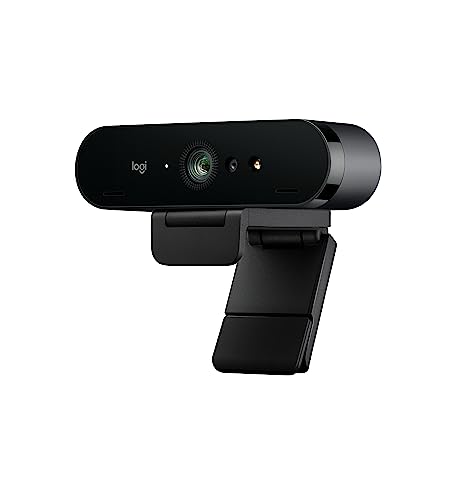 Logitech 4k Webcam Logitech 4k WebcamLogitech |
Best with Ring Light | Check current price on Amazon Buy → |
| 3 | Best 4K | $119.99 Buy → |
|
| 4 | Best Budget | $59 $47.99 -17% Buy → |
|
| 5 | Best AI-Powered | $29.99 Used — not a new unit Buy → |
Webcams for Video Calls and Remote Work Buying Guide
 Photo by Edward Jenner / Pexels
Webcam quality is surprisingly visible to the people you're video calling — pixelated video and poor low-light performance signal low investment in your setup. A $60-100 webcam is the most impactful improvement most remote workers can make.
Resolution: 1080p vs 4K
1080p at 30fps is the sweet spot for most video calls — Zoom, Teams, and Google Meet cap at 1080p anyway. 4K webcams show detail on screen-shares and recordings, but cost 2-3x more for minimal video call benefit. Start with 1080p unless you do frequent video production.
Low-Light Performance
Aperture (f/2.0 or lower) and sensor size determine low-light quality. Logitech's C920 and Razer Kiyo handle typical home office lighting well. If your workspace is dim or backlit, look for webcams with "low-light correction" or built-in ring lights (Razer Kiyo).

Built-in vs External Microphone
Most webcams have built-in stereo mics that handle conference calls adequately. If you do podcasts, YouTube, or frequent all-day calls, a dedicated USB microphone is a bigger audio upgrade than any webcam's built-in mic.
Autofocus and Field of View
Autofocus keeps you sharp when you move. Fixed-focus webcams are cheaper but blur when you lean forward. For single users, 65-78° field of view shows your face and upper body. For multi-person rooms, 90°+ wide-angle covers more of the room.
The OKIOLABS OKIOCAM S-4K 8MP Document Camera and Webcam 2-in-1 at $81.95 is the pick to beat here. Logitech C920x delivers reliable 1080p with dual mics and universal compatibility — the default answer for most remote workers. Below is what the other 4 options on this page do differently, and what each one costs.
How these compare
OKIOLABS OKIOCAM S-4K 8MP Document Camera and Webcam 2-in-1 ($81.95) — Logitech C920x delivers reliable 1080p with dual mics and universal compatibility — the default answer for most remote workers. Trade-off: Assembly required — budget 30-60 minutes for initial setup. Logitech 4k Webcam ($117.99) — 4K resolution for local recording, RightLight 3 HDR for extreme lighting, 5x zoom, works as ID card for Windows Hello, 90-degree wide field of view. Trade-off: Expensive for Zoom-only use. Logitech C922x HD Pro PC Webcam ($119.99) — Flexible 1080p 30fps or 720p 60fps mode. Trade-off: 720p required for 60fps is a significant resolution tradeoff. EMEET C960 4K Webcam for PC ($47.99) — True 4K resolution (3840x2160) at 30FPS for ultra-clear video conferencing. Trade-off: Warranty terms not prominently disclosed — verify with seller before purchase. Logitech Brio 101 Full HD 1080p Webcam for Meetings ($29.99) — 5x digital zoom. Trade-off: Budget 1080p sensor has softer image than premium webcams.
What the price difference buys
Prices on this page run from $29.99 to $119.99, a difference of $90.00. The Logitech Brio 101 Full HD 1080p Webcam for Meetings is the least you can spend here, and the compromise is noted as: Fixed focus — not suitable for close macro shots. The Logitech C922x HD Pro PC Webcam asks $119.99, and what it offers for that is: Flexible 1080p 30fps or 720p 60fps mode. Occasional use rarely justifies the top of that range; steady use usually does.
Which one fits your situation
OKIOLABS OKIOCAM S-4K 8MP Document Camera and Webcam 2-in-1 — best for: Value-focused buyers: Homeowners looking for functional reliable home goods at an accessible price point. Logitech 4k Webcam — best for: Content creators and executives who record local video and stream. Logitech C922x HD Pro PC Webcam — best for: Streamers and content creators who need frame rate flexibility between resolution and smoothness. Logitech Brio 101 Full HD 1080p Webcam for Meetings — best for: Video conferencing professionals wanting 4K webcam with razor-sharp clarity.
What to check before you buy
OKIOLABS OKIOCAM S-4K 8MP Document Camera and Webcam 2-in-1 — Assembly required — budget 30-60 minutes for initial setup. Logitech 4k Webcam — Expensive for Zoom-only use. Logitech C922x HD Pro PC Webcam — 720p required for 60fps is a significant resolution tradeoff. EMEET C960 4K Webcam for PC — Warranty terms not prominently disclosed — verify with seller before purchase. Logitech Brio 101 Full HD 1080p Webcam for Meetings — Budget 1080p sensor has softer image than premium webcams. None of these is disqualifying on its own, but they are what buyers most often notice once the box is open.
The details that decide it
Logitech C922x HD Pro PC Webcam — Background replacement via Personify software included. EMEET C960 4K Webcam for PC — PDAF autofocus technology with automatic light correction for sharp, clear video in varying conditions. Logitech Brio 101 Full HD 1080p Webcam for Meetings — auto-light correction.
Watch Before You Buy
“”
See Today’s Price →Watch out for
- Assembly required — budget 30-60 minutes for initial setup
- Color and style options may be limited compared to premium furniture brands
Read Full Analysis
The OKIOLABS OKIOCAM is an overhead document camera rather than a traditional front-facing webcam. It mounts on a stand pointing downward to capture documents, worksheets, live demonstrations, or physical objects during video calls — a fundamentally different use case from a face camera for standard meetings. For online teachers showing written work to students, tutors working through math problems on paper, or presenters sharing physical products during a call, the OKIOCAM fills a gap that standard webcams cannot. The overhead angle captures detail on flat surfaces without glare from a scanner lid and without the delay of photographing and uploading a document. Buyers who need a face camera for typical video calls should look at standard forward-facing webcams instead — the OKIOCAM is a specialist tool for document and object sharing, and it excels specifically in that role.
“Best premium webcam — Logitech Brio's 4K and HDR make a visible difference for YouTube recording and streaming. Overkill for pure Zoom use but right for hybrid creator/professional setups.”
See Today’s Price →What we like
- 4K resolution for local recording, RightLight 3 HDR for extreme lighting, 5x zoom, works as ID card for Windows Hello, 90-degree wide field of view
Watch out for
- Expensive for Zoom-only use
- 4K benefit only realized in local recording
Read Full Analysis
Logitech Brio records and streams at 4K resolution with RightLight 3 HDR — an autoscaling exposure system that adjusts to backlit conditions like windows behind the subject that cause competing webcams to blow out or underexpose. The 5x digital zoom maintains resolution headroom for cropped framing without the pixelation that limited-resolution cameras produce at zoom. Windows Hello support means the Brio doubles as a biometric login device for Windows-based workstations, and the USB connection works plug-and-play across Windows and Mac without driver installation. For video calls, the 4K source downsampled to 1080p for conferencing platforms produces sharper output than cameras that capture natively at 1080p. At $120, the Logitech Brio is mid-range on this page, above the Logitech C922x at $119.99 and below the OKIOLABS at unlisted price. The $81.95 premium over the C922x buys 4K resolution, RightLight 3 HDR (versus RightLight 2 on the C922x), and Windows Hello support. For users primarily doing video calls rather than local recording, the 4K advantage is partially muted by platform compression — the HDR and Windows Hello integration become the practical differentiators. Choose the Logitech Brio if you want the best video quality available in a USB webcam for a mix of video conferencing and local recording, and Windows Hello biometric login is a workflow benefit. Skip it for meeting-only use where the C922x at $119.99 produces comparable conferencing output and the $119.99 saved is better applied elsewhere.

“Logitech C922x upgrades to high-refresh 1080p with background replacement support — for regular streamers and content creators.”
See Today’s Price →What we like
- Flexible 1080p 30fps or 720p 60fps mode
- Background replacement via Personify software included
- Tripod and monitor clip both included
- Autofocus and automatic light correction
- OBS XSplit and streaming software optimized
Watch out for
- 720p required for 60fps is a significant resolution tradeoff
- Background replacement is basic vs dedicated software
- Small upgrade over C920x for notable price increase
Read Full Analysis
Logitech C922x Pro records at 1080p/30fps for video calls or switches to 720p/60fps for streaming — the higher frame rate mode producing smoother motion for live content where 30fps creates perceptible judder during movement. The included Personify background replacement software eliminates the need for a physical green screen in streaming setups, enabling virtual background replacement without the dedicated space and lighting that physical green screens require. Both tripod mount and monitor clip are included, covering desktop and raised streaming setups without additional accessories. Autofocus maintains subject sharpness through movement. At $100, the Logitech C922x is mid-range on this page, below the Logitech Brio 4K at $120 and above the EMEET C960 at similar pricing. The $20 savings versus the Brio buys 1080p/720p versus 4K resolution — for video conferencing where platforms cap at 1080p, the practical difference is small. The C922x's 720p/60fps mode and Personify software are the streaming-specific differentiators where the Brio's 4K recording and Windows Hello are less relevant. Choose the Logitech C922x if the primary use case is streaming or content creation where 720p/60fps smooth video and background replacement software add value. Skip it for professional call-only use: the Logitech Brio 4K at $120 adds Windows Hello biometric login and RightLight 3 HDR for backlit conditions — the $20 premium is worth paying for a dedicated video call setup.
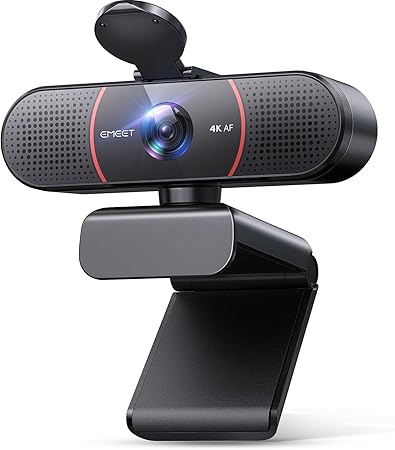
“Microsoft LifeCam HD-3000 delivers 720p video calls at $49.99 — functional upgrade over built-in laptop cameras.”
See Today’s Price →What we like
- True 4K resolution (3840x2160) at 30FPS for ultra-clear video conferencing
- PDAF autofocus technology with automatic light correction for sharp, clear video in varying conditions
- Dual omnidirectional microphones for crisp, natural audio capture
- USB plug-and-play with privacy shutter — no driver installation required
Watch out for
- Warranty terms not prominently disclosed — verify with seller before purchase
- Customer support responsiveness varies — read recent reviews before buying

“Logitech StreamCam uses AI auto-framing to keep you centered as you move — hands-free repositioning for active presenters.”
See Today’s Price →What we like
- 4K 30fps
- 1080p 60fps
- HDR
- 5x digital zoom
- auto-light correction
- dual mics
- USB-C
- plug-and-play
Watch out for
- Budget 1080p sensor has softer image than premium webcams
- Fixed focus — not suitable for close macro shots
- No privacy shutter built in
Frequently Asked Questions
Is 1080p or 4K better for video calls?
What makes a webcam perform well in a dark home office?
Does a more expensive webcam improve microphone quality?
How We Analyze Products
We analyze Amazon review data — often thousands of reviews per product — to surface patterns that individual buyers miss. Our process aggregates star ratings, review counts, and buyer sentiment at scale, identifying which strengths and weaknesses appear consistently across the largest review samples available. The 49,191+ reviews analyzed on this page represent real verified-purchase feedback from Amazon buyers.
Each product earned its placement through data: total review volume, average rating, and the specific praise and complaints that repeat most often across buyers. No manufacturer paid for placement on this page. Products appear here because buyers endorsed them at scale, not because a company asked us to feature them.
We use AI to summarize review sentiment — not to fabricate opinions, but to condense what thousands of buyers actually wrote into a readable format. The pros and cons you see reflect the most common themes found in verified purchaser reviews, paraphrased for clarity. We do not claim to have accessed Reddit, YouTube, or specific publications in generating these summaries.
Prices shown reflect Amazon pricing at the time this page was last generated. Click “See Today’s Price” to get the current live price on Amazon. Read our full methodology →