5 Best Gaming Monitors Under $250 (2026)
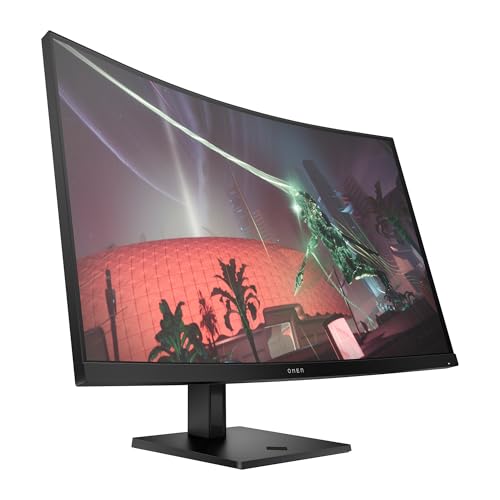
The HP OMEN 32c is the best gaming monitor under $250 - a 32-inch curved QHD panel at 165Hz, which is more screen and more refresh rate than anything else here manages at this price. If 32 inches is more desk than you have, the ASUS TUF 27-inch 1440P further down trades size rather than sharpness.
At a Glance
| # | Product | Award | Price | Resolution | Refresh Rate | Panel | Score |
|---|---|---|---|---|---|---|---|
| 1 | Best Overall | Check price on Amazon Buy → |
— | — | — | — | |
| 2 | Best High Refresh | $169.99 as of Nov 24, 12:34 PM CT details Buy → |
FHD 1080p | 240 | — | 4.6 | |
| 3 | Best 1440p Value | $168.99 as of Nov 25, 10:41 AM CT details Buy → |
QHD Wide 1440p | 180 Hz | Fast IPS | 6.7 | |
| 4 | Best Value Under $200 | $214 as of Nov 24, 12:32 PM CT details Buy → |
QHD Wide 1440p | 170 Hz | Fast IPS | — | |
| 5 | Best ASUS Pick | Check price on Amazon Used — not a new unit Buy → |
FHD 1080p | 144 Hz | IPS | 6.4 |
Score Breakdown
| HP OMEN 32c QHD 165Hz… | Lenovo Legion R27fc-3… | ASUS TUF Gaming VG27A… | msi G274QPF-QD, 27" G… | ASUS VP249QGR 23.8" G… | |
|---|---|---|---|---|---|
| Overall | – | 4.6 | 6.7 | – | 6.4 |
| Display | – | 73 | 80 | 73 | 73 |
| Response Time | – | 25 | 80 | 70 | 80 |
| Color Accuracy | – | 40 | 40 | 55 | 40 |
Scores 0–100 from published specifications and independent reviewers' measurements. Amazon star ratings are shown separately and are never part of a score. 0 = feature not present. – = insufficient data. How we score →
5 Best Gaming Monitors Under $250 Buying Guide
 Photo by RDNE Stock project / Pexels
The sub-$250 gaming monitor tier is genuinely competitive now, but it still forces a choice: resolution, refresh rate, or size. Every pick below is under the ceiling, and each gives up one of the three.
What You Get at This Price
At the top of the range the HP OMEN 32c gives you a 32-inch curved QHD panel at 165Hz, which is the most screen and the most refresh rate this budget reaches. Step down and you choose: 27-inch 1440p at high refresh for sharpness, 1080p at very high refresh for competitive frame rates, or a 24-inch IPS panel where colour accuracy and a compact footprint matter more than either.
Key Decision Factors
Resolution against refresh rate is the real decision. 1440p at 165-180Hz is the sweet spot for most mid-range GPUs and is what three of these five deliver. 1080p at very high refresh suits competitive shooters specifically - CS2, Valorant, Apex - where frame rate beats pixel count. Panel type matters too: IPS gives better colour and viewing angles, VA gives deeper blacks, and at this price you will not get both.
What to Avoid
Monitors claiming 4K well under this ceiling usually have TN panels with poor viewing angles and weak colour. Treat vague HDR claims the same way - real DisplayHDR 400 means 400-nit peak brightness, not a sticker on the box. Prefer a name-brand IPS or VA panel over an unlisted brand at the same price.
Worth Spending More?
Above this ceiling, 1440p at higher refresh and better HDR implementations open up, and the step from 1080p to 1440p is the single upgrade most people notice. If your budget can stretch past $250, that is where it should go - see our best gaming monitor under $300 comparison.
How We Picked These
We compare gaming monitors that are actually under $250 on panel type, resolution, refresh rate and connectivity, using each product's own specifications and its current retail listing. We re-check price and stock before a product keeps its place, and anything that drifts above the ceiling comes off the page rather than being quietly demoted.
Watch Before You Buy
Showing 5 of 5 products
“A 32-inch curved QHD panel at 165Hz that still lands under the ceiling - the most screen and the most refresh rate on this page for the money.”
See Today’s Price →What we like
- 31.5-inch QHD panel delivers higher pixel density and more screen real estate than 27-inch 1080p alternatives
- FreeSync support reduces screen tearing with compatible AMD GPUs across a broad frame rate range
- Curved VA panel reduces edge glare compared to flat IPS panels under typical room lighting conditions
Watch out for
- VA panel technology produces some blooming around bright objects in dark scenes — noticeable in high-contrast viewing
- HP OSD controls and menu navigation are less responsive and intuitive than Samsung or LG panel equivalents
Read Full Analysis
The OMEN 32c is the pick if you want size and speed together rather than trading one for the other.
What you get
QHD at 165Hz on a 32-inch curved panel: the extra vertical space is the difference between a game and a spreadsheet feeling cramped, and 165Hz is enough for competitive play without paying for 240Hz you cannot see.
What you give up
It is a big panel on a small desk, and curved panels suit gaming better than precise design work.

“Lenovo Legion R27fc-30 280Hz curved — the highest refresh rate in this comparison for competitive gaming.”
See Today’s Price →What we like
- 280Hz refresh rate for competitive esports
- Curved VA panel for immersive gaming
- HDMI 2.1 supports next-gen consoles
Watch out for
- FHD (1080p) resolution — not QHD or 4K
- VA panel has slower pixel response than IPS
Read Full Analysis
The Lenovo Legion R27fc-30 is a 27-inch FHD curved gaming monitor delivering a 280Hz maximum refresh rate - the highest on this page. The VA panel uses a 1000R immersive curve and includes HDMI 2.1 for next-generation consoles at high refresh rates. That 280Hz advantage is specific and real for competitive esports - CS2, Valorant, Apex Legends - where frame rate delivery is worth more than pixel count. For story-driven games or mixed productivity use, the 1440p options on this page give a better picture for the money. Best for dedicated competitive players who can actually maintain 280Hz frame rates in their main titles and want the highest refresh ceiling in a curved format. The HDMI 2.1 port adds console flexibility.

“ASUS TUF VG27AQ3A 27-inch QHD 180Hz — 1440p gaming under $200, an excellent step up from 1080p.”
See Today’s Price →What we like
- 27-inch 1440p (QHD) Fast IPS panel at 180Hz
- 1ms response with ELMB Sync
- FreeSync Premium and G-Sync compatible
- 130% sRGB color and HDR10 support
- Built-in speakers; DisplayPort cable in the box
Watch out for
- 1440p at 180Hz needs a stronger graphics card than 1080p
Read Full Analysis
The ASUS TUF Gaming VG27AQ3A is a 27-inch QHD Fast IPS gaming monitor with a 180Hz refresh rate, 1ms GTG response, FreeSync Premium and HDR400 certification. The stand adjusts for tilt, swivel and height - ergonomics usually stripped out at this price to hit a cost target. Fast IPS improves motion clarity over standard IPS while keeping the colour accuracy and wide viewing angles IPS is bought for. Against the 1080p options here it is a straight resolution upgrade; against the 32-inch panel at the top of the page it trades size for a sharper image at a normal desk distance. The strongest all-round pick for most buyers on this page. If deep black reproduction matters more to you than colour accuracy, a VA panel suits you better than this one.

“QHD at 27 inches for under two hundred, with the fast response gaming panels are bought for. The cheapest way onto this page without dropping to 1080p.”
See Today’s Price →What we like
- 2560x1440 IPS panel with accurate colors
- 165Hz refresh rate
- Rapid IPS with 1ms response (better than standard IPS)
- USB-C 65W charging (rare at this price)
- Anti-glare coating
Watch out for
- USB-C connectivity requires compatible device
- Slightly lower peak brightness vs VA
- Bezels thicker than ASUS VP249
Read Full Analysis
The MSI G274QPF-QD is the value floor here that does not give up resolution.
What you get
2560x1440 across 27 inches keeps text sharp and gives real desktop room, and the quantum-dot panel holds colour better than most at this price.
What you give up
27 inches rather than 32, and no curve. For a desk you sit close to, that is arguably the better trade anyway.
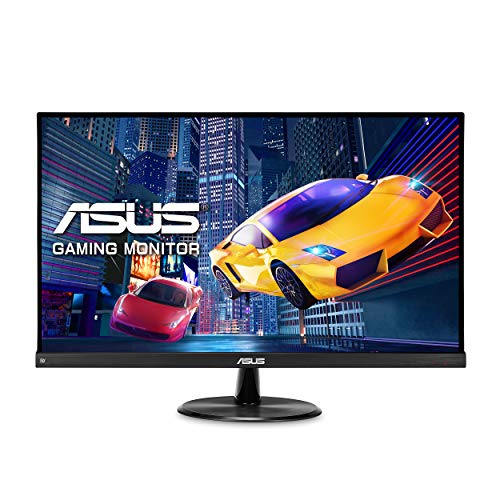
“ASUS VP249QGR 24-inch IPS — reliable IPS gaming with 144Hz and FreeSync from a trusted brand.”
See Today’s Price →What we like
- 144Hz IPS panel at an exceptional price
- 1ms MPRT and 4ms GTG response time
- FreeSync Premium and G-Sync compatible
- Low blue light and flicker-free for long sessions
- Thin bezels for clean desk setup
Watch out for
- Prices are high for a 24-inch 1080p monitor — LG 24GN650-B delivers similar performance for $170
- stand adjusts tilt only — no height adjustment without an aftermarket arm
- TN panel alternative in some regional markets delivers inferior color vs. IPS
- 1080p at 24 inches shows soft text edges at typical viewing distance
Read Full Analysis
The ASUS VP249QGR is a 24-inch Full HD IPS gaming monitor with a 144Hz refresh rate, 1ms MPRT response, and both FreeSync Premium and G-Sync Compatible certification - so it works with either GPU brand at no extra cost. The IPS panel gives 178-degree viewing angles and colour consistency that TN alternatives at this price cannot match, and thin bezels on three sides suit multi-monitor layouts. Its 1080p resolution is the compromise: the 27-inch 1440p options on this page are a full resolution step up. The VP249QGR's case rests on the compact 24-inch footprint and on covering both GPU ecosystems. Best as a secondary display in a multi-monitor setup, or for competitive FPS configurations where 1080p at 144Hz is the deliberate target for frame-rate reasons.
Frequently Asked Questions
Is 4K gaming worth it under $250?
What refresh rate should I get for gaming under $250?
Is curved or flat better for gaming?
Is a curved monitor worth it for gaming?
What's the cheapest 1440p gaming monitor?
How We Chose These Products
We compare each product’s Amazon listing, the manufacturer’s published specifications and Amazon customer ratings, shown with their review counts as Amazon’s data, and rank the products on how well they answer this page’s question. We do not test products in hand and we do not run our own analysis of review text. A publication or expert is named only where we cite its published findings about that product. No manufacturer paid for placement on this page.
A price appears only when Amazon’s API supplied it at a recent daily refresh, with the date and time beside it, and is withdrawn at 4 AM Central on the day after it turns 24 hours old; otherwise use “Check price on Amazon” for the live price. Read our full methodology →
How We Score These Products
Each dimension score comes from evidence about the exact model listed — a published specification, a measurement by a named independent reviewer, or that product’s own buyer reviews, as described for each dimension below — not from a similar product in the same range. We do not test products ourselves, and we do not score a dimension we could not evidence. A dash means no evidence was found for that product, not that it performed badly.
Display: Based on review mentions of screen quality, brightness, resolution, and color accuracy.
Response Time: From evidence about this exact model (specification, named reviewer or its own reviews).
Color Accuracy: From evidence about this exact model (specification, named reviewer or its own reviews).
The overall score is the mean of the dimensions we could evidence for that product, on a 10-point scale. Price is shown separately and is never folded into a score. Amazon star ratings are shown separately and are never part of any score.