Best HDMI Switches 2026: More Sources, One TV

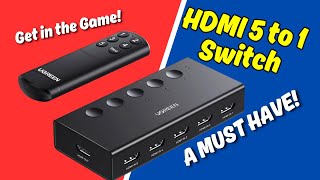
The UGREEN HDMI 2.1 3-in-1 switch is our pick: it passes 4K at up to 240Hz and 8K at 60Hz with VRR, so a PS5 or Xbox Series X keeps its 120Hz modes, where the Zettaguard 5-port is an HDMI 2.0 switch that stops at 4K at 60Hz. Choose the Zettaguard if you have four or five sources and 4K at 60Hz is enough.
Holiday shopping





At a Glance
| # | Product | Award | Price |
|---|---|---|---|
| 1 | Our Top Pick | $29.99 as of Nov 24, 12:38 PM CT details Buy → |
|
| 2 | 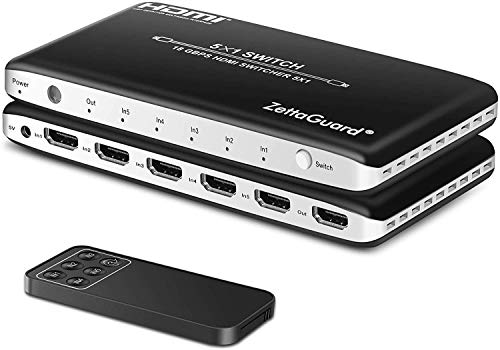 Zettaguard 4K 60Hz 5 Port 5 x 1 H… Zettaguard |
Best for Five Sources | $18.99 as of Nov 24, 12:28 PM CT details Buy → |
| 3 | Best 2-Port HDMI 2.1 | $18.66 as of Nov 24, 12:31 PM CT details Buy → |
|
| 4 | Best Simple Desk Switch | $8.99 as of Nov 24, 12:34 PM CT details Buy → |
|
| 5 | Longest Warranty | $34.99 as of Nov 24, 12:11 PM CT details Buy → |
Related guides we’ve checked
 Best Ethernet Cables for Beginners (2026)Top pick: Amazon Basics RJ45 Cat 6 Ethernet Patch Cable
 Best Zip Ties 2026: 4-Inch, 8-Inch & Heavy-Duty PicksTop pick: VELCRO Brand ONE-WRAP Cable Ties
 Best Wireless Charger Under $20 (2026)Top pick: INIU Wireless Charger
Gift shopping? Holiday Gift Guide 2026: checked picks for everyone on your list.
HDMI Switches Buying Guide
 Photo by Andrey Matveev / Pexels
An HDMI switch solves one problem: more devices than HDMI ports on the TV. Three questions decide which switch you need: how many sources you connect, whether a PS5, Xbox Series X or gaming PC needs HDMI 2.1 for 4K at 120Hz, and whether you want to switch with a remote. The UGREEN 3-in-1 leads this page because it answers all five for a typical console-and-streamer setup.
HDMI 2.1 or HDMI 2.0: do you need 4K at 120Hz?
A streaming stick, cable box, Blu-ray player or older console sends at most 4K at 60Hz, which an HDMI 2.0 switch carries. A PS5, Xbox Series X or gaming PC can send 4K at 120Hz, which needs HDMI 2.1 bandwidth all the way to the TV. The UGREEN lists 4K at up to 240Hz and 8K at 60Hz over 40Gbps. The OREI 2-port lists 4K at 120Hz and 8K at 60Hz over 48Gbps. Both pass VRR, which matches the TV's refresh rate to the console to stop tearing. The Zettaguard is an HDMI 2.0 switch rated for 4K at 60Hz, and the Anker also tops out at 4K at 60Hz. The Kinivo lists 4K at 30Hz, so it suits 1080p sources better than 4K ones.
Inputs and how you switch
Count your sources and leave a spare input for the next device. The Zettaguard takes five. The UGREEN and the Kinivo take three. The OREI and the Anker take two. The UGREEN comes with a remote and also has a button and three LEDs on the box, but it never switches automatically. The Zettaguard comes with an IR remote. The OREI switches by button, or automatically once the active source is fully powered off. The Anker has one button and no automatic detection. The Kinivo has a remote, a button and an auto mode, which its listing says some devices, including Apple TV, Roku and PS5, do not trigger.
Power, cables and audio
Long HDMI runs are where switches fail, so most makers here set a cable limit. The UGREEN asks for 8K cables of 3 metres or less on each side at 8K. The OREI supports cables up to 10 feet and Zettaguard recommends staying under 10 feet. The Anker needs input and output cables under 3.3 feet each for 4K at 60Hz, which suits a desk more than a TV cabinet. The UGREEN must stay powered while in use and ships with a USB-A to USB-C cable but no wall adapter. The OREI runs from its included USB power cable. For a soundbar, connect it to the TV's ARC or eARC port rather than through the switch; the UGREEN listing states it does not support ARC or eARC.
Which switch fits your setup
For a PS5 or Xbox Series X plus one or two other sources, choose the UGREEN. For a home theater with four or five 4K sources and no 120Hz console, the Zettaguard's five inputs and remote fit best. For exactly two HDMI 2.1 sources, the OREI 2-port is the smallest option with automatic switching. The Anker suits two sources sharing a desk monitor on short cables. The Kinivo is a 3-port with a remote and the longest warranty here, two years, for 1080p sources.
How we picked: we compared each product's own listing - what it is, what comes in the box, the specifications its maker states and the warranty - and ranked them on how well they answer this page's question. We have not tested these products in hand.
Watch Before You Buy
“UGREEN's 3-in-1 HDMI 2.1 switch with a remote: 8K at 60Hz, 4K at up to 240Hz, VRR, G-Sync and FreeSync over 40Gbps, with a button and three LEDs on the box.”
See Today’s Price →What we like
- HDMI 2.1: 8K at 60Hz and 4K at up to 240Hz over 40Gbps
- VRR, G-Sync and FreeSync pass-through
- Remote control plus a button on the box
- Three LEDs show the active input
- HDR10+, Dolby Atmos and HDCP 2.3
Watch out for
- No automatic switching
- No ARC or eARC, and it needs USB power with no wall adapter in the box
Read Full Analysis
The UGREEN is the switch for a living room with a current console. It takes three HDMI sources and sends one to the TV, and its HDMI 2.1 bandwidth of 40Gbps carries 8K at 60Hz and 4K at 120, 144 or 240Hz, so a PS5, Xbox Series X or gaming PC keeps its high-refresh modes. VRR, G-Sync and FreeSync pass through to keep the picture free of tearing, and HDR10+, Dolby Atmos and HDCP 2.3 are listed too. You switch with the included remote or the button on the box, and three LEDs show which input is live. Know its limits before you buy: it does not switch automatically, it does not support ARC or eARC, and it must stay powered while in use; it ships with a USB-A to USB-C cable but no wall adapter or HDMI cables. UGREEN asks for 8K cables of 3 metres or less on each side for 8K at 60Hz.
Skip this if: You want automatic switching, or you have more than three sources
“A 5-in-1-out HDMI 2.0 switch with an IR remote: 4K at 60Hz with 4:4:4 color, HDCP 2.2 and lossless audio formats for up to five sources on one TV.”
See Today’s Price →What we like
- Five HDMI inputs to one output
- IR remote included
- 4K at 60Hz with 24-bit RGB and 4:4:4 color
- HDCP 2.2 for protected 4K streams
- Passes LPCM 7.1, Dolby TrueHD and DTS-HD Master Audio
Watch out for
- HDMI 2.0 at 18Gbps: no 4K at 120Hz
- Zettaguard recommends HDMI cables under 10 feet
Read Full Analysis
The Zettaguard is the switch for a cabinet full of sources. It connects up to five HDMI devices, such as a Blu-ray player, a cable or satellite box, a game console and streaming players, to one TV input, and you change source with the included remote. It is an HDMI 2.0 switch at 18Gbps, so it carries 4K at 60Hz with 24-bit RGB or 4:4:4 color, supports HDCP 2.2 for protected 4K streams, and passes LPCM 7.1, Dolby TrueHD and DTS-HD Master Audio. Built-in TMDS equalization and clock recovery help the signal along, though Zettaguard still recommends HDMI cables under 10 feet. It cannot pass 4K at 120Hz, so a PS5 or Xbox Series X is held to 4K at 60Hz through it.
Skip this if: You want 4K at 120Hz from a PS5, Xbox Series X or gaming PC

“OREI's 2-port HDMI 2.1 switch: 8K at 60Hz, 4K at 120Hz and 1080p at 240Hz over 48Gbps, with VRR, ALLM, QFT, Dolby Vision and Atmos, and automatic or manual switching.”
See Today’s Price →What we like
- HDMI 2.1 at 48Gbps: 8K at 60Hz, 4K at 120Hz and 1080p at 240Hz
- VRR, ALLM and QFT for gaming
- HDR10+, Dolby Vision, CEC and Dolby Atmos pass-through
- Automatic or manual switching
- USB-powered, with a 1-year warranty
Watch out for
- Two inputs only, and no remote
- Auto-switching works only once the active source is fully powered off
Read Full Analysis
The OREI is the compact HDMI 2.1 switch for two sources, such as two consoles or a console and a PC. Its 48Gbps bandwidth carries 8K at 60Hz, 4K at 120Hz and 1080p at 240Hz, and it passes the gaming features that need HDMI 2.1, VRR, ALLM and QFT, along with HDR10+, Dolby Vision, CEC, Dolby TrueHD, Dolby Atmos and DTS-HD Master Audio. It switches by button at any time, or automatically, but only once the active source is completely powered off. It runs from the included USB power cable, OREI supports HDMI cables up to 10 feet (its fiber cables beyond that), and it carries a 1-year warranty. No remote comes in the box.
Skip this if: You have more than two sources, or want to switch from the couch with a remote

“Anker's 2-in-1-out switch with a single button: up to 4K at 60Hz with HDR, 3D and Dolby support, for a laptop, PC or console sharing one monitor or TV.”
See Today’s Price →What we like
- Two inputs, one output, switched with a single button
- Up to 4K at 60Hz
- Supports HDR, 3D and Dolby
- 18-month warranty
Watch out for
- 4K at 60Hz needs cables under 3.3 feet each, 6.5 feet combined
- No automatic switching and no HDMI CEC
Read Full Analysis
The Anker is the simplest switch here: two HDMI inputs, one output and a button to choose between them. It passes up to 4K at 60Hz and supports HDR, 3D and Dolby, but it is fussy about cables: Anker says 4K at 60Hz needs input and output cables shorter than 3.3 feet (30AWG), with a combined length of no more than 6.5 feet, which suits a desk better than a TV cabinet. It does not detect signals or switch automatically, it does not support HDMI CEC, and it shows one display at a time. Anker backs it with an 18-month warranty. It is the right buy for a laptop and a PC, or a console and a laptop, sharing one monitor.
Skip this if: Your sources sit more than a few feet from the screen, or you want a remote

“Kinivo's 301BN 3-in-1-out switch with an IR remote: rated for 4K at 30Hz, with HDR10, Dolby Vision and Atmos listed, an aluminum shell, gold-plated connectors and a two-year warranty.”
See Today’s Price →What we like
- Three inputs with an IR remote, a button and an auto mode
- HDR10, Dolby Vision and Atmos listed
- Aluminum alloy shell and 24K gold-plated connectors
- Two-year warranty with lifetime US-based support
Watch out for
- Rated for 4K at 30Hz, not 60Hz
- Auto-switching does not work with some devices, including Apple TV, PS5 and Roku
Read Full Analysis
The Kinivo 301BN connects three HDMI devices to one TV and switches by remote, by its button or automatically, though Kinivo warns that some devices, including Apple TV, Xbox One, PS5, PS4 and Roku, do not support its auto-switching. Its listing rates it for 4K at 30Hz, below the 4K at 60Hz the other switches here pass, so it suits 1080p sources better than 4K gaming or 4K streaming. It lists 18Gbps, HDCP 2.2, HDR10, Dolby Vision and Atmos, VRR and ALLM. It is built in an aluminum alloy shell for heat dissipation, with 24K gold-plated connectors, and Kinivo gives it a two-year warranty with lifetime US-based customer support, the longest warranty on this page.
Skip this if: You want 4K at 60Hz or more from any source
Frequently Asked Questions
Will an HDMI switch reduce picture quality?
Do I need HDMI 2.1 for a PS5 or Xbox Series X?
Can I use an HDMI switch with a soundbar?
What is the difference between an HDMI switch and a splitter?
Do HDMI switches change input automatically?
How We Chose These Products
Ranked from each maker's listing on what decides a switch: HDMI version and bandwidth (4K at 60Hz or 120Hz), number of inputs, how you switch (remote, button or automatic), power and cable limits, and warranty.
We compare each product’s Amazon listing, the manufacturer’s published specifications and Amazon customer ratings, shown with their review counts as Amazon’s data, and rank the products on how well they answer this page’s question. We do not test products in hand and we do not run our own analysis of review text. A publication or expert is named only where we cite its published findings about that product. No manufacturer paid for placement on this page.
A price appears only when Amazon’s API supplied it at a recent daily refresh, with the date and time beside it, and is withdrawn at 4 AM Central on the day after it turns 24 hours old; otherwise use “Check price on Amazon” for the live price. Read our full methodology →