Best Laptops for Data Science (2026): RAM, Python & ML Workflows

The ASUS VivoBook 15.6-inch 2025 Laptop is the best value laptop for data science — the Ryzen 7 processor handles pandas, scikit-learn, and Jupyter notebooks smoothly, and the 16GB RAM prevents kernel crashes on large dataset operations.
At a Glance
| # | Product | Award | Price | Display | Processor | RAM | Score |
|---|---|---|---|---|---|---|---|
| 1 | Best Budget Data Science | Check price on Amazon Buy → |
15.6 Inches | — | — | 7.7 | |
| 2 | Check price on Amazon Used — not a new unit Buy → |
— | Apple M4 | 16GB Unified Memory | 9.0 | ||
| 3 | Best Performance | Check price on Amazon Used — not a new unit Buy → |
— | Apple M4 | 16GB Unified Memory | 7.5 | |
| 4 | Best RAM for ML | $1,999 as of Nov 24, 12:36 PM CT details Buy → |
— | — | — | 7.3 | |
| 5 | Best Windows Enterprise | $2,269 as of Nov 24, 12:36 PM CT details Buy → |
14 Inches | — | — | 7.0 |
Score Breakdown
| ASUS VivoBook 15.6 20… | Apple 2025 MacBook Ai… | Apple 2024 MacBook Pr… | Apple 2024 MacBook Pr… | Lenovo ThinkPad X1 Ca… | |
|---|---|---|---|---|---|
| Overall | 7.7 | 9.0 | 7.5 | 7.3 | 7.0 |
| Battery Life | 80 | 95 | 74 | 74 | 65 |
| Display | 80 | 86 | 85 | 80 | 73 |
| Portability | 70 | 88 | 65 | 65 | 73 |
Scores 0–100 from published specifications and independent reviewers' measurements. Amazon star ratings are shown separately and are never part of a score. 0 = feature not present. – = insufficient data. How we score →
Laptops for Data Science Buying Guide
 Photo by Google DeepMind / Pexels
Data science workflows — Python, R, pandas, scikit-learn, PyTorch, TensorFlow, and Jupyter notebooks — stress RAM and CPU more than most productivity tasks. A laptop that handles 100,000-row DataFrames and model training sessions needs careful selection.
Key Decision Factors
RAM is the primary bottleneck: 16GB gets you through exploratory analysis on modest datasets; 32GB handles larger DataFrames and keeps multiple Jupyter kernels running simultaneously. Unified memory (Apple Silicon) is more efficient per GB than discrete DRAM in conventional laptops — 16GB M4 unified memory performs closer to 24GB conventional RAM for ML workloads. CPU core count affects parallel data processing in pandas and sklearn. GPU matters only for deep learning (PyTorch/TensorFlow local training) — without a discrete GPU or Apple's Neural Engine, training on large neural networks is impractically slow. Battery: data scientists often run long training loops away from power; 10+ hours is important.
Price Tiers: What You Get
Under $700: Ryzen 7 laptops with 16GB for basic data work — the ASUS VivoBook ($819.99) handles pandas and sklearn without issue. $700-1,100: MacBook Air M4 16GB — exceptional for Python, Jupyter, and PyTorch on Mac with ML frameworks optimized for Apple Silicon. $1,100-1,600: MacBook Pro 14" M4 — 16GB starting RAM, active cooling for sustained training. $1,600-2,000: MacBook Pro M4 Pro (24GB) or Lenovo ThinkPad X1 Carbon — professional-grade RAM for large models.

Who Should Buy What
The ASUS VivoBook Ryzen 7 ($819.99) is for data science students running coursework — handles pandas, matplotlib, and sklearn tutorials without issue. The MacBook Air M4 16GB is the best value for working data analysts: Apple Silicon runs Python and Jupyter efficiently, 18-hour battery survives conference days. The MacBook Pro 14" M4 with active cooling handles long model training without throttling. The MacBook Pro M4 Pro 24GB is the pick for ML engineers — 24GB unified memory handles larger model weights locally. The Lenovo ThinkPad X1 Carbon ($2,288.99) is the enterprise choice for data engineers who need Windows, corporate IT compatibility, and physical RAM upgrade paths.
What to Avoid
Avoid 8GB RAM laptops for data science — loading a 500MB CSV into pandas with 8GB RAM leaves no headroom for the kernel and other applications. Skip Chromebooks entirely — Python environment setup requires Linux mode, which is functional but limiting. Don't assume a gaming laptop with dedicated GPU is better for data science — most data science work is CPU-bound, not GPU-bound, and gaming GPUs use power budgets that drain batteries faster.
Watch Before You Buy
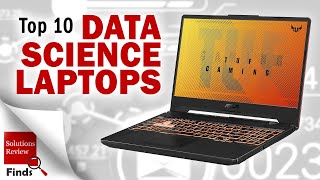

“ASUS VivoBook Ryzen 7 $699. Eight cores, 16GB RAM. Handles pandas, sklearn, and Jupyter comfortably. Best Windows option for data science students and analysts.”
See Today’s Price →What we like
- Intel Evo
- OLED touchscreen
- S Pen included
- 2-in-1 convertible
- Thunderbolt 4
- 3.1 lbs
Watch out for
- No touchscreen
- No 2-in-1 capability
- Camera is basic 720p
Read Full Analysis
The ASUS VivoBook 15.6-inch with Ryzen 7 7730U earns Best Budget Data Science on this page by delivering eight CPU cores and 16GB RAM for $615 — the entry point for running pandas, scikit-learn, and Jupyter notebooks without performance bottlenecks on standard analytical workloads. ASUS's VivoBook line is a consistent choice for data science students and early-career analysts who need solid Python performance without the Apple Silicon price premium. The VivoBook is $203 less than the MacBook Air M4 and $984 less than the MacBook Pro 14" M4. The trade-off against Apple is workflow environment: macOS Metal GPU acceleration benefits PyTorch on Apple Silicon, while the Ryzen 7's x86 architecture offers full compatibility with Linux data science toolchains and broader environment configuration flexibility. The VivoBook lacks dedicated GPU acceleration for deep learning training, which becomes a bottleneck as model complexity scales. Buy if you are a data science student or analyst working primarily with tabular data in Python and want the most capable CPU per dollar in this lineup. Skip if you run deep learning model training — the MacBook Air M4's GPU Metal acceleration, or the MacBook Pro's active-cooled sustained output, handles iterative ML training faster at higher price tiers.

“MacBook Air M4 16GB $919.08. Efficient unified memory, Python/PyTorch Metal support, 18-hour battery. Best all-day data science laptop for non-GPU-intensive workflows.”
See Today’s Price →What we like
- All-day battery life (18h+)
- Fanless silent design
- Stunning Liquid Retina display
- MagSafe charging
- Best MacBook value for most users
Watch out for
- Only 8GB RAM (upgrades pricey)
- 256GB storage fills fast
- No dedicated GPU ports
Read Full Analysis
The Apple MacBook Air 13-inch M4 with 16GB RAM earns Best Value on this data science page for its 18+ hour battery, fanless silent design, and unified memory architecture that serves Python workflows efficiently. The M4 chip's GPU cores provide Metal acceleration for PyTorch, enabling GPU-based model training on a fanless laptop — a capability the ASUS VivoBook at $615 cannot match with its integrated AMD graphics. The MacBook Air costs $203 more than the ASUS VivoBook Ryzen 7 and $781 less than the MacBook Pro 14-inch M4. The Air's fanless design is the key distinction from the Pro: during sustained ML training, the MacBook Air will eventually thermal throttle where the MacBook Pro's active cooling holds peak performance. For analysts running exploratory analysis and periodic model training rather than long continuous jobs, the Air's performance is sufficient. The 256GB base storage fills quickly with large datasets — budget for external storage or cloud storage. Buy if your work is primarily exploratory data analysis, statistical modeling, and intermittent ML workflows and you want an all-day battery machine that runs silently. Skip if you run continuous long-duration training jobs — the MacBook Pro 14-inch M4's active cooling sustains peak performance through extended computation that causes the Air to throttle.

“MacBook Pro 14" M4 16GB $1,599. Active cooling sustains ML training runs without throttling. ProMotion 120Hz display for long coding sessions. Best for data engineers.”
See Today’s Price →What we like
- ProMotion 120Hz Liquid Retina XDR display
- MiniLED with extreme dynamic range
- HDMI + SD card slot + 3 USB-C
- Up to 22h battery
- Active cooling for sustained workloads
Watch out for
- Base 8GB RAM limits heavy pro use
- More expensive than Air
- Slightly heavier
Read Full Analysis
The Apple MacBook Pro 14-inch M4 with 16GB RAM earns Best Performance on this data science page for its active cooling that sustains peak CPU and GPU throughput during long ML training runs where the MacBook Air eventually throttles. The MacBook Pro adds a ProMotion 120Hz Liquid Retina XDR display, a built-in HDMI port, SD card slot, and a third USB-C port — practical hardware that reduces hub dependency during fieldwork and dataset ingestion from storage cards. The MacBook Pro costs $781 more than the MacBook Air M4 and $200 less than the MacBook Pro M4 Pro. The core data science case for the Pro over the Air is sustained performance: training runs that take longer on the fanless Air complete faster on the Pro with consistent clock speeds maintained by active cooling. The Lenovo ThinkPad X1 Carbon is the enterprise Windows alternative with a premium keyboard and IT management tooling, but offers no equivalent GPU acceleration advantage for PyTorch workloads. Buy if you train ML models regularly, run heavy ETL pipelines, or need sustained performance during extended computation sessions. Skip if your workload is primarily exploratory analysis and visualization — the MacBook Air M4 handles those workflows equally well with the same M4 chip and saves $781.
“MacBook Pro 14" M4 Pro 24GB $1,706.32. 24GB unified memory handles larger model weights and multi-notebook workflows. Best for ML practitioners who train local models.”
See Today’s Price →What we like
- Blazing M4 Pro CPU and GPU crush 4K and 6K timelines
- Up to 24 hours battery life on a single charge
- Liquid Retina XDR display with ProMotion is stunning for color grading
Watch out for
- Base 512GB SSD fills fast with RAW footage
- No built-in SD card slot on 14" (use adapter)
Read Full Analysis
The Apple MacBook Pro 14-inch M4 Pro with 24GB unified memory earns Best RAM for ML on this data science page for its doubled memory ceiling over the 16GB M4 MacBook Pro — 24GB handles larger model weights, simultaneous multi-notebook environments, and memory-intensive data pipelines without swapping to storage. The M4 Pro chip's 12-core CPU and higher GPU core count also accelerate PyTorch Metal operations faster than the base M4. The MacBook Pro M4 Pro costs $200 more than the 16GB M4 model and $30 less than the Lenovo ThinkPad X1 Carbon. For ML practitioners training local models, the 24GB memory upgrade eliminates a real constraint: loading large transformer model checkpoints or running multiple training experiments simultaneously without memory pressure. The ThinkPad X1 Carbon offers enterprise build quality and IT manageability on Windows but provides no equivalent GPU acceleration advantage for PyTorch workloads. Buy if you train local language models, work with large embeddings, or run multi-notebook ML experiments that exhaust 16GB. Skip if your workloads fit comfortably in 16GB — the MacBook Pro 14" M4 at $1,599 saves $200 with the same underlying chip architecture.
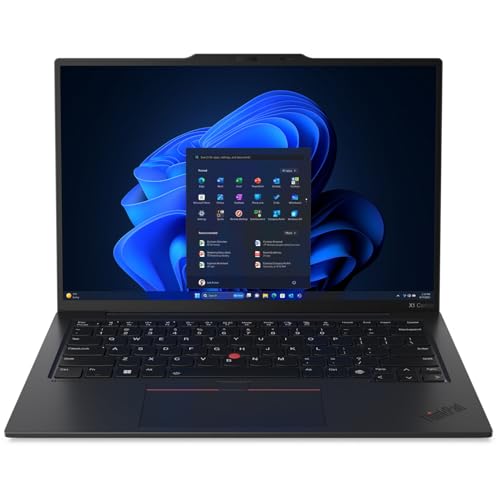
“Lenovo ThinkPad X1 Carbon Gen 13 $1,999.99. Enterprise build quality, excellent keyboard, 32GB+ RAM upgrade path. Best Windows data engineering laptop with corporate IT support.”
See Today’s Price →What we like
- 12th Gen Intel Core
- IPS touchscreen
- 512GB SSD
- ThinkPad keyboard
- Thunderbolt 4
Watch out for
- Premium business-ultrabook pricing
- Heavier at 2.48 lbs than its ultra-slim competitors
Read Full Analysis
The Lenovo ThinkPad X1 Carbon Gen 13 earns Best Windows Enterprise on this data science page as the top choice for practitioners in corporate or government environments where Windows is a hard requirement and enterprise IT management, security, and long-term serviceability matter. Lenovo's ThinkPad keyboard is widely regarded as the best in the laptop industry for extended coding sessions, and X1 Carbon configurations support 32GB+ RAM for data engineering workloads. The ThinkPad X1 Carbon is the most expensive option in this lineup, $30 above the MacBook Pro M4 Pro. Against all four Apple options here, Lenovo's differentiation is enterprise ecosystem depth — vPro management, broad Lenovo docking station compatibility, and multi-year corporate service programs. For raw ML training performance, any M4 chip Apple option delivers faster PyTorch throughput per dollar. The ThinkPad's case is IT infrastructure and organizational compliance, not GPU acceleration. Buy if your organization requires Windows enterprise management and you need ThinkPad build quality and multi-year corporate service support alongside your data science workflow. Skip if you work independently without IT infrastructure requirements — the MacBook Air M4 delivers better ML performance per dollar in an unmanaged environment.
Frequently Asked Questions
Is 16GB RAM enough for data science and machine learning?
Should data scientists use Mac or Windows laptops?
Do I need a laptop GPU for machine learning, or can I use cloud?
Can the MacBook Air M4 handle PyTorch training?
How We Chose These Products
We compare each product’s Amazon listing, the manufacturer’s published specifications and Amazon customer ratings, shown with their review counts as Amazon’s data, and rank the products on how well they answer this page’s question. We do not test products in hand and we do not run our own analysis of review text. A publication or expert is named only where we cite its published findings about that product. No manufacturer paid for placement on this page.
A price appears only when Amazon’s API supplied it at a recent daily refresh, with the date and time beside it, and is withdrawn at 4 AM Central on the day after it turns 24 hours old; otherwise use “Check price on Amazon” for the live price. Read our full methodology →
How We Score These Products
Each dimension score comes from evidence about the exact model listed — a published specification, a measurement by a named independent reviewer, or that product’s own buyer reviews, as described for each dimension below — not from a similar product in the same range. We do not test products ourselves, and we do not score a dimension we could not evidence. A dash means no evidence was found for that product, not that it performed badly.
Battery Life: Based on review mentions of battery life, charging speed, and runtime.
Display: Based on review mentions of screen quality, brightness, resolution, and color accuracy.
Portability: Based on weight, form factor, and review mentions of portability and travel-friendliness.
The overall score is the mean of the dimensions we could evidence for that product, on a 10-point scale. Price is shown separately and is never folded into a score. Amazon star ratings are shown separately and are never part of any score.