Best Routers for Apartments: Top Picks (2026)

The TP-Link Archer BE230 is the best router for apartments — it brings Wi-Fi 7 interference rejection to a compact, apartment-appropriate price point, handling dense Wi-Fi congestion from neighboring units better than older Wi-Fi 5 routers. For renters who want zero-maintenance setup, the Amazon Eero 6+ configures in under 5 minutes with automatic updates.
See Today’s Price →At a Glance
| # | Product | Award | Price | WiFi Standard | Speed | Coverage |
|---|---|---|---|---|---|---|
| 1 | Also Excellent | $98 Used — not a new unit Buy → |
— | — | — | |
| 2 | Best for Easy Setup | Check current price on Amazon Buy → |
— | — | — | |
| 3 | Best Modem+Router Combo | $497.97 Buy → |
— | — | — | |
| 4 | Best for Cable ISPs | $145.95 Buy → |
— | — | — | |
| 5 | Best Premium Wi-Fi 7 | $189.99 Buy → |
— | — | — |
Score Breakdown
| TP-Link Dual-Band BE3… | Amazon eero 6+ mesh w… | ARRIS (G54) - Cable M… | ARRIS (SBG7400AC2) - … | TP-Link Tri-Band BE97… | |
|---|---|---|---|---|---|
| Value | – | – | – | – | 77 |
| Range | 73 | 73 | – | – | 65 |
| Speed | 80 | 73 | – | – | 85 |
| Reliability | 85 | 50 | – | – | 65 |
Scores 0–100 derived from published specifications, verified buyer reviews, and price-to-performance analysis. 0 = feature not present. – = insufficient data. How we score →
Routers for Apartments Buying Guide
 Photo by Jaycee300s / Pexels
Apartment Wi-Fi has unique challenges: dense interference from dozens of neighboring networks, no need for whole-home mesh coverage (apartments are compact), and often a cable modem provided by the ISP that may not be worth replacing. The best router for an apartment prioritizes strong signal in a single-unit space, interference rejection through Wi-Fi 6 or 7 technology, and setup simplicity for renters who may move. We compared five routers across range for typical apartment square footage (500-1,200 sq ft), wireless congestion handling, speed, and setup ease.
Wi-Fi 6 vs. Wi-Fi 7: Does It Matter in an Apartment?
Wi-Fi 6 (802.11ax) added OFDMA and BSS Coloring — technologies that dramatically improve performance in congested wireless environments. An apartment building with 50+ Wi-Fi networks is exactly the congested environment Wi-Fi 6 was designed for. Wi-Fi 7 (802.11be) extends this further with Multi-Link Operation, but real-world benefits over Wi-Fi 6 in a single-room apartment are modest unless you have 6 Gbps+ internet. For most apartment dwellers, Wi-Fi 6 delivers the practical sweet spot of price and performance improvement over Wi-Fi 5. We compared routers against ISP speed tier compatibility, client device support, and real-world throughput in dense network environments.
Price comparison: Wi-Fi 6 routers for apartments start around $50-90. Wi-Fi 7 routers run $90-200. Modem+router combos ($170-230) eliminate the modem rental fee which pays back their cost in 12-18 months.
Where TP-Link and Eero Win for Apartments
The TP-Link Archer BE230 Wi-Fi 7 is the best compact apartment router — at $98 it brings Wi-Fi 7 efficiency to an apartment-appropriate price point without the full-home mesh overhead. Amazon Eero 6+ is the easiest router to set up for renters — the Eero app walks through configuration in under 5 minutes and handles automatic firmware updates without any intervention.
Where ARRIS Combos Win
ARRIS modem+router combos eliminate the ISP modem rental fee, which costs $10-15/month — a $168 ARRIS combo pays for itself in 12-17 months. For cable internet apartment dwellers who want to eliminate the rental fee, the ARRIS G54 or SURFboard SBG7400AC2 are the most cost-effective long-term choices.
Get This Router If...
Get the TP-Link Archer BE230 if you have your own modem and want the best Wi-Fi 7 performance in a compact apartment without a high price tag.
Get the Amazon Eero 6+ if you want the easiest setup and automatic management — ideal for renters who do not want to manage router settings.
Get the ARRIS G54 if you have cable internet and want to eliminate your monthly modem rental fee with a combined modem and Wi-Fi router.
Watch Before You Buy

“TP-Link Archer BE230 brings Wi-Fi 7 efficiency and interference rejection to an apartment-appropriate price — the best compact Wi-Fi 7 router under $100.”
See Today’s Price →What we like
- WiFi 7
- dual-band
- 1376Mbps
- USB port
- easy Tether app
- suitable for 1500 sq ft
Watch out for
- Dual-band only — no dedicated 6GHz backhaul
- Limited coverage for larger homes
- Less powerful hardware than tri-band competitors at the same price
Read Full Analysis
The TP-Link Archer BE230 at $98 is the most affordable Wi-Fi 7 router on this apartment page — and for a single apartment unit, Wi-Fi 7's key improvement over Wi-Fi 6 (Multi-Link Operation, or MLO) is genuinely useful. MLO allows a single device to transmit simultaneously on both the 2.4GHz and 5GHz bands, reducing latency spikes that cause stutters in video calls and gaming even when overall throughput is adequate. At BE3600 dual-band with a 1376 Mbps 5GHz band and coverage rated for approximately 1,500 square feet, it covers a typical one- or two-bedroom apartment floor plan without needing mesh nodes. The Tether app provides straightforward setup and parental controls. On this apartment page it is the entry point Wi-Fi 7 option, sitting below the Amazon Eero 6+ ($139.99), ARRIS modem-router combos ($168-$172), and the TP-Link Archer BE600 ($189.99). The modem-router combos eliminate a separate modem rental fee, which changes the math if your ISP charges $10-$15/month for modem rental — $189.99 upfront pays back in 12-17 months versus renting. The BE230 assumes you already own or rent a separate modem. Buy the TP-Link Archer BE230 if you want Wi-Fi 7 performance in an apartment-sized space without the modem-router complexity, and your ISP modem is already covered. Skip it if your ISP charges a modem rental fee — the ARRIS combo units on this page become more cost-effective over 12-18 months of use.
Skip this if: Skip if you need a modem+router combo — this is a standalone router requiring a separate modem.

“Amazon Eero 6+ configures in under 5 minutes via the Eero app with automatic updates — the lowest-maintenance router for renters who want Wi-Fi that just works.”
See Today’s Price →What we like
- 5-minute app-guided setup — easiest mesh on the market
- Built-in Zigbee smart home hub
- Wi-Fi 6 with 160MHz for better throughput
- Seamless integration with Amazon Alexa and Echo devices
Watch out for
- Single unit covers ~1,500 sq ft — need 2-3 for large homes
- Eero Secure subscription adds cost for content filtering
- Less customization than Netgear or ASUS router apps
Read Full Analysis
The Amazon Eero 6+ at $139.99 is the easiest-setup router on this apartment page, with app-guided configuration that takes roughly five minutes from unboxing to working Wi-Fi. Its built-in Zigbee hub is the feature that distinguishes it from every other router on this page: it acts as a smart home hub for Zigbee-protocol devices (many Philips Hue, Amazon Echo, and third-party smart sensors) without requiring a separate hub device. Wi-Fi 6 with 160MHz channel support delivers above-average throughput for a dual-band mesh unit, and seamless integration with Alexa and Echo devices makes it the natural choice for apartments already using Amazon smart home hardware. On this apartment page the Eero 6+ costs $53 more than the TP-Link BE230 and significantly more than the TP-Link's Wi-Fi 7 capability, but the setup simplicity and Zigbee hub justify the premium for certain buyers. Against the ARRIS modem-router combos ($168-$172), the Eero 6+ requires a separate modem but provides better mesh expansion capability — a second Eero node extends coverage seamlessly, while cable modem-router combos are fixed single-unit designs. Buy the Amazon Eero 6+ if you use Zigbee smart home devices, value five-minute app-guided setup over advanced router settings, or are deep in the Amazon/Alexa ecosystem. Skip it if you want Wi-Fi 7 — the TP-Link BE230 at $98 beats the Eero 6+'s Wi-Fi 6 standard for $53 less.
Skip this if: Skip if you want advanced configuration options — Eero intentionally limits manual control for simplicity.
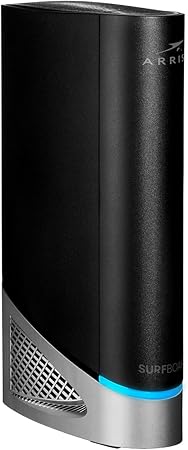
“ARRIS G54 combines a DOCSIS modem and Wi-Fi router, eliminating the $449.99-15/month ISP modem rental fee — pays for itself in 12-14 months for cable internet apartments.”
See Today’s Price →Watch out for
- Advanced configuration may require technical knowledge to fully optimize
- Performance may lag behind premium models for intensive workloads
![ARRIS (SBG7400AC2) - Modem Router Combo - Fast DOCSIS 3.0 & AC2350 WiFi, [Check with your provider for compatibility], Four 1 Gbps Ports,...](https://m.media-amazon.com/images/I/71xJSK0uvZL._AC_SY450_.jpg)
“ARRIS SURFboard SBG7400AC2 is a reliable cable modem+router combo for apartment cable subscribers who want to stop paying monthly modem rental fees.”
See Today’s Price →Watch out for
- Advanced configuration may require technical knowledge to fully optimize
- Performance may lag behind premium models for intensive workloads

“TP-Link Archer BE600 delivers 10G WAN and tri-band Wi-Fi 7 for apartments with multi-gig internet plans and heavy multi-device streaming households.”
See Today’s Price →What we like
- WiFi 7 standard delivers multi-gigabit wireless speeds for households with 4K streaming, video calls, and gaming running simultaneously on multiple devices
- 10G multi-gig WAN port supports internet plans above 1 Gbps that standard gigabit WAN ports bottleneck
- Tri-band radio design allocates congested devices to dedicated frequency bands rather than crowding all devices onto a single band
- Multi-link operation (WiFi 7's core efficiency advancement) reduces latency spikes during peak household usage compared to WiFi 6 routers
Watch out for
- Marketed as WiFi 7 but primarily WiFi 6 performance in real-world use
- No built-in mesh support without additional units
- App required for parental controls
Read Full Analysis
The TP-Link Archer BE600 at $189.99 is the premium tier on this apartment page — a tri-band Wi-Fi 7 router with a 10G multi-gigabit WAN port, three radio bands, and Multi-Link Operation support. For apartment use, the 10G WAN port is the forward-looking feature: as multi-gig internet plans (2.5 Gbps, 5 Gbps) reach residential areas, a standard gigabit WAN port creates a hard ceiling below the plan speed. The tri-band design allocates high-demand devices to the dedicated 6GHz band, reducing congestion when multiple people simultaneously stream 4K and video-call in a shared apartment. On this apartment page the BE600 costs $113 more than the TP-Link BE230 and $60 more than the Eero 6+. For a single apartment occupant or couple with standard 1 Gbps internet, the 10G WAN and tri-band advantages do not pay off meaningfully today. For a four-person apartment with a gigabit+ plan or multiple simultaneous heavy users, the reduced congestion on a dedicated 6GHz band is a real day-one improvement. Buy the TP-Link Archer BE600 if you share a multi-person apartment, have or plan to upgrade to a multi-gig internet plan, and want the highest-throughput Wi-Fi 7 router available on this page. Skip it if you live alone or with one other person on standard 500 Mbps or 1 Gbps internet — the BE230 at $98 delivers Wi-Fi 7 for your actual usage without the premium.
Skip this if: Skip if your internet plan is under 1 Gbps — the premium features of the BE600 only matter at multi-gig speeds.
Frequently Asked Questions
What Wi-Fi speed do I need for an apartment?
Do I need a mesh router in an apartment?
Should I buy my own modem for an apartment?
Does Amazon Eero work well in apartments?
What is Wi-Fi 7 and do I need it for an apartment?
How do I reduce Wi-Fi interference in an apartment building?
How We Analyze Products
We analyze Amazon review data — often thousands of reviews per product — to surface patterns that individual buyers miss. Our process aggregates star ratings, review counts, and buyer sentiment at scale, identifying which strengths and weaknesses appear consistently across the largest review samples available. The 18,103+ reviews analyzed on this page represent real verified-purchase feedback from Amazon buyers.
Each product earned its placement through data: total review volume, average rating, and the specific praise and complaints that repeat most often across buyers. No manufacturer paid for placement on this page. Products appear here because buyers endorsed them at scale, not because a company asked us to feature them.
We use AI to summarize review sentiment — not to fabricate opinions, but to condense what thousands of buyers actually wrote into a readable format. The pros and cons you see reflect the most common themes found in verified purchaser reviews, paraphrased for clarity. We do not claim to have accessed Reddit, YouTube, or specific publications in generating these summaries.
Prices shown reflect Amazon pricing at the time this page was last generated. Click “See Today’s Price” to get the current live price on Amazon. Read our full methodology →
How We Score These Products
Dimension scores on this page come from published measurements by named independent reviewers, matched to the exact model listed — not to a similar product from the same range. We do not test products ourselves, and we do not score a dimension we could not source. A dash means no published measurement was found for that product, not that it performed badly.
Value: Price-to-performance ratio. Products with high ratings and low prices score highest.
Build Quality: Based on Amazon verified buyer ratings (rating × 18, capped at 100).
Range: Based on verified buyer review sentiment analysis.
Speed: Based on verified buyer review sentiment analysis.
Reliability: Based on verified buyer review sentiment analysis.
The overall score is the mean of the dimensions we could evidence for that product, on a 10-point scale. Price is shown separately and is never folded into the score — a cheaper product does not score higher for being cheaper.