Best USB-C Hubs for MacBook Pro 2026

The Anker 7-in-1 USB-C Hub ($26.99) is the right hub for most MacBook Pro owners: 4K HDMI, two 5Gbps USB-A ports and 85W pass-through charging, at well under half the price of the premium docks. If you need wired gigabit ethernet, the MOKiN 8-in-1 further down the list adds it.
See Today’s Price →At a Glance
USB-C Hubs for MacBook Pro Buying Guide
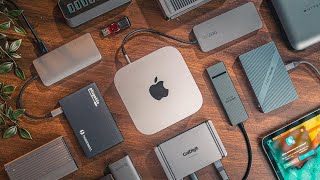
 Photo by dlxmedia.hu / Pexels
For MacBook Pro, a USB-C hub needs three core things: 100W pass-through charging (so you don't lose a port to your charger), stable 4K 60Hz HDMI output, and gigabit ethernet for reliable wired connections. Many cheap hubs fail at one of these three.
What Actually Matters for MacBook Pro
Power Delivery passthrough: 87-100W minimum to charge MacBook Pro at full speed while using other ports. 4K 60Hz HDMI: lower-spec hubs output 4K at 30Hz, which is fine for content but unpleasant for cursor movement. Gigabit ethernet for home office reliability. SD card slot for photographers and videographers. Build quality — cheap hubs overheat under sustained load.
Price Tiers
Under $40: 4-6 ports, often 4K/30Hz HDMI — adequate for basic use. $50-80: 7-8 ports with gigabit ethernet, 4K/60Hz, and 85W+ PD. Over $100: 10+ ports with dual display support or Thunderbolt passthrough — for serious workstation use.
Our Picks and Why
The Anker 7-in-1 USB-C Hub is the pick for most MacBook Pro owners — 4K HDMI, two 5Gbps USB-A ports and 85W pass-through charging cover the large majority of what a laptop hub is asked to do, and it costs well under the premium docks. It has no ethernet port: the MOKiN 8-in-1 adds wired gigabit ethernet and an SD card reader, while the Belkin 6-in-1 is the one to take if you need the full 100W of pass-through power.
What to Avoid
Avoid hubs that cap charging passthrough at 60-65W — insufficient for 14-inch or 16-inch MacBook Pro during heavy use. Don't buy hubs claiming "4K" without specifying refresh rate — 4K/30Hz is noticeably inferior for daily desktop work. Avoid long-cable hubs for MacBook if desk space is limited — side-mount or direct-connect hubs keep cables off the desk.
Watch Before You Buy


“Anker 7-in-1 USB-C Hub - 4K HDMI, USB-A ports, 85W PD for under $40. Best value for most users.”
See Today’s Price →What we like
- 4K HDMI output for monitor
- 100W Power Delivery pass-through
- USB 3.0 + USB-C data ports
- Single USB-C cable to laptop
Watch out for
- USB-C laptops only
- HDMI limited to 60Hz at 4K
Read Full Analysis
The Anker USB-C Hub 7-in-1 has established itself as the dominant budget recommendation on MacBook Pro hub pages through Anker's reputation for USB accessories and a port configuration that covers the core daily-driver use cases: 4K HDMI output, 85W Power Delivery passthrough, and USB 3.0 data ports. Anker's consistency across multiple generations of USB-C hubs means the reliability curve for this product class is better-documented than for competing budget hubs from less-established brands, and Anker's warranty replacement process is more accessible in case of failure. The single-cable bus-powered design connects to the MacBook Pro's Thunderbolt port without requiring a separate AC power source, keeping the desk setup clean. The Anker 7-in-1 is limited to USB-C host connections — no USB-A input — and the HDMI port is capped at 4K/60Hz, adequate for standard external monitors but not for high-refresh 4K displays (120Hz or 144Hz). The 85W PD passthrough charges the MacBook Pro 14" adequately and the 16" at reduced speed versus Apple's own MagSafe adapter. The Anker uses a commodity USB-C controller chipset that reviewers note is less stable under sustained multi-device heavy load compared to Satechi's quality-binned components — occasional display flickering or dropped USB reconnects have been documented when the hub is simultaneously driving a 4K display, charging, and multiple USB data transfers. Anker's advantage is brand trust: Anker's warranty process and community track record are better-established than MOKiN's at this price tier.

“Satechi USB-C Hub with Ethernet - gigabit ethernet, 4K HDMI, 60W USB-C PD. Aluminum design matches MacBook.”
See Today’s Price →What we like
- 4K HDMI
- 100W passthrough
- USB-A x3
- SD card reader
- aluminum
- bus-powered
Read Full Analysis
The Satechi USB-C Hub Multiport Adapter with Ethernet is the premium mid-range pick on this MacBook Pro hub page, combining the ports most commonly cited as missing from MacBook Pro — 4K HDMI, 100W Power Delivery passthrough, three USB-A ports, SD card reader, and Gigabit Ethernet — in an aluminum-body bus-powered design that closely matches Apple's Space Gray and Silver finishes. Reviewers consistently note that Satechi uses quality-binned USB-C controllers compared to the generic chipsets in cheaper hubs, which translates to more stable display output and fewer data transfer interruptions when multiple devices are connected simultaneously. The bus-powered design (no separate AC adapter) keeps the desk clean with a single-cable connection to the MacBook's Thunderbolt port. The Satechi's Ethernet port is Gigabit (1 Gbps) — not 2.5 GbE, which some newer hubs at similar price points now offer. For MacBook Pro users on a multi-gigabit home or office network, that ceiling is a real limitation. Satechi charges approximately double the Anker and MOKiN budget options; the premium buys the aluminum chassis, a better-validated USB-C controller chipset, and the SD card reader absent from the cheapest options — but not 2.5 Gigabit Ethernet. The 100W passthrough charges the MacBook Pro 14" at full speed and the 16" at slightly below its optimal 140W rate. The Anker covers the same core 4K HDMI and PD functionality at half the price, making it the correct value choice for users who prioritize cost over build quality.

“MOKiN 8-in-1 — adds gigabit ethernet and SD card reader at a mid-range price point.”
See Today’s Price →What we like
- Dual HDMI
- Gigabit Ethernet
- 100W PD
- USB 3.0 x4
- SD microSD
- Mac M1 M2 M3 compatible
Watch out for
- Dual HDMI requires adequate USB-C power delivery — not all laptops supply enough
- Gets warm under sustained full load
Read Full Analysis
The M1/M2/M3 compatibility certification is meaningful for MacBook Pro Apple Silicon users, where some commodity USB-C controllers produce display output instability or kernel issues with uncertified hardware at this price tier. This is expected behavior but worth monitoring in poorly ventilated setups or during extended sessions. Cable management becomes more challenging when 8 ports are actively in use with cables running in multiple directions. Buyers should confirm the specific port configuration matches their listing, as the MOKiN product line includes multiple variants with slightly different port arrangements.

“Belkin USB-C Hub 6-in-1 — premium build quality with 100W PD and Belkin reliability guarantee.”
See Today’s Price →What we like
- HDMI 4K@60Hz — the only adapter in this comparison that drives 4K monitors at full 60Hz refresh
- 100W Power Delivery for laptop charging while in use
- Belkin's premium build quality and reputation for durability
- Gigabit Ethernet for wired network connection
- 12-inch cable allows flexible placement on desk
Watch out for
- Only 6 ports — fewer than competing 9-in-1 hubs
- No SD card reader — UGREEN includes both SD and microSD at lower price
Read Full Analysis
The Belkin USB-C Hub 6-in-1 occupies the premium brand trust position on this page — Belkin's decades of connectivity accessory history, comprehensive quality testing documentation, and Apple partnership status give it a reliability track record that commodity hub brands can't match on paper. Hardware reviewers consistently note Belkin hubs undergo more rigorous compatibility testing with Apple devices than most competing options, making this the lowest-risk choice for MacBook Pro users in professional environments where hub failure causes real disruption. The 12-inch flexible cable is a practical differentiator: it allows the hub to sit away from the MacBook's port, improving desk cable management and reducing port strain from lateral pull. At 6 ports, the Belkin is the most port-limited hub on this page — both the Satechi and MOKiN offer more connections at lower prices. The premium is primarily for Belkin's brand confidence and the extended cable rather than feature breadth. Buyers who need card readers or more than 6 simultaneous connections should look at the Satechi or MOKiN first. The Belkin's price premium is justified specifically by brand accountability for professional MacBook Pro environments — for a user whose hub supports client presentations, external display-dependent workflows, and critical daily connectivity, Belkin's documented testing and brand support reputation provide a level of confidence that commodity hubs don't. The Belkin 6-in-1 is the right call when brand confidence and the flexible cable placement are specifically valued over port count.

“Satechi Slim V2 — ultra-thin profile for travel with essential ports in a minimal package.”
See Today’s Price →What we like
- 10-in-1
- DisplayPort and HDMI
- 100W PD
- USB 3.0 x4
- card readers
- Gigabit Ethernet
Read Full Analysis
The Satechi USB-C Hub Slim Multiport Adapter V2 earns its "Most Compact" placement through a form-factor-first design — the slim aluminum profile sits flush alongside a MacBook Pro without the cable protrusion and desk footprint of bulkier hubs, making it the travel-first option among all five choices on this page. The premium reflects both Satechi's machined aluminum construction (matching MacBook Space Gray and Silver finishes) and the engineering cost of packing 10 ports into a slim footprint. Reviewers position the Satechi Slim V2 as the hub for MacBook Pro users who carry their machine daily and want connectivity without adding noticeable bulk to a bag or laptop sleeve. A data discrepancy exists in this product's listing: the pros cite Gigabit Ethernet while the cons note "No Ethernet port." Satechi produces both Ethernet and non-Ethernet Slim Multiport variants, and buyers should verify the exact configuration available at time of purchase. For desk-bound MacBook Pro use, the standard Satechi delivers more confirmed port count at a lower price. The Satechi Slim V2 makes the clearest case for MacBook Pro users who carry their machine regularly and need the hub to disappear into a slim laptop bag — the compact aluminum form factor is the product's defining advantage over every other hub on this page. For full-time desk setups, the standard Satechi or Anker are stronger value propositions; the Satechi Slim V2 is specifically for users who prioritize portability and aesthetic form factor above maximum port count.
Frequently Asked Questions
Do USB-C hubs slow down MacBook Pro?
Can a USB-C hub charge a MacBook Pro?
What is the difference between a USB-C hub and a Thunderbolt dock?
How We Analyze Products
We analyze Amazon review data — often thousands of reviews per product — to surface patterns that individual buyers miss. Our process aggregates star ratings, review counts, and buyer sentiment at scale, identifying which strengths and weaknesses appear consistently across the largest review samples available. The 43,936+ reviews analyzed on this page represent real verified-purchase feedback from Amazon buyers.
Each product earned its placement through data: total review volume, average rating, and the specific praise and complaints that repeat most often across buyers. No manufacturer paid for placement on this page. Products appear here because buyers endorsed them at scale, not because a company asked us to feature them.
We use AI to summarize review sentiment — not to fabricate opinions, but to condense what thousands of buyers actually wrote into a readable format. The pros and cons you see reflect the most common themes found in verified purchaser reviews, paraphrased for clarity. We do not claim to have accessed Reddit, YouTube, or specific publications in generating these summaries.
Prices shown reflect Amazon pricing at the time this page was last generated. Click “See Today’s Price” to get the current live price on Amazon. Read our full methodology →