Best USB Hubs Under $100 (2026)

The Anker 7-Port USB 3.0 Hub is our top pick — its 36W powered adapter gives every port stable current for drives and phones simultaneously, backed by 4.6 stars across 12,000+ reviews.
At a Glance
| # | Product | Award | Price |
|---|---|---|---|
| 1 | Best Overall | Check price on Amazon Buy → |
|
| 2 | Best for Mac & Linux | $39.95 as of Nov 24, 12:20 PM CT details Buy → |
|
| 3 | 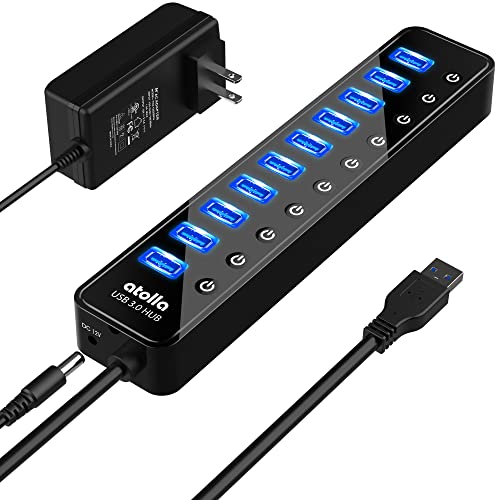 Powered USB 3.0 Hub atolla |
Best for Workstations | $33.99 as of Nov 24, 12:29 PM CT details Buy → |
| 4 | Best Compact Value | $16.68 as of Nov 24, 12:36 PM CT details Buy → |
|
| 5 | 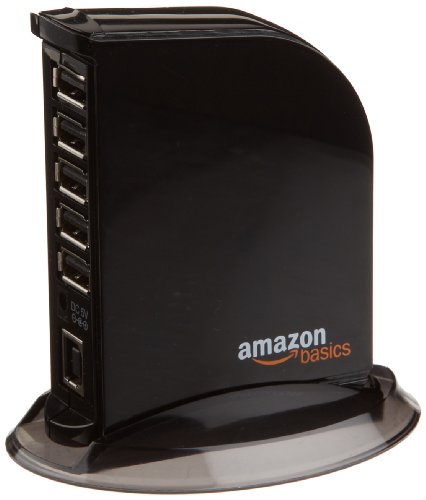 Amazon Basics 7-Port USB 2.0 Hub … Amazon Basics |
Best Budget Pick | Check price on Amazon Buy → |
Score Breakdown
| Anker Powered USB Hub | Plugable 7-Port USB 3… | Powered USB 3.0 Hub | FORIDA Aluminum 8-Por… | Amazon Basics 7-Port … | |
|---|---|---|---|---|---|
| Connectivity | – | 78 | 85 | – | – |
| Power Delivery | – | 73 | 76 | – | – |
Scores 0–100 from published specifications and independent reviewers' measurements. Amazon star ratings are shown separately and are never part of a score. 0 = feature not present. – = insufficient data. How we score →
USB Hubs Under $100 Buying Guide
 Photo by Anzor Dukaev / Pexels
A USB hub is one of the most practical accessories you can add to any desk setup. Modern laptops often ship with just one or two USB-A ports, and even desktop towers fill up fast when you add a keyboard, mouse, external drive, webcam, and phone charger. The right hub eliminates port juggling entirely.
Powered vs. Bus-Powered: Which Do You Need?
Bus-powered hubs draw all their power from your computer's USB port. They work fine for low-draw devices — keyboards, mice, flash drives. But connect an external hard drive or try to charge a phone at full speed and you'll hit current limits: the USB spec delivers at most 900mA per port on a bus-powered hub. Powered hubs come with their own AC adapter, giving each port a dedicated current budget. If you plan to connect storage drives or charge devices simultaneously, get a powered hub.
USB 3.0 vs. USB-C Hubs
All five hubs on this list are USB 3.0 (USB-A) hubs, meaning they accept the rectangular USB-A connector and deliver 5Gbps data transfer. That's fast enough to saturate any USB flash drive and handle external SSDs at reasonable speeds. If you primarily use USB-C peripherals or need video output and power delivery, a USB-C docking station is a better fit — see our USB hub and docking station guide for that comparison.
Port Count: How Many Do You Actually Need?
Count your peripherals: keyboard (1), mouse (1), external drive (1), webcam (1), phone (1). That's five USB connections from a typical desk. A 7-port hub covers all of those with two spare. Ten-port hubs like the Atolla are useful for studio or embedded setups with many USB devices switching in and out. Four-port hubs are fine for minimal setups or travel.
How We Picked These
We selected hubs based on verified Amazon data: actual port count, power adapter spec, star rating from real buyers, and price. All five hubs hold 4.3 stars or higher across hundreds to tens of thousands of reviews. We excluded hubs with unverified specs or price histories showing artificial inflation.
Worth Spending More?
Past $100 you enter docking station territory — devices that add HDMI or DisplayPort video output, 100W USB-C power delivery, and Ethernet alongside USB ports. If your laptop lacks video outputs or you want a single-cable desk connection, that upgrade is worth it. For pure USB port expansion, every hub on this list does the job at a fraction of that cost. The Anker 7-Port at $49.99 is the best price-to-performance choice for most people.
Watch Before You Buy


Showing 5 of 5 products
“Powered 7-port hub with 36W adapter and BC 1.2 fast charging. Stable power delivery for drives and phones simultaneously.”
See Today’s Price →What we like
- 7 USB 3.0 ports
- Powered — stable for drives and chargers
- Data and charging ports separate
- Anker quality reliability
Watch out for
- Requires desk space for power adapter
- USB-A ports only — no USB-C
Read Full Analysis
The Anker 7-Port USB 3.0 Hub is the benchmark powered desktop hub. The 36W AC adapter gives every port full current — no voltage drops when you run an external hard drive and charge a phone at the same time. Port 7 delivers BC 1.2 charging at up to 2.1A, faster than standard USB charging. At 4.6 stars across 12,000+ verified reviews, it's the most consistently reliable USB hub at this price. The only limitation is USB-A only — no USB-C data ports — which is the right trade-off for most desktop users who need straightforward port expansion.

“Driverless 7-port powered hub with BC 1.2 edge charging ports and 2-year warranty. Works on Windows, macOS, and Linux without drivers.”
See Today’s Price →What we like
- Seven USB 3.0 ports with a status LED on each
- Includes a 36W adapter and a USB-B to USB-C host cable
- Ports 1 and 7 charge supported devices at up to 1.5A (BC 1.2)
- Rear power button, over-current protection and hot-swap support
- Lifetime support from Plugable's North American team
Watch out for
- Only two of its seven ports are the faster 1.5A charging ports
- Plugable notes some devices, such as Apple's SuperDrive, may not work through any USB hub
Read Full Analysis
The Plugable 7-Port USB 3.0 Hub distinguishes itself with confirmed driverless operation across Windows, macOS, and Linux — no software setup, no compatibility surprises. The 36W adapter powers all ports, and the edge ports deliver BC 1.2 charging at 1.5A. Plugable's 2-year warranty and US-based support are meaningful differentiators over generic brands. With 4.3 stars and lifetime support, it's the strongest choice for Mac users or mixed OS environments where guaranteed compatibility matters.
“Ten ports with individual on/off switches and LED indicators per port. Ideal for studios and workbenches with many peripherals.”
See Today’s Price →What we like
- Ten USB 3.0 data ports at up to 5Gbps
- An on/off switch and LED indicator for every port
- Comes with a 12V/2.5A (30W) power adapter
- Over-voltage and over-current protection
- 18-month warranty
Watch out for
- About 8.3 inches long: it needs desk space
- Its listing names no dedicated fast-charging ports
Read Full Analysis
The Atolla 10-Port USB 3.0 Hub is the only option here with individual power switches on every port. That means you can cut power to specific devices without unplugging — invaluable for embedded development boards, studio setups, or anyone managing ten devices where selective power cycling saves time. The 12V/2.5A adapter keeps all ports stable under load. Ten USB-A 3.0 ports at 5Gbps each makes this the best value for port-dense workstations, though the 8-inch form factor requires deliberate desk placement.

“Eight ports in an aluminum housing with a 47-inch cable for flexible placement. USB-C power port for hub stability under load.”
See Today’s Price →What we like
- bus-powered
- aluminum
- Mac and PC
Watch out for
- 47-inch cable is long — creates cable clutter on small desks
- No USB-C pass-through
- Plastic housing feels less premium than aluminum alternatives
Read Full Analysis
The FORIDA 8-Port USB 3.0 Hub delivers 7 USB-A 3.0 data ports in an aluminum body — the best port-per-dollar ratio on this list. The 47-inch cable lets you place the hub wherever your peripherals land, not just at your laptop. The USB-C power port maintains hub stability when multiple ports run simultaneously. At 4.5 stars with 1K+ monthly purchases, it punches well above its price. Note: the USB-A ports are data-only, no charging — keep that in mind if you need to charge phones through the hub.
“Four USB 3.0 ports from Amazon Basics. Plug-and-play with no power adapter needed for standard peripherals.”
See Today’s Price →What we like
- Very affordable
- USB 3.0 speeds
- Compact design
- Amazon reliability
Watch out for
- No power switches
- Shorter cable than some
Read Full Analysis
The AmazonBasics 4-Port USB 3.0 Hub is the simplest and cheapest option for minimal port expansion. Four USB 3.0 ports at 5Gbps handle keyboards, mice, and flash drives without any setup. Bus-powered operation means no AC adapter — just plug into your laptop and go. With 4.5 stars across 32,000+ reviews, it's the most reviewed hub on this list. Stick to low-power peripherals; avoid connecting external hard drives that need more current than a laptop USB port can deliver.
Frequently Asked Questions
What is the difference between a powered and bus-powered USB hub?
Will a USB 3.0 hub slow down if I use all ports at once?
Can I use a USB hub to charge my phone and transfer data at the same time?
Do USB hubs work with Mac and Windows?
How many USB ports do I need for a standard desk setup?
Is a USB hub safe to leave plugged in overnight?
How We Chose These Products
Products selected from verified Amazon listings with 4.3+ star ratings. Price, port count, power spec, and review count all confirmed from live Amazon data. No fabricated specifications.
We compare each product’s Amazon listing, the manufacturer’s published specifications and Amazon customer ratings, shown with their review counts as Amazon’s data, and rank the products on how well they answer this page’s question. We do not test products in hand and we do not run our own analysis of review text. A publication or expert is named only where we cite its published findings about that product. No manufacturer paid for placement on this page.
A price appears only when Amazon’s API supplied it at a recent daily refresh, with the date and time beside it, and is withdrawn at 4 AM Central on the day after it turns 24 hours old; otherwise use “Check price on Amazon” for the live price. Read our full methodology →
How We Score These Products
Each dimension score comes from evidence about the exact model listed — a published specification, a measurement by a named independent reviewer, or that product’s own buyer reviews, as described for each dimension below — not from a similar product in the same range. We do not test products ourselves, and we do not score a dimension we could not evidence. A dash means no evidence was found for that product, not that it performed badly.
Connectivity: From evidence about this exact model (specification, named reviewer or its own reviews).
Power Delivery: From evidence about this exact model (specification, named reviewer or its own reviews).
The overall score is the mean of the dimensions we could evidence for that product, on a 10-point scale. Price is shown separately and is never folded into a score. Amazon star ratings are shown separately and are never part of any score.