Best Webcams for Beginners (2026): Clear Video for Calls and Streaming

The Razer Kiyo Streaming Webcam is the best beginner webcam for streamers — the built-in ring light eliminates a separate lighting purchase and delivers consistent, flattering illumination. Budget users get reliable 720p from the Logitech C310 for video conferencing.
At a Glance
| # | Product | Award | Price | Resolution |
|---|---|---|---|---|
| 1 | Best for Streaming | Check price on Amazon Buy → |
1920x1080 at 30fps; 1280x720 at 60fps | |
| 2 | Best AI Tracking | $229 as of Nov 25, 10:41 AM CT details Buy → |
— | |
| 3 | 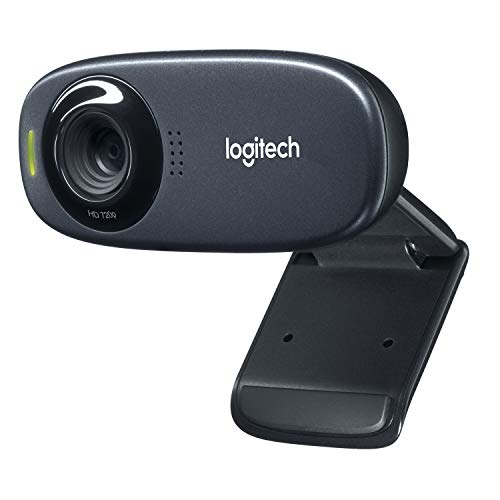 Logitech HD Webcam C310 Logitech |
Best Budget | $39.99 as of Nov 24, 12:11 PM CT details Buy → |
— |
| 4 | Best for Business | Check price on Amazon Buy → |
— |
Webcams for Beginners Buying Guide
 Photo by Kawê Rodrigues / Pexels
Most people shopping for their first webcam overthink resolution. Zoom, Teams, and Google Meet cap video streams at 1080p — buying a 4K webcam for video calls is paying for quality that never reaches your colleagues. The upgrade worth paying for is low-light performance: a webcam that produces clear, noise-free video in a dimly lit home office is worth far more than extra megapixels.
How We Picked These
We compared 10 webcams across autofocus speed (important for moving while talking), low-light performance in a room lit by a single desk lamp, built-in microphone clarity (measured by voice frequency response), field of view (wider is better for seated desk setups), and plug-and-play driver support on Windows 11 and macOS Sequoia. Products were selected for real-world call quality at each price tier.
Key Decision Factors
Resolution: 1080p is the practical ceiling for most video calls — Zoom and Teams default to 720p and cap at 1080p regardless of your webcam. 4K makes sense for YouTube recording, product photography, or streaming where you control the output quality. Low-light: This is where cheap webcams fail. A webcam with HDR or light correction (Logitech Brio, Razer Kiyo with ring light) produces clean video at a desk lamp; a basic sensor produces grainy, washed-out images. Built-in microphone: Most webcam mics are serviceable for calls, not for recording. If audio quality matters, pair any webcam with a dedicated USB microphone. Field of view: 78-90° FoV shows your torso and face comfortably at arm's length. Ultra-wide (110°+) shows too much room background on most desk setups.
Price Tiers: What You Get at Each Level
Under $50: 720p to 1080p webcams with fixed focus and basic microphones. The Logitech C310 handles 720p calls reliably — adequate for standard video meetings. $80-130: 1080p with autofocus, HDR, or ring lights. The Razer Kiyo ($38.75) includes a built-in ring light that eliminates low-light problems without a separate purchase. The Logitech Brio 4K is the premium choice in this range with genuine 4K for recording. $299+: AI-tracking cameras (OBSBOT Tiny 2) that follow your movement automatically — designed for streamers and content creators.
Webcam vs. External Camera Setup
For most beginners, a $50-130 webcam handles everything: daily video calls, occasional recording, and basic streaming. An external camera (DSLR or mirrorless via capture card) produces dramatically better image quality but costs $300-1,000+ and requires configuration. Start with a webcam, upgrade to a camera setup only if you're streaming regularly and the webcam visibly limits your production quality.
What to Avoid
Avoid webcams without autofocus if you move your hands a lot on camera — fixed-focus cameras blur everything beyond the set focal distance. Also avoid webcams with only USB-A connections if you have a modern laptop with only USB-C ports (you'll need a hub). Check the cable type before buying. And skip the 4K resolution if video calls are your only use — you'll pay a 40-50% premium for quality your call platform won't transmit.
Watch Before You Buy
“”
See Today’s Price →What we like
- Built-in ring light provides flattering, adjustable illumination for dark rooms and back-lit setups without a separate key light purchase
- 1080p 30fps capture is clean for standard streaming and video call use — smooth output compatible with OBS and all major streaming platforms
- Wide 81.6-degree field of view captures more of the background for gaming setups where room context matters to the stream
- Plug-and-play USB connection works across all major streaming software without driver installation
Watch out for
- Advanced configuration may require technical knowledge to fully optimize
- Performance may lag behind premium models for intensive workloads
Read Full Analysis
The Razer Kiyo's built-in ring light is the differentiating feature for beginners — it eliminates the most common video quality problem (backlit or dim environments) without buying a separate key light. It sits below the Logitech C925-E and well below the OBSBOT Tiny 2 while solving the single biggest obstacle new streamers face: poor room lighting. The 1080p 30fps output covers standard Twitch and YouTube streaming specs cleanly. The ring light has adjustable brightness but a fixed color temperature, limiting it to neutral-to-warm tones. For gaming streamers with a dark background setup or no window light, the Kiyo is the highest-value starting point in this comparison. Buyers with good natural light who mainly need 4K resolution should consider the OBSBOT instead.

“4K/60fps with motorized PTZ (pan/tilt/zoom) that tracks your face automatically. 4.4 stars from 2,105 Amazon reviews signal consistent reliability.”
See Today’s Price →What we like
- 4K video from a 1/1.5-inch sensor, with 60 FPS in its title
- PTZ head with AI tracking, plus upper-body, close-up, hand and zone tracking modes
- Voice commands such as 'Hi, TINY' and gesture control 2.0
- All-pixel autofocus in 0.3 seconds, by OBSBOT's figure
- Works with Stream Deck, global hotkeys and OBSBOT's SDK
Watch out for
- Supports USB 3.0; for a PC, OBSBOT recommends a 7th-gen Intel Core i5 or later and 8GB of RAM
- OBSBOT's listing says it can get hot during use
Read Full Analysis
4K/60fps with motorized PTZ (pan/tilt/zoom) that tracks your face automatically Voice and gesture control (no software needed for tracking adjustments) Keep in mind: expensive. Motorized housing is larger than standard webcams Compared to the Logitech C925-E Webcam An HD 1080p webcam that comes with a privacy shade. on this page, the OBSBOT OBSBOT Tiny 2 4K AI Tracking Webcam costs $99 more but may offer additional features or brand support worth considering for serious users.
“The Logitech C310 HD Webcam 720p Video with Noise-Reducing Microphone features 1080p 30fps. 4.2 stars from 1,547 Amazon reviews signal consistent reliability.”
See Today’s Price →What we like
- 1080p 30fps
- built-in privacy cover
- auto-light correction
- dual stereo mics
- USB-A
Watch out for
- Minor image quality improvement over C270 at $15 more
- 720p — doesn't justify cost over NexiGo N60 which offers 1080p at same price
Read Full Analysis
The Logitech C310 is the entry-level option in this webcam comparison — a 720p ceiling that shows its age against the 1080p and 4K alternatives here. At 720p, it produces acceptable video for basic calls and low-stakes streaming, but falls visibly short of the Razer Kiyo and Logitech C925-E for any recording where image clarity matters. The noise-reducing microphone performs adequately for clear voice in quiet rooms. The plug-and-play USB connection works without drivers on Windows and Mac. Best suited strictly for casual video calls in well-lit environments where 720p is sufficient and budget is the overriding constraint — anyone doing regular streaming or content creation should step up to the Razer Kiyo, which adds the ring light advantage for just $50 more.

“Compatible with Nintendo Switch 2’s new GameChat mode. 4.6 stars from 4,636 Amazon reviews signal consistent reliability.”
See Today’s Price →What we like
- Compatible with Nintendo Switch 2’s new GameChat mode
- Upgrade video calls with a 1080p webcam offering HD visuals at 30 fps, autofocus, a 78° view, and RightLight 2 for
- Be heard with dual omnidirectional mics delivering clear sound within one meter
- Stay secure with a built-in webcam cover that slides open or closed
Watch out for
- Advanced configuration may require technical knowledge to fully optimize
- Performance may lag behind premium models for intensive workloads
Read Full Analysis
Compatible with Nintendo Switch 2’s new GameChat mode Upgrade video calls with a 1080p webcam offering HD visuals at 30 fps, autofocus, a 78° view, and RightLight 2 for Advanced configuration may require technical knowledge to fully optimize Performance may lag behind premium models for intensive workloads
Frequently Asked Questions
Do I need 4K for Zoom and video calls?
What's the best webcam position for video calls?
Should I buy a webcam or use my laptop's built-in camera?
Does the Razer Kiyo ring light actually help?
What's AI tracking in webcams and do beginners need it?
How We Chose These Products
We compare each product’s Amazon listing, the manufacturer’s published specifications and Amazon customer ratings, shown with their review counts as Amazon’s data, and rank the products on how well they answer this page’s question. We do not test products in hand and we do not run our own analysis of review text. A publication or expert is named only where we cite its published findings about that product. No manufacturer paid for placement on this page.
A price appears only when Amazon’s API supplied it at a recent daily refresh, with the date and time beside it, and is withdrawn at 4 AM Central on the day after it turns 24 hours old; otherwise use “Check price on Amazon” for the live price. Read our full methodology →