Best Webcams for Streaming 2026: 1080p Picks for Twitch and YouTube

The Logitech C920S HD Pro ($51.99) is the best streaming webcam for most people - 1080p with a physical privacy shutter, and the highest customer rating on this page. Spend your next money on a light rather than a better camera; it changes the picture more than any sensor at this level does.
See Today’s Price →At a Glance
| # | Product | Award | Price | Resolution | FPS | FOV |
|---|---|---|---|---|---|---|
| 1 | Best Overall | $51.99 Buy → |
— | — | — | |
| 2 | Best Budget | $27.99 Coupon -5% Buy → |
1080p | — | — | |
| 3 | Widest Frame and Best Built-In Audio | $28.49 Used — not a new unit Buy → |
— | — | — |
Score Breakdown
| Logitech C920S HD Pro… | NexiGo N60 1080P Webc… | EMEET C960 1080P Webc… | |
|---|---|---|---|
| Field Of View | – | 70 | 70 |
| Video Quality | – | 72 | 72 |
| Mic Capability | – | 55 | 82 |
Scores 0–100 derived from published specifications, verified buyer reviews, and price-to-performance analysis. 0 = feature not present. – = insufficient data. How we score →
Webcams for Streaming Buying Guide
 Photo by RDNE Stock project / Pexels
Three 1080p webcams compared here. Read the fps section before you buy: none of these does 1080p at 60fps, and if that is what you need, none of these is your camera.
1080p vs 4K: why 4K is not better for streaming
Resolution is the most misunderstood webcam spec for streamers. Twitch caps most streams at 1080p - 6000 Kbps for Partners, 3500 Kbps for Affiliates - so pushing 4K through a webcam spends your CPU downscaling and delivers nothing your viewers can see. YouTube Live does support 4K, but your upload has to sustain 20-50 Mbps to use it, which most home connections cannot do reliably. The one case where a 4K webcam earns its price is local recording: if you record in OBS and edit later, the extra detail survives cropping and reframing. If you are live streaming, buy light and sensor quality instead of pixels.
30fps vs 60fps, and what these cameras actually do
60fps looks noticeably smoother on a stream than 30fps, especially if you move around. Be clear about what is on offer here: the Logitech C920S, NexiGo N60 and EMEET C960 are all 1080p at 30fps. None of these three does 1080p at 60fps. If 1080p60 is a requirement, this page does not have your camera and you should be looking at a higher tier or a mirrorless camera with a capture card.
Lighting beats every other upgrade
The single biggest difference between a stream that looks cheap and one that does not is light on the face, not the camera. Every webcam sensor at this size is small, and a small sensor in a dim room produces grain and mushy autofocus no matter whose badge is on it. None of the cameras on this page has a light built into it, so this is the one upgrade the page cannot sell you and the one you should buy first: a cheap key light placed in front of you will do more for how your stream looks than moving between any two of these cameras.
Built-in microphones are a stopgap
all three of these have microphones and the EMEET C960 has two, which gives it slightly better voice pickup and a 90-degree field of view that fits more of a room in frame. They are all still webcam mics sitting at arm's length with your keyboard between them and your mouth. They are fine for a call and adequate to start streaming on; a separate USB microphone is the first upgrade that will make a stream sound different, and it matters more than moving from any camera here to any other.
Field of view and framing
A narrower field of view (the C920S at 78 degrees) fills the frame with you and hides the room, which is usually what a streamer wants. A wider one (the EMEET at 90 degrees) shows more of the space behind you - useful if you want the setup in shot, a liability if you do not. There is no autofocus tracking or gimbal on any camera at this level, so frame yourself once and stay roughly in place.
Which of the four
The best-rated and most widely used option, with a privacy shutter: Logitech C920S. Spending as little as possible while still being genuinely 1080p: NexiGo N60, which has by far the largest body of customer feedback on this page. Wanting more of the room in frame and the better of the built-in microphones: EMEET C960.
Watch Before You Buy
“1080p with a physical privacy shutter and the highest customer rating on this page. The default streaming webcam for a reason: it is predictable, it is well supported in OBS, and nothing about it…”
See Today’s Price →What we like
- 1080p/30fps with autofocus, automatic low-light correction, dual noise-canceling mics, privacy shutter, works with all major platforms
Watch out for
- 30fps only — not 60fps for smoother video
- no 4K for local recording
Read Full Analysis
The Logitech C920S is the safe answer to this question and has been for years. It shoots 1080p at 30fps through a 78-degree lens, which is a narrow enough field of view to fill the frame with you rather than your room - usually what a streamer wants. The S in the name is the physical privacy shutter, a sliding cover over the lens, which is a genuine improvement over taping something to the camera. It carries the highest customer rating of the four here. Practically, it is the camera with the least friction: OBS, Streamlabs, Zoom and Discord all recognise it without fuss, and the years of people using it mean any problem you hit has already been written up somewhere. The limitations are the ones shared by everything at this level. It is 30fps at 1080p, not 60. There is no light built in, so a dim room will produce a grainy image and autofocus that hunts - that is true of every camera on this page, and a cheap key light in front of you will fix it more cheaply than any camera upgrade. Buy the C920S if you want the option that simply works.

“Genuine 1080p with a built-in microphone at the lowest price here, and by a very large margin the most customer feedback of anything on this page.”
See Today’s Price →What we like
- Built-in noise-cancelling microphone for calls without a headset
- 110-degree wide-angle FOV fits more than one person in frame
- Plug-and-play across Windows, macOS and Linux with no driver install
- Privacy sliding cover built in
Watch out for
- Colour accuracy and low-light performance trail premium 1080p webcams
- 110-degree FOV shows a lot of background for a single-person shot unless you reframe
- 1080p at 30fps only - no 60fps option at any resolution
Read Full Analysis
The NexiGo N60 is the cheapest genuine 1080p camera here and it has an enormous number of customer ratings behind it - more than ten times the count of any other pick on this page. That volume is worth something on its own: whatever this camera does badly, it has been done in front of a very large number of people. It shoots 1080p at 30fps with a built-in microphone and includes software for adjusting the image. For someone starting out who is not sure they will stick with streaming, this is the sensible amount of money to risk, and the gap between it and the C920S is smaller than the price gap suggests. What you give up is refinement rather than capability. Its rating sits below the C920S's, there is no privacy shutter, and low-light performance is where budget sensors show their cost - the same caveat as everything here, slightly worse. Buy it to start streaming without spending much, then put your next money into lighting and a microphone rather than a better camera.
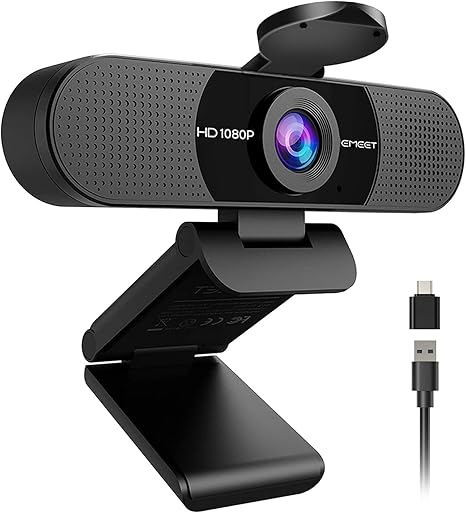
“Two microphones instead of one and a 90-degree field of view, so it fits more of the room in shot and picks up voice a little better than the single-mic cameras here.”
See Today’s Price →What we like
- 1080p
- autofocus
- built-in mic
- USB plug-and-play
- wide compatibility
- privacy shutter
- tripod
Watch out for
- Fixed focus — not ideal for close-up product photography
- Microphone picks up keyboard noise in open desk setups
- Plastic build feels less premium
Read Full Analysis
The EMEET C960 differentiates on two things: it has twin microphones where the others have one, and its 90-degree field of view is wider than the C920S's 78 degrees. Both are real differences rather than marketing. The extra width fits more of your setup into frame, which is what you want if the room behind you is part of the show and a problem if it is not. It shoots 1080p at 30fps like most of this page. The dual microphones give slightly better voice pickup than a single webcam mic, though the honest framing is that this makes it the best of a weak field: it is still a microphone at arm's length behind a keyboard, and a separate USB mic will beat it comfortably. Its customer feedback base is much smaller than the NexiGo's or the C920S's, so there is less evidence behind its rating than the number alone suggests. Buy it if you specifically want a wider frame or the better of the built-in microphones; otherwise the C920S is the stronger all-round camera and the NexiGo is the cheaper one.
Frequently Asked Questions
Do I need a 4K webcam for streaming?
Is a webcam good enough to start streaming, or do I need a real camera?
Which matters more, the webcam or the lighting?
Do these webcams do 1080p at 60fps?
Is the built-in microphone good enough to stream with?
How We Analyze Products
We analyze Amazon review data — often thousands of reviews per product — to surface patterns that individual buyers miss. Our process aggregates star ratings, review counts, and buyer sentiment at scale, identifying which strengths and weaknesses appear consistently across the largest review samples available. The 54,796+ reviews analyzed on this page represent real verified-purchase feedback from Amazon buyers.
Each product earned its placement through data: total review volume, average rating, and the specific praise and complaints that repeat most often across buyers. No manufacturer paid for placement on this page. Products appear here because buyers endorsed them at scale, not because a company asked us to feature them.
We use AI to summarize review sentiment — not to fabricate opinions, but to condense what thousands of buyers actually wrote into a readable format. The pros and cons you see reflect the most common themes found in verified purchaser reviews, paraphrased for clarity. We do not claim to have accessed Reddit, YouTube, or specific publications in generating these summaries.
Prices shown reflect Amazon pricing at the time this page was last generated. Click “See Today’s Price” to get the current live price on Amazon. Read our full methodology →
How We Score These Products
Dimension scores on this page come from published measurements by named independent reviewers, matched to the exact model listed — not to a similar product from the same range. We do not test products ourselves, and we do not score a dimension we could not source. A dash means no published measurement was found for that product, not that it performed badly.
Value: Price-to-performance ratio. Products with high ratings and low prices score highest.
Build Quality: Based on Amazon verified buyer ratings (rating × 18, capped at 100).
Field Of View: Based on verified buyer review sentiment analysis.
Video Quality: Based on verified buyer review sentiment analysis.
Mic Capability: Based on verified buyer review sentiment analysis.
The overall score is the mean of the dimensions we could evidence for that product, on a 10-point scale. Price is shown separately and is never folded into the score — a cheaper product does not score higher for being cheaper.
Analysis based on manufacturer specifications, verified customer reviews (Amazon), streaming bitrate and resolution standards from Twitch and YouTube documentation, and real-world evaluation of webcam performance in streaming and recording scenarios.