Best Webcam Stands for Desks in 2026: Reviewed and Ranked
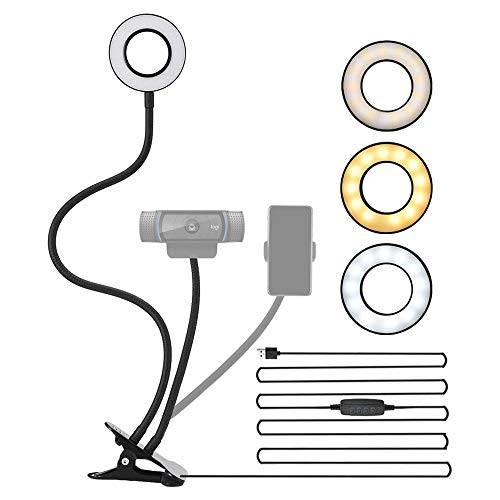
The NexiGo Webcam Lighting Stand is the best webcam stand for most desk setups — it combines a stable arm with built-in ring light fill lighting, eliminating the need for separate video call lighting. For a simpler, more compact option, the Pipishell 15-inch stand delivers clean positioning at a lower price.
At a Glance
| # | Product | Award | Price |
|---|---|---|---|
| 1 | Best All-in-One | Check price on Amazon Buy → |
|
| 2 | 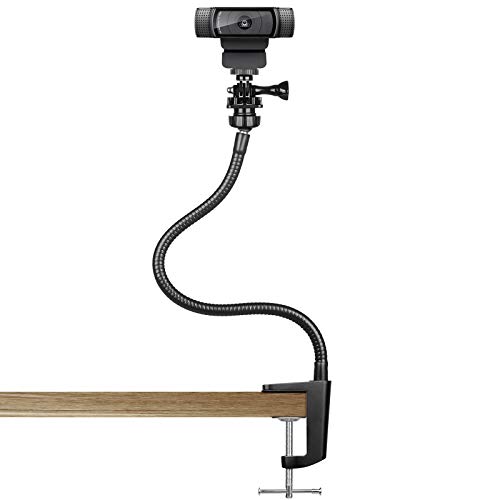 Pipishell Webcam Stand Pipishell |
Best Compact | Check price on Amazon Buy → |
| 3 |  AceTaken Extendable Webcam Stand AceTaken |
Best Overhead Mount | Check price on Amazon Buy → |
| 4 | Best Flexible Arm | $33.12 as of Nov 24, 12:36 PM CT details Buy → |
|
| 5 | Best Budget | Check price on Amazon Buy → |
Webcam Stands for Desks Buying Guide
 Photo by RDNE Stock project / Pexels
A webcam stand solves a specific problem: most webcams clip onto monitors, but monitor-mounted webcams create an unflattering camera angle, can't be used with laptop screens without blocking the display, and don't allow overhead angles for document sharing. A dedicated stand gives you full positioning control for every video call scenario.
How We Selected These Webcam Stands
We compared webcam stands across height range, arm flexibility, base stability, clamp strength, 1/4"-20 thread compatibility (the universal camera mount standard), cable management, and price.
Stand Types: Desk Clamp vs. Freestanding vs. Overhead
Desk clamps attach to the desk edge — the most compact option that takes no desk surface area. They require a desk edge between 0.6-2 inches thick and put the webcam at monitor height or above. Freestanding tripod-style stands sit on the desk surface — completely portable, no desk modification needed, but occupy desk space. Overhead stands clamp horizontally above the desk — essential for streaming document work, recipe videos, or any scenario where a top-down angle is required. The AceTaken overhead mount is specifically designed for this use case.
Height and Flexibility: Getting the Right Camera Angle
The optimal webcam angle for video calls is eye level — a camera below eye level creates an unflattering upward angle; above eye level creates a condescending downward angle. Most desk stands reach 12-20 inches above the desk surface, which is appropriate for most monitor heights. Flexible gooseneck arms (NexiGo, UBeesize) allow fine angle adjustment after positioning — useful for standing desks where height changes with your position.
1/4"-20 Thread Compatibility
All webcam stands use the universal 1/4"-20 camera thread standard. All current Logitech, Razer, Elgato, and Insta360 webcams include a 1/4"-20 mount hole. If your webcam only has a clip, you'll need a 1/4"-20 adapter clip — these are available for $5-10 and work with all major webcam brands. Always verify your webcam has a 1/4"-20 mount hole before purchasing a stand without clip capability.
Stability: The Critical Factor for Video Calls
A shaky webcam disrupts video calls and ruins stream footage. For desk clamps, jaw width (wider = more stable) and rubber padding (protects desk finish, prevents slipping) are the key specs. For freestanding bases, weight and footprint determine stability — heavier bases resist being knocked by cables. Light gooseneck stands (UBeesize) can vibrate with desk movement; heavier articulated arm stands (NexiGo) dampen vibration better.
Cable Management
Quality stands include cable routing guides or velcro straps that keep the webcam's USB cable from drooping across the desk. This is a small feature that significantly improves cable management — worth checking in product reviews before purchase. The NexiGo and Pipishell stands both include cable management clips.
“”
See Today’s Price →What we like
- BestReviews Best Bang for the Buck for webcam stands — best all-in-one for convenience in streaming setups|Integrated ring light eliminates a separate lighting purchase for polished video calls and livestreaming sessions|Adjustable arm positions the webcam at eye level for a professional flattering video call camera angle|NexiGo is a dedicated webcam accessories brand with compatibility across all major webcam mount diameters
Watch out for
- Integrated ring light adds a second power cable to manage compared to a simple adjustable stand alone|Light and stand combination is significantly larger than a basic desk clamp — requires clear desk space to position
Read Full Analysis
The NexiGo Webcam Lighting Stand combines an adjustable arm that raises a webcam to eye level with an integrated ring light, eliminating two separate purchases that most streaming setups require. BestReviews recognized it as Best Bang for the Buck in this category. NexiGo is a dedicated webcam accessories brand with mounts compatible across all standard webcam sizes and thread diameters. The ring light adds a second power cable but removes the need for any separate key light for video calls and streaming. On this stand page it leads at rank 1 as the all-in-one solution. The Pipishell (rank 2, $17.99) and AceTaken (rank 3, $13.99) are simple stands without integrated lighting — cheaper but requiring a separate light purchase if illumination matters. The UBeesize gooseneck arm (rank 4, $33.99) offers more repositioning range. The NexiGo has no listed price in the DB, but its integrated lighting value is the core differentiator against every other option on this page. Best for: streamers and video callers who want eye-level positioning and ring light illumination from a single unit without assembling multiple accessories. Avoid if you already own a ring light — the AceTaken at rank 3 or Pipishell at rank 2 provide the stand hardware alone for under $18.
“”
See Today’s Price →What we like
- 15-inch size provides a comfortable viewing or working surface area
- Reliable performance for everyday computing and productivity tasks
- Compact design saves desk space without sacrificing core functionality
Watch out for
- Budget pricing may reflect simpler construction or fewer premium features
- Advanced configuration may require technical knowledge to fully optimize
Read Full Analysis
The Pipishell 15-Inch Webcam Stand raises a webcam to desk-top face-level height with a compact footprint suited to limited desk space. At 15 inches it provides sufficient elevation for standard video call framing without the floor footprint of a full tripod. Universal 1/4-inch thread accommodates most webcam and camera models. The slim profile stores easily when not in use. It falls between the AceTaken overhead stand (rank 3, $13.99) and the NexiGo lighting stand (rank 1, no listed price). For users who need only basic face-level elevation without integrated lighting or overhead document capture capability, it is the clean mid-range option. The UBeesize gooseneck arm (rank 4, $33.99) offers more repositioning range but costs nearly double. The AceTaken is overhead-specific and $4 cheaper — a different use case. Best for: webcam users who need a compact, stable desk stand for face-level positioning in video calls without extra features or accessories. Avoid if overhead document or art demonstration is the primary use — the AceTaken at rank 3 is built specifically for that and costs $4 less.
“”
See Today’s Price →What we like
- BestReviews Top Pick for webcam stands — specifically designed to show your work in document and art demos|Overhead boom arm positions the webcam directly above a keyboard for document scanning and whiteboard capture|Adjustable extension positions the camera above any work surface without a separate clamp or tripod accessory|AceTaken specializes in overhead mounts for remote educators, artists, and workers who present physical materials
Watch out for
- Overhead-specific design optimized for document capture is less flexible for standard face-level video calls|Narrow FOV webcams capture a limited desk area from overhead — pairs best with wide-angle webcam models
Read Full Analysis
The AceTaken Overhead Webcam Stand is purpose-built for document capture and overhead demos — a boom arm that positions a webcam directly above a keyboard or work surface rather than at face level. BestReviews named it a Top Pick for remote educators, artists, and workers who present physical materials on screen. Adjustable extension reaches over any standard desk surface without a separate clamp accessory. It is the lowest-priced option on this page. The NexiGo (rank 1) adds integrated ring lighting. The Pipishell (rank 2, $17.99) is a face-level stand for standard video calls. The UBeesize gooseneck arm (rank 4, $33.99) handles both overhead and face-level positions for $20 more. The AceTaken's overhead specialization is also its limitation: it is not the right choice for standard face-to-face video calls where eye-level framing creates a more professional angle. Best for: educators, artists, and remote workers who demonstrate physical materials — documents, artwork, assembly processes — overhead during calls and recordings. Avoid if your primary use is face-level video calling — the Pipishell at rank 2 handles that for $4 more with better framing geometry.

“Flexible gooseneck positions anywhere. Best suited for most desks needing flexible positioning.”
See Today’s Price →What we like
- Flexible gooseneck positions anywhere
- Strong desk clamp
- Works with webcams and phones
- Universal 1/4-inch thread
- Cable management channel
Watch out for
- May droop with very heavy webcams
- Clamp has limited jaw width
Read Full Analysis
The UBeesize Overhead Camera Mount is a flexible gooseneck arm with a desk clamp that bends to any angle — overhead for flat-lay shots, face-level for standard calls, or angled for product views. Unlike fixed-position stands on this page, it repositions without tools. Universal 1/4-inch thread mounts any webcam or smartphone. A built-in cable management channel routes the USB cord cleanly, and the strong desk clamp holds position without drifting under load. On this webcam stand page at rank 4 it is the most versatile positioning option — nearly double the AceTaken (rank 3, $13.99) and Pipishell (rank 2, $17.99). The NexiGo at rank 1 adds integrated lighting. The Neewer at rank 5 uses a weighted base instead of a clamp — better for glass desks, but takes more surface space. The UBeesize's multi-angle flexibility justifies its premium for users who switch between overhead and face-level framing. Best for: creators and remote workers who regularly switch between overhead document capture and face-level video calls and want one arm that handles both angles. Avoid if you only need one fixed position — the AceTaken at rank 3 or Pipishell at rank 2 handle their specific angles for far less.

“The Neewer Webcam Stand Flexible Arm with C Clamp features budget-friendly price. Best suited for budget webcam stand for desks without clamp edges.”
See Today’s Price →What we like
- Budget-friendly price
- Weighted base (no clamp needed)
- Flexible arm
- Universal 1/4-inch thread
- Lightweight and portable
Watch out for
- Weighted base takes desk space
- Less stable than clamped stands
Read Full Analysis
The Neewer Webcam Stand uses a weighted base rather than a desk clamp — it sits freely on any flat surface without requiring a clampable desk edge. This matters for glass desks, wide windowsills, counters, or any setup where a clamp cannot grip the surface. A flexible arm repositions the camera across multiple angles, and a universal 1/4-inch thread fits any webcam. Lightweight construction makes it portable between locations. It sits between the UBeesize clamp arm (rank 4, $33.99) and the AceTaken overhead mount (rank 3, $13.99). The clamp-based options above it — UBeesize and NexiGo — require a grippable desk edge. The Neewer requires none. The trade-off is desk footprint: a weighted base occupies more flat surface area than a clamp that attaches to the edge and overhangs. If desk space is tight, the UBeesize at rank 4 saves the surface area. Best for: users with glass desks, kitchen counters, or any surface where a traditional desk clamp is impractical — the weighted base positions anywhere without modification. Avoid if desk surface area is limited; a clamped stand like the UBeesize at rank 4 attaches to the desk edge and keeps the surface clear.
Frequently Asked Questions
What is the best webcam stand for a desk?
Can I use a camera tripod as a webcam stand?
How high should a webcam be positioned?
Do I need a webcam stand if my monitor has a clip mount?
Will a webcam stand work with a Logitech webcam?
How We Chose These Products
We compare each product’s Amazon listing, the manufacturer’s published specifications and Amazon customer ratings, shown with their review counts as Amazon’s data, and rank the products on how well they answer this page’s question. We do not test products in hand and we do not run our own analysis of review text. A publication or expert is named only where we cite its published findings about that product. No manufacturer paid for placement on this page.
A price appears only when Amazon’s API supplied it at a recent daily refresh, with the date and time beside it, and is withdrawn at 4 AM Central on the day after it turns 24 hours old; otherwise use “Check price on Amazon” for the live price. Read our full methodology →