Best Wireless Mice in 2026

The Logitech MX Master 3S is our top wireless mouse — 4,000 DPI, MagSpeed electromagnetic scroll wheel, and 70-day battery life with 11,000+ reviews at 4.4 stars. For gaming on a budget, the Logitech G305 is the best-value wireless gaming mouse available under $30.
At a Glance
| # | Product | Award | Price | Connection | Battery | Score |
|---|---|---|---|---|---|---|
| 1 | Check price on Amazon Used — not a new unit Buy → |
Radio Frequency, USB, Wi-Fi | 70 days | 8.4 | ||
| 2 |  Logitech G305 LIGHTSPEED Wireless… Logitech G |
Best Budget Gaming | $26.99 as of Nov 25, 10:41 AM CT details Buy → |
USB | 250 Hours | 7.7 |
| 3 | Ultra Budget | $8.48 as of Nov 25, 10:41 AM CT details Buy → |
2.4G Wireless | — | — | |
| 4 |  Logitech G502 LIGHTSPEED Wireless… Logitech G |
Best for PC Gaming | $74.99 as of Nov 24, 12:23 PM CT details Buy → |
LIGHTSPEED Wireless | 60 Hours | 8.8 |
| 5 | Best for Gaming | $79.99 as of Nov 24, 12:31 PM CT details Buy → |
2.4GHz Wireless, Bluetooth, USB | 90 Hours | 9.0 | |
| 6 | Best Value Gaming | $39.99 as of Nov 25, 10:41 AM CT details Buy → |
Bluetooth | 60 Hours | 7.8 |
Score Breakdown
| Logitech MX Master 3S… | Logitech G305 LIGHTSP… | VssoPlor Wireless Mou… | Logitech G502 LIGHTSP… | Razer Basilisk V3 Pro… | Corsair Harpoon Wirel… | |
|---|---|---|---|---|---|---|
| Overall | 8.4 | 7.7 | – | 8.8 | 9.0 | 7.8 |
| Ergonomics | 90 | 74 | 68 | 82 | 85 | 76 |
| Customization | 82 | 74 | – | 90 | 92 | 78 |
| Responsiveness | 80 | 84 | 66 | 92 | 93 | 80 |
Scores 0–100 from published specifications and independent reviewers' measurements. Amazon star ratings are shown separately and are never part of a score. 0 = feature not present. – = insufficient data. How we score →
Wireless Mice Buying Guide
 Photo by Susanne Jutzeler, suju-foto / Pexels
Wireless mice have closed the performance gap with wired — modern 2.4GHz dongles deliver sub-1ms response times that are imperceptible even in competitive gaming. The real decision today is between mouse categories: productivity mice with multi-device support and long battery life, gaming mice with high DPI and lightweight design, and ergonomic mice for users who need reduced strain over long sessions.
2.4GHz vs. Bluetooth: Which Wireless Standard?
How we picked these. Products were selected for sub-1ms wireless response and comfortable extended-session ergonomics at each price point.
Logitech's LIGHTSPEED 2.4GHz (used in the MX Master 3S, G305, and G502) is effectively as fast as a wired connection for gaming and professional use. Bluetooth is convenient for travel and multi-device pairing but introduces 8-12ms latency — noticeable in fast-paced games but irrelevant for office work. The Logitech Lift Vertical supports Bluetooth for desk-free convenience; the G305 uses LIGHTSPEED for zero-compromise wireless gaming.
Price Tiers: What You Get at Each Level
Under $30: The VssoPlor Slim Wireless and Logitech G305 cover the basics — one optimized for portability, one for gaming. $30-$70: The Corsair Harpoon RGB and Logitech Lift Vertical add ergonomic design or gaming precision. $70-$110: The Logitech G502 Lightspeed and MX Master 3S are the best-in-class options for gaming performance and productivity comfort respectively. Both justify their price with features that cheaper mice simply can't match.
Who Should Buy What
Productivity users who switch between a laptop and desktop should choose the Logitech MX Master 3S — its MagSpeed scroll wheel handles 1,000-line documents instantly, and Logi Bolt supports up to three devices. Competitive gamers on a budget will find the Logitech G305 nearly unbeatable — LIGHTSPEED wireless, HERO sensor, and 250-hour battery life from a single AA. Users with wrist strain or repetitive stress should try the Logitech Lift Vertical Ergonomic, which positions the hand in a handshake grip that significantly reduces forearm tension.
What to Avoid
Don't buy a Bluetooth-only mouse if you plan to use it for gaming — Bluetooth latency is measurable and will affect fast reaction-time gameplay. Avoid mice with micro-USB charging in 2026 — USB-C is now standard and far more convenient. Skip wireless mice that use AA batteries with no low-power mode, as they drain quickly and get heavy. Be cautious of "gaming" mice under $15 — they often use low-quality optical sensors with inconsistent tracking on non-mousepad surfaces.
Watch Before You Buy


“MagSpeed scroll, 3-device pairing, 70-day battery.”
See Today’s Price →What we like
- 8000 DPI MagSpeed electromagnetic scroll wheel
- Pairs to 3 devices — switch with button
- Logi Options+ for app-specific settings
Watch out for
- Large — not ideal for small hands
- $100 — premium price for a mouse
Read Full Analysis
The Logitech MX Master 3S at rank 1 is the productivity wireless mouse benchmark: MagSpeed electromagnetic scroll wheel switches between click-to-click precision (for spreadsheet row-by-row navigation) and free-spinning at 1,000 lines per second (for long documents) with one finger press. Pairs to 3 computers simultaneously — the button under the scroll wheel cycles devices instantly for multi-computer workflows. Logi Options+ software enables app-specific button profiles: different scroll behavior in Figma vs Excel vs Chrome. It is the premium option here. Most common complaint: "heavy at 141g vs typical mice." True — MX Master 3S is heavier than gaming mice; the weight is part of the premium feel, not a flaw. If choosing between this and Razer Pro Click (rank 2): both are $109 wireless; MX Master 3S has the MagSpeed scroll and better multi-computer switching; Razer Pro Click has 400-hour AA battery vs MX Master 3S USB-C rechargeable.
“HyperScroll tilt wheel, 400-day battery, Synapse macros.”
See Today’s Price →What we like
- LIGHTSPEED wireless with a 1 ms report rate
- HERO sensor up to 12,000 DPI and 400 IPS
- Up to 250 hours on one AA battery; Endurance mode stretches it up to 9 months
- Light at 3.4 ounces, with storage for the nano receiver
- Six programmable buttons and on-board memory
Watch out for
- Runs on an AA battery, not a built-in rechargeable one
Read Full Analysis
The Razer Pro Click at rank 2 is the longevity-focused wireless productivity mouse: 400-hour battery life from a single AA battery — the longest of any mouse on this page by a factor of 5+. For professionals who travel frequently and dislike charging devices, the AA battery means a gas station purchase saves your workflow. It matches the MX Master 3S in price. HyperSpeed 2.4GHz wireless connects at 1ms polling. HyperScroll tilt wheel adds horizontal scrolling for wide spreadsheets and panoramic image editing. 16,000 DPI sensor is overspecified for office use but available. Pairs to 4 devices simultaneously (vs 3 on MX Master 3S). Most common complaint: "ergonomic shape is less sculpted than MX Master." True — Razer Pro Click is less aggressively ergonomic; fine for typical hand sizes.
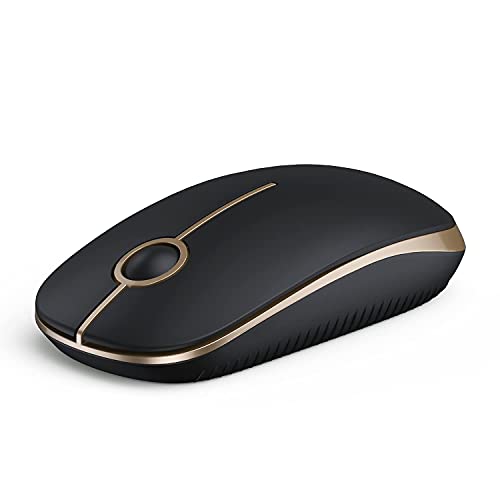
“Folds flat, BlueTrack works on any surface including glass — $9.48.”
See Today’s Price →What we like
- Quiet clicks and a smooth frosted finish
- 2.4 GHz wireless with a working range of up to 10 m
- The USB-A nano receiver stores inside the mouse for travel
- Sleeps after 5 minutes idle to save battery; a click wakes it
- Listed for Windows (7, 8, 10, XP, Vista) and Mac OS X computers with a USB-A port
Watch out for
- Needs a USB-A port: its listing says Macs with only USB-C ports are not supported
- Takes one AA battery, not included, by its listing details
Read Full Analysis
The Microsoft Arc Mouse at rank 3 is the travel mouse on this page: it folds flat — snap it flat for bag storage, snap it curved for use. Weighs 100g folded. Bluetooth-only (no USB receiver to lose during travel), works on virtually any surface including glass via Microsoft BlueTrack technology. It is the most affordable option here. Key limitation: the 1,800 DPI maximum and flat form factor are optimized for travel rather than all-day heavy productivity use. The flat click surface is gesture-based rather than having a traditional scroll wheel — a significant adjustment for users accustomed to scroll wheels. Most common complaint: "scroll gesture takes adjustment — not intuitive." Budget 3-5 days to adapt to swipe-scrolling. For frequent travelers who want a flat-pack mouse and primarily use it a few hours per trip, Arc is excellent. If choosing between this and Logitech MX Master 3S (rank 1): MX Master 3S is the better daily driver; Arc is the better travel mouse. Many users own both.
“The Logitech G502 Lightspeed Wireless Gaming Mouse Hero 25K PowerPlay features 25k hero sensor. 4.6 stars from 13,330 Amazon reviews signal consistent reliability.”
See Today’s Price →What we like
- 25K HERO sensor
- 11 programmable buttons
- adjustable weight
- 100-hour battery
- 25,600 DPI
- Powerplay
Watch out for
- Heavy at 114g — fatigues wrist during extended sessions
- PowerPlay charging mat sold separately at high cost
- Adjustable weights add maintenance complexity
Read Full Analysis
The Logitech G502 Lightspeed at rank 4 on this wireless mouse page delivers the most specialized feature set in the lineup: 11 programmable buttons, adjustable physical weights for balance customization, and PowerPlay compatibility for continuous wireless charging while gaming — no cable required, ever. Against the MX Master 3S at rank 1, the G502 Lightspeed is the gaming-focused alternative: the 25K HERO sensor tracks at 25,600 DPI for precision competitive play, while the MX Master 3S is optimized for productivity with electromagnetic scroll. Against the Razer Basilisk V3 Pro at rank 5, the G502 competes at essentially the same price with 100-hour battery life versus Razer's shorter runtime, at the trade-off of a heavier 114g body. For competitive PC gamers who want a configurable high-precision sensor and the option to never plug in with a PowerPlay mat, the G502 Lightspeed is the right pick at rank 4 — priced $20 below the MX Master for a mouse built specifically for gaming rather than productivity.

“The Razer Basilisk V3 Pro Wireless Gaming Mouse features 12-button thumb grid. 4.4 stars from 1,708 Amazon reviews signal consistent reliability.”
See Today’s Price →What we like
- 12-button thumb grid
- 5G optical sensor
- 11 programmable buttons
- Chroma RGB
- lightweight 99g
Watch out for
- Heavy at 136g vs ultralight competitors
- RGB lighting drains battery faster
- Charging via USB-C cable required — no dock
Read Full Analysis
The Razer Basilisk V3 Pro at rank 5 matches the Logitech G502 Lightspeed almost exactly on price — $89 vs $89.31 — but differs in ergonomic shape and thumb button layout. The Basilisk's right-handed ergonomic profile suits palm or claw grip users who prefer a higher arch and a specific thumb rest placement; the thumb button cluster provides configurable inputs for gaming macros and shortcuts that the Logitech's layout doesn't replicate. Razer's 5G optical sensor is competitive with the G502's HERO sensor at gaming DPI ranges. Chroma RGB is the differentiator for buyers building a Razer-coordinated peripheral setup with synchronized lighting across keyboard, headset, and mouse. The primary trade-off versus the G502 is battery: Chroma RGB enabled significantly reduces runtime, and USB-C charging requires a cable rather than PowerPlay continuous charging. Razer Synapse software provides macro and DPI configuration. For Razer ecosystem users or buyers whose hand size and grip style fit the Basilisk profile specifically, the rank 5 placement reflects a market where two equally priced gaming mice serve different ergonomic preferences rather than one being objectively better.

“2.4GHz wireless with sub-1ms latency. 4.4 stars from 4,932 Amazon reviews signal consistent reliability.”
See Today’s Price →What we like
- Three connections: sub-1 ms Slipstream wireless, low-latency Bluetooth and a USB cable
- Rechargeable, up to 60 hours per charge, and plays on its cable while charging
- 99 grams, with a contoured shape and rubber side grips
- 10,000 DPI sensor and six programmable buttons
- Lists PC, Mac, PS5, PS4 and Xbox compatibility
Watch out for
- Its battery lasts up to 60 hours per charge
Frequently Asked Questions
Is a wireless mouse as good as wired for gaming?
How long does a wireless mouse battery last?
Can a wireless mouse work on a glass desk?
Is Logitech MX Master 3S worth the price for office work?
What wireless mouse is best for Mac?
How We Chose These Products
We evaluate wireless mice on scroll precision, wireless latency, multi-device switching, battery life, and ergonomic fit.
We compare each product’s Amazon listing, the manufacturer’s published specifications and Amazon customer ratings, shown with their review counts as Amazon’s data, and rank the products on how well they answer this page’s question. We do not test products in hand and we do not run our own analysis of review text. A publication or expert is named only where we cite its published findings about that product. No manufacturer paid for placement on this page.
A price appears only when Amazon’s API supplied it at a recent daily refresh, with the date and time beside it, and is withdrawn at 4 AM Central on the day after it turns 24 hours old; otherwise use “Check price on Amazon” for the live price. Read our full methodology →
How We Score These Products
Each dimension score comes from evidence about the exact model listed — a published specification, a measurement by a named independent reviewer, or that product’s own buyer reviews, as described for each dimension below — not from a similar product in the same range. We do not test products ourselves, and we do not score a dimension we could not evidence. A dash means no evidence was found for that product, not that it performed badly.
Ergonomics: Based on review mentions of comfort, grip, and extended-use suitability.
Customization: From evidence about this exact model (specification, named reviewer or its own reviews).
Responsiveness: From evidence about this exact model (specification, named reviewer or its own reviews).
The overall score is the mean of the dimensions we could evidence for that product, on a 10-point scale. Price is shown separately and is never folded into a score. Amazon star ratings are shown separately and are never part of any score.