How to Build a Gaming PC in 2026: Choosing and Fitting the Parts
Spend the most on the graphics card, pair it with a six-core CPU, and do not cut corners on the power supply or case airflow. The Corsair 4000D RS Frame airflow case and the Noctua NH-D15 air cooler are examples of parts worth paying for; if you would rather skip assembly, CyberPowerPC's Gamer Master desktop with a Ryzen 7 8700F and an RTX 5060 Ti arrives built.
Holiday shopping




Related guides we’ve checked
 Best Portable External SSDs 2026: 1TB Drives ComparedTop pick: Samsung T9 Portable SSD 1TB
 Best HDMI Switches 2026: More Sources, One TVTop pick: UGREEN HDMI 2.1 Switch 3 in 1 Out
 Best Monitors for Mac 2026: 4K USB-C and Thunderbolt PicksTop pick: Dell UltraSharp U2725QE 27-Inch 4K UHD IPS Black Monitor
Gift shopping? Holiday Gift Guide 2026: checked picks for everyone on your list.
How to Build a Gaming PC Buying Guide
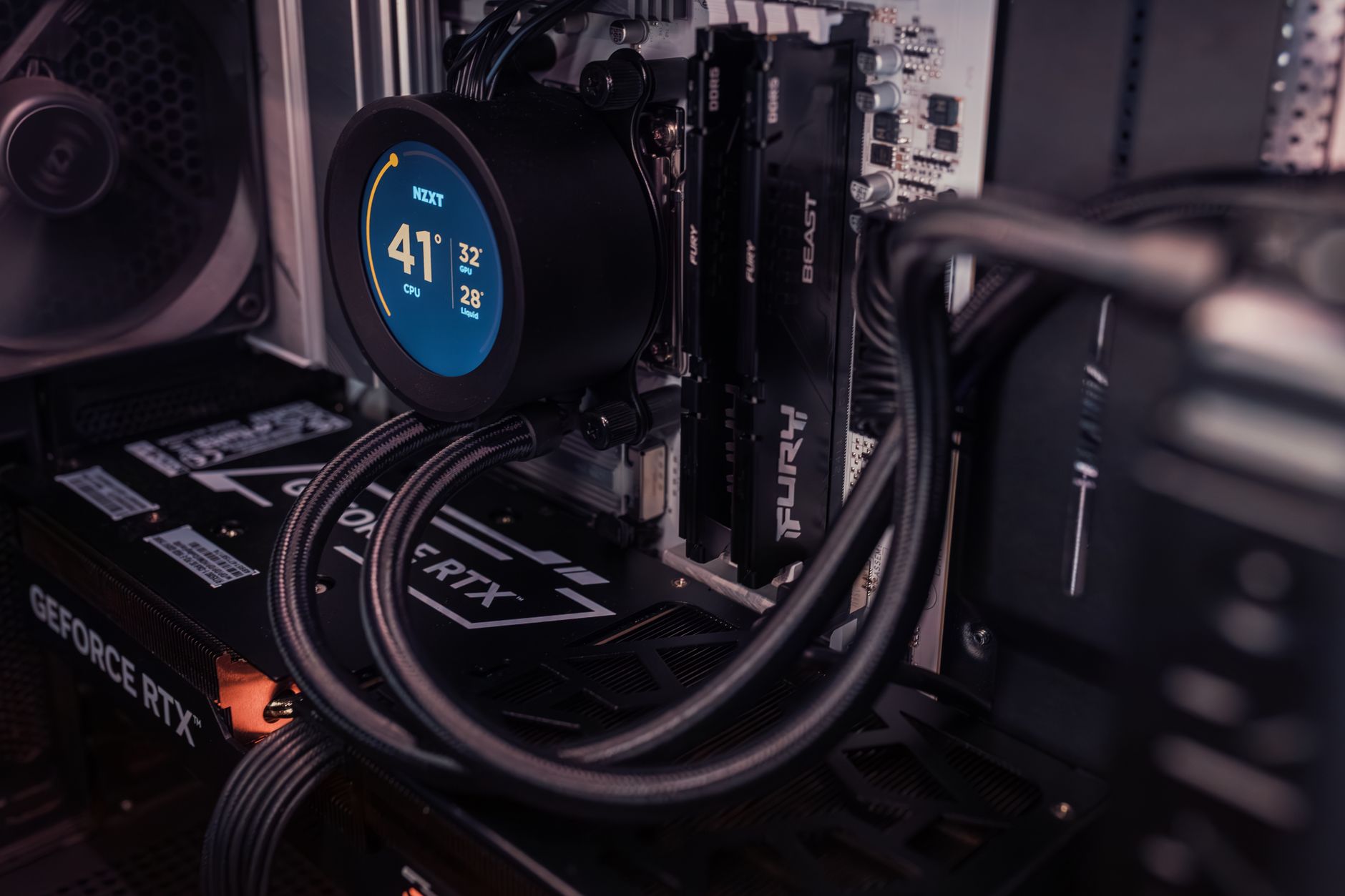 Photo by Matheus Bertelli / Pexels
Building a gaming PC is mostly a budgeting exercise: the graphics card decides how games look and run, and the parts around it - processor, memory, storage, power supply, case and cooling - have to keep it fed, powered and cool. This guide walks through each decision in the order it matters, with three examples from this page: the Corsair 4000D RS Frame case, the Noctua NH-D15 cooler and, for readers who would rather not build, CyberPowerPC's Gamer Master desktop.
Start with the graphics card
The graphics card does most of the work in a game, so it should take the largest share of the budget. Decide the resolution you play at first, because it sets how much card you need. Video memory is the spec to check: 8GB is a sensible floor for 1080p, 12GB starts to matter at 1440p, and 4K play wants 16GB or more. A card with more video memory than you need today leaves room as games grow. Before you order, check the card's length against your case and its recommended power supply wattage against your PSU.
Processor and platform
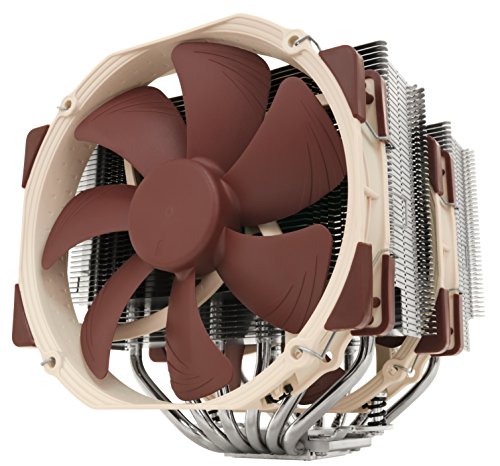
For gaming alone, a current six-core processor is enough for most players; eight or more cores earn their place if you also stream, edit video or render. The longer-term choice is the platform. The CPU socket and chipset decide which motherboards fit, which memory type you can use and whether a later processor will drop into the same board, so check the socket's upgrade path before you buy. A processor that runs hot under load needs an aftermarket cooler rather than the one in its box. The Noctua NH-D15 is an example: a dual-tower air cooler with six heatpipes and two 140mm NF-A15 fans, with mounting for Intel LGA1851, LGA1700, LGA1200 and LGA115x and AMD AM5 and AM4. At 168mm tall it needs a case with room for it and memory that clears it.

Memory, storage and power
Memory: 16GB is the usual starting point for gaming, and 32GB helps if you keep a browser, voice chat and a stream running alongside a game. Memory has to match the board: some platforms take DDR5 only, others DDR4 or DDR5 depending on the motherboard, so read the motherboard's spec sheet before ordering RAM. Storage: an NVMe SSD of at least 1TB keeps load times short; a hard drive is fine for an archive but slow for games. Power supply: size it to the graphics card maker's recommendation with some headroom, buy an 80 Plus Bronze unit or better, and do not treat it as the place to save money, because a failing power supply can take other parts with it. Its warranty term tells you how long its maker stands behind it.
Case and airflow
A case with a closed front can starve the graphics card of cool air, and a hot card slows itself down. Look for a mesh or perforated front panel and fans already fitted. The Corsair 4000D RS Frame is built that way: its steel front panel is perforated in a Y-pattern, three Corsair RS PWM fans come fitted in the front, Corsair's InfiniRail lets you slide front fans of up to 200mm into place (140mm in the roof), and it fits multiple 360mm radiators. It is a mid-tower, so measure the space where it will sit, and check that your graphics card and cooler fit inside it.
Common mistakes
Mistake 1: a fast processor with a slow graphics card. In most games the card sets the frame rate, so money moved from the processor to the card usually buys more performance.
Mistake 2: memory that does not match the board. Check the motherboard's memory type and supported speeds before you order.
Mistake 3: a case that starves the graphics card of air. A closed front panel and too few fans trap heat; choose a mesh front with fans fitted.
Mistake 4: forgetting thermal paste. An aftermarket cooler needs paste between it and the processor; the Noctua NH-D15 comes with its NT-H1 paste.
Putting it together, or buying it built
When you assemble, plan around the case and the cooler. The Noctua NH-D15 uses Noctua's SecuFirm2 mounting system, which Noctua says makes installation easy, with an offset mounting option, and its 168mm height has to clear the case side panel and your memory. In the Corsair 4000D RS Frame, the inner side panel next to the motherboard tray either covers your cables or comes off so you can mount side fans, InfiniRail lets you slide the front fans to where your parts need air, and Corsair's title lists compatibility with reverse-connector motherboards. Leave time on a first build for cable management and the first boot.
Building lets you choose every part, including the power supply and the cooler, and you can upgrade one part at a time. A prebuilt arrives ready to play. CyberPowerPC's Gamer Master is an example: an 8-core AMD Ryzen 7 8700F on an AMD B850 chipset with an NVIDIA GeForce RTX 5060 Ti 8GB, 16GB of DDR5 and a 1TB PCIe 4.0 NVMe SSD, Windows 11 Home, WiFi 6 and Bluetooth 5.3, with a keyboard and mouse and a one-year parts and labor warranty. Its 8GB of video memory meets the 1080p floor above but falls short of the 12GB suggested for 1440p, and its listing names neither the motherboard model nor the power supply, so you cannot judge its upgrade headroom the way you can with parts you choose yourself.
How we picked: we compared each product's own listing - what it is, what comes in the box, the specifications its maker states and the warranty - and chose them as examples of the choices this guide explains. We have not tested these products in hand.
Watch Before You Buy
“Corsair's 4000D RS Frame: an airflow mid-tower with a Y-pattern perforated steel front, three RS PWM fans fitted and room for multiple 360mm radiators.”
See Today’s Price →What we like
- Three CORSAIR RS PWM fans fitted in front, with a Zero RPM mode at low load
- InfiniRail slides fans up to 200mm into any front position (140mm in the roof)
- Fits multiple 360mm radiators
- FRAME modular parts, such as the front I/O panel, can be swapped later
Watch out for
- Fitting side fans means removing the inner cable-cover panel, which leaves the cables on show
Read Full Analysis
This guide's third mistake is a case that starves the graphics card of air, and the 4000D RS Frame is built around the fix. Its steel front panel is perforated in three dimensions with a Y-pattern for a low-obstruction path for cool air, and three Corsair RS PWM fans come fitted in the front; they daisy-chain on 4-pin PWM and have a Zero RPM mode for near-silent running at low load. Corsair's InfiniRail system lets you slide fans of up to 200mm anywhere along the front (140mm in the roof), the case fits multiple 360mm radiators, and an inner side panel either hides cables or comes off to take side fans. FRAME modular parts, such as the front I/O panel, can be swapped later. It is a mid-tower, so measure the space where it will sit.
Skip this if: You want a small case, or solid sound-dampened panels
“Noctua's NH-D15: a dual-tower air cooler with six heatpipes and two 140mm NF-A15 fans, with NT-H1 thermal paste, mounting for Intel and AMD sockets including AM5, and a 6-year warranty.”
See Today’s Price →What we like
- Dual-tower heatsink with six heatpipes
- Two NF-A15 140mm fans with PWM and Low-Noise Adaptors
- NT-H1 thermal paste and SecuFirm2 mounting included
- Mounts on Intel LGA1851, LGA1700, LGA1200, LGA115x and AMD AM5 and AM4
- 6-year manufacturer's warranty
Watch out for
- 168mm tall, so check your case's cooler clearance and your RAM height first
Read Full Analysis
If your CPU runs hot enough to need more than its stock cooler (this page's FAQ points to hot-running chips), the NH-D15 is a classic air answer. Two towers of fins sit on six heatpipes, cooled by two NF-A15 140mm fans with PWM speed control and Low-Noise Adaptors for quieter running. Noctua includes its NT-H1 thermal paste and the SecuFirm2 mounting system for Intel LGA1851, LGA1700, LGA1200 and LGA115x and AMD AM5 and AM4, with an offset mounting option, and backs the cooler with a 6-year warranty. It is 168mm tall, so check your case's CPU cooler clearance and the height of your RAM before you order.
Skip this if: Your case is narrow, or your RAM has tall heat spreaders
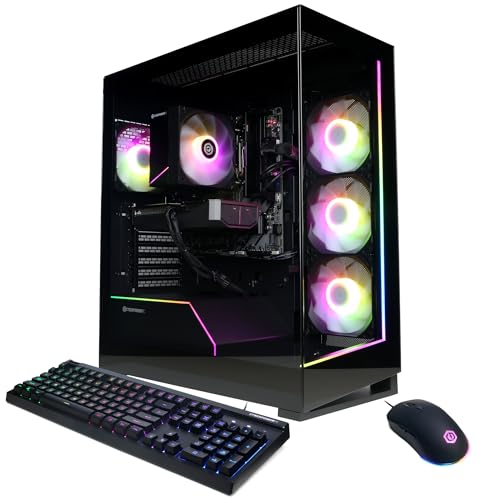
“CyberPowerPC's Gamer Master: a ready-built desktop with an 8-core Ryzen 7 8700F, a GeForce RTX 5060 Ti 8GB, 16GB of DDR5 and a 1TB PCIe 4.0 SSD, with a keyboard and mouse.”
See Today’s Price →What we like
- 8-core AMD Ryzen 7 8700F at 4.1GHz on an AMD B850 chipset
- NVIDIA GeForce RTX 5060 Ti 8GB graphics with one HDMI and two DisplayPort outputs
- 16GB DDR5 memory and a 1TB PCIe 4.0 NVMe SSD
- Two USB-C 3.2 ports, WiFi 6 and Bluetooth 5.3
- Keyboard and mouse included, with a one-year parts and labor warranty and free lifetime tech support
Watch out for
- Its listing names neither the motherboard model nor the power supply, so upgrade headroom is unknown
Read Full Analysis
This page is about building, but not everyone wants to, and this desktop is the skip-assembly option. CyberPowerPC pairs an 8-core AMD Ryzen 7 8700F at 4.1GHz on an AMD B850 chipset with an NVIDIA GeForce RTX 5060 Ti 8GB, 16GB of DDR5 memory and a 1TB PCIe 4.0 NVMe SSD, with Windows 11 Home installed. The graphics card has one HDMI and two DisplayPort outputs, and the case adds two USB-C 3.2 ports, four USB-A 3.2 and two USB-A 2.0 ports, wired LAN, WiFi 6 and Bluetooth 5.3, behind a tempered side panel with custom RGB lighting. A keyboard and mouse are in the box, and CyberPowerPC backs it with a one-year parts and labor warranty and free lifetime tech support. Measured against this guide, its 8GB of video memory meets the 1080p minimum the GPU section sets but falls short of the 12GB it suggests for 1440p, and the listing names neither the motherboard model nor the power supply, so you cannot judge upgrade headroom the way you can with parts you choose yourself.
Skip this if: You want to choose every part yourself, or you play at 1440p and want more than 8GB of video memory
Frequently Asked Questions
How much does it cost to build a gaming PC in 2026?
Is it cheaper to build or buy a pre-built gaming PC?
How long does it take to build a gaming PC?
What GPU should I buy for 1440p gaming in 2026?
Do I need an aftermarket CPU cooler?
How We Chose These Products
We compare each product’s Amazon listing, the manufacturer’s published specifications and Amazon customer ratings, shown with their review counts as Amazon’s data, and rank the products on how well they answer this page’s question. We do not test products in hand and we do not run our own analysis of review text. A publication or expert is named only where we cite its published findings about that product. No manufacturer paid for placement on this page.
A price appears only when Amazon’s API supplied it at a recent daily refresh, with the date and time beside it, and is withdrawn at 4 AM Central on the day after it turns 24 hours old; otherwise use “Check price on Amazon” for the live price. Read our full methodology →