Huion vs XP-Pen: Which Is Better? (2026)

XP-Pen wins for most buyers: the XPPen Deco 01 V3 pairs a 10 x 6.25-inch drawing area with a battery-free pen that reads 16,384 pressure levels and a USB-C connection, where the Huion Inspiroy H1060P's pen reads 8,192 and a Mac needs a USB adapter. Choose the Huion H1060P if you want more shortcuts: 12 press keys plus 16 soft keys, against the Deco's 8.
Holiday shopping





At a Glance
| # | Product | Award | Price | Display |
|---|---|---|---|---|
| 1 | Most Shortcut Keys | $39.70 as of Nov 25, 10:41 AM CT details Buy → |
— | |
| 2 | Best for Notes and Signatures | $26.58 as of Nov 25, 10:41 AM CT details Buy → |
6 Inches | |
| 3 | Best Pen Display | $198.55 as of Nov 25, 10:41 AM CT details Buy → |
13.3 | |
| 4 | Our Top Pick | $41.75 as of Nov 25, 10:41 AM CT details Buy → |
— | |
| 5 | Best Compact XP-Pen Tablet | $29.99 as of Nov 25, 10:41 AM CT details Buy → |
— | |
| 6 | Best XP-Pen Pen Display | $181.09 as of Nov 25, 10:41 AM CT details Buy → |
— |
Related guides we’ve checked
 Best Drawing Tablets 2026: Screenless, Display & EntryTop pick: Wacom Intuos Pro Medium
 Best Desk Lamps (2026): LED Picks for Work and StudyTop pick: Lepro LED Desk Lamp 9.5W 800lm
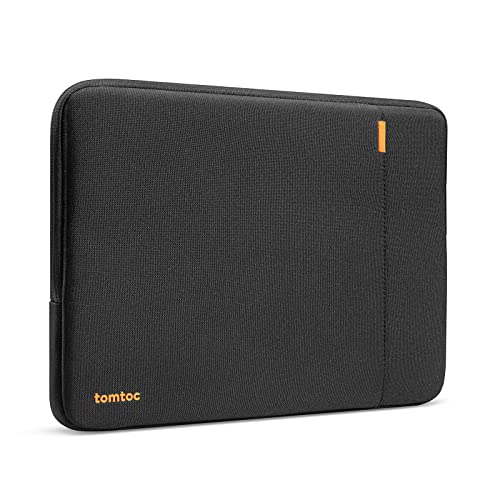 Best Laptop Sleeves 2026: 15, 16 and 17-Inch PicksTop pick: tomtoc 360° Protective Laptop Sleeve
Gift shopping? Holiday Gift Guide 2026: checked picks for everyone on your list.
Huion vs XP-Pen Buying Guide

XP-Pen wins this matchup for most buyers. Its current pen tablets, the Deco 01 V3 and the Deco Mini7 V2, come with battery-free pens that read 16,384 pressure levels, twice the 8,192 of Huion's Inspiroy H1060P and H640P, and both connect by USB-C. Huion takes the pen-display pairing: the Kamvas 13 (Gen 3) lists a factory calibration report and an average Delta E under 1.5, which XP-Pen's Artist 13.3 Pro V2 listing does not. The six models are paired like for like below.
Large pen tablets: XPPen Deco 01 V3 vs Huion Inspiroy H1060P
Both give you a 10 x 6.25-inch drawing area and a battery-free pen with 60-degree tilt. The Deco 01 V3's pen reads 16,384 pressure levels against the H1060P's 8,192, it connects USB-C to USB-C with adapters included, and it is 8 mm thin; XP-Pen lists Windows 7 or later, macOS 10.13 or later, ChromeOS 88 or later, Linux and Android 10 or later. The H1060P answers with far more shortcuts - 12 programmable press keys plus 16 soft keys, against the Deco's 8 - and supports Windows 7 or later, macOS 10.12 or later, Android 6.0 or later and Linux (Ubuntu, under Xorg), though a Mac needs a USB adapter and iPhone and iPad are not supported. Left-handed users are covered by both: the H1060P rotates 180 degrees in the driver, and the Deco's keys are set up for right- or left-hand use.
Compact pen tablets: XPPen Deco Mini7 V2 vs Huion Inspiroy H640P

The Deco Mini7 V2 has a 7 x 4-inch drawing area, a 16,384-level battery-free pen with 60-degree tilt, 8 shortcut keys and a USB-C connection, with a USB to USB-C adapter and 10 spare nibs in the box; XP-Pen says it works with osu! without any driver software. The H640P has a 6 x 4-inch area in a body 0.3 inches thin and 0.61 lbs, an 8,192-level pen with 5080 LPI resolution and a 233 PPS report rate, and 6 press keys that can hold a different shortcut profile for each app. It works with Mac, Windows, Linux and Android 6.0 or later, but not iPhone or iPad. On the listings the XP-Pen gives you the larger area and the higher pressure count; the Huion is the thinner of the two, 0.3 inches against 0.36, and Huion pitches it for a laptop bag.
Pen displays: Huion Kamvas 13 (Gen 3) vs XPPen Artist 13.3 Pro V2

Both are fully laminated 13.3-inch screens that must be plugged into a computer, and both pens read 16,384 pressure levels. Huion's case is color: the Kamvas lists 99% sRGB coverage, the Rec.709 gamut, an average Delta E under 1.5 and a factory calibration report, lists a USB-C single-cable connection (its listing details name a full-featured USB-C cable, sold separately, or a 3-in-1 cable), and adds anti-sparkle Canvas Glass 2.0, a pen with a 2 g activation force and three side buttons, five programmable keys, two dials and an adjustable ST300 stand. The Artist 13.3 Pro V2 answers with eight customizable keys and a Red Dial that zooms, resizes brushes and flips the canvas, an 88% NTSC gamut (Adobe RGB 91% or more, sRGB 123% or more) with a 178-degree viewing angle, and a pen with 60-degree tilt and two buttons. It connects through an included 3-in-1 cable, and its listing gives no Delta E figure or calibration report.
Is a pen display worth the premium?
A pen display costs several times as much as a pen tablet from either brand, so this page is a cross-tier comparison as well as a brand one. What the extra money buys is drawing directly on the image, instead of drawing on a blank pad while you watch the monitor, which takes practice. The costs are desk space and cables: both displays here must be connected to a computer to work. If you are learning, a pen tablet from either brand is the cheaper way to find out how much you will draw; if color accuracy matters to your work, the Kamvas 13 (Gen 3)'s calibration report is the specific thing a display adds.
Get XP-Pen if, get Huion if
Get XP-Pen if you want a pen tablet: the Deco 01 V3 and the Deco Mini7 V2 pens read 16,384 pressure levels, both connect by USB-C, and both list Android 10 or later and ChromeOS. Get Huion if you want a pen display with a stated color accuracy and a calibration report (the Kamvas 13 (Gen 3)), the most shortcut keys on a pen tablet (the H1060P's 12 press keys plus 16 soft keys), or a very thin, light tablet for a backpack (the H640P, 0.3 inches and 0.61 lbs).
How we picked: we compared each product's own listing - what it is, what comes in the box, the specifications its maker states and the warranty - and ranked them on how well they answer this page's question. We have not tested these products in hand.
Watch Before You Buy
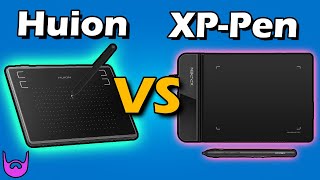
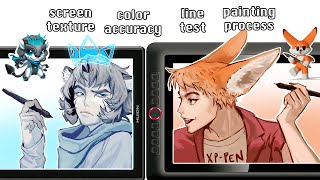
“Huion's 10 x 6.25-inch screenless tablet with a battery-free 8,192-level tilt pen and the most shortcuts on this page: 12 press keys plus 16 soft keys.”
See Today’s Price →What we like
- 10 x 6.25-inch working area
- Battery-free PW100 pen with 8,192 pressure levels and ±60° tilt
- 12 programmable press keys plus 16 soft keys
- Works with Windows, macOS, Android and Linux
- Turns 180° in the driver for left-handed use
Watch out for
- A Mac needs a USB adapter
- No iPhone or iPad support
- Screenless: you draw on the tablet while watching your monitor
Read Full Analysis
The Inspiroy H1060P is the shortcut-heavy large tablet. Its 10 x 6.25-inch working area matches the Deco 01 V3's, and its battery-free PW100 pen supports 60-degree tilt with 8,192 pressure levels, half the Deco's 16,384. Where it pulls ahead is control: 12 programmable press keys plus 16 programmable soft keys, so zoom, undo, eraser and scrolling can all live on the tablet. Huion lists Windows 7 or later, macOS 10.12 or later, Android 6.0 or later through an OTG connector, and Linux (Ubuntu, under Xorg); a Mac needs a USB adapter, and iPhone and iPad are not supported. Left-handed users rotate it 180 degrees in the driver. The body is 10 mm slim.
Skip this if: You want a 16,384-level pen or a USB-C connection
“Huion's 6 x 4-inch screenless tablet, 0.3 inches thin and 0.61 lbs, with a battery-free 8,192-level pen and 6 customizable press keys.”
See Today’s Price →What we like
- 6 x 4-inch active area in a body 0.3 inches thin and 0.61 lbs
- Battery-free PW100 pen with 8,192 pressure levels and side buttons
- 6 customizable press keys with per-app shortcut profiles
- Works with Windows, Mac, Linux and Android 6.0 or later
- Flips for left-handed use
Watch out for
- No iPhone or iPad support
- Its 8,192-level pen reads half the 16,384 levels some newer tablet pens list
Read Full Analysis
The Inspiroy H640P is the tablet that disappears into a backpack: Huion lists it at 0.3 inches thin and 0.61 lbs, with a 6 x 4-inch active area. Its battery-free PW100 pen reads 8,192 pressure levels with 5080 LPI resolution and a 233 PPS report rate, and its side buttons switch between pen and eraser. Six customizable press keys hold your most-used commands, and the driver can keep a different shortcut profile for each app. It works with Mac, Windows, Linux and Android 6.0 or later, but not iPhone or iPad, and left-handed users flip it and change the setting in the driver. Huion also pitches it as a note-taking and signature pad. Against the Deco Mini7 V2 it has the smaller area and the lower pen pressure count.
Skip this if: You want a 16,384-level pen or a larger drawing area
“Huion's fully laminated 13.3-inch pen display with anti-sparkle Canvas Glass 2.0, a 16,384-level pen, 99% sRGB with a factory calibration report and a USB-C connection.”
See Today’s Price →What we like
- Fully laminated 13.3-inch display with anti-sparkle Canvas Glass 2.0
- PenTech 4.0 pen: 16,384 pressure levels, 2 g activation force, 3 side buttons
- 99% sRGB, average Delta E under 1.5, factory calibration report
- 5 programmable keys and dual dials
- USB-C connection and an adjustable ST300 stand
Watch out for
- Not standalone: it must be connected to a computer or laptop
- Android use needs a device with USB 3.1 Gen 1 and DisplayPort 1.2
- Its listing details name a full-featured USB-C cable, sold separately, or a 3-in-1 cable
Read Full Analysis
The Kamvas 13 (Gen 3) is the better-documented of the two pen displays here. Its 13.3-inch screen is fully laminated under Huion's anti-sparkle Canvas Glass 2.0, which Huion says reduces glare and improves accuracy. Color is where it separates itself: Huion lists 99% sRGB coverage, the Rec.709 gamut, 16.7 million colors and an average Delta E under 1.5, and includes a factory calibration report with each unit. The PenTech 4.0 pen reads 16,384 pressure levels with a 2 g activation force (IAF) and three side buttons, and the display adds five programmable shortcut keys and two dials. Huion lists a USB-C single-cable connection, and its listing details name a 3-in-1 cable or a full-featured USB-C cable sold separately; the adjustable ST300 stand comes with it. It is not a standalone tablet: it must be connected to a computer, and Huion lists Windows 10 or later, Mac OS 10.12 or later, Linux (Ubuntu 20.04 LTS) and Android devices that support USB 3.1 Gen 1 and DisplayPort 1.2. Against the XPPen Artist 13.3 Pro V2 it has fewer shortcut keys, five against eight.
Skip this if: You want to draw without a computer - it is not standalone
“A 10 x 6.25-inch screenless tablet with a battery-free pen that reads 16,384 pressure levels with 60-degree tilt, 8 shortcut keys and a USB-C connection.”
See Today’s Price →What we like
- Battery-free stylus with 16,384 pressure levels and 60° tilt
- 10 x 6.25-inch drawing area
- 8 customizable shortcut keys for either hand
- USB-C with adapters; works with Android 10 and later
- 8 mm thin and easy to carry
Watch out for
- Wired: it connects by cable
- Screenless: you watch the monitor while you draw
Read Full Analysis
The XPPen Deco 01 V3 is the pick of this matchup. Its 10 x 6.25-inch drawing area matches Huion's H1060P, but its battery-free pen reads 16,384 pressure levels - twice the H1060P's 8,192 - with 60-degree tilt for shading. Eight shortcut keys can be set up for right- or left-handed use, the tablet is 8 mm thin, and it connects USB-C to USB-C, with adapters included for other ports. XP-Pen lists Windows 7 or later, macOS 10.13 or later, ChromeOS 88 or later, Linux and Android 10 or later, where it recommends the XPPen Tools app to match the phone's screen shape. The ends of the drawing area light up, so you can find it in the dark. It is screenless and wired: you watch your monitor while you draw, and it connects by cable.
Skip this if: You want to draw directly on a screen

“A compact 7 x 4-inch tablet with a battery-free 16,384-level pen, 60-degree tilt, 8 shortcut keys and USB-C, with 10 spare nibs in the box.”
See Today’s Price →What we like
- 7 x 4-inch drawing area
- Battery-free pen with 16,384 pressure levels and 60° tilt
- 8 shortcut keys for right- or left-handed use
- USB-C, with a USB to USB-C adapter, a USB-C to USB-A cable and 10 spare nibs in the box
- Works with osu! without driver software
Watch out for
- Smaller drawing area than 10-inch tablets
- Wired: it connects by USB-C cable
Read Full Analysis
The XPPen Deco Mini7 V2 is the compact half of XP-Pen's lineup and the closest rival to Huion's H640P. Its 7 x 4-inch drawing area is larger than the H640P's 6 x 4 inches, and its battery-free pen reads 16,384 pressure levels with 60-degree tilt, against 8,192 on the Huion. Eight shortcut keys work for right- or left-handed users, XP-Pen describes its updated driver as simplified for beginners, and the tablet works with osu! without any driver software. It connects by USB-C, and the box holds a USB to USB-C adapter, a USB-C to USB-A cable and 10 spare nibs. XP-Pen lists Windows 7 or later, Mac OS X 10.10 or later, Android 10 or later, Harmony OS 2 or later, ChromeOS 88 or later and Linux. Overall it measures 10.2 x 6.3 x 0.36 inches.
Skip this if: You draw with big arm movements and need a large drawing area
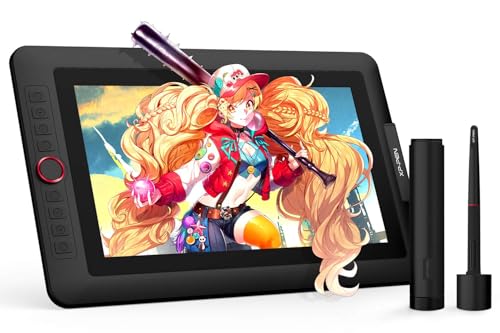
“XP-Pen's fully laminated 13.3-inch pen display with a Red Dial, 8 shortcut keys, an 88% NTSC gamut and a battery-free 16,384-level pen with 60-degree tilt.”
See Today’s Price →What we like
- Fully laminated 13.3-inch FHD screen with virtually no parallax
- 88% NTSC gamut (Adobe RGB 91% or more, sRGB 123% or more) and a 178-degree viewing angle
- Red Dial zooms, resizes brushes and flips the canvas; 8 customizable keys
- Battery-free pen with 16,384 pressure levels, 60° tilt and two buttons
- Pen case doubles as a stand and holder; 8 spare nibs included
Watch out for
- Not standalone: it must be connected to a computer
- Its listing gives no Delta E figure or calibration report
Read Full Analysis
The XPPen Artist 13.3 Pro V2 matches the Kamvas 13 (Gen 3) on screen size and pen pressure and answers with more physical controls. Its 13.3-inch FHD screen is fully laminated - glass and panel bonded together for virtually no parallax - and XP-Pen lists an 88% NTSC gamut, Adobe RGB 91% or more and sRGB 123% or more, with a 178-degree viewing angle. The Red Dial zooms, changes brush size and flips the canvas with one wheel, and the display has eight customizable shortcut keys. The battery-free pen reads 16,384 pressure levels with 60-degree tilt and a 220 RPS report rate, has two shortcut buttons, and comes with a pen case that doubles as a stand and holder, plus eight spare nibs. It must be connected to a computer through the included 3-in-1 cable, and XP-Pen lists Windows 7 or later, Mac OS X 10.10 or later, ChromeOS 88 or later and Linux. Its listing gives no Delta E figure or calibration report, which is where the Kamvas pulls ahead for color work.
Skip this if: You need a stated color accuracy or a calibration report
Frequently Asked Questions
Is Huion or XP-Pen better?
What is the difference between a pen tablet and a pen display?
Do Huion and XP-Pen tablets work with Android phones?
Which is better for left-handed artists?
Can I use these tablets for osu!?
How We Chose These Products
Paired model for model from each maker's listing: drawing area, pen pressure levels and tilt, shortcut keys, connection and system support, and for the pen displays, screen, colour figures and calibration.
We compare each product’s Amazon listing, the manufacturer’s published specifications and Amazon customer ratings, shown with their review counts as Amazon’s data, and rank the products on how well they answer this page’s question. We do not test products in hand and we do not run our own analysis of review text. A publication or expert is named only where we cite its published findings about that product. No manufacturer paid for placement on this page.
A price appears only when Amazon’s API supplied it at a recent daily refresh, with the date and time beside it, and is withdrawn at 4 AM Central on the day after it turns 24 hours old; otherwise use “Check price on Amazon” for the live price. Read our full methodology →