Best Soldering Irons for Beginners (2026)
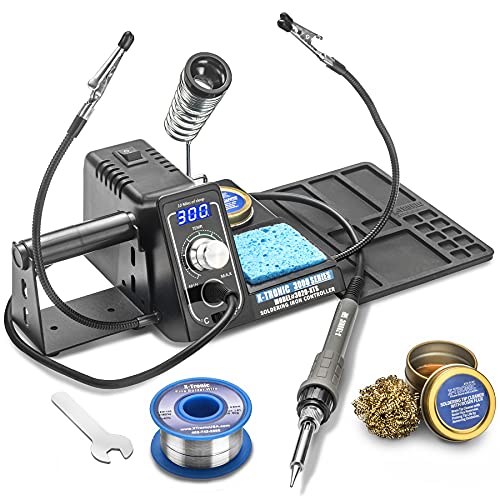
The X-Tronic 3020-XTS is our pick for a first iron: a 75W digital station with PID temperature control, in a kit that adds helping hands, solder and tip cleaners, where the PINE64 PINECIL ships with no power supply or stand. Choose the PINECIL if you want a slim iron that runs from a USB-C charger and reaches operating temperature in 12 seconds.
At a Glance
| # | Product | Award | Price |
|---|---|---|---|
| 1 | Our Top Pick | $54.75 as of Nov 24, 12:17 PM CT details Buy → |
|
| 2 | Best Portable USB-C Iron | $39.99 as of Nov 24, 7:43 PM CT details Buy → |
|
| 3 | Best Station with a Preset | $71.90 as of Nov 24, 12:31 PM CT details Buy → |
|
| 4 | Best 14-Piece Starter Kit | $13.56 as of Nov 24, 12:19 PM CT details Buy → |
|
| 5 | Best Kit in a Hard Case | $18.69 as of Nov 24, 12:24 PM CT details Buy → |
Soldering Irons for Beginners Buying Guide
 Photo by www.kaboompics.com / Pexels
A first soldering iron has to do two things well: hold a temperature you can set, and give you a safe place to put it down. The X-Tronic 3020-XTS leads this page because one box covers both: a digital station with its own iron holder, plus the helping hands, solder and tip cleaners a first project needs. The others are a slim USB-C iron, a plain digital station from Weller and two plug-in pen kits.
Adjustable temperature comes first
Too cool and solder will not flow; too hot and you lift the copper pads off a board. Every station and pen kit here lets you set the heat. X-Tronic says the 3020-XTS heats from 200 to 480 degrees C (392 to 896 degrees F) in under 30 seconds, shows the temperature on an LED readout and holds it with PID control. The Weller station has a display that reads in Fahrenheit or Celsius and stores a preset temperature. The ANBES pen adjusts from 200 to 450 degrees C and the YIHUA 947-III from 428 to 896 degrees F, though neither has a temperature display. The PINECIL's bullets give no temperature range, only that it reaches operating temperature in 12 seconds; its listing details give an upper temperature rating of 400 degrees C.
What comes in the box
A beginner needs more than the iron: a stand, solder and a way to clean the tip. The X-Tronic kit covers them: a spring-style holder, a 50g roll of lead-free solder, a brass sponge cleaner with flux and a wet sponge, plus two helping hands to hold a board. The ANBES kit packs 14 pieces into a bag, including a dual-spring stand with a sponge, five tips, a metal desoldering pump, tweezers, a wire stripper and solder wire. The YIHUA kit fits its iron, five tips, solder, a desoldering pump, a tip cleaner, a sponge and a holder into a hard case. The Weller station has an integrated safety rest, but its listing describes no solder, cleaner or spare tips. The PINECIL comes as the iron and one B2 tip, with no power supply, so it needs a charger, a holder and solder bought separately.
Station, pen or USB-C iron
A station keeps the controls in a base unit on the bench and the iron on a cord: the X-Tronic's iron cord is 40 inches long and its power cord 55 inches, and the Weller is a 70W, 120-volt station with a pencil-grip iron. A pen-style iron such as the ANBES or the YIHUA plugs straight into the wall and takes up almost no space; the YIHUA adds a power switch on the iron, so you can turn it off without unplugging it. The PINECIL is the portable one, about 6 inches long, powered from a USB-C charger that supports PD or QC 3.0 or from a DC5525 barrel supply.
Heat-up time and standby
Fast heating matters less than it sounds; standby matters more, because an iron left on wears its tip and is a burn waiting to happen. X-Tronic says the 3020-XTS climbs from 200 to 480 degrees C in under 30 seconds, and it sleeps after 10 minutes idle. Pine64 gives the PINECIL 12 seconds and an automatic standby when it is not in use. Weller quotes 15 seconds from 212 to 650 degrees F for the WLSKD7012A, which also has a standby mode. The ANBES listing mentions no sleep mode, so switch it off when you walk away. The YIHUA's red light at least tells you its state: lit while heating, blinking when ready, off as it cools.

Safety habits for a first project
Solder in a ventilated room and keep the smoke from the flux away from your face. Return the iron to its stand every time you let go of it, and never rest it on the bench. Wear eye protection when you clip component leads, and wash your hands after handling solder, especially leaded solder. Unplug or switch off the iron when you finish.

Which one to buy
Buy the X-Tronic 3020-XTS if you want to open one box and start. Choose the PINECIL if you already own a suitable USB-C charger and want an iron that travels. Choose the Weller WLSKD7012A if you want a digital station with a preset and will buy solder and a cleaner yourself. Choose the ANBES kit if you want to try soldering with the least to store, or the YIHUA 947-III if you want the kit in a hard case with a power switch on the iron.
How we picked: we compared each product's own listing - what it is, what comes in the box, the specifications its maker states and the warranty - and ranked them on how well they answer this page's question. We have not tested these products in hand.
Watch Before You Buy
“The X-Tronic 3020-XTS is a 75W digital soldering station with PID temperature control that comes with two helping hands, a roll of lead-free solder and tip cleaners.”
See Today’s Price →What we like
- 75W station with PID temperature control and a blue LED readout
- Two helping hands and a 50g roll of lead-free solder included
- Brass sponge tip cleaner with flux, plus a wet sponge
- ESD safe, 10-minute sleep timer and a °C/°F switch
Watch out for
- Only one brass-sponge flux tin comes in the box, though the main photo shows two
Read Full Analysis
The 3020-XTS earns the top spot because a beginner can open one box and start. The station is a 75W digital unit, 60 watts for the iron and 15 for the small control board inside it, with a blue LED readout, a Celsius and Fahrenheit switch and PID temperature control, and X-Tronic says it climbs from 200 to 480 degrees C (392 to 896 degrees F) in under 30 seconds. Around it the kit supplies what a first project needs: two helping hands to prop a small circuit board in front of the station, a 50g roll of lead-free solder on a side-mounted holder, a spring-style iron holder, a brass sponge tip cleaner with cleaning flux and a wet sponge. The station is ESD safe and sleeps after 10 minutes idle. The iron has a 40-inch cord and the station a 55-inch power cord. X-Tronic, a US brand based in Lincoln, Nebraska, backs it with a 3-year warranty, with terms, and lifetime support. One caution from the listing itself: the main photo shows the flux tin twice, but only one comes in the box.
Skip this if: You need to solder away from a bench and a wall outlet - the PINECIL runs from USB-C
“PINE64's PINECIL is a slim smart iron that runs from a USB-C charger or a DC barrel supply and reaches operating temperature in 12 seconds; no power supply is included.”
See Today’s Price →What we like
- Runs from USB-C (PD or QC 3.0) or a DC5525 barrel supply
- Reaches operating temperature in about 12 seconds, per Pine64
- On-demand rapid boost
- Auto standby when it is not in use
- Slim stainless-steel core in a polycarbonate shell, about 6 inches long
Watch out for
- No power supply or stand in the box
Read Full Analysis
The PINECIL is the opposite of a bench station: an iron about 6 inches long that travels in a laptop bag. Pine64 builds it around a stainless-steel core in a polycarbonate shell and gives it two power inputs, a USB-C port that accepts PD and QC 3.0 chargers and a DC5525 barrel jack. Its listing says it reaches operating temperature in 12 seconds, has an on-demand rapid boost, and switches to standby by itself when it is not in use. For a beginner the catch is the box, which holds the iron and a single B2 tip. The listing states plainly that no power supply is included, and it shows no stand or solder either, so add a suitable USB-C charger, a holder and solder before your first joint. If you would rather have all of that in one purchase, the X-Tronic 3020-XTS kit is the easier start.
Skip this if: You want a power supply and stand in the box - it ships with neither

“Weller's WLSKD7012A is a 70W digital soldering station that heats from 212 to 650 degrees F in about 15 seconds, with a preset temperature, standby and a built-in safety rest.”
See Today’s Price →What we like
- 70W digital station with a temperature display in Fahrenheit or Celsius
- Heats from 212 to 650 degrees F in about 15 seconds, per Weller
- Preset temperature and a standby mode
- Integrated safety rest for the iron
- Quick tip changes and a molded pencil grip
Watch out for
- Its listing describes no solder, tip cleaner or spare tips in the box
- A corded 120-volt station: it stays on the bench
Read Full Analysis
The WLSKD7012A is the plain digital station on this page: its listing describes the station, the iron and its safety rest, and nothing else in the box. It is a 70W, 120-volt unit that Weller says heats from 212 to 650 degrees F in 15 seconds. The display reads in Fahrenheit or Celsius, and you can store a preset temperature or put the station into standby when you pause. The iron has a molded pencil grip for comfort and control, sits in an integrated safety rest between joints, and takes quick tip changes when a tip wears or the job calls for another shape. Because the listing describes no solder, tip cleaner, spare tips or helping hands, plan to buy solder and a brass tip cleaner with it. If you want those in the same box, the X-Tronic 3020-XTS kit supplies them.
Skip this if: You want solder, tip cleaners and helping hands included - its listing describes none
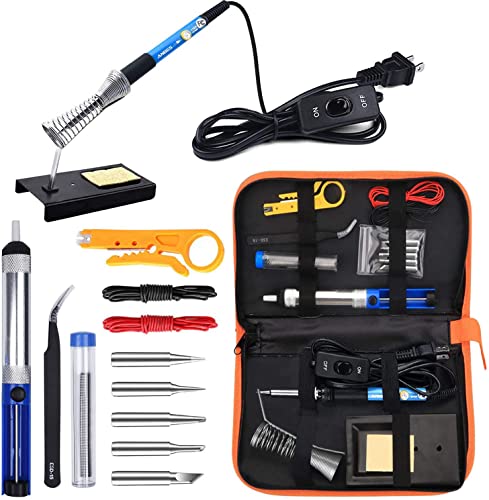
“The ANBES 14-in-1 kit is a 60W pen-style iron adjustable from 200 to 450 degrees C, with five tips, a metal desoldering pump, a stand, tweezers, a wire stripper and a storage bag.”
See Today’s Price →What we like
- Adjustable temperature from 200°C to 450°C
- Five interchangeable tips
- Metal desoldering pump, tweezers and a wire stripper in the kit
- Dual-spring stand with sponge and a storage bag
Watch out for
- Its listing quotes no temperature readout or stability figure
Read Full Analysis
The ANBES kit is the low-commitment way to find out whether you like soldering. It is a 60W pen-style iron that plugs straight into the wall and adjusts from 200 to 450 degrees C, with five interchangeable tips held by a heat- and impact-resistant screw thread. The rest of the 14 pieces cover the basics around it: a dual-spring stand with a sponge, a metal desoldering pump for clearing through-hole joints, tweezers, a wire stripper and cutter, a tube of solder wire, two lengths of electronic wire and a bag to carry it all. ANBES lists circuit boards, appliance, phone and computer repairs, stained glass and jewelry among the uses. Its listing mentions no temperature display, so you set the heat without a readout. If you keep at the hobby, a digital station such as the X-Tronic 3020-XTS is the step up.
Skip this if: You want a digital temperature readout - its listing mentions none

“YIHUA's 947-III kit is a 60W analog iron adjustable from 428 to 896 degrees F, with its own power switch and a status light, packed with five tips, solder and a desoldering pump in a hard case.”
See Today’s Price →What we like
- Adjustable from 428 to 896 degrees F with a knob
- Power switch on the iron and a light that shows heating, ready and cooling
- Five 900M-series tips, solder, a desoldering pump, tip cleaner and sponge
- Hard carrying case
- 12-month US warranty
Watch out for
- Analog iron: no temperature readout
- Made for 110-127V US outlets only
Read Full Analysis
The YIHUA 947-III is the kit to keep in a drawer or take to a repair. Everything packs into a hard carrying case: the analog iron, solder wire, five assorted tips, a desoldering pump, a tip cleaner, a cleaning sponge and an iron holder with a sticky base. The iron uses a ceramic heating element of up to 60 watts, takes 900M-series tips and adjusts from 428 to 896 degrees F with a knob. Two details help a beginner. A built-in power switch turns the iron off without unplugging it, and a red indicator light stays lit while the iron heats, blinks when it is ready to use and goes out as it cools. YIHUA describes the kit as suited to entry-level and hobby soldering or as a backup iron, and covers it with a 12-month US warranty. It runs on 110-127V with a US plug. As an analog iron set by a knob, it has no temperature display.
Skip this if: You want a digital temperature readout - this is an analog iron set by a knob
Frequently Asked Questions
What temperature should a beginner solder at?
Is a soldering station better than a pen-style iron for a beginner?
What do I need to buy with a PINECIL?
What solder should a beginner use?
Is soldering safe for beginners?
How We Chose These Products
We compared each iron's own listing: temperature range and control, heat-up time, what comes in the box, how it is powered and its sleep or standby features. We have not tested these irons in hand.
We compare each product’s Amazon listing, the manufacturer’s published specifications and Amazon customer ratings, shown with their review counts as Amazon’s data, and rank the products on how well they answer this page’s question. We do not test products in hand and we do not run our own analysis of review text. A publication or expert is named only where we cite its published findings about that product. No manufacturer paid for placement on this page.
A price appears only when Amazon’s API supplied it at a recent daily refresh, with the date and time beside it, and is withdrawn at 4 AM Central on the day after it turns 24 hours old; otherwise use “Check price on Amazon” for the live price. Read our full methodology →