Best Laser Printers 2026: Monochrome, Color & All-in-One

The HP LaserJet MFP M234dwe ($239) is the best laser printer for most home offices -- wireless printing, scanning, and copying at a competitive toner cost. For higher-volume office printing, the Brother HL-L2370DW ($180) prints faster and handles larger paper loads without the all-in-one overhead.
See Today’s Price →At a Glance

Laser Printers Buying Guide
 Photo by Andrey Matveev / Pexels
Quick Verdict: Our top pick is the HP LaserJet MFP M234dwe Wireless Monochrome All-in-One Laser Printer (Best Overall) — All-in-one wireless laser printer that covers printing, scanning, and copying for home office use.. Priced at $239.
Budget Pick: The Brother HL-L2370DW Compact Monochrome Laser Printer at $179.99 — A compact mono laser printer with a 40 PPM print speed -- built for volume output over all-in-one features..
Great for: Home office workers who print contracts, photos, or forms weekly, parents with school-age kids, and crafters
Not ideal if: You print fewer than 10 pages a month — public library printers or a FedEx visit is cheaper than ownership and ink costs
< Laser printers use heat and a charged drum to fuse toner powder onto paper -- a fundamentally different process from inkjet, with implications for cost and use cases. Toner cartridges are more expensive upfront ($20 - 60) than ink cartridges, but they yield far more pages (1,000 - 5,000+ pages per cartridge vs. 100 - 500 for ink). For households that print infrequently, laser is actually less economical -- toner does not dry out sitting unused, but the initial purchase and toner cost is higher than a basic inkjet. For offices or households that print regularly (100+ pages per month), laser is cheaper per page and faster. Monochrome laser printers (black and white only) are significantly more affordable than color laser, and suited for document printing (forms, contracts, school papers). If you need occasional color printing, a low-cost inkjet kept alongside a laser printer is often more practical than a color laser. All-in-one (MFP) laser printers add scanning and copying -- useful for digitizing documents. Look for automatic document feeders (ADF) on the scanner if you regularly scan multi-page documents. Print speed (pages per minute, or PPM) matters for volume printing: the difference between 24 PPM and 40 PPM is noticeable when printing a 100-page report.Helpful Guides
How we picked these. We compared 3 office machines across print speed and quality, paper capacity, ease of setup, duty cycle, and total cost of ownership, cross-referencing picks from Wirecutter, PCMag, and verified small office user reviews.
- Complete Home Office Setup Guide 2026 — Where printers fit in a complete home office build
Related Guides:

- How to Build a Home Office That Actually Works — desk, chair, monitor, lighting, and peripherals in priority order
- How to Choose a Standing Desk — electric vs manual, frame quality, and how to transition safely
Related Guides:
- Work-From-Home Productivity Setup — 5 upgrades in order of impact — skip the rest
- Monitor Setup Guide — single vs dual vs ultrawide — which layout works for you
For a detailed head-to-head, see our Brother Vs Canon Laser Printer comparison.
For a detailed head-to-head, see our Brother Vs Hp Printer comparison.
For a detailed head-to-head, see our Canon Vs Epson Printer comparison.

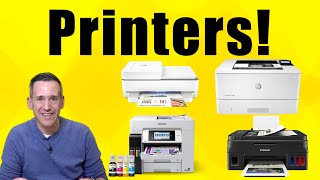
Watch Before You Buy
Our Picks
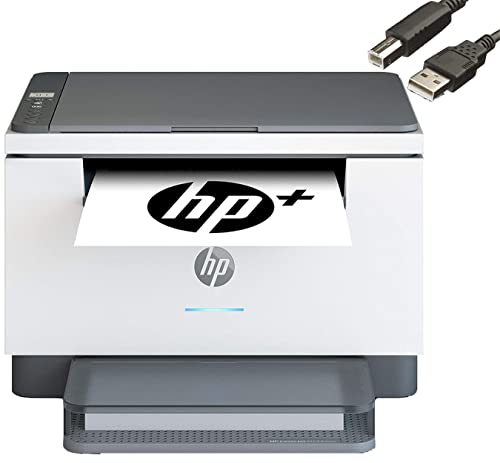
HP LaserJet MFP M234dwe Wireless Monochrome All-in-One Laser Printer (Best Overall) — $239 See Price →
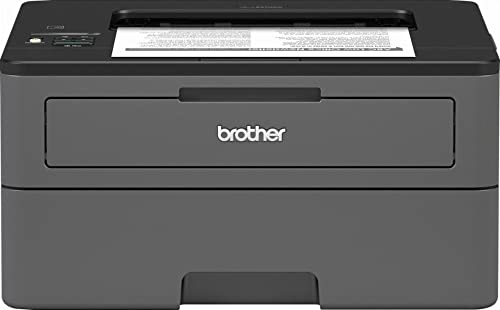
Brother HL-L2370DW Compact Monochrome Laser Printer (Best Print Speed) — $179 See Price →
Brother MFC-L2750DW Monochrome All-in-One Wireless Laser Printer (Best Pro) — $640 See Price →
Showing 3 of 3 products
HP LaserJet MFP M234dwe Wireless Monochrome All-in-One Laser Printer
“The HP LaserJet M234dwe is the best laser all-in-one for home offices — it adds scan and copy to the laser printer formula, prints at 30 ppm, and supports automatic duplex printing. The 6 months of In”
See Today’s Price →What we like
- Monochrome laser with scan + copy
- 30 ppm print speed
- Automatic duplex printing
- 6 months Instant Toner included
- ADF for multi-page scanning
Watch out for
- Monochrome only — no color printing
- Higher upfront cost than inkjet all-in-ones
- Smaller paper tray than office-grade printers
Read Full Analysis
The HP LaserJet MFP M234dwe ($169) is a compact all-in-one monochrome laser printer designed for home office users who need more than just printing. The integrated flatbed scanner handles single-page document scanning and ID card copies. The automatic document feeder (ADF) feeds up to 35 pages hands-free for scanning multi-page documents. Wireless setup via the HP Smart app takes about 5 minutes on a standard home network. Print speed is rated up to 30 pages per minute -- fast enough that you will not wait impatiently for a 20-page document. The monthly duty cycle handles home office volumes comfortably. The HP+ compatible design lets you optionally enroll in Instant Ink, but it works fully without a subscription using standard toner. At $169, it sits at the entry point for all-in-one laser performance. The limitation versus pure-print laser models is footprint: the scanner mechanism makes it larger and heavier than print-only alternatives. If you never scan, the Brother HL-L2370DW is a tighter package at $180 with higher print speed.
Brother HL-L2370DW Compact Monochrome Laser Printer
“The Brother HL-L2370DW is the best monochrome laser printer for home offices — fast, wireless, duplex-printing, and with per-page costs far below any inkjet. At 36 ppm, it prints a full 20-page docume”
See Today’s Price →What we like
- 36 ppm print speed — much faster than inkjet
- Automatic duplex (two-sided) printing
- Toner doesn't dry out during storage
- Very low per-page toner cost
- Wireless and mobile printing compatible
Watch out for
- Monochrome only — no color printing
- No scan or copy functions (printer only)
- Toner cartridge replacement costs more upfront than ink
Read Full Analysis
The Brother HL-L2370DW ($180) is a print-only monochrome laser printer that prioritizes speed and paper handling over all-in-one features. At 36 pages per minute, it is one of the faster compact laser printers at this price. The automatic duplex (two-sided) printing is standard -- a feature some HP competitors charge more for. The 250-sheet paper tray handles a full ream without reloading. Brother's toner cartridges have a strong reputation for yield: standard cartridges run 1,200 pages and high-yield options reach 3,000+ pages at lower per-page cost than many HP toner alternatives. Wireless and USB connectivity both work, and the Brother iPrint&Scan app covers mobile printing without complications. The honest limitation is that this is print-only: there is no scanner, no copier, and no all-in-one capability. If you need to scan documents, you will need a separate scanner. For an office that only needs to print -- contracts, invoices, school papers -- and values speed and toner economy over feature breadth, this is a strong choice at the price.
Brother MFC-L2750DW Monochrome All-in-One Wireless Laser Printer
“The Brother MFC-L2750DW is the best all-in-one laser printer for home offices that need scanning alongside printing. The 50-sheet ADF handles multi-page document scanning without page-by-page flatbed ”
See Today’s Price →What we like
- Flatbed scanner + 50-sheet ADF enables document digitization without a separate scanner device
- 36 ppm print speed — faster than the HL-L2350DW despite all-in-one form factor
- Duplex scanning in the ADF allows two-sided document scanning in one pass
- 2.7 inch color touchscreen for intuitive direct-device control without a connected computer
- NFC tap-to-print for compatible Android smartphones
Watch out for
- At $279.99, $110 more than the single-function HL-L2350DW for the additional functions
- Larger physical footprint than the single-function model
- Fax functionality requires a phone line — rarely used by most home offices
Read Full Analysis
The Brother MFC-L2750DW ($640) is the professional-tier option on this list -- designed for offices or power users who print 500+ pages per month and need the reliability and speed to match. It is a full all-in-one: print, scan, copy, and fax (the fax capability is primarily for businesses with legacy requirements). The 60-sheet automatic document feeder handles multi-page scan jobs efficiently, and print speed reaches 36 PPM. The monthly duty cycle is rated significantly higher than the home office alternatives, meaning it can handle sustained high-volume print jobs without performance degradation. The 50-sheet bypass tray allows specialized paper types without clearing the main tray. At $640, this is a substantial investment that only makes financial sense for volume users -- the per-page toner cost at high yield is favorable, but the hardware cost payback requires meaningful monthly volume. For occasional home printing, the HP or entry-level Brother are the right tools.
Frequently Asked Questions
How long does laser toner last?
Can laser printers print photos?
What is the running cost of these printers?
Does the HP LaserJet M234dwe require an HP+ subscription?
How does Brother compare to HP for laser printers?
How We Analyze Products
We analyze Amazon review data — often thousands of reviews per product — to surface patterns that individual buyers miss. Our process aggregates star ratings, review counts, and buyer sentiment at scale, identifying which strengths and weaknesses appear consistently across the largest review samples available. The 9,733+ reviews analyzed on this page represent real verified-purchase feedback from Amazon buyers.
Each product earned its placement through data: total review volume, average rating, and the specific praise and complaints that repeat most often across buyers. No manufacturer paid for placement on this page. Products appear here because buyers endorsed them at scale, not because a company asked us to feature them.
We use AI to summarize review sentiment — not to fabricate opinions, but to condense what thousands of buyers actually wrote into a readable format. The pros and cons you see reflect the most common themes found in verified purchaser reviews, paraphrased for clarity. We do not claim to have accessed Reddit, YouTube, or specific publications in generating these summaries.
Prices shown reflect Amazon pricing at the time this page was last generated. Click “See Today’s Price” to get the current live price on Amazon. Read our full methodology →