Best Drawing Tablets for Beginners (2026)

The Wacom Intuos Pro Medium is our pick for a beginner who means to keep drawing: its Pro Pen 3 has 8,192 pressure levels and tilt with a choice of grips, and the tablet adds 10 ExpressKeys, 2 dials and a Bluetooth connection. Choose the HUION Inspiroy 2 Medium if you are just trying digital drawing: a 9 x 5-inch pad with a scroll wheel, 8 keys and a battery-free tilt stylus.
At a Glance
| # | Product | Award | Price | Connectivity | Pressure Levels | Target Audience |
|---|---|---|---|---|---|---|
| 1 | Our Top Pick | $299.95 as of Nov 25, 10:41 AM CT details Buy → |
USB-C or Bluetooth | 8,192 | Animator, Artist, Designer | |
| 2 | Best with a Scroll Wheel | $60.79 as of Nov 24, 1:48 PM CT details Buy → |
— | — | — | |
| 3 | Best for Left- and Right-Handed Use | $41.75 as of Nov 25, 10:41 AM CT details Buy → |
— | — | — | |
| 4 | Best Starter Accessory Kit | $42.49 as of Nov 24, 1:48 PM CT details Buy → |
— | — | — |
Drawing Tablets for Beginners Buying Guide
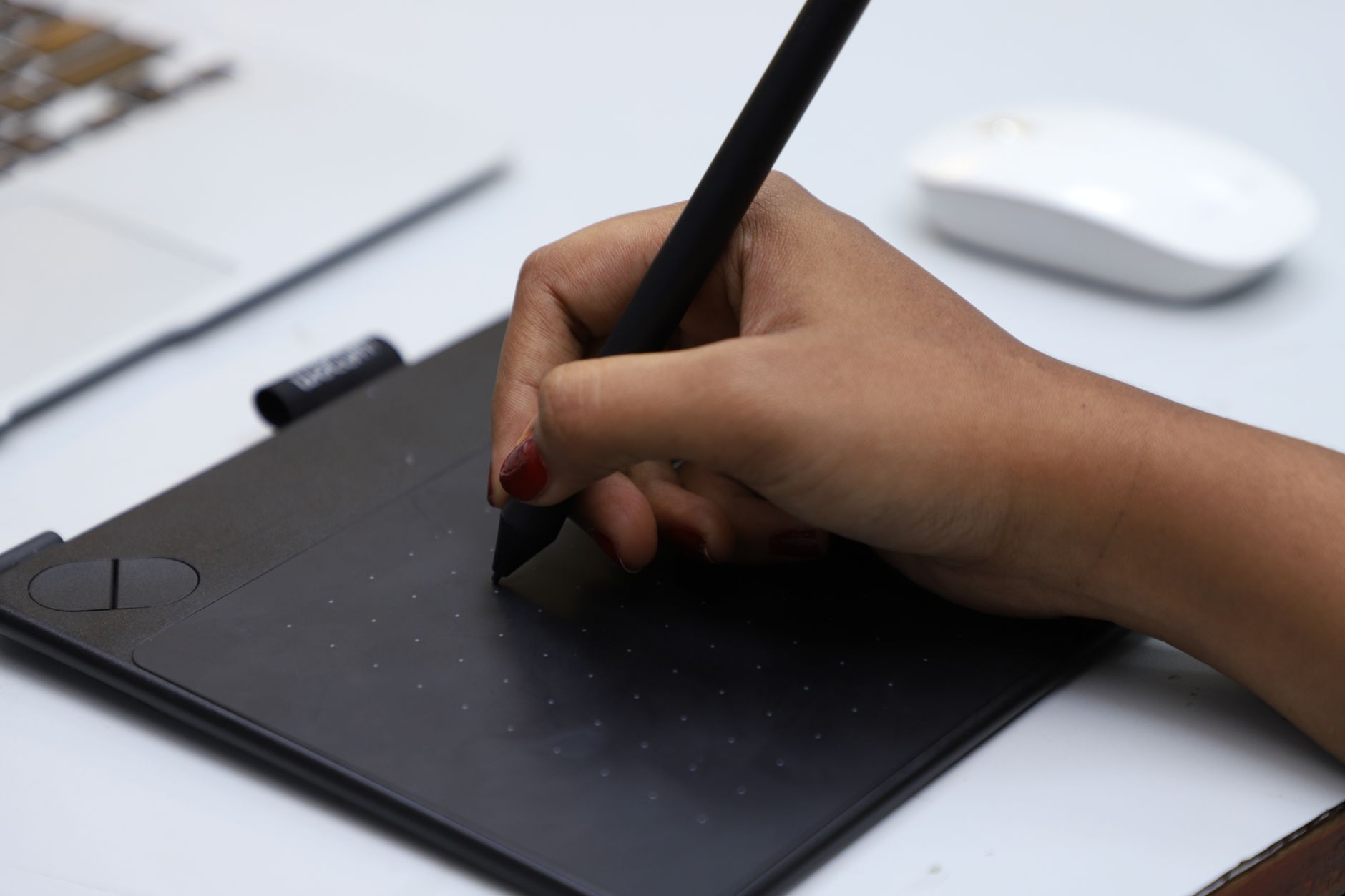 Photo by VARAN NM / Pexels
A first drawing tablet should make practice easy. The big choice is between a screenless pen tablet, which you draw on while watching your monitor, and a pen display, which you draw on directly. The picks here are all screenless tablets. The Wacom Intuos Pro Medium leads for a beginner who means to keep going; the others suit a first try.
Screenless tablet or pen display
A screenless tablet is a pad: your hand moves on the desk and the line appears on your monitor, which takes some getting used to for anyone coming from paper. A pen display puts the line under the pen. The screenless tablets here connect by cable, and the Intuos Pro also over Bluetooth.
Pressure, tilt and the pen
The HUION, XPPen and UGEE pens are listed as battery-free, so they never stop for a charge. Makers list pressure differently: Wacom gives the Intuos Pro's Pro Pen 3 8,192 levels, XPPen gives the Deco 01 V3's stylus 16,384 and UGEE gives the M708's pen 16K, while HUION's listing gives no count. A pressure figure is a maker's number, not a measure of feel. Tilt helps with shading, and the Intuos Pro, HUION (60 degrees), XPPen (up to 60 degrees) and UGEE pens all list it. The Intuos Pro's pen also takes a slim, straight or flared grip and lets you adjust its balance and buttons.
Drawing area
A larger area lets you draw with your arm rather than your wrist, but it needs desk space. The XPPen Deco 01 V3 gives 10 x 6.25 inches, the UGEE M708 10 x 6 and the HUION Inspiroy 2 Medium 9 x 5. Wacom gives the Intuos Pro Medium a footprint of 11.4 x 8.1 inches in a 16:9 format for wide and multiple monitors.
Shortcut keys and connections
Shortcut keys keep your other hand off the keyboard. The Intuos Pro has 10 ExpressKeys and 2 mechanical dials, the HUION a scroll wheel and 8 press keys, the XPPen 8 shortcut keys for either hand and the UGEE 8 hot keys. For Android, the HUION works with Android 6.0 or later on devices that support OTG, and the XPPen with Android 10 or later through the XPPen Tools app. The UGEE needs its driver from UGEE's website before the pen responds.
Who should buy what
If you expect to keep drawing, the Wacom Intuos Pro Medium, which Wacom sells as a professional pen tablet, gives you the Pro Pen 3, ExpressKeys, dials and Bluetooth to grow into. For a large, light first pad, the XPPen Deco 01 V3; for a scroll wheel, the HUION Inspiroy 2 Medium; for a 10 x 6-inch pad with spare nibs, gloves and a cleaning kit in the box, the UGEE M708.
How we picked: we compared each product's own listing - what it is, what comes in the box, the specifications its maker states and the warranty - and ranked them on how well they answer this page's question. We have not tested these products in hand.
Watch Before You Buy
“Wacom Intuos Pro Medium - a screenless professional tablet with the Pro Pen 3 (8,192 pressure levels, tilt, three grip shapes), 10 ExpressKeys, 2 dials and USB or Bluetooth.”
See Today’s Price →What we like
- Pro Pen 3: 8,192 pressure levels, tilt and lag-free tracking
- Choice of slim, straight or flared pen grip, with adjustable balance and buttons
- 10 customizable ExpressKeys and 2 mechanical dials
- 16:9 format suits wide and multiple monitors
- USB or Bluetooth to multiple computers; 4 mm thin magnesium body
Watch out for
- Screenless: you draw on the tablet while watching your monitor, which takes practice
Read Full Analysis
Wacom's Intuos Pro Medium is the professional screenless tablet on this page, and the one to buy if you already expect to keep drawing. Its Pro Pen 3 has 8,192 pressure levels, tilt support and what Wacom calls lag-free tracking, and you can fit a slim, straight or flared grip and adjust the pen's balance and button layout to your hand. On the tablet, 10 customizable ExpressKeys and 2 mechanical dials sit along the top edge, close to the keyboard, so shortcuts stay under your other hand. The 16:9 format suits wide and multiple monitors, and Wacom gives the medium size a footprint of 11.4 x 8.1 inches (291 x 206 mm), 4 mm at its thinnest, in a magnesium body. It connects over USB or wirelessly over Bluetooth and switches between computers. It is screenless, so you draw on the tablet while watching your monitor, which takes practice for anyone coming from paper. Choose it for a pen and a set of controls you can grow into; choose the HUION Inspiroy 2 Medium if you want a wired first pad with a scroll wheel that also works with Android phones.
Skip this if: You are only trying out digital drawing and want a simple wired pad

“HUION Inspiroy 2 Medium - a 9 x 5-inch screenless tablet with a scroll wheel, 8 programmable keys and a battery-free PenTech 3.0 stylus with 60-degree tilt.”
See Today’s Price →What we like
- Scroll wheel and 8 programmable press keys, set per app
- Battery-free PW110 stylus with 60-degree tilt and a soft silicone grip
- 9 x 5-inch drawing area
- Works with Windows, macOS, Linux, ChromeOS and Android phones that support OTG
Watch out for
- Its listing gives no pressure level count
- Wired only: it must stay connected by its cable
Read Full Analysis
HUION's Inspiroy 2 Medium is the screenless pad with a scroll wheel: the wheel and 8 press keys can each be set to your own shortcuts, with different settings for different apps. Its 9 x 5-inch drawing area pairs with the PW110 battery-free stylus, which HUION redesigned with a slimmer body, a soft silicone grip and side buttons, and which supports 60 degrees of tilt on its PenTech 3.0 technology. It works with Windows 7 or later, macOS 10.12 or later, Linux (Ubuntu 20.04 LTS), ChromeOS 88 or later and Android 6.0 or later on phones and tablets that support OTG. It has no battery of its own and must stay connected by its cable, and its listing's title and bullets do not give a pressure level count. Choose it if you want a scroll wheel beside your shortcut keys; choose the XPPen Deco 01 V3 for a larger 10 x 6.25-inch area.
Skip this if: You want a drawing area bigger than 9 x 5 inches

“XPPen Deco 01 V3 - a 10 x 6.25-inch screenless tablet with a battery-free 16,384-level stylus, 60-degree tilt, 8 shortcut keys and USB-C, 8 mm thin.”
See Today’s Price →What we like
- Battery-free stylus with 16,384 pressure levels and 60° tilt
- 10 x 6.25-inch drawing area
- 8 customizable shortcut keys for either hand
- USB-C with adapters; works with Android 10 and later
- 8 mm thin and easy to carry
Watch out for
- Wired: it connects by cable
- Screenless: you watch the monitor while you draw
Read Full Analysis
XPPen's Deco 01 V3 gives a first tablet a large working area: 10 x 6.25 inches, in a pad 8 mm thin that fits in a backpack. The battery-free stylus has 16,384 pressure levels and up to 60 degrees of tilt, and 8 customizable shortcut keys work for right- or left-handed use. It connects USB-C to USB-C, with adapters in the box, and works with Windows 7 or later, macOS 10.13 or later, ChromeOS 88 or later, Linux and Android 10 or later through the XPPen Tools app; the ends of the drawing area light up so you can see it in the dark. The box also holds 10 spare nibs, a stylus stand, a glove and a protective film. Choose it for a large drawing area in a light, wired pad; choose the HUION Inspiroy 2 Medium if you want a scroll wheel.
Skip this if: You want a wireless tablet

“UGEE M708 - a 10 x 6-inch screenless tablet with a battery-free tilt pen rated at 16K pressure levels, 8 hot keys and a 12-month warranty.”
See Today’s Price →What we like
- 10 x 6-inch drawing space
- Battery-free tilt pen rated at 16K pressure levels
- 8 hot keys
- Pen stand, 8 spare nibs, gloves and a cleaning brush and cloth in the box
- 12-month warranty and 24/7 support
Watch out for
- The pen needs UGEE's driver, downloaded from its website, before it responds
Read Full Analysis
UGEE's M708 is a classic large pad: a 10 x 6-inch drawing space with 8 hot keys, and a battery-free pen that supports tilt and 16K levels of pressure sensitivity. You install UGEE's driver from its official website before the pen responds, and it works with Photoshop, Illustrator, SAI, GIMP and other creative software; its title lists Windows, iOS and Android. The box includes a pen stand, 8 spare nibs and a nib replacement ring, a two-finger glove and normal gloves, a cleaning brush and a cleaning cloth, and UGEE offers 24/7 support and a 12-month warranty. Choose it for a large area and a full accessory kit; choose the XPPen Deco 01 V3 for a 10 x 6.25-inch area in a pad 8 mm thin.
Skip this if: You would rather not install a driver before you start
Frequently Asked Questions
Do beginners really need a screen display tablet?
Is Wacom worth the premium for a beginner?
What pressure sensitivity do beginners actually need?
Is HUION as good as Wacom for beginners?
What software comes with drawing tablets?
How We Chose These Products
We compare each product’s Amazon listing, the manufacturer’s published specifications and Amazon customer ratings, shown with their review counts as Amazon’s data, and rank the products on how well they answer this page’s question. We do not test products in hand and we do not run our own analysis of review text. A publication or expert is named only where we cite its published findings about that product. No manufacturer paid for placement on this page.
A price appears only when Amazon’s API supplied it at a recent daily refresh, with the date and time beside it, and is withdrawn at 4 AM Central on the day after it turns 24 hours old; otherwise use “Check price on Amazon” for the live price. Read our full methodology →