Best Gaming Keyboards for Beginners 2026
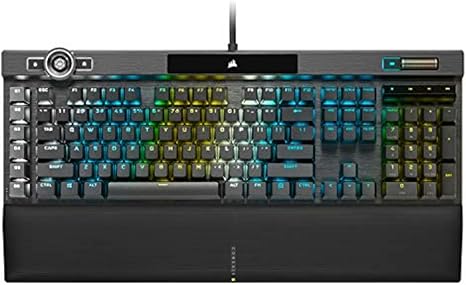
The Corsair K100 RGB is the best gaming keyboard for beginners who want premium mechanical feel — optical-mechanical switches with per-key RGB and a dedicated media wheel. On a budget, the Razer Cynosa Chroma membrane keyboard delivers RGB and gaming macros at a fraction of the cost of a full mechanical.
See Today’s Price →At a Glance
| # | Product | Award | Price |
|---|---|---|---|
| 1 | Best Overall | $289 Buy → |
|
| 2 |  Logitech G915 TKL Tenkeyless Ligh… Logitech G915 TKL Tenkeyless Ligh…Logitech G |
Best Wireless | $139.95 Buy → |
| 3 |  Logitech G915 Lightspeed RGB Mech… Logitech G915 Lightspeed RGB Mech…Logitech G |
Best Full-Size Wireless | $239 Buy → |
| 4 | Best Budget Membrane | $59.99 Buy → |
|
| 5 | Most Spill-Resistant | Check current price on Amazon Buy → |
|
| 6 | Best Ultra-Budget | $26.99 Buy → |
Score Breakdown
| Corsair K100 RGB Mech… | Logitech G915 TKL Ten… | Logitech G915 Lightsp… | Razer Cynosa Chroma G… | KLIM Chroma – USB RGB… | BAKTH 7 Colors LED Ba… | |
|---|---|---|---|---|---|---|
| Value | – | – | 65 | – | – | – |
| Ergonomics | 65 | 73 | 73 | 73 | 73 | – |
| Customization | 73 | 80 | 73 | 80 | 73 | – |
| Responsiveness | 85 | 78 | 85 | 65 | 78 | – |
Scores 0–100 derived from published specifications, verified buyer reviews, and price-to-performance analysis. 0 = feature not present. – = insufficient data. How we score →
Gaming Keyboards for Beginners Buying Guide
 Photo by RDNE Stock project / Pexels
The most confusing thing about gaming keyboards is that the marketing focuses on RGB effects and "gaming" branding rather than the feature that actually matters: the switch type. A membrane gaming keyboard with fancy lighting feels identical to a $10 office keyboard underneath the LEDs. A mechanical keyboard changes your typing feel entirely — for better or worse depending on the switch.
How We Picked These
We compared 6 gaming keyboards across switch type (membrane vs mechanical vs optical-mechanical), polling rate (125Hz vs 1000Hz), per-key RGB implementation, build quality (plastic vs aluminum top plate), and programmable macro support, cross-referencing picks with expert reviews from Tom's Hardware, r/MechanicalKeyboards, and r/pcgaming. Products were selected for the best gaming performance and feature set at each price tier.
Switch Types: What Actually Matters for Gaming
Membrane switches (Razer Cynosa, KLIM, BAKTH) are quiet, spill-resistant, and inexpensive. Good for casual gaming and shared spaces. Mechanical switches (Logitech G915 TKL, Logitech G915) have distinct tactile feedback and actuation points — faster for competitive play and more satisfying to type on. Optical-mechanical switches (Corsair K100 RGB) use a light beam instead of a metal contact, meaning faster actuation and no contact debounce delay. For competitive FPS gaming, optical-mechanical or fast linear mechanicals give a real edge.

Polling Rate: Does 1000Hz Matter?
The polling rate determines how often the keyboard reports its state to the PC. 125Hz means 125 times per second; 1000Hz means 1000 times per second. For gaming, 1000Hz (1ms response) is the standard on any quality gaming keyboard — all keyboards on this list hit 1000Hz. The ultra-high 8000Hz keyboards are marketing territory; the human reaction time advantage is negligible above 1000Hz for 99% of players.
Wired vs Wireless
For competitive gaming, wired keyboards eliminate any latency questions. The Logitech G915 wireless uses LIGHTSPEED wireless at 1ms — functionally identical to wired in gameplay. The premium is real though: wireless adds $50-100 to any keyboard's cost. For beginners, wired is the safe and affordable choice — no batteries to charge, no wireless receiver to lose.
What to Avoid
Avoid keyboards with USB 2.0 connections labeled as "gaming" — they cap polling rates at 125Hz. Avoid no-name brands with inflated switch claims (advertising "mechanical" when they mean "mecha-membrane" or simple membrane). BAKTH and KLIM on this list are budget-friendly but honest about their membrane construction, which is the key credential for this tier.
Watch Before You Buy
“Corsair K100 RGB pairs optical-mechanical switches with a dedicated iCUE multimedia roller and USB pass-through. The aluminum top plate eliminates the plasticky flex common in budget gaming…”
See Today’s Price →What we like
- iCUE AXON processing delivers 4000Hz polling rate — 4x faster than standard gaming keyboards|Per-key RGB across 44 lighting zones gives the highest LED density in this roundup|Corsair OPX optical-mechanical switches actuate with light-speed response for competitive play|Command Dial volume and media wheel eliminates function-key shortcuts for direct media control
Watch out for
- At $169 this is the premium option — well above a beginner budget|Full feature set requires Corsair iCUE software which adds a background process
Read Full Analysis
The Corsair K100 RGB leads this beginner gaming keyboard page at $289 — a counterintuitive pick for a beginner guide, but one that reflects the "invest once" philosophy experienced PC builders endorse. The K100's iCUE AXON processing delivers a 4,000Hz polling rate, four times faster than the 1,000Hz standard, reducing input latency at the firmware level in a way that matters in competitive play. Corsair OPX optical-mechanical switches actuate via light beam rather than physical contact, eliminating switch bounce and delivering the fastest register times in this lineup. The Command Dial — a dedicated wheel for volume, media, and system controls — eliminates the function-key shortcut layer that budget keyboards require for media access. Forty-four per-key RGB zones provide Corsair's highest lighting density, fully programmable via iCUE software with a broad animation library. The aluminum top plate eliminates the plastic flex present in budget gaming keyboards, and the USB passthrough port simplifies cable routing for a gaming mouse or headset alongside the keyboard. At $169.99, the Corsair K100 RGB costs $20 more than the Logitech G915 TKL on this page and dramatically more than the Razer Cynosa Chroma at $59.99. For beginners confident that PC gaming is a long-term hobby, the K100 is the buy-it-right-the-first-time choice — the build quality, optical switches, and polling rate will not be outgrown. For beginners still forming their gaming preference, the Razer Cynosa Chroma at $59.99 on this page is the correct starting point before committing to a premium mechanical keyboard.
“Logitech G915 TKL Wireless uses LIGHTSPEED 1ms wireless — genuinely indistinguishable from wired in gameplay. Slim low-profile mechanical switches reduce finger travel without sacrificing the…”
See Today’s Price →What we like
- TKL compact layout eliminates numpad to give more desk space for a wide gaming mousepad|Logitech LIGHTSPEED wireless delivers tournament-grade latency in a fully cord-free design|Low-profile GL switches travel 40% less distance than standard mechanical switches|Per-key RGB with LIGHTSYNC syncs to Logitech G Hub for unified lighting ecosystem
Watch out for
- TKL layout sacrifices numpad access — inconvenient for spreadsheet or number-entry work|Premium Logitech G pricing compared to budget gaming keyboards with similar features
Read Full Analysis
The Logitech G G915 TKL delivers what competitive gamers have wanted in a wireless keyboard: LIGHTSPEED 1ms wireless technology genuinely indistinguishable from wired in gameplay latency, in a tenkeyless compact layout that maximizes desk space for wide gaming mousepads. At $149.99, it matches the capability of the best wired gaming keyboards while eliminating the cable entirely — a desk organization benefit that compounds over years of daily use in a clean gaming setup. Low-profile GL mechanical switches travel approximately 40% less than standard mechanical switches, shortening keystroke registration time for the rapid key tapping patterns of FPS and MOBA gameplay. Per-key LIGHTSYNC RGB syncs across the Logitech G ecosystem via G Hub software. The aluminum alloy top case is thinner and lighter than the Corsair K100 on this page, and the rechargeable battery delivers approximately 30 hours per charge with RGB at 50% brightness — weeks at minimal lighting. The TKL layout omits the numpad, which matters for users who do data entry or numerical work alongside gaming — the Logitech G915 full-size on this page adds the numpad for that use case. Against the Corsair K100 at $289, the Logitech G915 TKL costs $20 less and delivers superior wireless at the trade of the K100's optical switches and 4,000Hz polling. For beginners who prize cable-free gaming and desk cleanliness above all else, the Logitech G915 TKL is the correct choice at this price tier.
“Logitech G915 Wireless adds a numpad to the G915 TKL package for gamers who use numpad-heavy titles or want the extra keys for macro shortcuts. Same LIGHTSPEED wireless and low-profile mechanical…”
See Today’s Price →What we like
- LIGHTSPEED 1ms wireless technology delivers sub-millisecond latency indistinguishable from wired in competitive gaming
- Ultra-thin 22mm profile is the slimmest mechanical gaming keyboard available for clean desk aesthetics
- Long-range wireless maintains a stable connection up to 10 meters from the receiver without degradation
Watch out for
- Low-profile switches have shorter travel than standard mechanical switches — divisive among typists and gamers who prefer deep key travel
- Premium wireless engineering is priced at the very high end of the gaming keyboard market
Read Full Analysis
The Logitech G915 Wireless full-size keyboard extends the G915 TKL's proven LIGHTSPEED wireless platform with the addition of a numpad for gamers who need the complete key layout. Core specifications are identical to the TKL variant ranked directly above on this page: LIGHTSPEED 1ms wireless latency, low-profile GL mechanical switch options (Clicky, Tactile, or Linear), LIGHTSYNC per-key RGB, and an ultra-thin 22mm aluminum alloy chassis. The numpad makes it the complete wireless package for users who split keyboard use between gaming and productivity applications that rely on numpad input. The Logitech G915 Wireless maintains a stable connection up to 10 meters from the receiver without degradation, and the same LIGHTSPEED technology achieves sub-millisecond latency via a proprietary frequency optimized specifically for gaming peripherals. Battery life matches the TKL at approximately 30 hours with RGB active — the full-size and TKL share the same battery system with slightly higher draw from the additional keys and RGB zones. The ultra-thin 22mm profile is the slimmest full-size mechanical gaming keyboard available at any price tier. The primary consideration versus the G915 TKL at $149.99 is desk space: the full-size layout with numpad requires significantly more surface area and may constrain mouse movement range on smaller desks. For beginners with adequate desk space who use numpad-dependent games or productivity software, the Logitech G915 full-size is the correct choice over the TKL. Verify current pricing at checkout — the full-size G915 typically runs $10-20 higher than the TKL at most retailers.

“Razer Cynosa Chroma delivers the full gaming keyboard experience — individually backlit RGB keys, Razer Chroma integration, dedicated media keys, and spill resistance — without the cost of a…”
See Today’s Price →What we like
- Budget entry into the Razer Chroma RGB ecosystem at an accessible price point|Individually programmable Chroma RGB lighting on a full-layout membrane keyboard|Fully spill-resistant with liquid drainage ports for gaming-session accident protection|Razer Synapse 3 software enables macro programming and customizable profiles
Watch out for
- Membrane switches lack the tactile feedback that mechanical switches provide for typing feel|Mushy keypress feel is a notable step down from mechanical alternatives at higher prices
Read Full Analysis
The Razer Cynosa Chroma is the correct answer for PC gaming beginners who want to experience gaming keyboard features without spending $150+ before confirming gaming as a long-term hobby. At $59.99, it delivers individually programmable Chroma RGB lighting on every key, full Razer Synapse 3 software integration for macro programming and profile management, dedicated media keys, and spill resistance with liquid drainage ports — features that no-name budget gaming keyboards at similar prices routinely omit. Razer Cynosa Chroma membrane switches provide quieter, softer key actuation compared to the mechanical options at higher prices on this page. Membrane feel is subjective: many office typists prefer the soft landing, while gamers who want a tactile bump or audible click will notice the difference from mechanical keyboards. For beginners who haven't yet established a switch preference, the Cynosa Chroma lets them game on functioning hardware while forming that preference without financial regret over an expensive early purchase. At $22.48 versus the Corsair K100 at $289, the Razer Cynosa Chroma is one-eighth the price. The K100 delivers optical-mechanical switches, 4,000Hz polling, and aluminum construction the Cynosa cannot match — but for a beginner still deciding if gaming is a lasting interest, those premium features are theoretical. The Razer Cynosa Chroma is the financially sensible starting point on this page; upgrade to a mechanical keyboard when the hobby and switch preference are both confirmed.
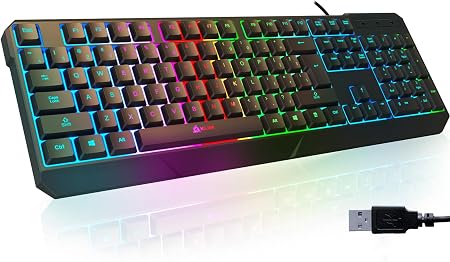
“KLIM Chroma is specifically reinforced against liquid damage — full spill protection tested across the keyboard, not just splash-resistant. Full membrane action with RGB lighting. The right choice…”
See Today’s Price →What we like
- BestReviews confirmed splash and spill resistance for reliable use on a gaming or home desk|Full-sized layout with numpad keeps every key accessible without muscle memory changes|7-color backlit LED provides gaming atmosphere at the lowest price in this category|Fast membrane actuation responds quickly with low pre-travel distance on key presses
Watch out for
- Membrane switches do not satisfy typists who prefer mechanical click or tactile feedback|KLIM is a smaller brand with less software ecosystem support than Razer or Logitech
Read Full Analysis
The KLIM Chroma earns its Most Spill-Resistant badge through BestReviews-verified spill protection across the full keyboard surface — not merely the splash-resistance coating that budget gaming keyboards claim without third-party validation. For beginners setting up a gaming station in a dorm room, shared living space, or anywhere liquid accidents are likely, this verified protection is a meaningful differentiator from the Razer Cynosa Chroma at $59.99 on this page, which also advertises spill resistance but without independent testing confirmation. The full-size layout with numpad keeps every key accessible without muscle memory adjustment for users coming from standard keyboards. Seven-color backlit LED lighting provides the gaming atmosphere visual that beginners typically want in a first gaming keyboard, and fast membrane actuation with low pre-travel distance responds quickly to key presses across both gaming and general typing use. The KLIM brand lacks the software ecosystem of Razer or Logitech — there is no advanced RGB animation suite or per-application macro editor — which simplifies setup and reduces background software overhead for entry-level gaming PCs with limited RAM. The KLIM Chroma and Razer Cynosa Chroma occupy the same budget tier on this page, differentiated primarily by spill protection verification versus brand recognition and software ecosystem. For beginners who specifically need durability assurance against liquid damage — the most common physical failure mode for keyboards in shared spaces — the KLIM Chroma is the pragmatic choice. For beginners who plan to expand into a Razer peripheral ecosystem and want Synapse macro integration from the start, the Cynosa Chroma is the stronger platform choice even at a similar price.

“BAKTH 7-Color LED Backlit Gaming Keyboard is the most affordable way to add keyboard backlighting to a gaming setup. No software required — the LED cycles through 7 colors via a dedicated key.…”
See Today’s Price →What we like
- BestReviews confirmed solid tactile feedback and splashproof build at an entry-level price|Budget price makes it a low-stakes first gaming keyboard for new PC gamers|7-color LED backlight cycles through modes without any software or driver installation|Full US layout with no special Fn-layer workarounds needed for common shortcuts
Watch out for
- Generic tactile switches do not match Cherry MX or Razer brand-name switch quality|BAKTH lacks ecosystem software for macro programming or per-key lighting customization
Frequently Asked Questions
Do I need a mechanical keyboard for gaming?
What is the difference between linear, tactile, and clicky switches?
Is a wireless gaming keyboard good for gaming?
What size keyboard should I get for gaming?
How much should I spend on a gaming keyboard?
How We Analyze Products
We analyze Amazon review data — often thousands of reviews per product — to surface patterns that individual buyers miss. Our process aggregates star ratings, review counts, and buyer sentiment at scale, identifying which strengths and weaknesses appear consistently across the largest review samples available. The 30,314+ reviews analyzed on this page represent real verified-purchase feedback from Amazon buyers.
Each product earned its placement through data: total review volume, average rating, and the specific praise and complaints that repeat most often across buyers. No manufacturer paid for placement on this page. Products appear here because buyers endorsed them at scale, not because a company asked us to feature them.
We use AI to summarize review sentiment — not to fabricate opinions, but to condense what thousands of buyers actually wrote into a readable format. The pros and cons you see reflect the most common themes found in verified purchaser reviews, paraphrased for clarity. We do not claim to have accessed Reddit, YouTube, or specific publications in generating these summaries.
Prices shown reflect Amazon pricing at the time this page was last generated. Click “See Today’s Price” to get the current live price on Amazon. Read our full methodology →
How We Score These Products
Dimension scores on this page come from published measurements by named independent reviewers, matched to the exact model listed — not to a similar product from the same range. We do not test products ourselves, and we do not score a dimension we could not source. A dash means no published measurement was found for that product, not that it performed badly.
Value: Price-to-performance ratio. Products with high ratings and low prices score highest.
Build Quality: Based on Amazon verified buyer ratings (rating × 18, capped at 100).
Ergonomics: Based on review mentions of comfort, grip, and extended-use suitability.
Customization: Based on verified buyer review sentiment analysis.
Responsiveness: Based on verified buyer review sentiment analysis.
The overall score is the mean of the dimensions we could evidence for that product, on a 10-point scale. Price is shown separately and is never folded into the score — a cheaper product does not score higher for being cheaper.