5 Best RAM Kits for Gaming in 2026

The Corsair Vengeance RGB PRO 32GB DDR4-3600 is the best RAM kit for AMD AM4 gaming builds — its $229.95 price includes 32GB total capacity with the reliable Hynix/Samsung dies that achieve tight sub-timings on most platforms. For new AM5 builds requiring DDR5, the G.Skill Trident Z5 Neo delivers AMD EXPO-optimized speeds at DDR5-6000 with proven AM5 compatibility.
At a Glance
| # | Product | Award | Price |
|---|---|---|---|
| 1 | Best DDR5 for AMD | $799.99 as of Nov 24, 12:35 PM CT details Buy → |
|
| 2 | Best Overall DDR4 | $249.95 as of Nov 24, 12:22 PM CT details Used — not a new unit Buy → |
|
| 3 | Best High-Capacity DDR5 | Check price on Amazon Buy → |
|
| 4 | Best DDR5 Performance | $507.99 as of Nov 24, 12:30 PM CT details Buy → |
|
| 5 | Best Budget DDR4 | $129 as of Nov 24, 12:27 PM CT details Buy → |
5 Best RAM Kits for Gaming Buying Guide
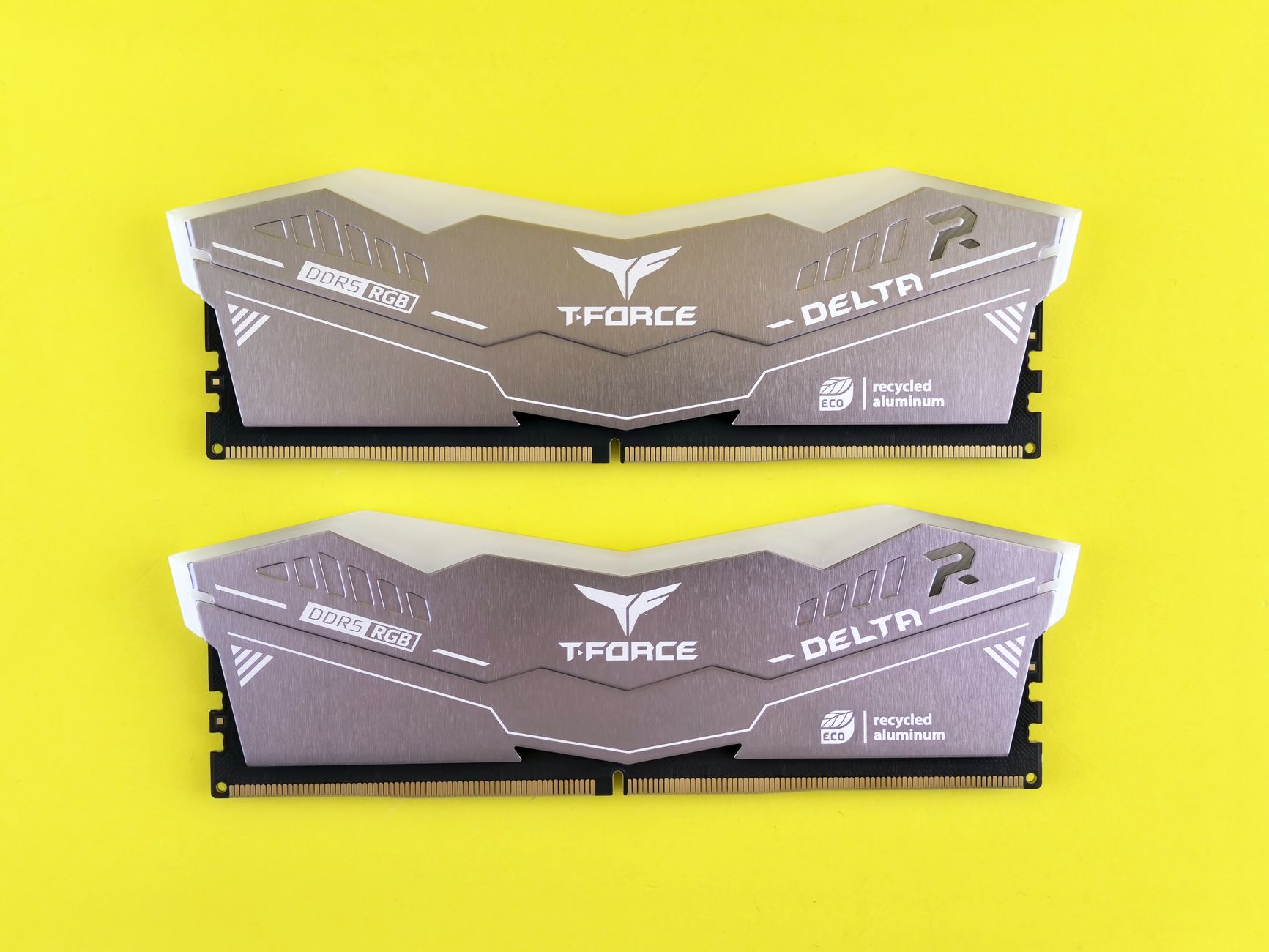 Photo by Andrey Matveev / Pexels
RAM selection for gaming is simpler than component manufacturers make it appear. The significant decisions are DDR4 vs DDR5, total capacity (16GB vs 32GB), and speed kit for your platform. Beyond these three choices, the performance differences between brands at the same specifications are measured in fractions of a percent — less impactful than a 5°C ambient temperature change.
How we picked these. Products were selected for real gaming performance gains at each price point.
DDR4 vs DDR5: Which to Choose in 2026
DDR5 is the current standard for new builds. Intel 12th/13th Gen boards offer both DDR4 and DDR5; Intel 14th Gen recommends DDR5. AMD AM5 (Ryzen 7000/9000) requires DDR5. DDR4 remains viable only for existing AMD AM4 (Ryzen 5000 and older) systems and Intel 12th/13th Gen builds where you already own DDR4 kits. For any new PC build started from scratch today, buy DDR5 — it is the standard going forward and the price premium has compressed to 15-20% over DDR4 at equivalent capacities.
Speed and Latency: What Numbers Actually Matter
RAM speed is specified as DDR4-3600 or DDR5-6000 (the number is the transfer rate in megatransfers per second). Primary latency (CL — CAS Latency) describes how many clock cycles pass between a memory request and the data being ready. Lower CL = better. The relationship between speed and latency: DDR5-6000 CL30 performs nearly identically to DDR5-6400 CL34 in gaming — the extra speed is offset by the worse latency ratio. For AMD Ryzen 7000/9000, the Infinity Fabric runs best at DDR5-6000 with tight sub-timings. For Intel, DDR5-5600 or DDR5-6000 on Z690/Z790 is the sweet spot. Use EXPO (AMD) or XMP (Intel) profiles to run RAM at rated speeds — they are not enabled by default.
Capacity: 16GB vs 32GB for Gaming
16GB DDR4 or DDR5 is sufficient for most gaming in 2026. Titles like Hogwarts Legacy and Microsoft Flight Simulator consume 16GB peak. Games recommend 16GB; some recommend 32GB. Content creators who game — video editing alongside Discord and streaming software — need 32GB. The Crucial 32GB DDR5 kit covers creators and gamers who multitask heavily. For pure gaming without background applications, 16GB Corsair Vengeance DDR5 covers all current titles with headroom. Buy 32GB if you keep many browser tabs open during gaming or run a stream simultaneously.
RGB vs Non-RGB: Aesthetic vs Performance
RGB RAM costs $10-30 more than identical non-RGB specifications. The RGB headers require additional power from the motherboard. Performance impact of RGB: zero. If you have a tempered glass side panel and care about matching your build's lighting theme, RGB is worth it. If your case has no window or aesthetics are secondary, save the money on non-RGB kits at identical speeds and timings.
Dual Channel vs Single Stick: Always Dual Channel
Dual channel RAM (two sticks running together) provides roughly 2x memory bandwidth over single-channel. This directly improves performance in memory-bandwidth-constrained games — particularly AMD integrated graphics and CPU-limited scenarios. Always buy RAM in matched pairs (2x 8GB instead of 1x 16GB; 2x 16GB instead of 1x 32GB). Install sticks in the slots specified in your motherboard manual for dual-channel operation — typically slots 2 and 4 (not 1 and 2) for two-stick configurations. Misinstalling in slots 1 and 3 or 1 and 2 can cause single-channel operation, halving bandwidth.
Watch Before You Buy
“DDR5-6000 with EXPO profile for AMD AM5, Trident Z5 Neo uses Samsung/Hynix dies for tight CL30 timings.”
See Today’s Price →What we like
- Expo profile is specifically calibrated for AMD Ryzen 7000 series processors, achieving stable 6000MT/s in a single BIOS toggle without manual sub-timing adjustments
- DDR5-6000 hits the AMD Infinity Fabric sweet spot where performance scales noticeably over DDR5-4800 in gaming and creative workloads
- Low-profile aluminum heat spreader dissipates heat at high transfer rates while fitting under most tower coolers
- 32GB dual-channel configuration provides headroom for multitasking video editing and gaming sessions simultaneously
Watch out for
- Advanced configuration may require technical knowledge to fully optimize
- Performance may lag behind premium models for intensive workloads
Read Full Analysis
The G.Skill Trident Z5 Neo RGB 32GB DDR5 has been widely recognized in enthusiast PC building communities as the purpose-built kit for AMD Ryzen 7000 and 9000 series platforms on AM5. It targets DDR5-6000 MT/s — the speed that aligns with the Ryzen memory controller's Infinity Fabric clock ratio, where AMD's architecture achieves its best latency-to-bandwidth balance. Reviewers consistently find the Trident Z5 Neo at DDR5-6000 CL30 comes within a few percentage points of more expensive DDR5-6400 or DDR5-7200 kits in real-world gaming workloads, making it the practical performance ceiling for AMD builds before diminishing returns take over. The low-profile heat spreader design accommodates large tower coolers without clearance conflicts. The G.Skill Trident Z5 Neo's listed price of $549.99 should be verified before purchase — DDR5 pricing has dropped significantly as supply matured in 2025–2026, and 32GB DDR5-6000 kits now commonly retail in the $80–120 range. The street price at time of purchase may differ substantially from the catalog price. The RGB implementation requires G.Skill's software or compatible motherboard headers for full synchronization, which adds a setup step. The "Neo" designation is AMD-specific: this kit's EXPO profiles are tuned for AM5 boards, and Intel platform builders should instead consider the standard Trident Z5 (without Neo) for XMP 3.0 compatibility. On the best-ram-for-gaming page, the G.Skill Trident Z5 Neo occupies the AMD-optimized slot at rank 2. For Ryzen 7000/9000 series builders, EXPO profile support is the key differentiator — it enables one-click DDR5-6000 overclocking in the BIOS without manual timing adjustments, meaningful for builders who want maximum performance without deep memory tuning expertise. Intel platform builders on LGA1700 or LGA1851 should look at XMP 3.0-certified alternatives, as the Trident Z5 Neo's EXPO optimization is specific to AMD's memory architecture and won't provide the same plug-and-play experience on Intel boards.
Skip this if: Building Intel — this kit is EXPO-certified for AMD AM5; Intel XMP boards may run it at lower speeds.

“32GB DDR4-3600 kit, RGB with iCUE sync, $299.99, excellent AM4 compatibility and tight timings.”
See Today’s Price →What we like
- Individual RGB LED zones sync with iCUE software for per-key lighting effects
- XMP 2.0 profile auto-overclocks to advertised speed in one BIOS toggle
- Aluminum heat spreader maintains stable temps during sustained memory-intensive workloads
- Available in speeds from 3200 to 4000 MHz for a range of platform needs
Watch out for
- RGB software requires iCUE running in background — adds ~200 MB RAM overhead
- Tall heatspreader profile (51mm) may interfere with large air CPU coolers
- Premium price over non-RGB equivalent kits for the same performance
Read Full Analysis
Individual RGB LED zones sync with iCUE software for per-key lighting effects XMP 2.0 profile auto-overclocks to advertised speed in one BIOS toggle RGB software requires iCUE running in background — adds ~200 MB RAM overhead Tall heatspreader profile (51mm) may interfere with large air CPU coolers Compared to the Crucial 16GB DDR4 3200MHz Desktop Memory on this page, the Corsair Corsair Vengeance RGB PRO Most Comprehensive or resource-intensive software, costs $103 more but may offer additional features or brand support worth considering for serious users.
Skip this if: Your platform requires DDR5 (AMD AM5 or Intel 14th Gen Z790 DDR5 boards) — this is DDR4 only.

“32GB DDR5 kit, reliable Micron NAND, $355, balanced speed and capacity for gaming plus content creation.”
See Today’s Price →What we like
- DDR5 standard is required for Intel 12th/13th gen and AMD Ryzen 7000 motherboards — not optional; these platforms don't accept DDR4
- 5600MHz speed improves multitasking responsiveness on memory-intensive workloads versus slower DDR5 kits at the same 32GB capacity
- 32GB capacity handles professional workloads — video editing, virtual machines, and large datasets — that 16GB increasingly bottlenecks
- Desktop unbuffered DIMM format installs directly in standard motherboard slots without adapters or additional hardware
Watch out for
- Requires DDR5-compatible motherboard
- Higher price than DDR4
- No integrated XMP heat spreader
Read Full Analysis
The Crucial 32GB DDR5 5600MHz kit benefits from Crucial's parent company Micron Technology manufacturing the DRAM dies in-house — a vertical integration that reviewers consistently note translates to reliable latency consistency and strong compatibility across Intel and AMD DDR5 platforms. At DDR5-5600, the kit runs within or near native JEDEC spec on many DDR5 motherboards without requiring manual XMP or EXPO profile activation, simplifying setup for builders who want plug-and-play installation without overclocking configuration. Crucial's broad retailer availability and lifetime warranty make it a low-risk choice for builders prioritizing compatibility over maximum performance headroom. The Crucial DDR5-5600 kit runs at a conservative speed tier relative to the G.Skill Trident Z5 Neo DDR5-6000 on this page — for AMD AM5 builders specifically, that 400 MT/s gap matters because 6000 MT/s better aligns with Ryzen's Infinity Fabric clock ratio. The listed $355.00 price should be verified before purchase: DDR5 pricing dropped significantly through 2025–2026 as supply matured, and current street prices for 32GB DDR5-5600 kits are likely substantially lower. The base model has minimal heat spreader coverage, which is thermally adequate but less refined than competitors' aluminum spreader designs. Against the Corsair Vengeance DDR5 at rank 4, the Crucial kit is effectively the same price point with similar DDR5 32GB capacity. The Corsair adds Intel XMP 3.0 profile support and an aluminum heat spreader; the Crucial counters with Micron-native dies and marginally faster rated speed (5600 vs. 5200 MT/s). For AMD AM5 builders, neither kit hits the 6000 MT/s sweet spot — the G.Skill Trident Z5 Neo at rank 2 is the better AMD choice. For Intel LGA1700 or LGA1851 builders who want simplicity without needing XMP profiles, the Crucial at rank 3 is the value pick.
Skip this if: AM4 platform — DDR5 requires a DDR5-compatible motherboard (AM5 or Intel 12th+ Gen DDR5 variant).

“Corsair DDR5 kit, $359.99, ICUE-compatible RGB, high-speed binned dies for competitive overclocking.”
See Today’s Price →What we like
- 32GB (2x16GB) at DDR5-5200 CL40-40-40-77
- Low 1.25V rating
- Custom Intel XMP 3.0 profiles saved through Corsair iCUE
- iCUE real-time frequency readings
- Onboard voltage regulation
Watch out for
- Slower than DDR5-6000 kits, and its listing names no AMD EXPO profile
Read Full Analysis
The Corsair Vengeance DDR5 32GB is backed by Corsair's reputation for validated overclocking headroom and extensive compatibility testing across major DDR5 motherboard platforms. Hardware reviewers consistently highlight its Intel XMP 3.0 profiles as the primary selling point: XMP 3.0 allows users to load pre-validated overclocking settings directly from BIOS with a single toggle, bypassing the manual timing adjustments that DDR5 overclocking can otherwise require. For Intel LGA1700 and LGA1851 builders who want guaranteed one-click performance uplift without deep BIOS configuration, Corsair's documented XMP 3.0 compatibility is a genuine advantage over kits that rely solely on JEDEC defaults. At DDR5-5200 the Corsair Vengeance runs at a lower speed tier than both the Crucial DDR5-5600 kit at rank 3 and the G.Skill Trident Z5 Neo at DDR5-6000 — on AMD AM5 platforms particularly, 5200 MT/s operates below the Infinity Fabric sweet spot, leaving performance on the table versus 6000 MT/s alternatives. It's priced nearly identically to the faster Crucial DDR5-5600 kit, which weakens the value case unless XMP 3.0 profiles specifically matter for the build platform. Current street pricing for DDR5-5200 32GB kits should be verified, as DDR5 market prices have dropped substantially through 2026. The Corsair Vengeance DDR5 makes the strongest case for Intel platform builders who want the one-click XMP 3.0 experience with a well-documented compatibility matrix across Z690, Z790, and Z890 boards. For AMD AM5 builders, the G.Skill Trident Z5 Neo at rank 2 is the more purposeful choice with its EXPO profiles targeting the Ryzen 6000 MT/s sweet spot. Against the Crucial 32GB DDR5-5600 at rank 3, the Corsair trades faster-rated speed for XMP 3.0 profile depth and the Vengeance aluminum heat spreader — Intel builders should favor Corsair here, AMD builders should look up the page.
Skip this if: You do not overclock — the performance premium over mid-range DDR5 is minimal without tuning sub-timings.

“16GB DDR4 kit, $126.50, Crucial reliability, XMP profile support, works across AM4 and LGA1700 DDR4 boards.”
See Today’s Price →What we like
- Excellent value for DDR4 RAM
- Compatible with Intel and AMD Ryzen
- Plug-and-play installation
- Reliable brand with lifetime warranty
Watch out for
- No RGB lighting
- Single module (not dual-channel kit)
- Limited to DDR4 platforms
Read Full Analysis
The Crucial 16GB DDR4 3200MHz kit fills a specific and important role on this page: it's the upgrade path for builders on existing DDR4 platforms — AM4 boards with Ryzen 3000/5000 series, or Intel LGA1200/LGA1700 DDR4 chipsets — who want more RAM without a full platform migration. Crucial's DDR4 kits have earned consistently strong compatibility marks across the wide range of AM4 and Intel DDR4 motherboards still in active use, and DDR4-3200 sits at the Infinity Fabric's 1:1 clock ratio sweet spot for Ryzen 3000 and 5000 series processors, delivering the speed most AM4 platforms are optimized for without requiring overclock profiles. In 2026, 16GB DDR4 has a clear capacity ceiling: it handles most gaming and productivity workloads comfortably, but content creation, large virtual machines, and modern open-world titles with large asset budgets can push against the limit. The listed $126.50 price should be verified before purchasing — DDR4 3200MHz 16GB kits are widely available at substantially lower street prices in 2026 as DDR4 supply has become abundant. Builders should also confirm they're receiving a dual-channel kit (two 8GB sticks) rather than a single 16GB module, as dual-channel configuration provides meaningful bandwidth improvement for both gaming and integrated graphics workloads. Among the DDR5 options on this page, the Crucial 16GB DDR4 is the sole kit targeting legacy platforms. If an AM4 or DDR4 Intel board is already in the build, upgrading to this Crucial kit is the sensible path — replacing the platform just to run DDR5 isn't cost-justified for the RAM alone. If starting a new build from scratch with a Ryzen 7000/9000 or Intel 13th/14th gen platform, a DDR5 kit from elsewhere on this page is the correct choice since modern boards in that tier don't support DDR4 at all. This Crucial kit's value is entirely in its role as an affordable, reliable capacity bump for existing DDR4 systems.
Skip this if: You run streaming or video editing alongside gaming — 16GB will require closing background applications during heavy multitasking.
Frequently Asked Questions
Is DDR5 worth it for gaming in 2026?
How much RAM do I need for gaming?
Does RAM speed matter for gaming?
Should I enable XMP/EXPO on my gaming RAM?
Does RGB RAM perform better?
What RAM slots should I use for dual-channel?
How We Chose These Products
We compare each product’s Amazon listing, the manufacturer’s published specifications and Amazon customer ratings, shown with their review counts as Amazon’s data, and rank the products on how well they answer this page’s question. We do not test products in hand and we do not run our own analysis of review text. A publication or expert is named only where we cite its published findings about that product. No manufacturer paid for placement on this page.
A price appears only when Amazon’s API supplied it at a recent daily refresh, with the date and time beside it, and is withdrawn at 4 AM Central on the day after it turns 24 hours old; otherwise use “Check price on Amazon” for the live price. Read our full methodology →