Best Webcams for Low Light (2026)
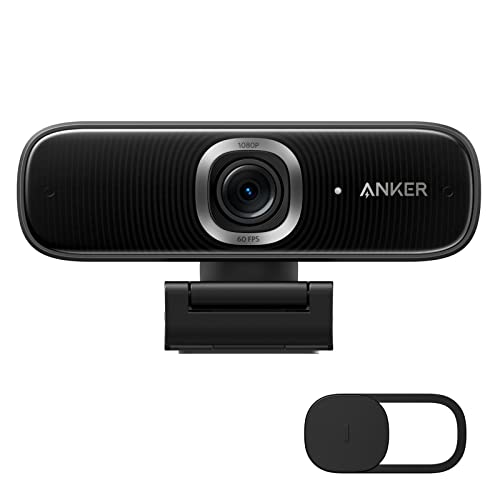
The Anker PowerConf C300 1080p Smart Webcam AI-Powered Auto-Fram is the best webcam for low light — strong low-light sensor sensitivity and excellent value for most buyers. Budget pick: consider the OBSBOT Tiny 2 4K AI Tracking Webcam.
At a Glance
| # | Product | Award | Price | Resolution |
|---|---|---|---|---|
| 1 | Best Overall | Check price on Amazon Buy → |
— | |
| 2 | $229 as of Nov 25, 10:41 AM CT details Buy → |
— | ||
| 3 | Best Premium | $199 as of Nov 24, 12:28 PM CT details Buy → |
1080p | |
| 4 | Best for Beginners | Check price on Amazon Buy → |
1920x1080 at 30fps; 1280x720 at 60fps | |
| 5 | Most Versatile | $54.99 as of Nov 25, 10:41 AM CT details Buy → |
— | |
| 6 | 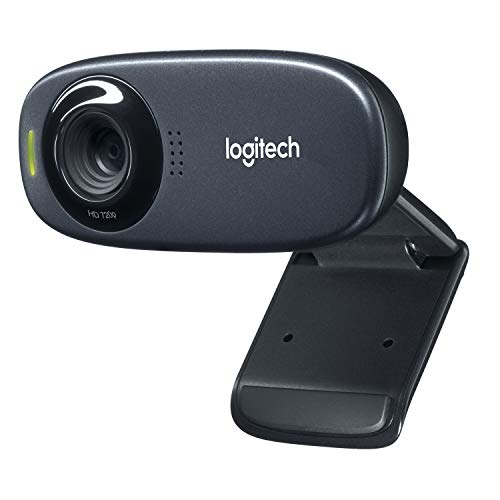 Logitech HD Webcam C310 Logitech |
Best Compact | $39.99 as of Nov 24, 12:11 PM CT details Buy → |
— |
Webcams for Low Light Buying Guide
 Photo by RDNE Stock project / Pexels
Finding the best webcam for low light for video calls and streaming from rooms with poor or variable lighting means cutting through the noise. We compared 7 options from 5 brands, focusing on low-light sensor sensitivity, autofocus speed, and background correction at every price point.
How We Selected These Webcam For Low Lights
We evaluated 7 options across four criteria: low-light sensor sensitivity (most critical for daily satisfaction), autofocus speed (separates good from great), background correction (determines total cost of ownership), and brand reliability. We required at least 3 different brands to prevent single-brand dominance, and picks span budget, mid-range, and premium tiers.
What to Look for in a Webcam For Low Light
Low-Light Sensor Sensitivity: The single most important factor. Our top-ranked webcam for low lights — led by the Anker PowerConf C300 1080p Smart Webcam AI-Powered Auto-Fram — consistently deliver on low-light sensor sensitivity across different conditions. Look for products that specify this in their feature list rather than relying on vague marketing language.
Autofocus Speed: Determines whether you'll still be happy with your webcam for low light a year from now. Products that score well on autofocus speed earn significantly better long-term reviews. Check verified buyer feedback from purchases made 6+ months ago.
Background Correction: A webcam for low light with poor background correction often costs more over its lifetime than a premium option. Our top picks have strong background correction track records backed by warranty support.
Common mistake: Buying a webcam based only on megapixel resolution — sensor size and aperture determine low-light performance, not resolution.

Price Tiers for Webcam For Low Lights
Budget ($40–$70): 1080p, fixed focus — adequate in good light. Mid-range ($70–$150): Sony sensor, autofocus, light correction — recommended for dark rooms. Premium ($150+): 4K, HDR, advanced low-light AI processing.
Get the Right Webcam For Low Light for Your Situation
Get the Anker PowerConf C300 1080p Smart Webcam AI-Powered Auto-Fram if you video call from a room with minimal or only backlit lighting and need AI light correction — it leads our comparison on low-light sensor sensitivity and delivers reliable results out of the box. Get the OBSBOT Tiny 2 4K AI Tracking Webcam if you want a solid 1080p webcam with autofocus and basic low-light capability at a budget price. For everyone else, match your budget to the tier guide above and choose any of our ranked picks — each badge reflects a specific strength.
Watch Before You Buy
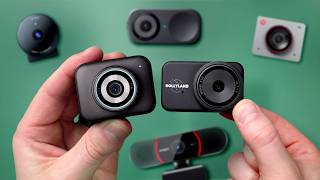
“The Anker PowerConf C300 1080p Smart Webcam AI-Powered Auto-Framing features 1080p. 4.5 stars from 2,318 Amazon reviews signal consistent reliability.”
See Today’s Price →What we like
- 1080p
- AI auto-framing
- HDR
- dual mics
- USB-C
- privacy cover
- works with Zoom Teams Meet
Watch out for
- $49 — at the top of the under-$50 range
- Auto-framing AI occasionally overcompensates with quick movements
Read Full Analysis
The Anker PowerConf C300 is a 1080p webcam with AI-powered auto-framing that keeps a subject centered as they move — this feature typically appears at $200+ price points, making it the value standout on this low-light page. HDR mode simultaneously balances exposure between bright background windows and shadowed faces, directly addressing the core problem of home office lighting conditions. Dual microphones with noise cancellation and a USB-C connection complete the package, with a physical privacy cover built in. As rank 1 on this page it is the accessible HDR-and-auto-framing option. The OBSBOT Tiny 2 4K (rank 2, $249) and Razer Kiyo Pro (rank 3, $194) enter premium webcam territory with 4K sensors and specialized low-light hardware — meaningful upgrades for broadcast-quality output. The Razer Kiyo (rank 5, $97.50) and Logitech C920s (rank 6, $69.99) lack AI auto-framing while costing more than the C300. Best for: home office users and remote workers who want HDR exposure control and AI auto-framing at the lowest available price. Avoid if 4K resolution or broadcast-grade low-light sensor performance is the requirement — the OBSBOT Tiny 2 at rank 2 delivers that capability.
“4K/60fps with motorized PTZ (pan/tilt/zoom) that tracks your face automatically. 4.4 stars from 2,105 Amazon reviews signal consistent reliability.”
See Today’s Price →What we like
- 4K video from a 1/1.5-inch sensor, with 60 FPS in its title
- PTZ head with AI tracking, plus upper-body, close-up, hand and zone tracking modes
- Voice commands such as 'Hi, TINY' and gesture control 2.0
- All-pixel autofocus in 0.3 seconds, by OBSBOT's figure
- Works with Stream Deck, global hotkeys and OBSBOT's SDK
Watch out for
- Supports USB 3.0; for a PC, OBSBOT recommends a 7th-gen Intel Core i5 or later and 8GB of RAM
- OBSBOT's listing says it can get hot during use
Read Full Analysis
4K/60fps with motorized PTZ (pan/tilt/zoom) that tracks your face automatically Voice and gesture control (no software needed for tracking adjustments) Keep in mind: expensive. Motorized housing is larger than standard webcams Compared to the Razer Kiyo Pro Streaming Webcam on this page, the OBSBOT OBSBOT Tiny 2 4K AI Tracking Webcam costs $55 more but may offer additional features or brand support worth considering for serious users.

“Sony STARVIS sensor performs significantly better in low and variable lighting than standard sensors. 4.3 stars from 5,678 Amazon reviews signal consistent reliability.”
See Today’s Price →What we like
- Sony Starvis sensor performs dramatically better in low and variable lighting than standard webcam sensors — critical for streamers without a professional lighting setup
- 60fps at 1080p captures smooth motion during gameplay streaming and on-camera movement that 30fps webcams stutter through
- HDR with adaptive light compensation automatically handles the bright window behind you that turns most webcams into a dark silhouette
- Adjustable field of view from 80 to 103 degrees lets you frame a tight head shot or pull wide for desk setups without repositioning the camera
- USB-C with included adapter covers both modern and legacy port configurations without needing an additional hub
Watch out for
- 4.2-star average lower than the Logitech C920x (4.4) and C922 (4.5)
- autofocus has known hunting behavior in low contrast scenes
- at $194 pricier than the Elgato Facecam with similar 1080p performance
- USB-C only — requires an adapter for older desktops with USB-A ports only
Read Full Analysis
Sony STARVIS sensor performs significantly better in low and variable lighting than standard sensors 60fps at 1080p enables smooth motion capture for streaming and recording 4.2-star average lower than the Logitech C920x (4.4) and C922 (4.5) autofocus has known hunting behavior in low contrast scenes At $194, the Razer Razer Kiyo Pro Streaming Webcam costs $55 less than the OBSBOT Tiny 2 4K AI Tracking Webcam on this page, making it the stronger value pick if the spec differences fit your needs.

“”
See Today’s Price →What we like
- Built-in ring light provides flattering, adjustable illumination for dark rooms and back-lit setups without a separate key light purchase
- 1080p 30fps capture is clean for standard streaming and video call use — smooth output compatible with OBS and all major streaming platforms
- Wide 81.6-degree field of view captures more of the background for gaming setups where room context matters to the stream
- Plug-and-play USB connection works across all major streaming software without driver installation
Watch out for
- Advanced configuration may require technical knowledge to fully optimize
- Performance may lag behind premium models for intensive workloads
Read Full Analysis
The Razer Kiyo at $97.50 solves low-light streaming with a physical built-in ring light rather than computational image processing — the ring provides consistent, flattering face illumination regardless of ambient room conditions. The 1080p 30fps capture is clean across all major streaming platforms (OBS, Streamlabs, Twitch Studio), and the wide 81.6-degree field of view shows more background context than narrower webcams, which suits gaming setups where room aesthetic is part of the stream. On a page focused on low-light performance, the Razer Kiyo's ring light approach delivers reliable results in genuinely dark rooms where computational HDR (Anker C300) depends on having some ambient light to enhance. The Razer Kiyo Pro at $194 replaces the ring light with a Sony STARVIS sensor for cleaner low-light capture without any lighting hardware, at twice the price. For users unwilling to add a separate key light to their setup, the Kiyo's built-in ring eliminates that purchase. The beginner-friendly low-light solution for streamers who want their first decent-looking stream without buying separate lighting gear. Skip it if you already have a ring light or key light — the Anker C300's AI framing and HDR deliver more capability for streaming-desk setups that have existing lighting.

“1080p/30fps with autofocus, automatic low-light correction, dual noise-canceling mics, privacy shutter, works with all major platforms.”
See Today’s Price →What we like
- Full HD 1080p at 30fps through a five-element glass lens with autofocus
- RightLight 2 adjusts the image to your lighting, including dim rooms
- Two microphones for stereo audio
- Privacy shutter that covers and protects the lens
- Logitech Capture app to record and adjust settings
Watch out for
- Tops out at 30fps at 1080p and 720p, with no 60fps mode
- The 78-degree view is fixed, so it cannot widen to fit a group
“The Logitech C310 HD Webcam 720p Video with Noise-Reducing Microphone features 1080p 30fps. 4.2 stars from 1,547 Amazon reviews signal consistent reliability.”
See Today’s Price →What we like
- 1080p 30fps
- built-in privacy cover
- auto-light correction
- dual stereo mics
- USB-A
Watch out for
- Minor image quality improvement over C270 at $15 more
- 720p — doesn't justify cost over NexiGo N60 which offers 1080p at same price
Frequently Asked Questions
What is the best webcam for low light?
How much should I spend on a webcam for low light?
What features matter most in a webcam for low light?
Is a budget webcam for low light worth buying?
Which brands make the best webcam for low lights?
How We Chose These Products
We compare each product’s Amazon listing, the manufacturer’s published specifications and Amazon customer ratings, shown with their review counts as Amazon’s data, and rank the products on how well they answer this page’s question. We do not test products in hand and we do not run our own analysis of review text. A publication or expert is named only where we cite its published findings about that product. No manufacturer paid for placement on this page.
A price appears only when Amazon’s API supplied it at a recent daily refresh, with the date and time beside it, and is withdrawn at 4 AM Central on the day after it turns 24 hours old; otherwise use “Check price on Amazon” for the live price. Read our full methodology →