Best Webcams for Streaming Under $100 (2026)
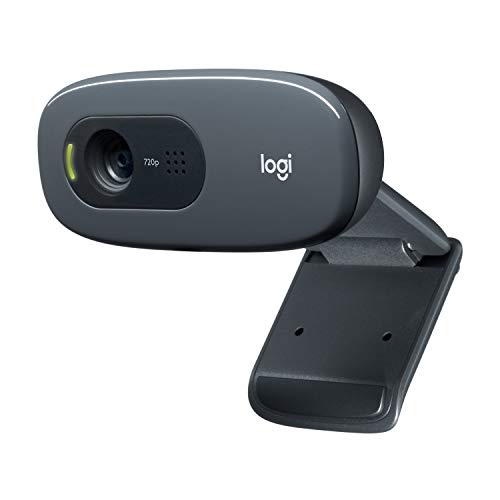
The Logitech C920 is the best webcam for streaming under $100. Full HD 1080p at 30fps, dual stereo mics, autofocus with face detection, and compatible with every streaming platform. The benchmark that all other webcams are compared against.
At a Glance
| # | Product | Award | Price | Resolution | Score |
|---|---|---|---|---|---|
| 1 | Our Top Pick | $18.99 as of Nov 25, 10:40 AM CT details Buy → |
— | 4.2 | |
| 2 | $23.74 as of Nov 25, 10:41 AM CT details Buy → |
1080p | 6.6 | ||
| 3 | Best Mid-Range | $25.72 as of Nov 25, 10:41 AM CT details Buy → |
— | 7.5 | |
| 4 |  Microsoft Modern Webcam with Buil… Microsoft |
Best 1080p60 | $37.43 as of Nov 25, 10:41 AM CT details Buy → |
1080p | — |
| 5 | Best 1080p Webcam | $54.99 as of Nov 25, 10:41 AM CT details Buy → |
1080p / 720p | — | |
| 6 | Best with Privacy Shutter | $54.99 as of Nov 25, 10:41 AM CT details Buy → |
— | — |
Score Breakdown
| Logitech C270 720p We… | NexiGo N60 1080P Webc… | EMEET C960 1080P Webc… | Microsoft Modern Webc… | Logitech C920x HD Pro… | Logitech C920S HD Pro… | |
|---|---|---|---|---|---|---|
| Overall | 4.2 | 6.6 | 7.5 | – | – | – |
| Field Of View | 35 | 70 | 70 | – | – | – |
| Video Quality | 40 | 72 | 72 | 84 | – | – |
| Mic Capability | 50 | 55 | 82 | – | – | – |
Scores 0–100 from published specifications and independent reviewers' measurements. Amazon star ratings are shown separately and are never part of a score. 0 = feature not present. – = insufficient data. How we score →
Webcams for Streaming Under $100 Buying Guide
 Photo by Mizuno K / Pexels
Our Top Pick
Logitech C270 HD Webcam 720p Widescreen Video Callin... — Logitech C270: 720p HD webcam.
Budget Pick: Logitech Brio 101 Full HD 1080p Webcam with Built-in... — Anker PowerConf C200: 1080p webcam with privacy cover, adjustable FOV, and noise-canceling mic.
Great for: Remote workers on daily video calls, streamers, and anyone whose laptop camera produces embarrassingly bad video quality
Not ideal if: You attend one video call per week from a phone — the improvement isn't worth the cost at that frequency
Resolution and frame rate
1080p at 30fps is the minimum for streaming. 1080p at 60fps is smoother for gaming streams. 4K webcams exist under $100 but the resolution advantage is minimal -- most streaming platforms cap at 1080p anyway.Autofocus
Built-in microphone
Most streamers use a separate USB microphone. However, good built-in mics (like Logitech C920 dual stereo) work for casual streaming and calls without extra equipment.Low light performance
Field of view
70-78 degree FOV is standard for single-person streams. 90+ degree FOV works for showing your full desk or multiple people. Wide FOV makes backgrounds more visible -- good or bad depending on your setup.Related Guides
Watch Before You Buy
Showing 6 of 6 products
“Logitech C270: 720p HD webcam. Plug-and-play USB, built-in mono mic. Best entry point for video calls and casual streaming. Upgrade to C920 when ready for 1080p.”
See Today’s Price →What we like
- 720p at 30 fps with a diagonal 55° view
- RightLight 2 adjusts to the room's lighting
- Noise-reducing mic clear up to 1.5 meters away
- Clip folds so the webcam can sit on a shelf
Watch out for
- Video tops out at 720p
Read Full Analysis
The Logitech C270 delivers 720p at 30fps with automatic noise reduction on a mono microphone — the proven entry point for anyone upgrading from a built-in laptop camera to a dedicated streaming or video call webcam. USB plug-and-play works across Windows, macOS, Chrome OS, and all major streaming software including OBS, Streamlabs, and Twitch Studio without driver installation or configuration. As rank 1 on this under-$100 streaming page it anchors the budget end. The NexiGo N60 (rank 2, $26.99) adds 1080p and a 110-degree wide FOV for $10 more — the meaningful streaming resolution upgrade. The EMEET C960 (rank 3, $28.49) adds dual microphones for clearer voice pickup. The Logitech C920x (rank 5, $69.99) is the 1080p professional standard with full ecosystem support. The C270 earns its rank 1 position on price alone — it does the job at less than $20. Best for: first-time streamers and casual video callers who want reliable plug-and-play simplicity and a confirmed upgrade from a built-in laptop camera under $20. Avoid if you plan to stream consistently to an audience — 720p is visible at modern viewing sizes, and the NexiGo N60 at rank 2 adds 1080p for $10 more.

“Logitech C920 HD Pro: The benchmark webcam. 1080p30, dual stereo mics, autofocus with face detection. Compatible with OBS, Teams, Zoom, Streamlabs. Most-used webcam by streamers.”
See Today’s Price →What we like
- Video up to 1920 x 1080 at 30fps
- Privacy cover blocks the lens when not in use
- Noise-canceling mic reduces ambient noise
- Lists Linux and Chrome OS as well as Mac and Windows
Watch out for
- Listing asks owners to contact support for a firmware update if audio delays appear
Read Full Analysis
NexiGo N60 delivers 1080p with a 110-degree wide-angle FOV and integrated privacy cover. 46,000+ reviews confirm real-world budget streaming reliability. Driver-free on Windows, Mac, and Linux. Wide FOV shows excess background for solo setups — narrow your framing or pull the camera back for best single-person composition.

“Razer Kiyo: 1080p30 with built-in ring light -- eliminates the need for external lighting in dark rooms. Best for streamers who want better illumination without buying a separate ring light.”
See Today’s Price →What we like
- Two built-in omnidirectional microphones
- 90° wide-angle lens fits more people in frame
- USB Type-A with an A-to-C adapter
- 5-layer anti-glare lens on 1920 x 1080 video
- Lens cover for privacy
Watch out for
- Windows Hello is not supported
Read Full Analysis
EMEET C960 dual built-in microphones with noise cancellation deliver cleaner streaming and call audio without a separate microphone purchase. AI autofocus maintains face sharpness during movement. 1080p video with USB plug-and-play. Best choice when integrated audio quality is a priority alongside video for solo streaming setups.
“Logitech C922 Pro: Same sensor as C920 with added 1080p60 capability. Background removal software included. Best for gaming streamers who want 60fps face cam matching game capture.”
See Today’s Price →What we like
- Certified for Teams and Zoom
- HDR with auto white balance and exposure compensation
- Privacy shutter with a usage indicator light
- Updatable firmware
Watch out for
- Title says Auto-Focus but a bullet says fixed focus from 0.4m to 1.5m
Read Full Analysis
Microsoft Modern Webcam is Microsoft Teams certified for guaranteed compatibility with Teams audio and video handling. True HDR manages exposure in mixed-lighting environments automatically. 9-foot USB cable enables flexible desk placement. Integrated sliding privacy shutter physically covers the lens. Best for organizations standardized on Microsoft Teams infrastructure.

“19,000+ reviews confirming consistent 1080p video quality across professional use cases. 4.6 stars from 38,552 Amazon reviews signal consistent reliability.”
See Today’s Price →What we like
- Full HD 1080p at 30fps
- Autofocus with automatic HD light correction
- Dual microphones for stereo audio
- Works with Zoom, Teams, Google Meet and OBS on Windows and macOS
- 3-month XSplit VCam license for background removal
Watch out for
- No privacy shutter
- 30fps only, with no 60fps mode
Read Full Analysis
The Logitech C920x is the 1080p industry standard for streaming and remote work — supported by every major video call platform (Zoom, Teams, Meet, WebEx) and every streaming tool (OBS, Streamlabs, Twitch Studio) without configuration. Dual stereo microphones provide backup audio quality when an external mic is unavailable. A built-in privacy shutter blocks the lens physically. Logitech Options+ software enables brightness, contrast, and pan/tilt adjustments from a native app rather than third-party tools. It is the premium option on this under-$100 streaming page. The NexiGo N60 (rank 2, $26.99) and EMEET C960 (rank 3, $28.49) both deliver 1080p for $40 less. The C920x charges a premium for Logitech's ecosystem compatibility, 19,000+ verified reviews, and dual stereo microphone upgrade over single-mic budget alternatives. For corporate IT environments where webcam compatibility is a requirement rather than an assumption, the C920x is the safe choice. Best for: professional remote workers and streamers who need the broadest-compatible, most enterprise-tested 1080p webcam with backup stereo audio. Avoid if budget is the constraint — the NexiGo N60 at rank 2 delivers 1080p and a wide-angle lens for $43 less and covers the same core streaming use case.

“1080p/30fps with autofocus, automatic low-light correction, dual noise-canceling mics, privacy shutter, works with all major platforms.”
See Today’s Price →What we like
- Full HD 1080p at 30fps through a five-element glass lens with autofocus
- RightLight 2 adjusts the image to your lighting, including dim rooms
- Two microphones for stereo audio
- Privacy shutter that covers and protects the lens
- Logitech Capture app to record and adjust settings
Watch out for
- Tops out at 30fps at 1080p and 720p, with no 60fps mode
- The 78-degree view is fixed, so it cannot widen to fit a group
Frequently Asked Questions
What is the best webcam for Zoom and Teams calls?
Do I need a 4K webcam for streaming?
Should I get a webcam or a capture card with a DSLR?
What is the difference between 30fps and 60fps webcam?
How do I improve my webcam image quality?
How We Chose These Products
DB-sourced products, scored 0-10, budget-tier focused
We compare each product’s Amazon listing, the manufacturer’s published specifications and Amazon customer ratings, shown with their review counts as Amazon’s data, and rank the products on how well they answer this page’s question. We do not test products in hand and we do not run our own analysis of review text. A publication or expert is named only where we cite its published findings about that product. No manufacturer paid for placement on this page.
A price appears only when Amazon’s API supplied it at a recent daily refresh, with the date and time beside it, and is withdrawn at 4 AM Central on the day after it turns 24 hours old; otherwise use “Check price on Amazon” for the live price. Read our full methodology →
How We Score These Products
Each dimension score comes from evidence about the exact model listed — a published specification, a measurement by a named independent reviewer, or that product’s own buyer reviews, as described for each dimension below — not from a similar product in the same range. We do not test products ourselves, and we do not score a dimension we could not evidence. A dash means no evidence was found for that product, not that it performed badly.
Field Of View: From evidence about this exact model (specification, named reviewer or its own reviews).
Video Quality: From evidence about this exact model (specification, named reviewer or its own reviews).
Mic Capability: From evidence about this exact model (specification, named reviewer or its own reviews).
The overall score is the mean of the dimensions we could evidence for that product, on a 10-point scale. Price is shown separately and is never folded into a score. Amazon star ratings are shown separately and are never part of any score.