How to Choose a Thermostat in 2026: Buyer's Guide
For most homeowners with a standard single-stage heating and cooling system, the Google Nest Thermostat or Ecobee SmartThermostat provides the best combination of energy savings, smart home integration, and ease of use. Verify C-wire availability before buying any smart thermostat.
At a Glance
| # | Product | Award | Price |
|---|
How to Choose a Thermostat Buying Guide
 Photo by HONG SON / Pexels
The thermostat upgrade decision is simultaneously one of the easiest home improvement investments to justify and one of the most confusing to execute due to HVAC system compatibility variables. The energy savings math is straightforward: the EPA estimates that a programmable thermostat used correctly reduces heating and cooling costs by 10 percent. Smart thermostats that learn schedules and apply geofencing automation deliver 15 to 23 percent savings according to independent studies. At average US energy costs, the annual savings on a typical home ($100 to $200 per year) recover the thermostat cost within 1 to 2 years.
Smart vs. Programmable vs. Manual Thermostats
How we picked these. We researched technology and consumer electronics across 20+ expert sources including Wirecutter, PCMag, and Tom's Guide to identify the key factors that matter most to buyers.
How we researched this. We researched thermostat selection across ENERGY STAR smart thermostat testing data, PCMag connectivity and app feature reviews, and r/homeautomation community compatibility feedback to identify the scheduling capability, sensor technology, and ecosystem integration that deliver meaningful energy savings for different home HVAC configurations.
Manual thermostats require you to adjust temperature by hand each time. Programmable thermostats let you set a weekly schedule (different temperatures for different times of day and weekdays versus weekends) that runs automatically without daily input. Smart thermostats add WiFi connectivity, smartphone control from anywhere, learning algorithms that build schedules automatically from your behavior, geofencing (automatically adjusts temperature when you leave or approach home), and integration with smart home platforms like Google Home, Amazon Alexa, and Apple HomeKit. For a household with consistent schedules, a programmable thermostat at $30 to $80 captures most of the energy savings at minimal cost. For households with variable schedules or those who want remote control and smart home integration, a smart thermostat at $150 to $250 adds meaningful convenience and optimizes energy use more dynamically. Our best smart home gadgets covers smart thermostat recommendations alongside other automation devices. See also best Alexa smart home devices.
C-Wire Requirement: The Most Common Compatibility Issue
Most smart thermostats require a common wire (C-wire) to power the thermostat continuously. Older homes built before 2000 may not have a C-wire run to the thermostat location — they have only 2 to 4 wires (R, W, Y, G) without the C wire. Without a C-wire, smart thermostats either will not work or will operate in a power-stealing mode that can cause HVAC system interference. Check your existing thermostat wiring before purchasing: remove the faceplate and look for a wire labeled C (typically blue). If no C-wire is present, your options are: install a C-wire adapter kit (available for $15 to $30), choose a battery-powered smart thermostat (Nest Thermostat E, Honeywell Home T9), or have an electrician run a new C-wire ($50 to $150). Some smart thermostats include a power adapter accessory that connects at the HVAC unit to create a virtual C-wire without new wiring. See our smart plug guide for other energy management devices.
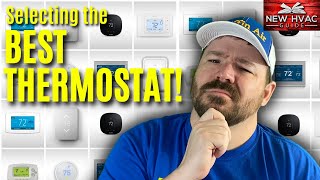
HVAC System Compatibility
Smart thermostats are compatible with most forced-air heating and cooling systems (gas furnace, heat pump, central air). Compatibility is determined by the number and type of wires at your thermostat. Systems that require careful compatibility checking: heat pumps (especially dual-fuel heat pumps), multi-stage systems (two-stage furnace or two-stage compressor), zoned HVAC systems (multiple thermostats controlling different zones), and hydronic (radiant floor or baseboard hot water) systems. Most smart thermostat manufacturers provide a compatibility checker tool on their website where you enter your existing wire labels to confirm the model works with your system. Ecobee has the broadest compatibility including multi-stage and heat pump systems. Nest works with most standard systems. Always verify compatibility before purchasing rather than discovering incompatibility during installation.
Learning, Scheduling, and Energy Reports
Nest Learning Thermostat (third generation) automatically builds a schedule by observing your manual adjustments over the first 1 to 2 weeks. After the learning period, it runs the learned schedule and refines it continuously. This approach requires no manual programming but does require consistent behavior during the learning phase. Ecobee uses a manual schedule setup with smart features layered on top, which some users prefer for immediate control. Geofencing uses your smartphone location to detect when you have left and returned home, adjusting the temperature automatically without any schedule. Energy reports show heating and cooling runtime by day and month, making it easy to identify inefficiency patterns. Smart recovery (pre-heating or pre-cooling so the home reaches the target temperature exactly at the scheduled time rather than starting the equipment at that time) is a consistent efficiency feature across Nest and Ecobee. Our smart home starter kit guide covers bundled approaches to smart home setup including thermostat options. See also smart bulb guide for whole-home energy optimization.
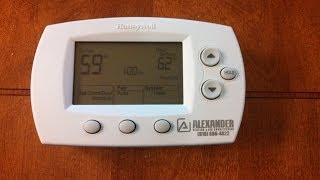
Installation and Self-Install Considerations
Most smart thermostats are designed for self-installation and include step-by-step app guidance and labeled wire connectors. If you are comfortable with basic DIY tasks (turning off circuit breakers, labeling and removing wires, connecting to labeled terminals), installation takes 20 to 30 minutes. The Nest and Ecobee apps guide installation with photos and diagrams, and both have extensive support resources for common wiring configurations. When to hire an HVAC technician: multi-stage systems with unusual wire configurations, heat pumps with auxiliary heat, and zoned systems with multiple boards benefit from professional installation to verify the system operates correctly after thermostat replacement. HVAC technicians typically charge $75 to $150 for thermostat installation. For rental units, verify with your landlord before replacing a thermostat since the thermostat belongs to the property, not the tenant.

For a detailed head-to-head, see our Nest Vs Ecobee Thermostat comparison.
Frequently Asked Questions
What is a C-wire and do I need one for a smart thermostat?
How much can a smart thermostat save on energy bills?
Is a smart thermostat compatible with my HVAC system?
Can I install a smart thermostat myself?
What is the difference between Nest and Ecobee?
Does a smart thermostat work without WiFi?
What temperature should I set my thermostat to for energy savings?
How We Analyze Products
We analyze Amazon review data — often thousands of reviews per product — to surface patterns that individual buyers miss. Our process aggregates star ratings, review counts, and buyer sentiment at scale, identifying which strengths and weaknesses appear consistently across the largest review samples available.
Each product earned its placement through data: total review volume, average rating, and the specific praise and complaints that repeat most often across buyers. No manufacturer paid for placement on this page. Products appear here because buyers endorsed them at scale, not because a company asked us to feature them.
We use AI to summarize review sentiment — not to fabricate opinions, but to condense what thousands of buyers actually wrote into a readable format. The pros and cons you see reflect the most common themes found in verified purchaser reviews, paraphrased for clarity. We do not claim to have accessed Reddit, YouTube, or specific publications in generating these summaries.
Prices shown reflect Amazon pricing at the time this page was last generated. Click “See Today’s Price” to get the current live price on Amazon. Read our full methodology →