Mesh WiFi vs Range Extender: Which Should You Buy? (2026)
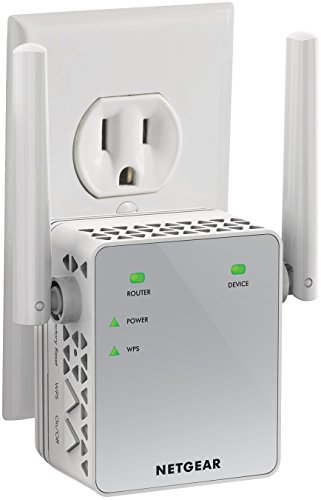
The NETGEAR EX3700 AC750 Range Extender at about $40 is the best budget dead-zone fix — plug-in design with Ethernet passthrough and one-touch WPS setup delivers the lowest-cost way to extend an existing router reach to a single room.
Mesh WiFi vs Range Extender Buying Guide
Dead zones in your home mean your router's signal doesn't reach certain areas reliably. Two solutions exist: range extenders (also called Wi-Fi boosters or repeaters) and mesh Wi-Fi systems. They're not equal — range extenders are a band-aid; mesh systems are the right fix. But range extenders cost about $40-100 while mesh systems cost about $140-500, so the trade-off is real and sometimes justified.
How Range Extenders Work (and Why They're Limited)
A Wi-Fi range extender receives your router's signal, then rebroadcasts it from a new location. This sounds simple but creates a fundamental problem: the extender uses half its bandwidth to receive from the router and half to transmit to your device — total bandwidth available to your device is cut by approximately 50% compared to being directly connected to the router. Additionally, most range extenders create a separate Wi-Fi network name (SSID) — you're connected to "HomeNetwork_EXT" in the back bedroom instead of "HomeNetwork." Your device doesn't automatically hand off between networks as you move through the house; you have to manually switch. Single-band extenders (operating on just 2.4 GHz) further reduce performance because they can't use a separate band for the router-to-extender link. Dual-band extenders (the NETGEAR EX3700 at about $40, TP-Link RE605X at about $50) are better because one band handles the router-to-extender link and the other handles the extender-to-device link — the bandwidth halving applies only to the device side. For a bedroom 40 feet from a router with two walls between them, a dual-band extender is a cost-effective fix. It won't give you full router performance, but it gives you a usable signal where there was none.
How Mesh Systems Work (and Why They're Better)
Mesh Wi-Fi systems consist of a main router and one or more satellite nodes. Unlike extenders, mesh systems communicate with each other on a dedicated backhaul channel — a separate band specifically for node-to-node traffic that doesn't consume the bandwidth your devices use. This dedicated backhaul is what eliminates the 50% bandwidth penalty of range extenders. More importantly, mesh systems present a single network name across the entire home. As you walk from the living room to the backyard, your phone automatically hands off from the main router to the satellite node closest to you — without you reconnecting. This seamless handoff is what separates mesh from extender experiences. Tri-band mesh systems (two 5 GHz bands) dedicate one 5 GHz band entirely to backhaul, giving devices full bandwidth on the remaining bands. The Amazon eero 7 uses a 2.4 + 5 GHz dual-band design with shared backhaul — adequate for most homes.

When a Range Extender Makes Sense
Range extenders make sense when: you have a single dead zone in one specific location, you're renting and can't run ethernet cable (which would be the cleanest solution), your budget is under $50-100, or you need a quick temporary solution while planning a permanent one. A dual-band extender like the TP-Link RE605X placed midway between the router and the dead zone solves coverage for a single room effectively. The performance will be reduced (60-70% of direct router performance in ideal placement) but functional for streaming and video calls. When range extenders fail: if multiple rooms are dead zones, if you need consistently fast performance in extended areas, or if the extender's separate network name is causing device connection issues with smart home products.
When Mesh Is the Right Investment
Mesh systems justify the cost when: you have dead zones in multiple areas, your home is over 2,000 sq ft, you have 15+ smart home devices that need reliable connectivity throughout the house, or you've already tried a range extender and been disappointed. The eero system (Amazon eero 7 router + additional nodes) lets you start with one router and add nodes as needed — each node covers approximately 1,500 additional sq ft. For a 3,000 sq ft home with a basement, three eero nodes (about $140 router + $169.99-150 per additional node) provide complete coverage with seamless handoff and maintained throughput. The upfront cost is higher than an extender but the user experience difference is meaningful.

Ethernet Backhaul: The Best of Both Worlds
If you can run an ethernet cable between mesh nodes — even temporarily using existing electrical conduit or existing cable TV runs — the wired backhaul eliminates the bandwidth-sharing problem entirely. Both eero and Orbi support ethernet backhaul: you run ethernet from the router to where you'd place a satellite node, and the node gets full bandwidth for device connections. This is the professional installer's preferred approach for large homes — it costs more to set up but delivers the closest-to-wired performance wirelessly.
What We Recommend
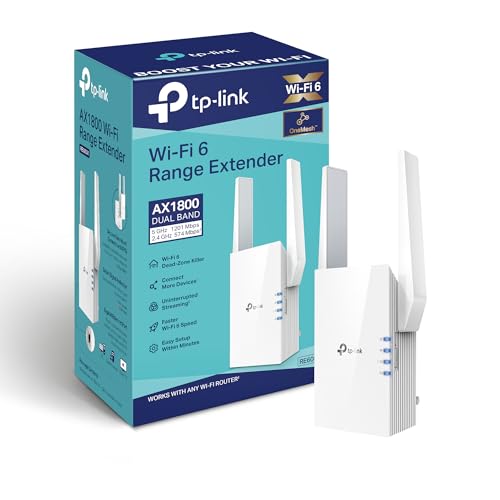
For a single dead zone on a budget: TP-Link RE605X or ASUS RP-AX56 — Wi-Fi 6 range extenders that minimize the bandwidth penalty. For whole-home coverage: Amazon eero 7 as the base, add additional nodes ($120/node) for each additional 1,500 sq ft. See our WiFi router guide and TP-Link vs eero comparison for related picks.
Common Mistakes
Don't place an extender in the dead zone itself — it should be placed where it still has a strong signal from the router (50-60% signal strength) while extending toward the dead zone. Don't use a single-band extender for anything beyond basic web browsing — the 50% bandwidth penalty on a single band makes video calls and streaming unreliable. Don't buy mesh for a studio apartment — a single good router covers small spaces without additional nodes. Don't expect a range extender to solve dead zones caused by thick concrete or metal — physical obstructions require a wired ethernet drop or powerline adapter as the backhaul solution.

“NETGEAR EX3700 WiFi Range Extender AC750 — single-band budget extender for basic dead zone coverage. Best for one device/room at very low cost.”
See Today’s Price →What we like
- Very affordable
- Compact plug-in design
- Ethernet port
- Works with any router
- Simple WPS setup
Watch out for
- AC750 speeds — not fast enough for 4K streaming in extended zone
- No WiFi 6
“TP-Link RE605X AX1800 WiFi 6 Extender — Wi-Fi 6 dual-band with dedicated 5 GHz backhaul. Minimizes the bandwidth penalty of range extending.”
See Today’s Price →What we like
- WiFi 6 AX1800 at lower price
- WPS pairing
- Compact plug-in
- Easy app setup
Watch out for
- No Gigabit Ethernet port on all models
- Minimal feature difference from RE600X at close prices

“ASUS RP-AX56 WiFi 6 AX1800 Extender — AiMesh compatible, allowing it to act as a mesh node with ASUS routers for seamless roaming support.”
See Today’s Price →What we like
- Wi-Fi 6 (802.11ax) support dramatically reduces latency vs. Wi-Fi 5 extenders
- Works as an AiMesh node with ASUS routers for seamless whole-home mesh networking
- AX1800 speeds handle 4K game streaming and downloads simultaneously
Watch out for
- Only 1.8Gbps total — slower than higher-end Wi-Fi 6 extenders
- No Ethernet port on the wall plug unit
Read Full Analysis
The ASUS RP-AX56 brings Wi-Fi 6 (802.11ax) to the range extender category — upgrading from the Wi-Fi 5 standard used by basic extenders to reduce latency and improve throughput in multi-device homes. AX1800 dual-band speeds handle simultaneous 4K streaming and gaming without the bandwidth bottleneck older extenders create. Crucially, it also functions as an AiMesh node when paired with an ASUS router, converting an extender into a unified mesh network node. On this mesh-vs-extender page, the ASUS RP-AX56 at $99.99 bridges both categories. The NETGEAR EX3700 is a bare-bones Wi-Fi 5 extender that creates a separate SSID. The TP-Link RE605X is a Wi-Fi 6 extender without mesh capability. The Amazon eero 7 is a standalone mesh router requiring no existing infrastructure. The ASUS occupies a unique position: it works as a standard extender with any router but unlocks as a mesh node with ASUS hardware. Choose the ASUS RP-AX56 if you own an ASUS router and want to add mesh capability without replacing your equipment. If you don't have ASUS hardware and want true seamless mesh, the eero 7 offers a cleaner whole-home setup for $70 more.

“Amazon eero 7 — the starting point for a mesh system that eliminates dead zones entirely. Add nodes for $120/node to cover additional areas.”
See Today’s Price →What we like
- Supports internet plans up to 2.5 Gbps through two auto-sensing 2.5 GbE ports
- Dual-band Wi-Fi 7 with multi-link operation (MLO) and wireless speeds up to 1.8 Gbps
- Covers up to 2,000 sq ft and 120+ devices; add more eero units to extend it as a mesh
- Backward compatible with earlier eero generations; three-year warranty
Watch out for
- Tops out at 2.5 Gbps plans - faster fiber tiers need a 10 Gbps port
- Dual-band, where tri-band Wi-Fi 7 routers add a 6 GHz radio
Read Full Analysis
The Amazon eero 7 is the only dedicated mesh router on this comparison page, operating on Wi-Fi 7 standards with 320MHz channel widths in the 6GHz band — the current bandwidth ceiling for residential Wi-Fi. TrueMesh routing evaluates the fastest path to each device continuously, unlike extenders that create static secondary networks with their own SSIDs. Each node provides roughly 2,000 sq ft of coverage. Priced at $169.99, the eero 7 costs 70% more than the ASUS RP-AX56 and 17x more than the NETGEAR EX3700. The premium is defensible because the eero 7 is not an addition to a network — it is the network. Range extenders from NETGEAR and TP-Link extend an existing router's signal but introduce latency and separate SSIDs at the seams. The ASUS bridges that gap with AiMesh but requires an ASUS router as the foundation. The eero 7 starts from scratch and requires nothing else. The eero 7 is the pick for building or overhauling a whole-home Wi-Fi 7 network from the ground up. Skip it for a single dead zone in an otherwise fine setup — a $69.99 TP-Link RE605X resolves that without replacing your entire network infrastructure.
Frequently Asked Questions
Is a mesh WiFi system better than a range extender?
Do range extenders slow down WiFi?
How many mesh nodes do I need?
Can I mix a range extender with my existing router?
What is ethernet backhaul and should I use it?
Why does my WiFi extender show a different network name?
How We Chose These Products
We compare each product’s Amazon listing, the manufacturer’s published specifications and Amazon customer ratings, shown with their review counts as Amazon’s data, and rank the products on how well they answer this page’s question. We do not test products in hand and we do not run our own analysis of review text. A publication or expert is named only where we cite its published findings about that product. No manufacturer paid for placement on this page.
A price appears only when Amazon’s API supplied it at a recent daily refresh, with the date and time beside it, and is withdrawn at 4 AM Central on the day after it turns 24 hours old; otherwise use “Check price on Amazon” for the live price. Read our full methodology →